
The support queue is already moving by 9:17.
A refund request sits beside two login failures, a billing question, and a customer who wrote "urgent" in the subject line but forgot to include the account name. The AI pilot has drafts for all five. Some are useful. One is better than the note a tired human would have written. Another cites the wrong policy with complete confidence.
Nobody knows what would have happened yesterday if those drafts had been allowed to leave the queue.
That is the uncomfortable week between demo and automation. The AI can prepare work, but the team has not earned the right to let it act. Before it sends messages, updates records, closes tickets, routes exceptions, or touches customer data, run a shadow week.
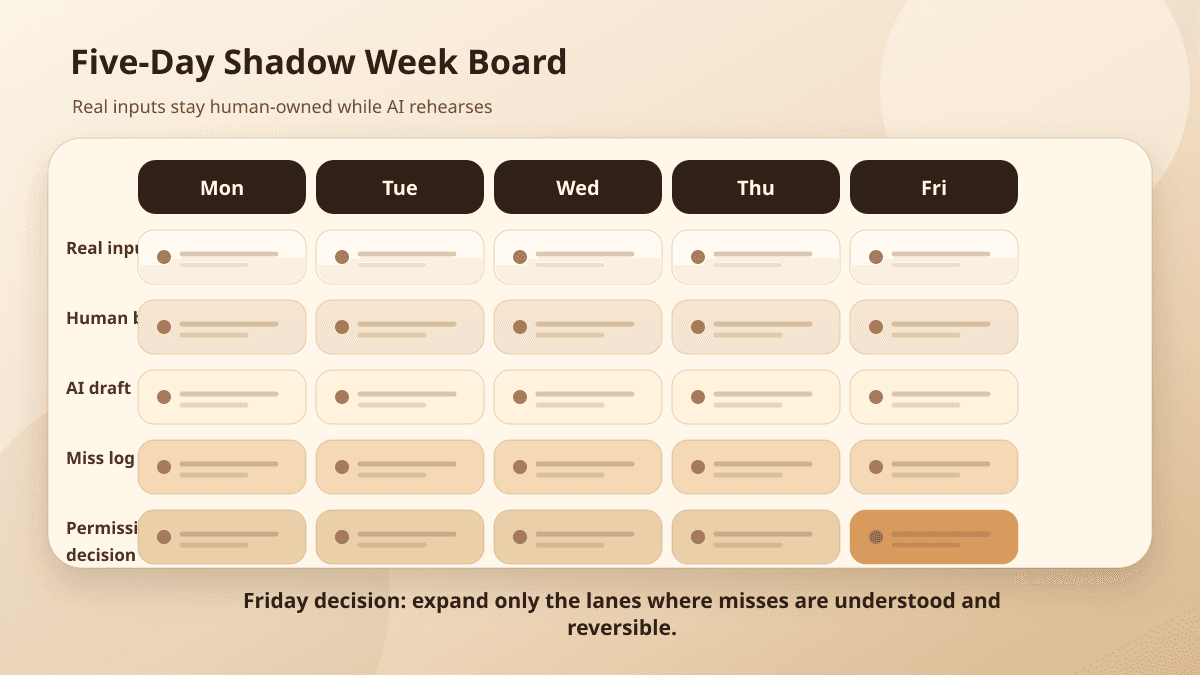
For one week, the workflow operates in rehearsal. Real inputs come in. Humans keep making the real decisions. AI drafts, classifies, extracts, routes, or recommends in the background. At the end, the team compares the AI's proposed work against what people actually did.
A shadow week is not a governance ceremony. It is field testing for a workflow that might soon affect customers.
Start with yesterday's queue
Do not begin with synthetic examples. They are too clean.
Pull a small sample from the work people already handled: support tickets, intake forms, invoice exceptions, CRM follow-ups, content review requests, access questions, scheduling changes, failed syncs. Ten to twenty items is enough for a first pass if the cases are real.
Choose a narrow slice. "Support automation" is too broad. "First-pass classification and draft response for billing and login tickets" is testable. "CRM automation" is too broad. "Draft the first follow-up and prepare a CRM note for inbound service inquiries" gives the team something to compare.
Keep sensitive records inside existing systems. If examples include customer data, credentials, protected health information, payment details, private contracts, or internal notes, do not paste them into a public AI tool. OWASP's guidance on sensitive information disclosure is a good outside check here: minimum useful context, clear retention rules, and no more access than the task requires. The shadow week should use the same data security discipline the production workflow would need.
For each sampled item, capture the human decision before looking at the AI output:
Input: support ticket #1842
Human decision: classify as billing, request account ID, do not mention refund yet
Human evidence: ticket text, plan tier, previous ticket, billing policy
Final action: sent clarification email, left case open
Reviewer note: refund language requires support lead review
That becomes the baseline. Without it, the team ends up judging whether the AI draft sounds plausible instead of whether it matches the work.
Use the workflow baseline worksheet to keep active work, elapsed time, review, rework, exceptions, quality, and direct cost inside the same boundary.
Let AI draft, but do not let it send
During the shadow week, the AI should produce the work it would produce in production, but every proposed action stays behind glass.
If the workflow is support triage, the AI can classify the ticket, draft a reply, link the help article it used, and flag escalation language. If the workflow is intake follow-up, it can summarize the request, draft the first email, prepare a CRM note, and list missing fields. If the workflow is document extraction, it can extract fields and attach source snippets beside each field.
The important word is propose.
A proposed action is inspectable. A sent email is history. A proposed CRM update can be compared to the source record. A changed lifecycle stage can trigger downstream work before anyone notices the model misunderstood the customer.
This is the same reason an AI approval queue separates draft, classify, route, hold, escalate, execute, and log. The workflow needs a state where "the AI thinks this" is not the same as "the business did this."
For the shadow run, save the AI output as structured work, not a blob of text:
{
  "workflow": "support_triage_shadow_week",
  "sourceRecord": "ticket_1842",
  "proposedAction": "draft_customer_reply",
  "draft": "...",
  "classification": "billing",
  "sourcesUsed": ["ticket_body", "plan_tier", "billing_policy_v3"],
  "reviewReason": "customer mentioned refund",
  "confidenceSignal": "medium",
  "createdAt": "2026-06-01T09:17:00Z"
}
That structure makes review faster. It also exposes missing evidence. If the draft looks right but sourcesUsed is empty, the team has learned something before customers are involved.
Compare against the human decision
At the end of each day, compare the AI's proposed work against the human baseline.
Do not score it as pass or fail too early. A draft can be useful and still unsafe. A classification can be correct but missing the escalation cue. A response can be polished while making a promise the policy does not allow.
Use categories that name the kind of work still required:
1. Ready for approval queue: useful, sourced, and within the written boundary.
2. Needs edits: useful draft, but wording, source, or field choice needs human correction.
3. Missing evidence: plausible output, but reviewer cannot see enough to approve.
4. Wrong but recoverable: would waste time or require correction, but not harm a customer if caught.
5. Unsafe: would send the wrong message, touch the wrong record, skip escalation, expose data, or cross the do-not-automate boundary.
The miss pattern matters more than the average score.
If the AI keeps drafting good replies but missing account-access language, the escalation trigger is weak. If it classifies most tickets correctly but uses the wrong help article, retrieval or source display needs work. If it performs well on ordinary cases and fails on angry customers, the workflow may still be useful as long as anger routes to a human before drafting goes anywhere.
The ITBench research on real-world IT automation agents made this point in a harder technical setting: agents can investigate plausible evidence and still fail to resolve the underlying task. The same failure shows up in business queues. A support draft can be partly right and still point the reviewer toward the wrong action. Receipts and comparison data keep the team from mistaking fluent work for safe work.
Record every miss as a workflow change
A shadow week is not only an AI evaluation. It is a workflow design exercise.
Every miss should become one of five changes:
Prompt change: the AI misunderstood the task or output format.
Source change: the AI lacked the record, policy, example, or field needed to decide.
Rule change: the application should have routed, blocked, or escalated the item.
Reviewer change: the human did not see enough evidence to judge the proposal quickly.
Scope change: this kind of input does not belong in the first automated workflow.
This keeps the team from treating every bad output as a model problem. Sometimes the model is wrong. Sometimes the workflow is asking for judgment that nobody has encoded. Sometimes the reviewer screen hides the exact evidence a person needs.
A useful miss log is short and specific:
Case: ticket_1842
AI proposed: send billing clarification with refund language
Human did: ask for account ID, hold refund language for support lead
Miss: skipped escalation trigger for refund mention
Change: route tickets with refund, chargeback, account access, legal, or security language to human review before drafting customer-facing text
Receipt field needed: escalation trigger and policy rule shown to reviewer
That note is worth more than a vague accuracy percentage. It tells a builder what to change before the next run.
Define the escalation triggers before expanding
By Thursday, the team should be able to name the inputs the AI should not handle alone.
Some triggers are about consequence: refunds, billing changes, account access, legal claims, security incidents, medical or HR information, public publishing, irreversible updates, angry customers, executive accounts, or anything touching regulated data.
Others are about uncertainty: missing required fields, conflicting source records, no cited evidence, low source quality, stale policy, unusual customer language, or a proposed action the reviewer cannot verify from the screen.
Write the triggers where the system can enforce them. Do not bury them in a prompt and hope the model remembers. OWASP's excessive agency guidance is blunt on this point: constrain tools, permissions, and autonomy to what the task actually needs.
The approval policy should say what the AI may read, draft, change, send, escalate, and log. The approval queue guide shows the product surface where those proposed actions can be held. The shadow week supplies the evidence for which rules belong there first.
A simple first rule might look like this:
Auto-prepare allowed: summarize ticket, classify product area, draft internal note.
Approval required: any customer-facing reply.
Escalate before drafting: refund, billing dispute, account access, legal, security, angry customer, missing account ID, conflicting policy evidence.
Never automate in version one: refunds, access changes, case closure, account status changes.
That is not bureaucracy. It is the operating boundary the demo did not have.
Decide what moves from draft to action
Friday is the decision day.
Do not ask, "Did the AI work?" That question is too vague. Ask which pieces of the workflow earned more permission.
Maybe internal classification can run automatically when the case is ordinary, reversible, and below the consequence threshold. Maybe customer replies should remain drafts in the queue. Maybe the AI is helpful only as an evidence packet builder. Maybe the workflow is not ready because too many cases depend on private context reviewers cannot inspect.
The decision should fit on one page:
Workflow: first-pass support triage for billing and login tickets
Sample: 20 recent tickets
Useful outputs: category, urgency draft, source links, first reply draft
Main misses: refund language, missing account ID, stale policy link
Auto-allowed next week: internal category suggestion only
Approval queue next week: customer reply drafts and CRM notes
Escalation triggers: refund, account access, legal, security, anger, missing source evidence
Do-not-automate: refunds, case closure, account status, billing updates
Receipt fields: input ID, sources shown, proposed action, review rule, reviewer decision, final action, rollback note
Decision: run one more shadow week with stricter escalation and better source display
That artifact is the bridge from shadow run to production design. It tells builders what to implement, reviewers what to expect, and owners what still has not earned autonomy.
It also prevents a common mistake: expanding the agent because the demo felt good. Evidence should grant permission one action at a time.
The week is short because the point is learning
A shadow week should feel almost boring. That is part of the design.
You are not trying to prove that AI can replace a team. You are trying to find the narrowest part of the workflow where AI can prepare useful work, humans can review it quickly, receipts can explain what happened, and escalation catches the cases that should stay manual.
If the week shows that nothing can move to action yet, that is still progress. You found the missing policy, source, reviewer evidence, or data boundary before the system touched customers.
If the week shows that one internal, reversible action is safe to automate, take that inch. Keep the rest in review.
BaristaLabs usually starts process automation work here: one real workflow, one approval boundary, one receipt, one careful expansion path. The technology matters, but the operating proof matters more.
For more implementation guides, start at the BaristaLabs learn center. Before an AI workflow acts for the business, make it spend a week proving what it would have done yesterday.
Map a shadow week
Turn the shadow run into an automation decision
BaristaLabs helps teams run a controlled shadow week, compare AI proposals against human decisions, log misses, and decide which actions can move into review or automation.
Best fit when one workflow already looks useful but the team has not proved which drafts are safe, which misses matter, or when the system should escalate.
Turn this idea into a pilot
Which workflow should go first?
Use the readiness check to compare impact, effort, risk, owner, and next step before requesting a review.
- 3-5 minutes
- Deterministic score
- No sensitive data
Practical AI Workflow Notes
Want more practical AI operations ideas?
Get short notes on applying AI inside real small-business workflows — from document handling and customer follow-up to internal reporting, compliance, and automation guardrails.