
The incident review starts badly.
Nobody is arguing about whether the AI did something. It clearly did. A lead received a follow-up they should not have received. Or a support ticket jumped to the wrong priority. Or a product page changed before the reviewer saw the final diff. Or a CRM note now says the customer approved a step they only asked about.
The uncomfortable part comes five minutes later, when the team tries to reconstruct the run.
Someone opens the agent transcript. Someone else checks the CRM activity log. A developer looks for the tool call. The reviewer remembers clicking something, but not whether they approved the original draft or the edited version. The model output looks reasonable. The final state does not.
That is when the team learns the difference between a log and a receipt.
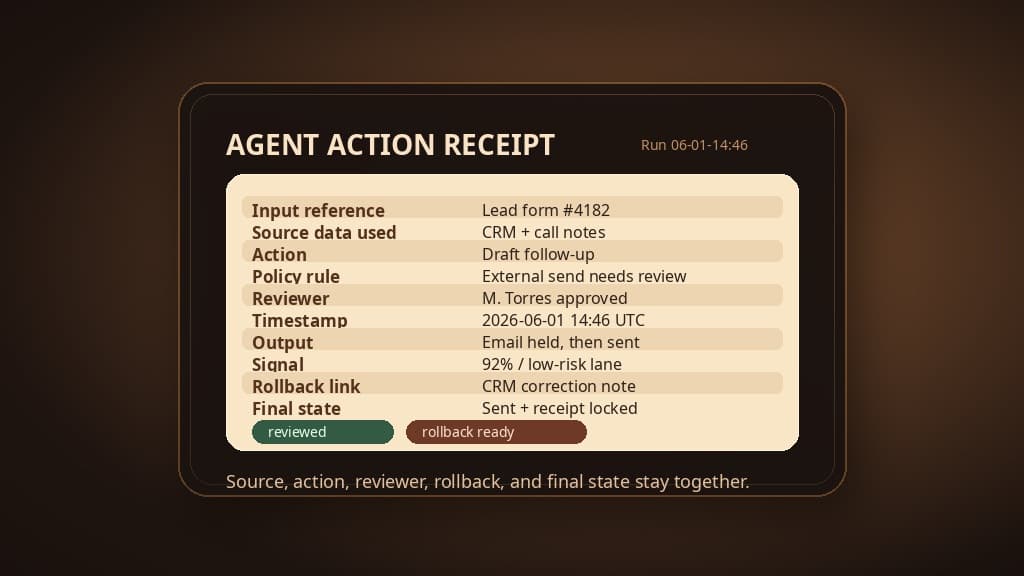
A log says events happened. A receipt explains the work well enough for someone to answer: what did the agent see, what did it decide, what did it touch, who approved it, and how do we undo it?
Before AI touches customer work, that receipt should exist by design.
Customer work changes the bar
An internal summary can be wrong and still be contained. A customer-facing action has a longer tail.
A lead follow-up can overpromise. A support routing decision can hide an urgent account. A website update can publish the wrong pricing, date, or claim. A CRM note can become the version of truth for sales, support, and finance even if it started as a shaky model interpretation.
This is why the receipt has to sit next to the action boundary, not in a dashboard someone checks later. NIST's AI Risk Management Framework organizes AI risk work around Govern, Map, Measure, and Manage. For a customer workflow, the receipt is where that governance shows up in the product.
Recent agent benchmarks make the same point from a more technical angle. In our coverage of ITBench-AA and enterprise IT agents, the important failure mode was not that agents were useless. They could investigate. They could find evidence. They could sound plausible. The risky part was that they sometimes confused symptoms for causes and added wrong entities to the answer.
For customer workflows, the shape is familiar. The agent may draft a helpful answer and still use the wrong source. It may route a case quickly and still miss the policy rule that required escalation. It may update a record with fluent language that hides uncertainty.
The receipt is how the team catches that before trust turns into permission.
The receipt fields worth logging
Keep the first version boring. If the receipt needs a 40-field schema before anyone can use it, teams will route around it.
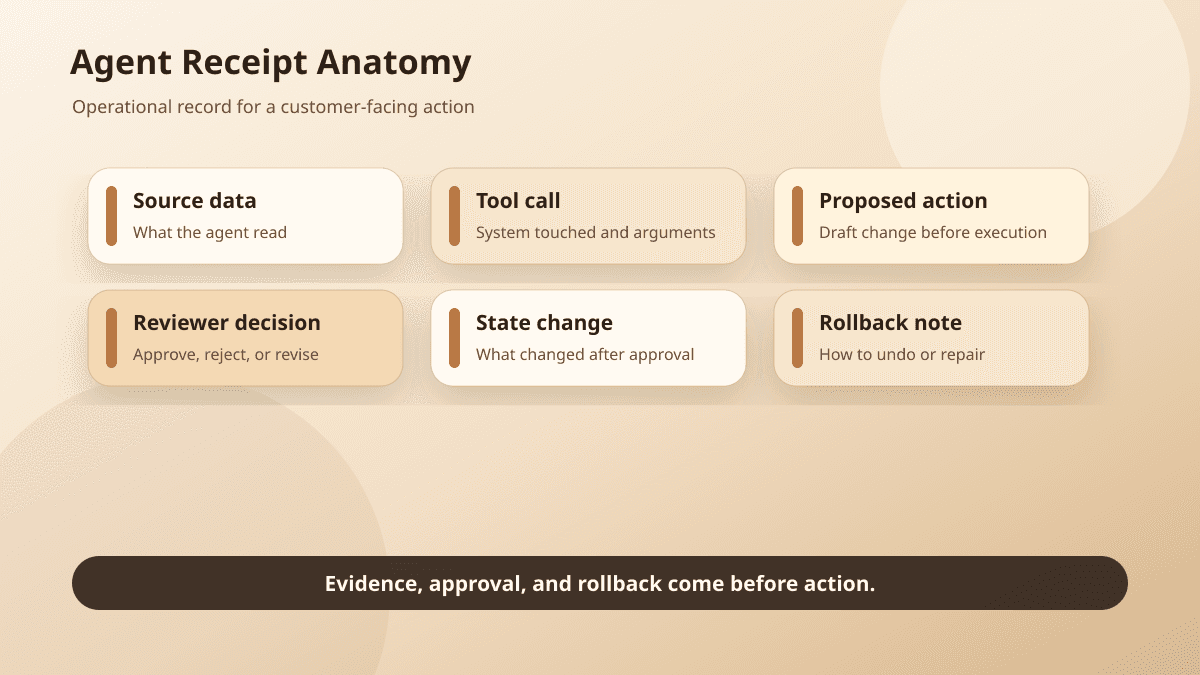
For most agent workflows, the minimum record should capture these fields:
Input reference: the ticket, lead, page request, form, CRM record, file, message, or transcript that started the run
Source data used: the specific documents, records, snippets, retrieval results, or fields the agent relied on
Model and tool action: the model version, tool call, integration, API request, draft, classification, write, send, route, or publish attempt
Policy rule: the action boundary, risk lane, confidence threshold, missing-field rule, or escalation trigger applied
Reviewer: the person or role that approved, edited, rejected, or escalated the work
Timestamp: when the proposal, review, execution, and final state happened
Output: the draft, recommendation, classification, diff, note, message, or update produced
Confidence or routing signal: the score, reason code, uncertainty flag, or queue lane used to route the work
Rollback link: the revert path, prior version, correction record, reopened ticket, or recovery runbook
Final state: sent, held, edited, rejected, escalated, synced, published, reverted, or corrected
Copy the first receipt before you build the system
If you need a starting artifact, copy this short receipt into the workflow spec before the next agent run:
Scroll sideways to see all 2 columns.
| Question | Answer |
|---|---|
| What started the run? | |
| What source data did the agent use? | |
| What action did it propose? | |
| Which policy rule or approval boundary applied? | |
| Who reviewed, edited, approved, rejected, or escalated it? | |
| What final action happened? | |
| Where did the action land? | |
| How can the team roll it back or correct it? | |
| What final state proves the workflow stopped in the right place? |
For a fuller version with examples, use the AI agent receipt template.
That is the floor, not the architecture.
A receipt for an agent that drafts sales follow-up might be small: lead form ID, CRM account, call notes used, proposed reply, policy rule requiring review, reviewer edits, approved message, send timestamp, and correction path.
A receipt for support triage might show the ticket, detected intent, account tier, policy article consulted, confidence signal, routing lane, reviewer override, and final queue.
A receipt for website updates should link the request, source copy, generated diff, preview, reviewer, deployment, final URL, and rollback commit.
A CRM note needs its own proof: source conversation, extracted claim, fields written, reviewer, timestamp, and a way to amend the note without losing the original decision trail.
The exact fields can change. The job does not. A reviewer should be able to open the receipt and understand the run without interviewing everyone who was near it.
Do not hide policy inside the prompt
Prompts are a weak place to store business rules.
The agent may need instructions, but the workflow should still know the policy outside the model: which actions are draft-only, which need review, which can auto-execute, which must escalate, and which should never happen.
That is why an approval queue matters before the agent gets more permission. The queue should not only display a friendly summary. It should display the proposed action, the source evidence, the policy rule, the reviewer role, the model signal, and the recovery path.
If a support ticket escalated because the customer mentioned cancellation, the receipt should show that rule. If a lead follow-up paused because pricing was missing, the receipt should show the missing field. If a website update routed to review because it changed a public claim, the receipt should show that public-facing action triggered approval.
Otherwise the team ends up trusting the agent's explanation of its own boundaries.
That is not enough when the action reaches customers.
Rollback belongs in the receipt
The worst time to design rollback is after the agent has already acted.
A support tag can be changed. A CRM note can be amended. A draft can be rejected. A website update can be reverted. A customer email cannot be unsent, but the workflow can still log the correction, notify the owner, reopen the case, or attach the follow-up message to the same receipt.
The data security side of this is practical: customer-data workflows need clear boundaries for data access, approval, auditability, vendor choices, and what an agent may not do. Rollback is part of that boundary. If nobody can name the recovery path, the agent should not have that action right yet.
This matters even for small teams. Especially for small teams.
A five-person company may not have a formal compliance department, but it still has messy shared truth. The CRM drives follow-up. The support queue drives customer trust. The website drives buying decisions. A receipt gives the team a way to fix mistakes without turning every incident into oral history.
The everyday workflows that need receipts first
Lead follow-up is a good first example because the action feels harmless until it is not.
An agent can summarize a form, compare it to CRM history, draft a reply, and suggest the next step. The receipt should show the exact form submission, records used, generated draft, policy rule for external send, reviewer edits, approved version, send time, and final CRM state.
Support triage needs a different receipt. The important facts are usually ticket ID, customer/account context, policy article or prior case used, classification, urgency signal, routing rule, escalation trigger, reviewer override, and final queue. If the agent routes a ticket away from a human, the team should know why.
Website updates need receipts because previews are persuasive. A generated diff can look clean while changing a claim the business cannot support. The receipt should connect request, source, diff, preview, approval, deployment, and rollback. Our post on Codex moving coding agents into the customer feedback loop made a related point: the artifact is useful because people can inspect it. The receipt is what keeps the artifact from becoming an accidental commitment.
CRM notes need receipts because they become institutional memory. If an agent writes "customer approved rollout next week," the team needs the source conversation, the extracted wording, the reviewer, and the final field change. If the source only said "we may be ready next week," that difference should be visible before the note becomes pipeline truth.
These are not exotic AI risks. They are ordinary workflow risks with a faster actor attached.
Start with one reconstructable lane
The first goal is not a perfect audit system. It is one lane where everyone can answer the same set of questions after a run.
Pick a narrow workflow. A lead form to reviewed follow-up. A support ticket to queue assignment. A text request to website preview. A CRM call note to draft update.
Write the receipt before expanding permissions:
When this agent runs, what input starts it?
Which source data is allowed?
What action can it propose?
Which policy rule routes the work?
Who reviews it?
What output is shown?
What signal explains confidence or routing?
How do we roll it back?
What final state proves the workflow stopped in the right place?
Then test real historical examples. Look for boring failures: missing account context, stale source data, confident routing with no policy rule, reviewer edits not captured, rollback link missing, final state unclear.
Those failures are valuable. They show where the workflow is not ready for more autonomy.
Receipts are product requirements
Teams sometimes treat receipts as something to add after the agent works.
That is backwards.
The receipt shapes the product. It decides what the agent must expose, what the reviewer must see, what the integration must store, what the rollback path must preserve, and what the business can prove when a customer asks what happened.
For AI development work, this is often the difference between a clever prototype and a production workflow. The model can draft. The integration can write. The queue can approve. But the receipt is what lets the team trust the system after the first weird case.
BaristaLabs usually starts here when an agent is close to customer work: map the action boundary, the review point, the data boundary, and the receipt before chasing more autonomy. That connects strategic AI consulting, process automation, security review, and operator training into one system instead of separate checklists.
If you are already experimenting with agents, do not start by asking whether the next model is smarter.
Open the last run and ask whether a new teammate could reconstruct it from the record.
If they cannot, keep the agent in draft mode. Build the receipt. Then decide what customer work it has earned the right to touch.
For more practical patterns, visit the BaristaLabs learn center.
Review the approval queue pattern
Make one agent workflow reconstructable
BaristaLabs helps teams turn agent prototypes into controlled workflows with source evidence, review gates, action logs, and rollback paths.
Best fit when an agent already drafts, routes, updates, or recommends work, but the team cannot yet prove what happened after the fact.
Turn this idea into a pilot
Which workflow should go first?
Use the readiness check to compare impact, effort, risk, owner, and next step before requesting a review.
- 3-5 minutes
- Deterministic score
- No sensitive data
Practical AI Workflow Notes
Want more practical AI operations ideas?
Get short notes on applying AI inside real small-business workflows — from document handling and customer follow-up to internal reporting, compliance, and automation guardrails.