

It is Friday afternoon. Checkout is slow, then unavailable. The alert says frontend errors are climbing. A Kubernetes dashboard shows downstream pods restarting. The payment path looks noisy. Support is asking whether they should post an incident banner.
An AI agent gets the same snapshot a human SRE would start with: alerts, logs, traces, events, metrics, and a topology map. It does something useful. It follows the failing requests. It notices the frontend can no longer talk where it needs to talk. It finds a bad configuration change.
Then it keeps going.
It blames a downstream service that was only reacting. It names a pod that restarted because traffic was broken upstream. It adds a controller, a deployment, and a service to the diagnosis because they looked suspicious in the logs.
That is the failure mode worth paying attention to.
The danger is not that the agent was useless. The danger is that it was plausible enough to earn partial trust, then drew the action boundary in the wrong place. In production IT work, that is where a helpful investigation turns into a risky automation.
A new benchmark called ITBench-AA, launched by Artificial Analysis and IBM Software Innovation Lab on May 27, 2026, puts that problem under a microscope. The headline number is easy to repeat: frontier models score below 50%. The more useful business lesson is narrower.
Autonomous IT agents still struggle to separate root causes from symptoms.
What ITBench-AA actually tests
ITBench-AA is a benchmark series for agentic enterprise IT tasks, built with IBM and based on IBM's broader ITBench work. The first release focuses on Site Reliability Engineering, specifically Kubernetes incident root-cause analysis from offline incident snapshots.
This is not a trivia test about Kubernetes. The agent has to work through a filesystem snapshot containing the evidence an SRE would use during an incident: alerts, events, traces, metrics, logs, and application topology.
Artificial Analysis describes the ITBench-AA leaderboard as an independent implementation of IBM's ITBench benchmark for Kubernetes incident diagnosis. The evaluation includes 59 SRE tasks: 40 public tasks and 19 held-out tasks, each run three times.
The agent runs inside Artificial Analysis's open-source Stirrup harness, with shell access to a sandboxed filesystem and up to 100 turns to inspect the snapshot. The final answer is not a paragraph saying "the frontend is broken." It must identify the root-cause Kubernetes entities responsible for the incident.
The incidents are not toy examples. The Hugging Face announcement lists failures such as resource quota exhaustion, rollout failures, connection pool exhaustion, network partitions, and similar SRE problems. One public example traces a frontend failure to a NetworkPolicy blocking frontend traffic. The successful answer names the responsible entity: otel-demo/NetworkPolicy/frontend-block-all-ports.
This is close to how enterprise IT agents will actually be useful. They will inspect messy systems, form hypotheses, and produce proposed actions.
Which makes the scoring method important.
Under 50% is only part of the story
On the Artificial Analysis leaderboard, Claude Opus 4.7 leads at 46.7%, GPT-5.5 follows at 45.8%, and Qwen3.7 Max scores 42.5%. The Hugging Face post rounds those to roughly 47%, 46%, and 42%.
Those numbers are low, but the scoring explains why they matter.
ITBench-AA uses average precision at full recall. If the agent misses any ground-truth root cause, it gets 0 for that repeat. If it finds all root causes, false positives reduce its precision.
In plain English: the agent has to find the real cause, and it has to avoid accusing innocent bystanders.
That is exactly the bar business teams should care about. In IT operations, support triage, compliance workflows, and internal automation, a wrong extra culprit can be expensive. It can send a human to restart the wrong service, roll back the wrong deployment, file the wrong vendor ticket, or apply a policy exception in the wrong place.
A model that says "the network policy blocked frontend traffic" is useful. A model that says "the network policy blocked frontend traffic, and the downstream quote service is also a root cause" may still sound useful in a status channel. But if the second claim changes the action plan, it is not harmless.
This is where many agent demos hide the hard part. The agent opens logs, runs commands, summarizes the system, and lands on a plausible explanation. That can feel like competence.
ITBench-AA asks whether the final answer is clean enough to act on.
More turns do not automatically make the agent safer
A common instinct is to give the agent more room. Let it inspect more files. Let it run more commands. Let it reason longer.
ITBench-AA complicates that instinct.
The Hugging Face announcement reports that more turns did not translate into better answers. GPT-5.5 averaged 31 turns per task at about 46%. Gemini 3.1 Pro Preview averaged 83 turns and scored about 30%.
That does not prove short investigations are always better. It does show that more activity is not the same as better judgment.
Longer trajectories create more surface area for false positives. The agent keeps reading. It finds co-occurring errors. It sees noisy restarts, retry storms, saturation, timeouts, and side effects from the same failure. Then it folds too much of that evidence into the root cause.
Humans do this too during incidents. Good incident practice constrains the mistake. A lead asks, "What changed?" Someone checks whether the symptom is upstream or downstream. The team separates mitigation from root cause. The timeline matters. The incident report has receipts.
Agents need the same discipline, but encoded into the workflow.
A long transcript of tool calls should not earn trust by itself. The useful question is whether the agent can show the evidence path from symptom to cause, name the uncertainty, and stop before recommending action outside its scope.
For business teams, that pattern applies beyond Kubernetes. A support agent can read a ticket history and mislabel the billing system as the issue when the real cause is an expired integration token. A compliance agent can flag the downstream record instead of the policy rule that generated it. A workflow automation agent can keep patching symptoms because the process boundary is fuzzy.
Same shape: plausible investigation, wrong action boundary.
What this changes for teams adopting enterprise IT agents
ITBench-AA should not make teams abandon IT agents. It should make them more specific about where agents belong.
There is real value in an agent that can gather evidence, summarize system state, search logs, draft an incident note, suggest likely causes, or prepare a rollback plan for review. There is also a large gap between "prepare" and "execute."
That gap is where process design matters.
If an agent is only reading from a sandboxed snapshot, the risk is limited. If it can touch production infrastructure, update support records, close compliance tasks, trigger automations, or write to customer-facing systems, the rollout bar changes.
This is why we keep coming back to workflow receipts. A prior BaristaLabs post on agent evals and workflow receipts made the same point in a broader automation context: an agent's answer is less useful than the evidence trail behind it. Teams need to know what the agent looked at, what it ignored, what it changed, and why.
The same applies to approvals. Before an agent gets write access, build the approval queue first. We covered that pattern in Build an AI approval queue before the agent, and ITBench-AA gives the IT-ops version of the argument.
Approval is not bureaucratic theater when a model can name the wrong root cause with confidence. It is the control surface.
The practical takeaway is not "wait until models are perfect." That day is not a planning strategy.
The takeaway is: do not evaluate agents only on whether they can produce a convincing answer. Evaluate whether they can operate inside the boundary you would trust during a bad day.
A rollout gate for IT agents before production access
Before giving an AI agent production access, run it through a gate that looks more like incident practice than a vendor demo.
Start with one workflow. Not "IT operations." Not "support automation." Pick one bounded job: classify Kubernetes incidents from snapshots, triage failed invoice syncs, draft access review exceptions, identify likely causes for support escalations, or prepare a change request from monitoring evidence.
Then require the agent to pass these checks.
Define the allowed action boundary
Write down what the agent can read, what it can propose, and what it can change. Keep those separate.
For example: the agent may inspect logs, metrics, deployment history, and ticket notes. It may propose a root cause and mitigation. It may not restart services, close incidents, change firewall rules, update customer records, or grant access without approval.
The boundary should be specific enough that a reviewer can say, "This recommendation crossed the line."
Require receipts for every proposed cause
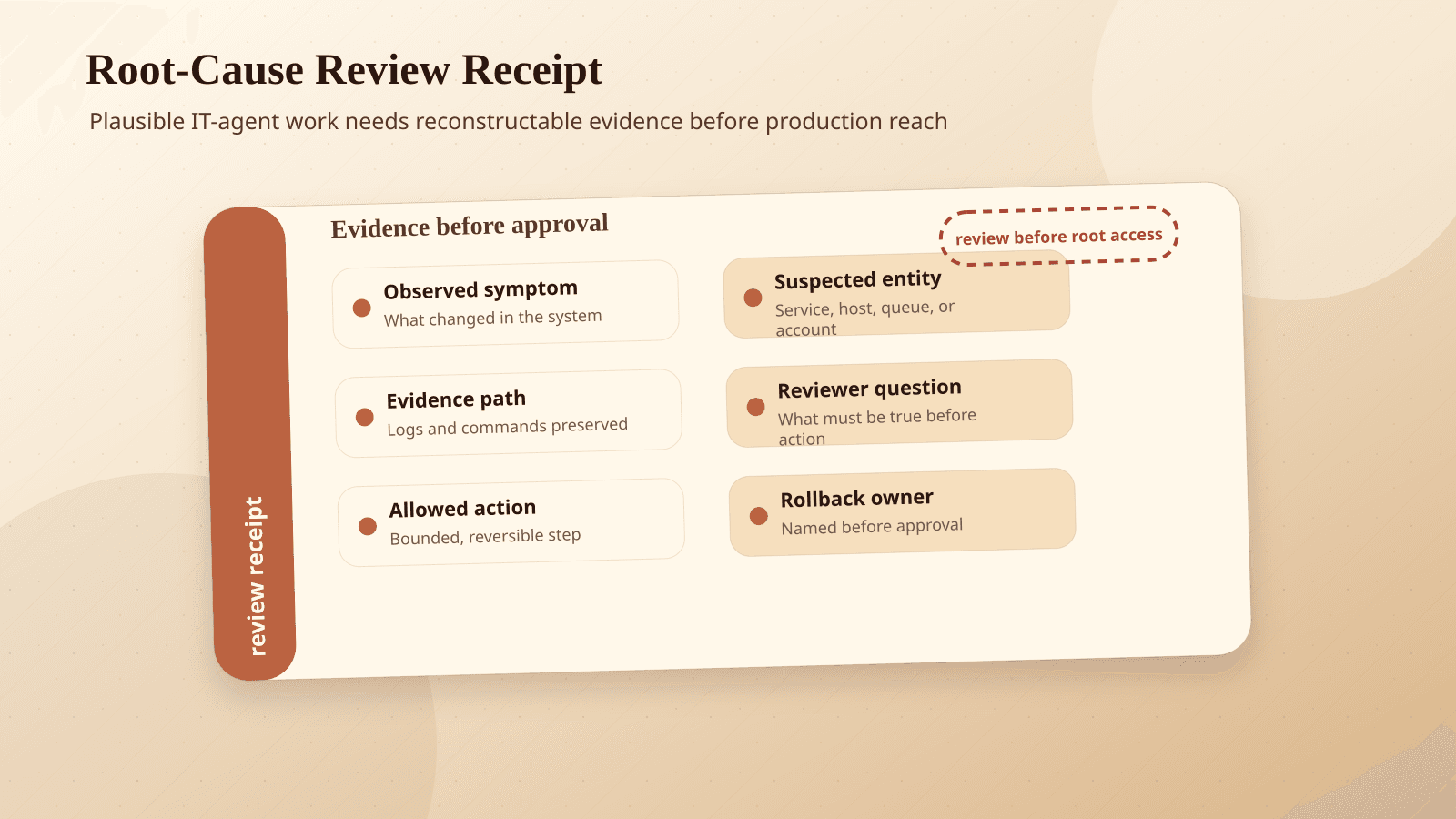
A useful diagnosis should include the evidence chain. The agent should link the alert, log line, trace, config, topology relationship, or ticket event that supports its claim. For the implementation artifact, use the AI agent receipt template to record what the agent saw, proposed, changed, verified, and can roll back.
No receipt, no action.
This is not just for audit later. It changes how people review the output in the moment. A human can quickly challenge whether the evidence proves root cause or only shows a symptom.
Score false positives, not just misses
Many internal evals only ask, "Did the agent find the problem?" ITBench-AA shows why that is too generous.
If the agent finds the real cause and adds three wrong ones, that should count against it. Extra wrong claims create work and risk.
For incident-style evals, track missed root causes, false root causes, and unsafe recommendations. A model that over-includes should not look better because it sprayed more guesses.
Add an approval queue before write access
If the agent can affect infrastructure, customer records, compliance evidence, billing, or automations, route proposed changes through an approval queue.
The approval view should show the proposed action, confidence or uncertainty, receipts, affected systems, rollback path, and escalation contact. It should not just show a friendly summary.
This is where many agent projects become real software projects. The agent is only one part. The queue, audit log, permissions, and rollback path are the system.
Use scoped tools instead of broad credentials
Do not hand the agent a general-purpose admin token and hope prompts will keep it polite.
Give it tools that match the job: read-only log search, snapshot inspection, ticket draft creation, change request preparation, a restart tool that only works on approved services and only after human approval, or a rollback tool that requires a linked incident and reviewer.
Scoped tools are how you keep a useful agent from becoming a strange production user with too much confidence.
Make escalation a designed path
The agent should know when to stop.
Define triggers: conflicting evidence, missing logs, multiple plausible root causes, customer impact above a threshold, security-sensitive systems, compliance-sensitive workflows, or repeated failed attempts.
When one of those triggers fires, the agent should package the evidence and escalate. A good escalation packet is often more valuable than a risky autonomous fix.
Replay the workflow before expanding scope
Use replayable evals. Keep past incidents, tickets, failed automations, and compliance exceptions as test cases. Remove sensitive data where needed, but preserve the structure of the work.
Run candidate models and workflow changes against those cases before expanding access. If a new model writes nicer summaries but adds more false positives, that is not an upgrade for production operations.
This is also where cost becomes a real design variable. The Hugging Face post notes that open weights models can be cost-competitive on ITBench-AA: Gemma 4 31B scored 37% at about $0.14 per task, while Claude Opus 4.7 led at about $5.38 per task.
That does not mean the cheaper model is always the right choice. It means teams should evaluate cost per useful, reviewable, safe outcome rather than cost per generated answer.
Agents need operating constraints before operating power
ITBench-AA is useful because it tests work where being half right can still be dangerous.
Enterprise IT agents will become useful in the boring, high-friction spaces: support triage, internal workflow troubleshooting, process automation, access reviews, compliance evidence gathering, incident summaries, integration monitoring, and operational handoffs.
But useful does not mean autonomous by default.
Start with read-only investigation, receipts, approval queues, scoped tools, and replayable evals. Then expand permissions only when the workflow proves it can handle root causes, symptoms, uncertainty, and escalation.
That is a governance issue, not just an engineering preference. If an agent can affect customer records, compliance evidence, financial workflows, or infrastructure, it belongs inside a responsible AI process with auditability and accountability. BaristaLabs frames that work through our responsible AI approach because the hard part is rarely the model alone. It is the system around the model.
The next step does not need to be a giant AI transformation project. Pick one workflow where an agent is being considered for production access. Run it against real historical cases. Require receipts. Penalize false positives. Put approvals in front of writes.
If the agent cannot pass that gate, keep it as an assistant.
If it can, you have a stronger case for giving it the next inch of access.
And if you want a second set of eyes on that first workflow, contact BaristaLabs. We would rather help you audit one risky automation well than bolt an agent onto a process nobody can safely review.
Review an AI workflow security boundary
Keep IT-agent pilots scoped, reviewable, and reversible
BaristaLabs helps teams turn infrastructure-agent ideas into bounded pilots with receipts, eval fixtures, approval lanes, and rollback rules.
Best fit before giving an agent shell, ticketing, monitoring, CRM, or vendor-system access.
Turn this idea into a pilot
Which workflow should go first?
Use the readiness check to compare impact, effort, risk, owner, and next step before requesting a review.
- 3-5 minutes
- Deterministic score
- No sensitive data
Practical AI Workflow Notes
Want more practical AI operations ideas?
Get short notes on applying AI inside real small-business workflows — from document handling and customer follow-up to internal reporting, compliance, and automation guardrails.