
Run the security review before the AI workflow gets access
A practical technical tutorial for reviewing one AI workflow before it gets access to inboxes, CRM records, documents, vendor APIs, or model tools.

Sean McLellan
Lead Architect & Founder

The demo is already good enough to make people impatient.
A support ticket arrives. The workflow reads the shared inbox, checks the customer's CRM notes, pulls two PDFs from the knowledge base, drafts a reply, and prepares a vendor API call that would update the account status.
Everyone in the room can see the time savings. Nobody has yet written down what the workflow is allowed to see, what it must ignore, who approves the outbound message, or what happens if the CRM note is wrong.
That is the moment to stop building and run the security review.
Not a generic AI risk meeting. Not a thirty-page policy review. One workflow. One access boundary. One packet of facts a business owner, security reviewer, legal stakeholder, or technical lead can actually inspect before permission expands.
BaristaLabs' AI workflow security review worksheet puts the same idea in its page title: "Before the AI workflow gets access, write down the boundary." The review is not ceremony. It is how the team decides whether the next build step is draft-only, human-reviewed action, or no access yet.
Start with the access request
A useful security review begins with the permission the workflow wants.
Do not start with the model. Start with the door it is asking to open.
For the support triage example, the workflow wants to read new tickets, customer profile fields, recent CRM notes, and approved support articles. It wants to draft a reply. It may eventually update a ticket category or CRM note. It may call a vendor API after approval.
That access request is already enough to create the first review packet:
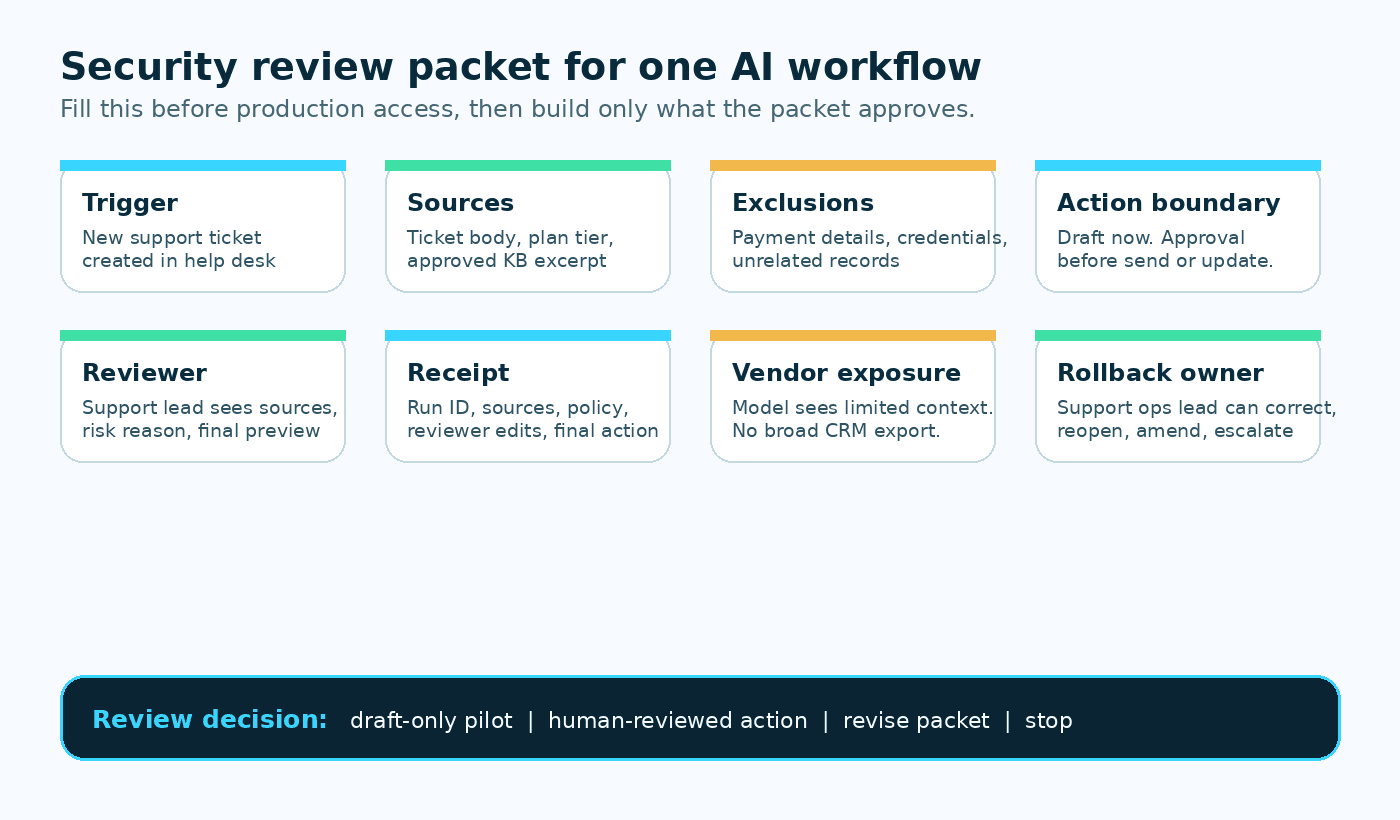
Workflow: support triage and draft reply
Trigger: new support ticket
Requested reads: ticket body, plan tier, recent same-account support note, approved support KB
Excluded reads: unrelated customer records, payment data, credentials, private sales notes, broad CRM exports
Draft-only actions: reply draft, category suggestion, missing-information list
Approval-required actions: send reply, save CRM note, close ticket, escalate to vendor API
Reviewer: support lead
Receipt: ticket ID, sources shown, draft, policy check, reviewer edits, final action, rollback path
Rollback owner: support operations lead
The packet turns a vague question, "Is this AI workflow safe?", into a smaller question: "Can this workflow get these permissions under these conditions?"
That smaller question is answerable.
Walk the sources before the actions
The source list is where many reviews get honest.
Teams often say a workflow needs "the CRM" or "the inbox" when it needs three fields and one message thread. Broad nouns hide broad permissions. A reviewer cannot approve least privilege if the packet only names systems.
Name the exact records, fields, documents, excerpts, embeddings, and APIs the workflow may use. Then name what it must not touch.
For a support workflow, the minimum source set may be the current ticket, plan tier, the last same-account support note, and one approved knowledge-base excerpt. The excluded set may be payment details, credential fields, private account strategy notes, unrelated customer records, HR/legal notes, and old exports sitting in a shared drive.
AI systems are very good at making extra context sound useful. Extra context can also become a way for hostile instructions to cross boundaries: OWASP's guidance on prompt injection warns teams to treat untrusted content as a control risk, not just a bigger context window.
The BaristaLabs data-security page says projects should be scoped around "the minimum data and access needed for the workflow." In a review packet, that principle has to become a table someone can argue with.
Separate drafting from execution
The next question is not whether the AI can write a good answer. It is what the system does with that answer.
Drafting a reply is different from sending it. Preparing a CRM note is different from saving it. Suggesting a ticket category is different from changing the queue. Summarizing an uploaded PDF is different from extracting fields into a system of record.
The review packet should split actions into three lanes:
Draft-only: The workflow can prepare text, fields, categories, summaries, or recommendations.
Approval required: A human must approve before the workflow sends, updates, publishes, escalates, or calls an external API.
Never in v1: The workflow cannot make promises, handle credentials, delete records, change access, approve refunds, quote legal terms, or make regulated determinations.
This split changes the build permission.
If the workflow only drafts an internal review packet, the first pilot may be reasonable with narrow read access and strong logging. If it sends customer messages or writes CRM notes, the approval queue becomes part of the product surface. If it changes access, refunds money, deletes data, or makes regulated decisions, the review should probably stop until security, legal, compliance, and the accountable business owner are in the room. OWASP describes this class of risk as excessive agency: the system can take consequential actions through tools, permissions, or APIs that exceed the boundary the business actually meant to grant.
The approval queue guide makes the same operational distinction: the risky moment is when the system does something with the generated text.
Show the reviewer what they need to decide
Access request field packet
Security review packet
Before production credentials expand, make the workflow's trigger, sources, actions, exposure, reviewer, receipt proof, and stop rule reviewable.
- 01
Workflow name
Required
Pins down: The one workflow seeking access.
Why it matters: Security review starts with the door the workflow wants to open, not with the model brand.
- 02
Business owner
Required
Pins down: The person accountable for the workflow outcome.
Why it matters: No access packet is complete if nobody owns the operational consequence.
- 03
Trigger
Required
Pins down: The event that starts the run, such as a new ticket, form, inbox item, or document.
Why it matters: The trigger defines when the workflow is allowed to wake up.
- 04
Sources
Required
Pins down: The exact records, fields, documents, excerpts, embeddings, and APIs the workflow may use.
Why it matters: Least privilege cannot be approved from broad nouns like inbox or CRM.
- 05
Actions
Required
Pins down: Draft-only actions, approval-required actions, and actions never allowed in v1.
Why it matters: Drafting, sending, updating, deleting, and vendor calls carry different risk.
- 06
Vendor/model exposure
Required
Pins down: Which providers, stores, logs, APIs, and retention paths see workflow data.
Why it matters: Internal user experience does not mean data stayed internal.
- 07
Reviewer role
Required
Pins down: The role that sees the evidence and approves, edits, rejects, or escalates.
Why it matters: Someone in support is not a control; a named reviewer lane is.
- 08
Receipt must prove
Required
Pins down: Trigger, sources, proposed action, policy rule, reviewer decision, final action, version, and rollback path.
Why it matters: A receipt should reconstruct the run without becoming a second customer database.
- 09
Stop condition
Missing
Pins down: Unknown ownership, broad credentials, missing evidence, unclear exposure, or no rollback owner.
Why it matters: Sometimes the review result is no access yet, and the packet should make that easy to say.
The first approval is usually smaller than the demo: narrow reads, draft-only actions, reviewer evidence, receipts, and rollback.
A reviewer screen should not ask for trust. It should show evidence.
For the support workflow, the reviewer needs to see the original ticket, the exact source excerpts used, the customer context shown to the workflow, the proposed reply, the CRM note preview, the policy rule, the risk reason, and the action that will happen after approval.
If the reviewer sees only a polished paragraph, they are reviewing tone. If they see the source packet and execution preview, they are reviewing the decision.
That is also why the review packet should name the reviewer role before implementation. "Someone in support" is not a control. "Support lead approves all outbound replies for the first 50 tickets and every ticket with refund, legal, access, security, cancellation, or angry-customer language" is a control a team can build.
Worksheet field list
Use this packet before granting production access:
Workflow name:
Business owner:
Builder / technical owner:
Trigger:
Systems touched:
Data fields used:
Data classification:
Excluded data:
Credential and permission model:
Vendor/model/API exposure:
Model-training and retention assumptions:
Allowed reads:
Draft-only actions:
Actions allowed without approval:
Actions requiring approval:
Actions never allowed in v1:
Reviewer role:
Evidence shown to reviewer:
Approval triggers:
Audit log / receipt fields:
Retention and removal expectations:
Rollback path:
First-run review sample:
Open legal/compliance/security questions:
Copy the fuller version from the AI workflow security review worksheet when you need a shareable review artifact.
Name vendor and model exposure plainly
Vendor review gets fuzzy when teams describe the workflow as internal because the user experience is internal.
Ask it plainly: which services see the data?
List the model provider, vector store, automation platform, document parser, API gateway, logging destination, file store, and any vendor API the workflow calls. Then document what leaves the client's environment, what gets retained, what is logged, what can be deleted, and whether the provider's settings allow data to be used for training. When a provider publishes terms for model data handling, cite the specific page in the packet; for example, Microsoft's Azure OpenAI data privacy documentation explains how prompts, completions, fine-tuning data, and abuse-monitoring review are handled for that service.
Do not bury this in architecture notes. Put it in the packet.
For the support workflow, the model may receive ticket text, a limited account context, and approved knowledge-base excerpts. The vendor API may receive a ticket ID and approved status change after review. The receipt may live with the help desk record, not in a separate unmanaged store of copied customer context.
Those are reviewable statements. A security or privacy stakeholder can approve them, narrow them, or reject them.
Decide what the receipt must prove
If the workflow makes a proposal or takes an action, the team needs a record that survives the demo.
A useful receipt should answer:
What started the run?
What sources did the workflow use?
What did it propose?
Which policy rule or approval trigger applied?
Who reviewed, edited, rejected, or approved it?
What final action happened?
Where did that action land?
Which model, tool, prompt, or workflow version was used?
How can the team correct or roll it back?
The agent receipt template exists because ordinary logs are often too thin for operational review. A log may prove something happened. A receipt should help someone reconstruct the run.
This is also a retention question. A receipt should not quietly become a second customer database. Name where receipts live, who can read them, how long they stay, and what deletion or handoff rule applies.
Know when to stop
The review does not always end with a narrower pilot. Sometimes it ends with no access.
Stop when nobody owns the workflow outcome. Stop when the data boundary is described only as "the inbox" or "the CRM." Stop when the workflow needs broad credentials to do a narrow job. Stop when vendor/model exposure is unknown. Stop when the reviewer cannot see the evidence behind the proposed action. Stop when there is no rollback owner. NIST's AI Risk Management Framework uses the same basic sequence for AI risk work: govern the system, map the context, measure the risks, and manage what remains.
Also stop when the workflow's first version depends on autonomy it has not earned.
The AI workflow controls guide is blunt about permission: an AI workflow should act without review only after the team has defined the action boundary, tested real inputs, watched misses, logged receipts, confirmed rollback, and agreed the remaining risk is acceptable for that narrow action.
That gives operators a way to say no without sounding anti-AI. The answer is not "never." The answer is "not until the packet proves it."
The first approval is usually smaller than the demo
After the review, the support workflow may not get permission to send messages or update the CRM.
It may get permission to read a narrow source set and prepare review packets for the first 50 tickets. The support lead may approve every customer-facing reply. Tickets with refund, legal, security, access, cancellation, or angry-customer language may route to a higher lane. Every run may write a receipt back to the ticket.
That is still progress.
A good security review does not kill the workflow. It turns the demo into a controlled pilot. It tells the builder what to implement, tells the reviewer what to inspect, tells the business owner what risk they are accepting, and tells the team what evidence they need before permission expands.
If you are close to granting an AI workflow access to customer records, documents, credentials, external messages, publishing, or vendor/model tools, start with the packet. BaristaLabs can help map that boundary through the security review worksheet and the data-security review path before the workflow reaches production data.
Security review for one workflow
Map the access boundary before the pilot expands
BaristaLabs helps teams turn a working AI demo into a scoped review packet with data boundaries, approval gates, vendor/model assumptions, receipt fields, and rollback paths.
Best fit when an AI workflow is close to customer records, documents, credentials, external messages, publishing, or vendor/model exposure.
Turn this idea into a pilot
Which workflow should go first?
Use the readiness check to compare impact, effort, risk, owner, and next step before requesting a review.
- 3-5 minutes
- Deterministic score
- No sensitive data
Practical AI Workflow Notes
Want more practical AI operations ideas?
Get short notes on applying AI inside real small-business workflows — from document handling and customer follow-up to internal reporting, compliance, and automation guardrails.