
When the score changes the queue: threshold tuning for AI approval workflows
Threshold tuning is not just a model dashboard choice. It changes review volume, customer-visible mistakes, and which AI actions still need human approval.

Sean McLellan
Lead Architect & Founder

The dashboard looked better after lunch.
The support team had started the morning with 118 AI-drafted refund recommendations waiting for review. By 1:15, the queue was down to 47. The model had not changed. The evidence packet had not changed. The team had only moved one number: any recommendation above 76% could now skip a human reviewer.
For about two hours, it felt like progress.
Then the exceptions started showing up. A strategic account received a refund message before finance checked the dispute note. A clean $14 duplicate charge still waited behind a dozen messy cases because the model score came in at 74%. Reviewers were no longer arguing about whether the model was "good." They were arguing about where the next mistake should land.
Threshold tuning in an approval workflow starts there. The number is not just a model setting. It is a routing decision for customers, reviewers, backlogs, and receipts.
The threshold is a queue rule
Google's Machine Learning Crash Course describes a classification threshold as the point where a model score turns into a class. Above the threshold, a spam model calls the message spam. Below it, the message stays in the inbox.
Approval workflows use the same machinery, but the consequence is more visible.
In a refund queue, the threshold might decide whether a recommendation goes straight to a customer, waits for finance, or stops until the system finds better evidence. In a support queue, it might decide whether an AI draft can be sent, whether a ticket needs a specialist, or whether the workflow stays manual.
A model score can help route work. It cannot answer the whole business question. A 91% score does not know whether the account is strategic, the action is reversible, the customer is angry, the evidence is stale, or the policy says money always needs a reviewer.
A threshold belongs inside an approval policy, not beside it. The earlier BaristaLabs piece, A confidence score is not an approval policy, covers that boundary in detail. Here, the policy already exists and the team is deciding whether the queue should get narrower, wider, or smarter.
False positives and false negatives have addresses
Machine learning language can make mistakes sound bloodless. False positive. False negative. Precision. Recall.
In a queue, every one of those terms points somewhere.
If "positive" means safe to approve automatically, a false positive is unsafe work that reached the customer or system of record too soon. A false negative is safe work that stayed in manual review even though the team wanted automation to handle it.
Those two mistakes create different kinds of damage.
A false positive might issue a refund to the wrong case, send a support reply with missing context, change a CRM field, publish a page update, or route a security ticket to the wrong owner. A false negative might keep reviewers approving obvious low-risk work by hand all afternoon.
The first mistake usually shows up as exposure. The second shows up as drag.
Precision and recall help because they force the team to name which mistake is more expensive. Google's lesson on accuracy, precision, and recall makes the tradeoff explicit: raising a threshold tends to reduce false positives and increase false negatives; lowering it tends to do the reverse.
Translated into queue language: tightening the rule protects the outside world but creates more review work. Loosening it clears the queue but lets more borderline work leave without a person.
Four moves before the slider moves
The tempting move is to open the dashboard and drag the threshold until the queue volume looks reasonable. That can work for a demo. It is a poor way to run customer-facing work.
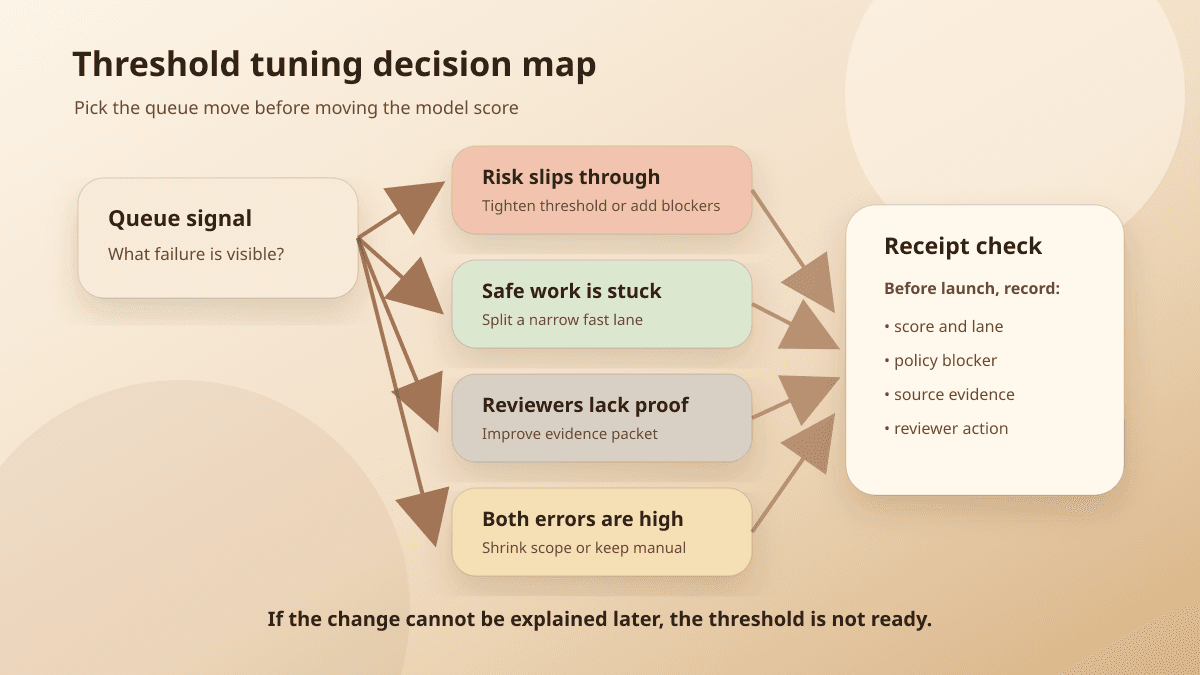
A better threshold review starts with four possible moves.
Route map
Threshold review lanes
Treat the score as a queue rule: compare what leaves automatically against what waits for a manual hold, then inspect the reviewer packet at the boundary.
Automatic / action lane
- Input:
- A scored recommendation appears complete enough to bypass or speed through review.
- Route:
- Lower friction only for narrow, reversible, source-backed work with policy blockers still active.
- Decision:
- Approve automatically, split a narrow fast lane, or add blockers before the threshold loosens.
- Consequence:
- Queue volume drops, but false positives can reach customers, money, records, or public claims too soon.
- Receipt question:
- What source, policy rule, score, and rollback path prove this action deserved the faster lane?
Manual / hold lane
- Input:
- A scored recommendation is borderline, missing evidence, broad in scope, or expensive to get wrong.
- Route:
- Hold for reviewer evidence, shrink automated scope, or keep the action manual until receipts improve.
- Decision:
- Approve, edit, reject, escalate, or keep manual after the reviewer sees the packet.
- Consequence:
- Customer exposure falls, but false negatives can create review drag and trap safe work in the queue.
- Receipt question:
- Which mistake are we reducing, where will the next one land, and what audit trail survives the change?
Borderline items need the reviewer packet: score and lane, policy rule, source evidence, missing evidence, reviewer decision, and receipt link.
The table is intentionally small. Threshold work gets messy when teams try to solve every queue symptom with one global number.
If risky items are reaching customers, the team can raise the threshold. But it can also add blockers: no automatic action when the request mentions cancellation, account access, legal terms, payment disputes, deletion, regulated data, or missing source records.
If safe work is stuck, the answer may be a narrow fast lane rather than a lower threshold. Duplicate-charge refunds under $25 with matching payment records are not the same operational problem as high-value refunds on strategic accounts.
If reviewers do not trust the recommendation, the evidence packet may matter more than the number. Show the source record, policy rule, confidence signal, missing fields, and proposed action. A reviewer who can see the receipt can make a faster decision without changing the model threshold.
If both kinds of error are high, keep the action manual. That is not failure. It is the workflow telling you the automated lane is too broad or the data source is too noisy.
Example
Field note: Do not tune the threshold because the queue is embarrassing on a dashboard. Tune it because you can name the mistake you are moving and the place it will land after the change.
Narrow the source before blaming the model
Scikit-learn's guide to tuning the decision threshold separates two jobs: estimating probabilities and deciding what action to take from those probabilities. That split is useful for operators because many approval problems are decision problems, not modeling problems.
The refund example might look like a threshold problem. Sometimes it is a data-boundary problem.
Maybe the model score drops whenever the payment record is missing. Maybe it handles duplicate charges well but struggles with cancellation language. Maybe it is reliable for consumer accounts and shaky for enterprise accounts because the source notes are longer, older, and full of exceptions.
Moving the threshold across all of that work hides the shape of the problem.
Narrowing the source can do more than tuning. Limit automation to one intake form, one product line, one reversible action, one account tier, or one amount range. Hold anything outside that slice for review until the team has enough receipts to know how the model behaves.
For approval queues, narrowing the source is how teams reduce blast radius. The team is not trying to prove the model is generally intelligent. It is trying to prove one workflow lane can move faster without creating a mess the business cannot explain.
The reviewer packet is part of the threshold
A threshold without reviewer evidence turns every borderline item into a debate.
The reviewer sees a score, a draft, and maybe a reason phrase. They still have to open the source ticket, scan the account history, find the policy, check whether the action is reversible, and decide whether the model missed a condition. The queue slows down even when the threshold is correct.
An AI approval queue should make the threshold reviewable. At minimum, the reviewer packet should show:
Proposed action: what the AI wants to send, update, route, approve, or publish
Score and lane: the threshold applied and the lane it created
Policy rule: why this action can proceed, wait, or stop
Source evidence: records, messages, documents, fields, or retrieval snippets used
Missing evidence: required fields or source records the system could not confirm
Reviewer decision: approve, edit, reject, escalate, or keep manual
Receipt link: the record someone can inspect after the action
Now the threshold has context. A 78% item with complete evidence and a reversible internal tag is not the same as a 78% item that changes customer money with missing records.
The AI workflow controls guide is useful here because threshold tuning rarely stands alone. It touches permissions, observability, escalation, rollback, and receipts. If a threshold change does not leave evidence, the team is left with folklore: someone remembers the slider moved, but nobody can reconstruct why.
Keep the action manual when the receipt is weak
Some workflows should stay manual until the receipt improves.
Manual control matters most when false negatives and false positives are both expensive. Security escalation is a simple example. Missing a real account-takeover ticket is costly. So is escalating every vague login complaint until the queue trains people to ignore alarms.
In that situation, the useful move may be to let AI draft, classify, summarize, or gather evidence while a human keeps the action authority. The model can prepare the packet. The reviewer still decides.
The same rule fits irreversible or trust-sensitive work: account deletion, payment changes, legal language, public publishing, medical or financial advice, access changes, and high-value customer promises. If the team cannot explain what source evidence justified the recommendation, the action should not skip review.
The agent receipt template gives the threshold decision a home. It records the input, source data, model signal, policy rule, reviewer, output, timestamp, and rollback path. Without that record, tuning becomes a memory game.
After the change, audit the two piles
A threshold change is not finished when the queue graph improves.
For the next week, sample two piles:
Approved too soon: work that bypassed review but should have waited
Held too long: work reviewers approved with little or no change
The first pile tells you whether precision got worse in a way the business can feel. The second tells you whether recall is still trapping safe work.
Look at the receipts, not just the count. Did the model use the right source? Did the policy rule fire? Did the reviewer have enough evidence? Was the action reversible? Did the customer or downstream team experience the mistake?
Then tune the lane, not the whole system.
A bad cluster in cancellation-related refunds does not mean every refund threshold should move. A noisy enterprise account pattern does not mean consumer accounts need more friction. A missing-field problem does not mean the model is weak; it may mean the workflow should stop until the source record is complete.
Good threshold tuning leaves a trail of small, boring decisions. This lane tightened. That source got excluded. This reviewer packet added a payment-record field. This action stayed manual. The number moved because the queue evidence said it should.
The number is the last step
Before changing the threshold, ask four questions:
Which mistake are we trying to reduce?
Where will the next mistake land after the change?
What evidence will the reviewer see at the boundary?
What receipt will prove the decision later?
If the team can answer those questions, the threshold becomes a useful control. If it cannot, the score is doing policy work it was never designed to do.
BaristaLabs helps teams make that boundary explicit: approval lanes, source evidence, reviewer packets, threshold rules, and receipts that survive the launch. Start with one workflow where the score already exists and the queue pain is visible. Then decide whether the right move is a new threshold, better evidence, narrower scope, or a manual hold.
Implementation help
Tune the threshold around the queue, not the dashboard
BaristaLabs helps teams connect model thresholds, source evidence, review load, approval policies, and receipts before AI starts touching customer work.
Best fit when a workflow already has scores, evals, or AI drafts, but the team is still deciding what can bypass review.
Turn this idea into a pilot
Which workflow should go first?
Use the readiness check to compare impact, effort, risk, owner, and next step before requesting a review.
- 3-5 minutes
- Deterministic score
- No sensitive data
Practical AI Workflow Notes
Want more practical AI operations ideas?
Get short notes on applying AI inside real small-business workflows — from document handling and customer follow-up to internal reporting, compliance, and automation guardrails.