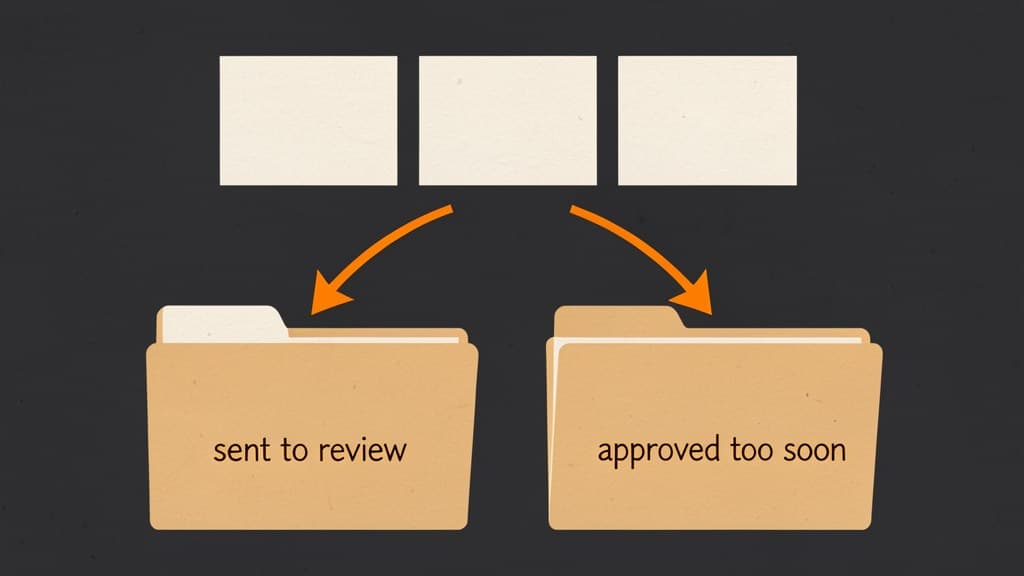

At 4:40 p.m., the support manager lowered the threshold.
The queue had 63 AI-drafted refund recommendations waiting for review. Most were routine. A few were weird. Finance wanted the backlog gone before close, and the model looked confident enough on the bulk of it.
So the rule changed: anything above 70% could pass through instead of waiting for a person.
The queue shrank. The problem did not.
By Friday, the team was no longer complaining about slow review. They were looking at two new piles: safe refunds that still got stuck because the model hesitated, and questionable approvals that reached customers too soon.
This is the tradeoff hiding inside precision and recall. The threshold did not make the model smarter. It changed where the mistakes landed.
The queue needs a positive class
Machine learning metrics sound abstract until you name the thing the model is trying to catch.
Google's Machine Learning Crash Course explains a classification threshold as the score where a model turns a probability into a class. In a spam example, email above the threshold becomes "spam." Email below it becomes "not spam."
An approval queue has the same shape, even if nobody calls it that.
For a refund workflow, the positive class might be "safe to approve automatically." For support triage, it might be "needs escalation." For lead follow-up, it might be "ready for a drafted reply."
Pick that class carefully. The metric only makes sense after the team agrees what the model is trying to find.
If "positive" means safe to auto-approve, a false positive is bad work leaving the queue. If "positive" means risky enough to review, a false positive is extra review load.
Same model vocabulary. Very different business pain.
This is why the earlier BaristaLabs piece, A confidence score is not an approval policy, starts with permission. A score can route work. It cannot decide what the word "positive" should mean for your business.
Precision asks what slips through
Precision measures how often the model's positive classifications are actually positive. Google's course defines precision as true positives divided by everything the model classified as positive.
In plain queue language: when the system says "approve this," how often is it right?
High precision matters when a positive decision creates exposure. A refund gets issued. A customer email gets sent. A CRM status changes. A public page update ships.
If the AI approval lane has poor precision, the queue looks efficient right up until customers see the mistakes.
This is the danger in lowering a threshold to clear a backlog. More items qualify for the positive class. Some are truly safe. Some are not. The queue gets smaller because more work bypasses review, not because the underlying uncertainty disappeared.
For customer-visible actions, precision is usually the first number operators feel. They may not use the term, but they know the symptom: "Too many things are getting approved that should have waited."
Recall asks what gets trapped
Recall measures how many actual positives the model catches. Google's course defines recall as true positives divided by all actual positives.
In queue language: of the work that really could move forward safely, how much did the system recognize?
Low recall creates a different frustration. The model is cautious, the queue stays full, and reviewers spend the afternoon approving obvious cases by hand.
For the refund team, that might mean the AI correctly blocks risky edge cases but still sends every clean $12 duplicate-charge refund to manual review. Nothing catastrophic happens. The workflow just fails to save time.
This is where a team can overcorrect. They see reviewers rubber-stamping safe items, so they lower the threshold. Recall improves because fewer safe cases get missed. Precision may fall because more borderline cases now pass.
The errors changed shape.
Google's thresholding lesson makes the same point with spam filters: raising a threshold usually reduces false positives but increases false negatives. Lowering it usually does the reverse.
Approval queues are a business version of that slider.
The confusion matrix is a queue map
A confusion matrix separates model outcomes into true positives, false positives, true negatives, and false negatives. It sounds like something that belongs in a notebook, but it is more useful as a queue map.
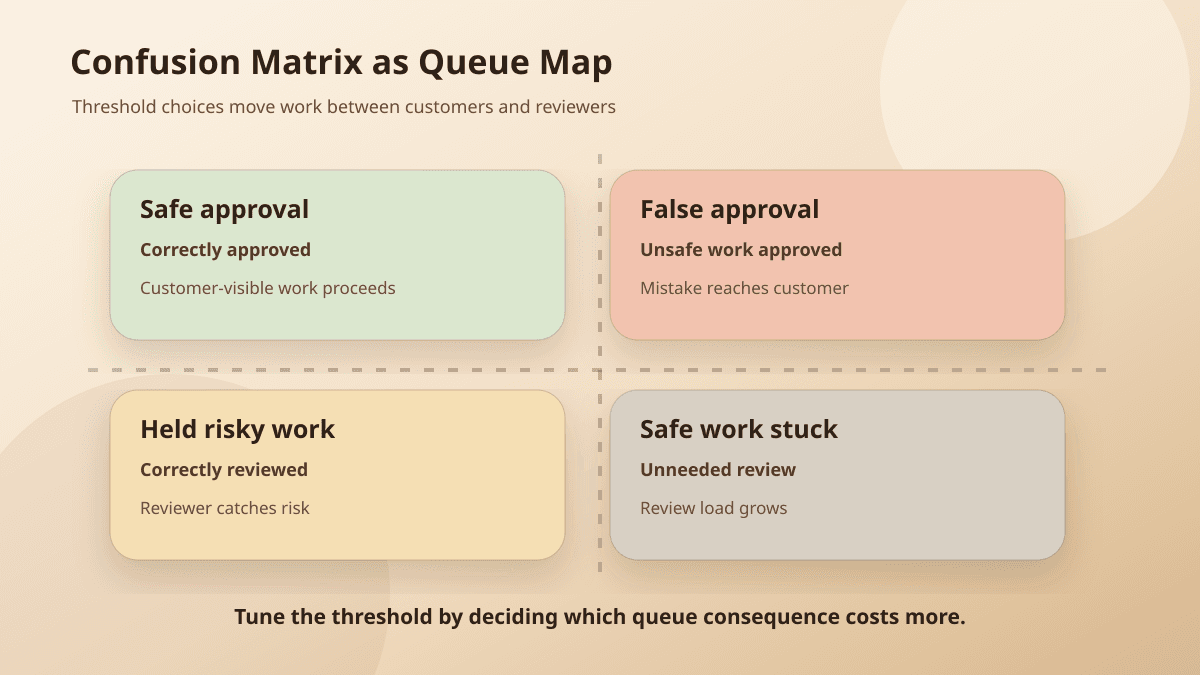
For an approval queue where "positive" means safe to approve, the four buckets look like this:
True positive: safe item approved quickly
False positive: unsafe item approved too soon
True negative: risky item held for review
False negative: safe item stuck in review
Those buckets should be visible in operations, not buried in a model evaluation report.
If false positives are rising, customers or systems of record may be absorbing the mistakes. If false negatives are rising, reviewers are absorbing the mistakes as extra work.
Neither bucket is free.
A false positive in a refund queue may issue money to the wrong case or signal a promise the company should not have made. A false negative may waste reviewer time and delay a customer who deserved a quick answer.
The right threshold depends on which cost the business can tolerate.
Start with the mistake, then tune the metric
Google's guidance on metric choice is direct: optimize for recall when false negatives are more expensive, and use precision when positive predictions need to be accurate.
That guidance is more useful than most vendor dashboards.
If missing a risky case is expensive, design for recall. Let more items enter review. Accept some false alarms because the cost of missing the case is worse.
That pattern fits fraud, compliance, safety, security, account access, and any workflow where a missed risk creates damage outside the queue.
If approving the wrong case is expensive, design for precision. Make the auto-approval lane narrower. Accept more manual review because the cost of a bad approval is worse than the cost of a delay.
That pattern fits refunds, contract language, sensitive customer replies, financial updates, public publishing, and status changes in systems of record.
The hard part is that many workflows contain both.
A support triage system might need high recall for security-related tickets because missing one is dangerous. The same queue might need high precision before it sends any customer-facing answer.
One global threshold will not carry that nuance.
Split the queue before arguing about the number
A better approval design starts by splitting work by consequence, then tuning thresholds inside each lane.
Customer-visible actions need tighter precision. Internal tags can tolerate more mistakes. Security, legal, payment, deletion, and access cases should route to review regardless of score. Missing information should pause the workflow instead of forcing a prediction.
This is where an approval queue becomes more than a holding pen. The queue should show the proposed action, the model signal, the policy rule, the source evidence, and the reason a reviewer is being asked to look.
The approval policy should name those lanes before the team automates around them.
For the refund manager, the next rule might look like this:
Auto-approve duplicate-charge refunds under $25 only when the model score is above 90%, the account has no recent dispute history, and the payment record matches the customer claim.

Send to review when the amount is higher, the account is strategic, the customer mentions cancellation, the payment record is missing, or the model score is below 90%.
The number only works because the policy around it names amount, account context, source evidence, and review triggers.
Watch both error buckets after launch
Once the workflow is live, do not only track review volume.
A shrinking queue can be good. It can also mean the system is approving too much. A growing queue can signal caution, but it can also mean the model is failing to recognize safe work.
Track the two buckets separately:
Approved too soon: items that bypassed review but should not have.
Sent to review unnecessarily: items reviewers approved with little or no change.
The first bucket tells you about precision. The second tells you about recall.
Review a sample every week. Pull the receipts. Look at the source evidence, the model signal, the policy rule, the reviewer decision, and the final customer or system outcome.
If the approved-too-soon bucket grows, tighten the auto-approval lane or add policy blockers. If the unnecessary-review bucket grows, look for a narrow class of safe work that can move faster.
Do not tune the whole workflow because one lane is noisy.
The plain-English decision
Before changing a threshold, ask one question:
Where do we want the next mistake to land?
With the customer? With the reviewer? In the backlog? In an escalation lane? In a draft that never sends?
Precision and recall do not answer that for you. They make the tradeoff visible.
If your team is trying to move from AI drafts into real workflow decisions, BaristaLabs can help connect the model metrics to the approval queue, process automation, and review policy. The goal is not a prettier dashboard. It is knowing which mistakes you are allowing, which ones you are catching, and why.
For more operator-friendly explainers, start with the Learn center. For implementation help, compare AI consulting and process automation based on whether you need the policy, the queue, or the integration work first.
Implementation help
Tune the queue around real consequences
BaristaLabs helps teams connect model thresholds, review load, approval rules, and rollback paths before AI starts touching customer work.
Best fit when a workflow already has scores, categories, or AI drafts, but the team is still deciding what can skip review.
Turn this idea into a pilot
Which workflow should go first?
Use the readiness check to compare impact, effort, risk, owner, and next step before requesting a review.
- 3-5 minutes
- Deterministic score
- No sensitive data
Practical AI Workflow Notes
Want more practical AI operations ideas?
Get short notes on applying AI inside real small-business workflows — from document handling and customer follow-up to internal reporting, compliance, and automation guardrails.