
The demo is already working.
A sales lead arrives through the website. The prototype reads the form, checks the CRM, drafts a follow-up email, writes a short note, and suggests the next status. Everyone around the screen can see the appeal. The work is repetitive. The draft is useful. The team starts comparing agent platforms.
Then someone asks the question the demo avoided: what is this thing allowed to do?
Can it read the full CRM record or only the form that was just submitted? Can it draft an email but not send it? Can it update a lead score? Can it change a customer status? Who reviews the first fifty outputs? What gets logged if the AI cites the wrong source?
If nobody has written those answers down, the next decision is not tool selection. It is the approval policy.
For most teams, an AI approval policy should fit on one page. It tells builders, reviewers, and operators what the system may read, what it may prepare, what it may execute, when a person must review it, and where the receipt lives afterward. NIST's AI Risk Management Framework uses a broader govern-map-measure-manage model, but the same idea applies here: name the risk, owner, control, and evidence before the system touches real work.
That page is the bridge between "we saw a good agent demo" and "we can test this inside real work."
The policy is the spec
Agent conversations often start with capabilities: browser control, tool use, memory, email, CRM writes, database access, code changes, multi-step planning.
Capabilities matter, but they are a bad starting point. A capable agent without a policy is just a large permission request.
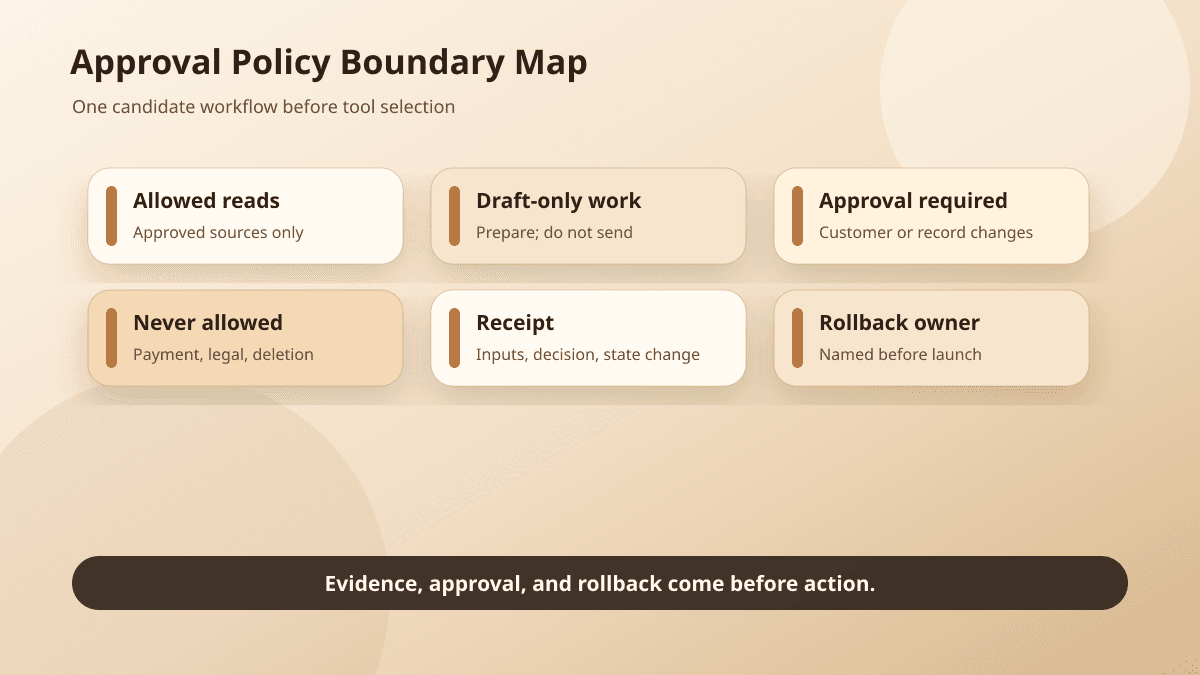
Start with one workflow. Then write the approval boundary in plain language:
- what the AI can read
- what it can draft
- what it can change without review
- what it can only propose
- what it must never do
- who reviews proposed actions
- what evidence the reviewer sees
- what gets logged
- how the team rolls back a bad action
That list looks basic. It is also where agent projects quietly fail.
A team can spend weeks comparing tools and still have no agreement on whether AI may send a customer email. The policy forces that decision before the platform makes it easy to skip.
This is why the policy belongs before the approval queue. The queue is the product surface where proposals, reviews, and receipts live. The policy decides which proposals are allowed to appear there.
Name the data the agent may read
Every workflow has a reading boundary.
For intake follow-up, the agent may need the submitted form, the prospect's company URL, the last CRM note, and approved service descriptions. It does not need every closed deal, private margin notes, billing history, or unrelated customer records.
For support triage, it may need the ticket body, product area, plan tier, recent support history, and public help docs. It should not need payment details or private admin notes.
For document extraction, it may need the uploaded document, extraction schema, validation rules, and destination field names. It should not need access to every file in the customer's folder.
For website updates, it may need the requested edit, the current page copy, the style guide, and approved examples. It should not need production deploy credentials just to suggest a headline change.
Write the read boundary as a table if that helps:
Workflow: support triage
Allowed sources: ticket body, customer plan, recent ticket history, help center articles
Blocked sources: payment details, internal HR notes, unrelated customer records
Retention: store source IDs and short excerpts used for review; do not copy full private records into the agent log
This is where data security becomes a workflow choice. OWASP's guidance on sensitive information disclosure gives the same advice in security language: limit what the system can access, retain, and reveal. The smaller the read boundary, the easier it is to explain the system, review its output, and investigate mistakes.
Separate drafts from actions
Most safe early agent workflows are preparation systems, not autonomous workers.
They draft the follow-up. They prepare the support routing note. They extract fields for review. They propose the website update. They assemble the evidence packet.
A draft has not changed the business yet. A sent email has. A draft can be edited. A published page must be corrected in public. A proposed CRM update can be compared against the source record. A committed change becomes production history.
The policy should name both sides of the line:
The agent may draft a customer follow-up email.
The agent may not send the email.
The agent may prepare a CRM note.
The agent may not change lifecycle stage without approval.
The agent may extract invoice fields.
The agent may not post the invoice to accounting.
The agent may propose website copy.
The agent may not publish or deploy the change.
This is the same operating idea behind building an approval queue before building an agent. Store the proposed action as something a person can inspect before it reaches the system of record.
Decide what can happen without review
Some actions may become safe to automate once the team has watched the workflow for a while.
A support agent might add an internal tag when the match is clear and the tag only affects routing. A document workflow might normalize dates or flag missing fields. A website workflow might open a draft pull request but not merge it.
The policy should still explain why those actions are allowed. A useful rule includes the action, the condition, and the limit:
Allowed without review: add an internal support category tag.
Condition: the ticket matches one known category and does not include refund, legal, security, outage, or account-access language.
Limit: the tag routes the ticket only; it does not send a customer reply or close the ticket.
Do not let the model decide its own freedom. Let the application enforce the boundary around action type, destination, dollar amount, account state, source quality, and sensitive language. OWASP calls this excessive agency: giving an AI system more tools, permissions, or autonomy than the task requires.
A confidence score is not enough. A model can sound confident about the wrong thing, and a workflow can be risky even when the classification is easy. The safer question is the one from Confidence score is not an approval policy: what must be true before the system is allowed to act?
Write the review rules while the workflow is small
Human review fails when the reviewer sees only generated text.
A good reviewer screen shows the proposed action, the source material, the rule that required review, the fields that will change, and the button that executes the action. The policy should name that evidence before anyone designs the UI.
For intake follow-up, the reviewer should see the form submission, proposed email, CRM note, missing fields, and any promise the AI appears to make.
For support triage, the reviewer should see the ticket, proposed category, answer draft if one exists, linked help articles, and any policy-sensitive terms.
For document extraction, the reviewer should see the source snippet beside each extracted field, validation errors, and the destination field that will receive the value.
For website updates, the reviewer should see the current copy, proposed change, page context, affected metadata, and a preview or diff.
Reviewer ownership also belongs in the policy. "Human review required" is too vague. Name the role:
Reviewer: support lead during business hours; operations manager for escalations.
Backup reviewer: customer success lead.
Review SLA: same business day for normal tickets; immediate escalation for account access, outage, security, or legal language.
That level of detail feels fussy during a demo. It becomes useful the first time the queue fills up on a Monday morning.
Define escalation before the first incident
Escalation rules are easier to write before a specific customer, employee, or deadline is involved.
The first version can be blunt. Escalate when the workflow touches money, account access, legal claims, medical or HR information, security incidents, public publishing, angry customers, private credentials, deleted data, or anything the reviewer cannot verify from the evidence shown.
The policy can also escalate uncertainty. If the agent cannot cite the source record, if required fields are missing, if two sources disagree, or if the output asks the reviewer to trust a hidden assumption, the system should stop.
For document extraction, that might mean escalating a contract when the effective date appears in two places. For support, it might mean escalating a refund request with chargeback language. For website updates, it might mean escalating pricing, compliance language, or a customer claim.
Escalation is not a failure state. It protects the parts of the workflow that should not be automated yet.
The broader responsible AI question is not whether a person is somewhere near the system. It is whether the system knows when human judgment is required.
Log the receipt, not just the output
A generated answer is not a receipt.
A receipt explains what happened well enough for someone to audit it later. At minimum, the policy should require:
- workflow name
- source record IDs
- source excerpts or references shown to the reviewer
- proposed action
- risk level or review reason
- model or system version
- reviewer name
- reviewer decision
- edits made before approval
- execution timestamp
- destination system
- rollback or correction link
If the agent drafts a follow-up email, the receipt should show the form, CRM record, draft, reviewer edits, approved version, and send timestamp. If it extracts fields from a PDF, the receipt should connect each field to the source snippet the reviewer saw.
If it proposes a website update, the receipt should link the diff, preview, approval, deployment, and revert path.
This is why agent evals should test workflow receipts, not only answer quality. The workflow is safe when the team can reconstruct the decision. Once the policy boundary is clear, copy the AI agent receipt template to turn those required fields into a record for the next run.
Put rollback on the same page
Every approval policy should answer one uncomfortable question: if this goes wrong, how do we undo it?
The rollback path depends on the action. A support tag can be changed. A draft can be rejected. A CRM note can be amended. A customer email may need a correction. A website update may need a revert. A document extraction may need the destination record flagged and reprocessed.
Write the rollback path next to the action boundary:
Action: publish website update
Default rule: not allowed for the agent; requires approved pull request and deployment review
Rollback: revert commit, redeploy previous version, record correction note in approval receipt
If nobody can name the rollback path, the agent should not take that action.
This helps during tool selection. A platform that makes execution easy but receipts and rollback hard may be the wrong first choice for a regulated or customer-facing workflow.
Draw the do-not-automate boundary
The most useful line in the policy may be the one that says no.
Do not automate actions where the team cannot inspect the evidence. Do not automate decisions that require relationship context nobody has written down. Do not automate irreversible actions in the first version.
Do not automate legal, medical, financial, HR, security, or access-control decisions unless the organization has the controls, review, and accountability to support them.
That boundary does not mean AI cannot help. It can often prepare the packet.
In sales, it can summarize the account and draft questions without promising terms. In support, it can gather context without closing the case. In document work, it can extract and highlight fields without posting them. In content operations, it can propose a change without publishing it.
That is usually enough for a first pilot. The team learns where the workflow is stable, where reviewers spend time, which sources are missing, and which actions might later become safe to automate.
The weekly workflow audit is a good companion exercise: watch the repeated work first, then write the policy for the smallest reviewable slice.
Choose the agent after the policy exposes the requirements
Once the approval policy exists, the platform conversation gets sharper.
You are no longer asking which agent sounds most impressive. You are asking which system can enforce read boundaries, create structured proposals, route reviews, show evidence, log receipts, manage permissions, integrate with the destination system, and support rollback.
A lightweight internal tool may be enough for a drafting workflow. A production customer workflow may need stronger permissions, audit logs, queue management, and integration controls. A workflow touching sensitive data may need stricter isolation, retention rules, and vendor review before any model sees the input.
BaristaLabs often starts here when helping teams plan process automation or an AI consulting engagement. The agent is rarely the first decision. The first decision is the boundary around real work.
Write the page. Show it to the people who will build, review, and own the workflow. If they cannot agree on the approval policy, the team is not ready to choose the agent yet.
If they can agree, the demo becomes more useful. Now it has a job, a boundary, a reviewer, a receipt, and a rollback path.
For more practical AI workflow guides, start with the BaristaLabs learn center. If you want a second set of eyes on the first version of your policy, bring one candidate workflow to an approval-policy review.
Review an AI approval policy
Turn the approval policy into a workflow the team can review
BaristaLabs helps translate one candidate AI workflow into data boundaries, approval checkpoints, reviewer evidence, receipts, and rollback paths before the build reaches production.
Best fit when you have a specific intake, support, CRM, document, or content workflow ready to test against a written approval boundary.
Turn this idea into a pilot
Which workflow should go first?
Use the readiness check to compare impact, effort, risk, owner, and next step before requesting a review.
- 3-5 minutes
- Deterministic score
- No sensitive data
Practical AI Workflow Notes
Want more practical AI operations ideas?
Get short notes on applying AI inside real small-business workflows — from document handling and customer follow-up to internal reporting, compliance, and automation guardrails.