
By Friday afternoon, the repeated work is usually obvious.
The same customer questions came through three channels. A spreadsheet picked up two new columns because the old handoff stopped working. Someone rewrote the same follow-up email for the fifth time. A folder of forms waited for one person who knows which exceptions matter.
Then someone saw an AI demo and asked the dangerous question: "Can we automate this?"
Maybe. But the safer first question is smaller: can you describe the workflow well enough to let AI prepare part of it for review?
That is the point of a weekly workflow audit. It gives a small team a way to inspect real work before choosing a tool, signing a vendor contract, or asking an AI system to touch customers and records. It is the practical companion to studying the first AI automation you should not automate yet: watch the work closely enough to find the part AI can prepare safely.
If every AI idea feels vague or risky, spend one week watching the work instead of shopping for software.
Start with the work that keeps coming back
Most first-pilot selection goes wrong because the team picks the loudest pain.
The loudest pain is not always the safest first pilot. It may be urgent because it is messy, political, under-documented, or full of exceptions. It may depend on a person who notices things nobody else has written down. AI can still help there, but not by pretending the work is simple.
A better candidate repeats often enough to measure, has inputs you can see, produces an output a person can inspect, and fails in ways the business can recover from.
That sounds less dramatic than "automate sales follow-up" or "let AI handle support." It is also how small teams avoid turning a promising pilot into a cleanup project.
The weekly audit is not a documentation exercise. It is a filter. You are looking for the smallest useful slice where AI can draft, classify, summarize, extract, or prepare work before a person approves the next step.
Run the audit in one ordinary week
Pick one workflow that showed up at least a few times last week. Customer intake. Support triage. Document handling. Invoice exceptions. Website updates. Sales follow-up. Internal requests that arrive by email and end in a spreadsheet.
Do not start by diagramming the whole company. Sit near the work.
For each instance, capture five things:
- What triggered the work?
- What did the person read before acting?
- What artifact did they produce?
- Who reviewed or corrected it?
- What would have made the output unsafe to send, post, update, or sync?
A customer intake example makes this concrete.
A prospect fills out a website form asking for help with a back-office process. The operations lead reads the form, checks the company site, looks at previous email history, decides whether the request is qualified, drafts a reply, and adds a note to the CRM.
That sounds like one task. It is really several actions with different risk levels.
The AI might safely summarize the form, identify missing fields, draft clarifying questions, and prepare a CRM note for review. It should not automatically promise pricing, send the reply, change the lead status, or route sensitive details into tools that do not need them.
Now the pilot candidate is visible. Not "automate intake." Prepare the intake review packet.
Score the workflow by how safely you can learn
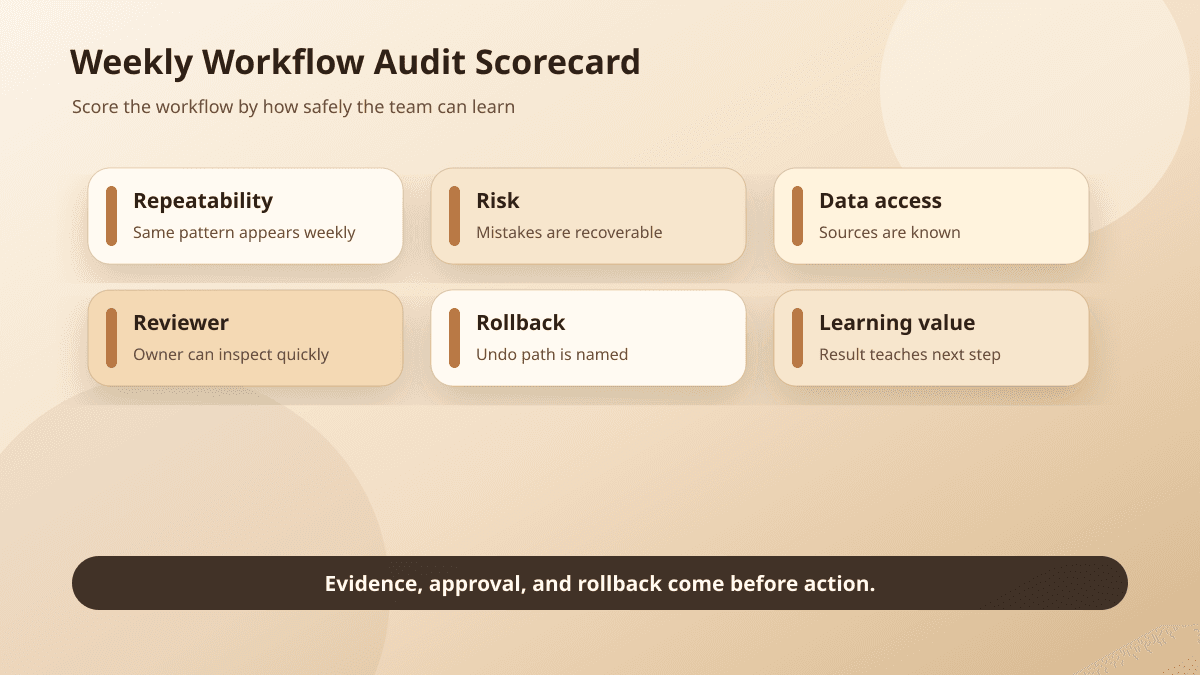
A first pilot should teach the team something within 30 to 60 days. That only happens if the workflow creates enough volume, enough feedback, and few enough catastrophic failure modes.
Use a rough score. It does not need to be fancy.
Frequency matters because one-off workflows do not produce learning loops. If the work appears weekly, the team can see patterns quickly. If it appears twice a year, it may be important, but it is a poor first AI pilot.
Reviewability matters more than people expect. A support classification is easy to check. A draft customer reply is readable. A proposed CRM update can be compared against the source conversation. A strategic pricing recommendation is harder to inspect quickly because the judgment depends on context, relationship, margin, timing, and risk.
Reversibility keeps mistakes from becoming incidents. An internal label can be changed. A draft can be edited. A routing note can be corrected. A sent customer promise, public post, permission change, refund, or deleted record is harder to unwind.
Data sensitivity decides how careful the boundary needs to be. If the workflow touches private customer data, contracts, HR details, payment information, health records, or regulated material, the first pilot may need tighter access controls, redaction, or a different starting point. BaristaLabs treats that as part of the data security design, not a detail to clean up later.
Integration complexity decides whether the first pilot is a workflow project or a systems project. If the useful action requires five brittle integrations before anyone can test it, start with a preparation step instead. Summaries, review packets, and draft queues often prove the value before the system writes anything back.
Example
Practical next step: score three candidate workflows from 1 to 5 on reviewability, reversibility, and data sensitivity. Pick the one with the safest learning loop, not the flashiest demo.
Look for the stable slice
The stable slice is the part of the workflow that has a clear input, a clear output, and a reviewer who can tell whether the result is good.
In support, the stable slice may be ticket classification and routing notes, not customer replies.
In sales, it may be call summaries and open questions, not follow-up strategy.
In bookkeeping, it may be an invoice exception packet, not posting the accounting change.
In a content workflow, it may be preparing a brief from source material, not publishing the final page.
This is where a lot of AI pilots should begin: preparation before execution.
The pattern also creates a natural approval boundary. AI prepares the work. A person checks the artifact. The system logs what changed. Only then does anything reach a customer, system of record, or public page.
If the team later finds that the same low-risk action is approved without edits week after week, more automation may be earned. If reviewers keep correcting the same field, the pilot found a real problem: missing context, unclear policy, weak retrieval, or a workflow nobody understood as well as they thought.
That is useful. A "not yet" is still a good outcome when it prevents a bad automation.
Red flags mean pause, not failure
Some workflows should not become the first AI pilot.
Pause when nobody owns the workflow. If every exception is handled by whoever happens to see the message first, AI will make the confusion faster.
Pause when the source material is messy. Scanned PDFs, stale templates, contradictory policies, and private notes scattered across inboxes may need cleanup before AI can produce reliable work.
Pause when the workflow touches sensitive data without clear boundaries. The team should know what the system can read, where outputs are stored, which vendors handle the data, and who can change access later.
Pause when the action leaves the building. Customer-facing messages, public publishing, CRM writes, refunds, account changes, legal commitments, and regulated advice need a review step until the team has evidence that a narrower rule is safe.
Pause when there is no review path. "A human will check it" is not a control unless the workflow names the reviewer, shows the source evidence, and gives that person time to approve, edit, reject, or escalate.
These red flags do not mean AI is off the table. They tell you the next project is cleanup, policy, or an approval-gated workflow, not autonomy.
Define the pilot boundary before the build
Once one candidate passes the audit, write the pilot boundary in plain language.
The boundary should answer:
- What can AI read?
- What will AI produce?
- Who reviews the output?
- What action is explicitly out of scope?
- What will prove the pilot worked after 30 to 60 days?
For the intake example, the boundary might look like this:
AI can read the submitted form, selected public company information, and the previous conversation thread. It produces a short intake summary, missing-field list, suggested qualification tag, and draft follow-up questions. The operations lead reviews the packet before any CRM update or customer email. The pilot does not send emails, change lifecycle stage, quote pricing, or sync sensitive notes into external tools. Success means the reviewer spends less time preparing each intake packet without increasing correction rate or missed exceptions.
That is enough to start a serious process automation conversation. It gives a builder a workflow, a boundary, a reviewer, and a measurement window. It also gives the business a way to say no to the wrong kind of automation before the tool makes the choice for them.
If the audit shows several possible pilots and the team cannot rank them, that is a useful place for AI consulting: prioritizing opportunities by workflow clarity, data exposure, review cost, and expected learning speed.
A safer first pilot is usually narrower than the original idea
The first AI pilot does not need to impress everyone in a demo.
It needs to survive a normal week.
A good pilot handles repeated work, prepares a useful artifact, leaves consequential action with a person, and creates evidence the team can inspect. The evidence matters because the next decision should come from observed workflow data, not enthusiasm after a product tour.
BaristaLabs usually starts here: one process, clear inputs, visible handoffs, a named reviewer, a data boundary, and a small enough slice to learn from quickly. That is the same workflow-first path behind our broader AI implementation work: prove a narrow pilot, then expand only where the evidence supports it.
If the weekly audit reveals that kind of candidate, the next step is to map the pilot and the approval boundary before choosing the tool.
Turn this idea into a pilot
Which workflow should go first?
Use the readiness check to compare impact, effort, risk, owner, and next step before requesting a review.
- 3-5 minutes
- Deterministic score
- No sensitive data
Practical AI Workflow Notes
Want more practical AI operations ideas?
Get short notes on applying AI inside real small-business workflows — from document handling and customer follow-up to internal reporting, compliance, and automation guardrails.