
The workflow that gets everyone excited is often the wrong first workflow to automate.
It is usually visible, annoying, and expensive. Customer emails. Sales follow-up. Proposal writing. Support triage. Invoice exceptions. The work feels repetitive enough that AI should help, but important enough that a bad answer would be painful.
That tension is a signal. It does not mean "do nothing." It means the first project may be to study the workflow before automating it.
A small business does not need a six-month AI strategy deck to start. It needs to understand which parts of the work are routine, which parts require judgment, and which parts only look routine because one experienced person is silently making decisions all day.
The tempting workflow hides the real process
Take sales follow-up after a discovery call.
On the surface, the task is simple: summarize the call and send next steps. An AI tool can draft that in seconds.
But the human doing the work is not just summarizing. They are reading the buyer's urgency, remembering which promises were made, deciding whether pricing should be direct or cautious, noticing procurement risk, and choosing whether to push for a meeting or slow down.
If you automate the whole thing too early, the AI does not merely save time. It flattens judgment.
The safer first step is to break the workflow into layers:
- What information must be collected?
- What facts can be summarized safely?
- What decisions does a person make?
- What exceptions change the next step?
- What would make a generated draft unacceptable?
Now the first AI project becomes clearer. Maybe the system should not send the follow-up. Maybe it should prepare a call brief, extract open questions, and draft a message for review.
That is still automation. It is just honest about where the human value lives.
Use a one-week shadow run
A shadow run is simple: let AI assist behind the scenes while the existing human workflow continues unchanged.
For one week, pick one workflow and record what happens:
- The human completes the task normally.
- The AI produces the same artifact in parallel.
- A reviewer compares the two.
- Differences are logged as categories, not anecdotes.
For example:
- Missing context
- Wrong tone
- Incorrect fact
- Good draft, weak next step
- Good summary, unsafe recommendation
- Useful but too generic
- Ready to use with light edits
This gives you something better than opinions. It gives you a defect map.
If 70% of AI drafts are factually correct but tonally wrong, you have a style and review problem. If 40% miss key context, retrieval is the bottleneck. If the answer is good but the recommended action is risky, the workflow needs approval gates.
The first week should teach you where the automation boundary belongs.
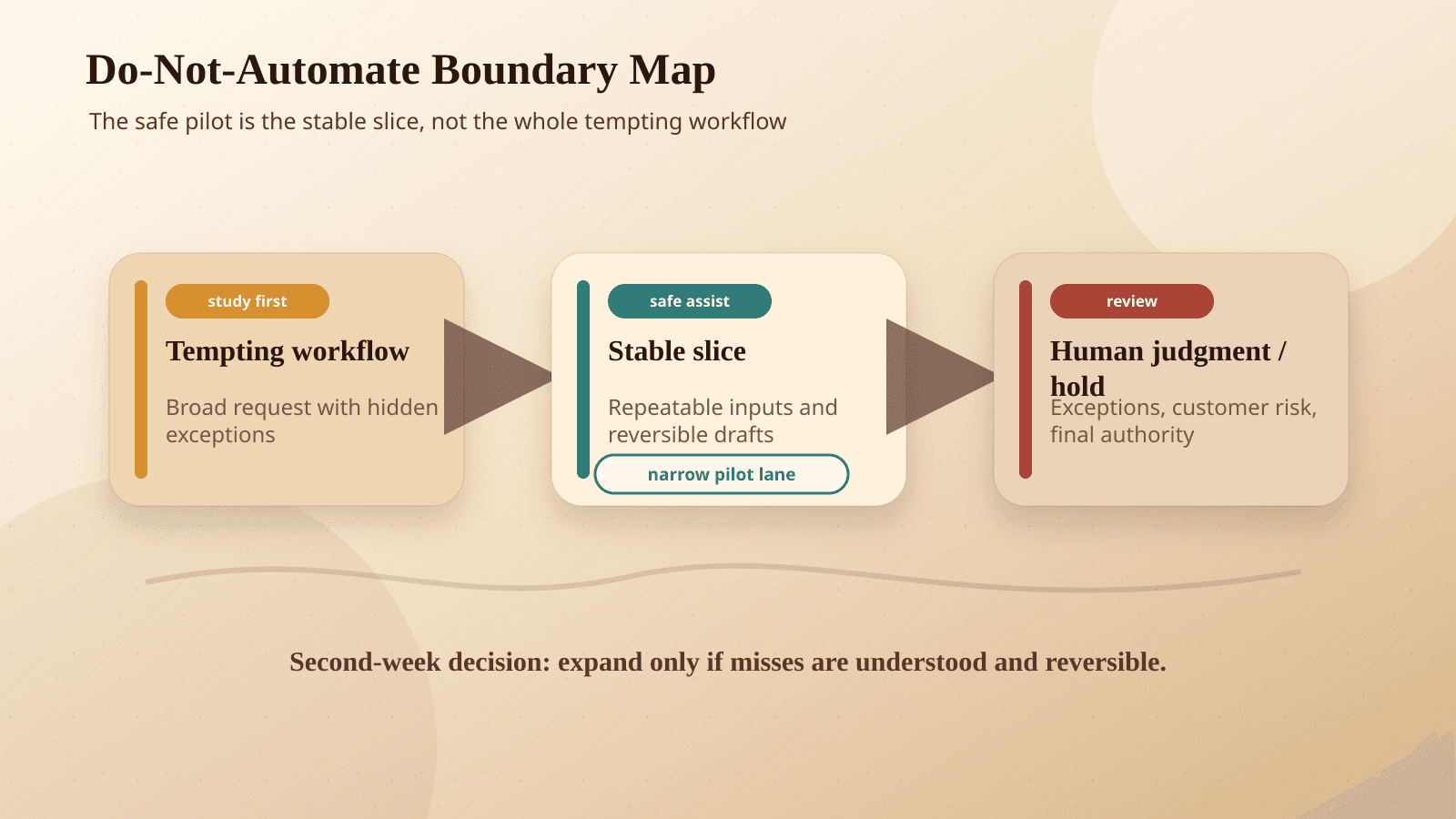
Automate the stable slice first
Most workflows have a stable slice hiding inside them.
In customer support, it may be classification, not response. In sales, it may be call summaries, not follow-up strategy. In bookkeeping, it may be document extraction, not exception handling. In hiring, it may be candidate packet preparation, not candidate judgment.
That stable slice is the best first automation because it has three traits:
- The inputs are predictable.
- The desired output is easy to inspect.
- A mistake is recoverable before it reaches a customer or financial system.
Once that slice is reliable, the next slice becomes easier to evaluate. You are not betting the business on a big leap. You are expanding from evidence.
Watch for the person who says "it depends"
Every small business has someone who understands the messy exceptions. They are the person who says, "It depends," and then explains five cases nobody wrote down.
Do not treat that person as resistance. Treat them as the process map.
Their exceptions should become workflow rules, review criteria, or escalation triggers. If they cannot explain the rule, sit with them while they do the work. The decision may be based on a tone, a pattern, a customer history, or a relationship risk that the system does not currently see.
That is not a reason to avoid AI. It is a reason to avoid pretending the workflow is simpler than it is.
The right first project may feel smaller
A good first AI project often sounds less exciting than the original idea:
- "Draft the reply, but require approval."
- "Summarize the call and list open questions."
- "Classify tickets and explain the routing reason."
- "Prepare the invoice exception packet."
- "Extract the fields, but do not update the accounting system."
These projects do not make a splashy demo. They make the next decision safer.
For small businesses, that matters. You usually do not have a spare operations team to clean up a broken automation. You need AI to reduce load without creating a hidden rework tax.
BaristaLabs usually starts by looking for this boundary: where can AI prepare better work for a person before it starts doing work instead of a person? The answer is often the fastest path to a system that survives contact with real operations.
Run a workflow audit
Turn one messy workflow into a safer first pilot
BaristaLabs helps small teams inspect one real workflow, identify the stable slice, write the review boundary, and decide what should stay human before automation starts.
Best fit when a visible workflow feels repetitive but still depends on judgment, exceptions, or customer-facing risk.
Turn this idea into a pilot
Which workflow should go first?
Use the readiness check to compare impact, effort, risk, owner, and next step before requesting a review.
- 3-5 minutes
- Deterministic score
- No sensitive data
Practical AI Workflow Notes
Want more practical AI operations ideas?
Get short notes on applying AI inside real small-business workflows — from document handling and customer follow-up to internal reporting, compliance, and automation guardrails.