


GitHub Copilot for JetBrains now supports enterprise-managed settings for plugin sources, MCP server access, OpenTelemetry, and agent permission modes. For teams that held JetBrains outside a managed Copilot rollout, the August 18 release closes several concrete control gaps—but it does not make every Copilot setting work in every client.
The practical decision is whether these four control areas are enough for one JetBrains pilot. Map the exact keys your policy requires, choose the deployment source, and prove both intended and blocked behavior on a current client before expanding. This article explains the support boundary and a small verification plan.
What changed for Copilot in JetBrains?
GitHub's August 18, 2026 changelog announces four areas of enterprise control for its JetBrains plugin.
Plugin governance now includes enabledPlugins, which can require a plugin to be enabled or disabled; extraKnownMarketplaces, which makes approved plugin sources available; and strictKnownMarketplaces, which limits installation to approved sources. These controls cover both which Copilot plugins may run and where users may obtain them.
MCP server policy uses allowedMcpServers and deniedMcpServers. GitHub's current managed-settings reference says that defining an allowlist blocks any server that does not match it. A deny entry is unconditional: a server remains blocked even when it also matches the allowlist.
OpenTelemetry management can set the collector endpoint, protocol, service name, resource attributes, and content-capture policy. Managed values take precedence over developer settings, and a developer can inspect the applied configuration under Settings > Tools > GitHub Copilot > Chat > OpenTelemetry.
Agent permission modes can be constrained with permissions.disableBypassPermissionsMode. Setting it to disable prevents the JetBrains agent from using Bypass Approvals or Autopilot. This is a direct control over an allow-all operating mode; it does not define which individual actions your workflow should approve.
Does this mean JetBrains has full policy parity?
No. GitHub's support table is property-specific, and its configuration guide says explicitly that supported clients do not all support every property.
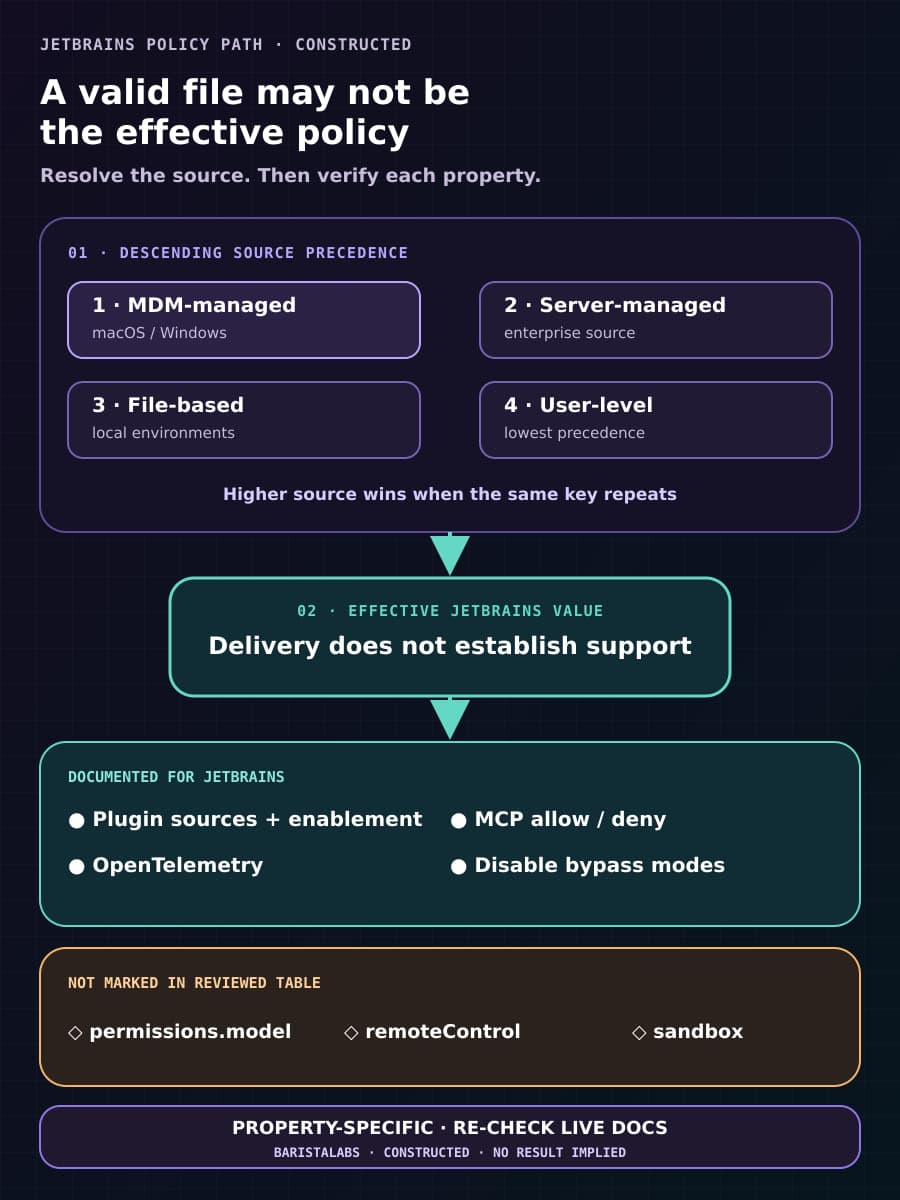
The current reference marks the plugin controls, MCP allow/deny keys, telemetry, and permissions.disableBypassPermissionsMode as supported in JetBrains IDEs. It does not mark permissions.model, remoteControl, or the sandbox key as supported there. That compatibility boundary can change, so check the live table when you plan a rollout rather than copying this article into a permanent policy.
This distinction matters operationally. “Enterprise managed settings are supported” describes a delivery system. It does not establish that every value in managed-settings.json has an effect in JetBrains. A policy file can be valid, reach a client, and still contain keys that the client does not implement.
BaristaLabs interpretation: JetBrains can now enter a more credible governed pilot, but only when the pilot's required controls fit the documented support matrix. If your approval depends on a managed sandbox or remote-control host restriction, the new release alone does not satisfy that requirement for JetBrains.
Which deployment source should you choose?
GitHub documents four settings sources in descending precedence: MDM-managed, server-managed, file-based, then user-level. When the same key appears in more than one source, the higher source controls the effective value.
The configuration guide calls server-managed settings the default for most enterprises and the best option for review workflows and audit history. An enterprise owner commits copilot/managed-settings.json to the enterprise's .github-private repository. Supported clients normally receive changes within about an hour; restarting the client or signing in again triggers an immediate refresh.
MDM-managed settings fit device-group targeting on macOS and Windows. They apply to local clients and outrank server-managed values. GitHub does not support native MDM delivery on Linux; its documented alternative there is file-based policy.
File-based settings work across platforms for local clients, including developer environments such as containers and Codespaces. They rank below MDM and server policy, so finding the expected JSON on disk is not enough. Check whether a higher-precedence source supplies a different value.
Choose one source based on the boundary you actually own. Use server policy when the control should follow signed-in enterprise users, MDM when it should follow a macOS or Windows device group, and file delivery when the other methods cannot reach the local environment. Do not deploy the same key from several sources merely for reassurance; that makes effective-state diagnosis harder.
How do you verify the four control areas?
GitHub recommends piloting each deployment method on a small device group. Select one current JetBrains client version, one settings source, a few enterprise users, and sanitized test resources. Record the expected effective value and any higher-precedence source before running a case.
For each announced control area, run one case that should succeed and one that should fail:
- Plugins: require one approved plugin or marketplace and confirm the intended state. Then attempt installation from a source excluded by
strictKnownMarketplacesand confirm it is refused. - MCP servers: connect to one server that matches the allowlist. Then try a server matched by
deniedMcpServers; it should remain blocked even if an allow rule also matches it. - Telemetry: send sanitized pilot activity and confirm it reaches the approved collector with the expected service and resource attributes. When content capture is disabled and locked, inspect the exported data to confirm content is absent rather than inferring that result from the configuration screen.
- Permission modes: confirm the agent can still use the normal approval path for a harmless operation. Then verify that Bypass Approvals and Autopilot are unavailable when the managed permission key is set to
disable.

A committed file, an MDM assignment, the passage of an hour, or a visible settings value is delivery evidence—not enforcement evidence. Keep the client version, user, device group, policy commit, effective value, test input, result, and time for each case. Stop the pilot if a denied MCP server connects, an unapproved marketplace installs, captured content leaves when policy says it should not, or a bypass mode remains available.
What does this release not establish?
The announcement and docs describe supported keys and intended behavior. They do not provide independent enforcement testing, fleet adoption data, incident outcomes, or a cross-version reliability benchmark. They also do not name a minimum JetBrains plugin version in the release text inspected for this article; use the latest plugin as GitHub recommends and record the exact version you test.
Managed telemetry routing does not settle data governance by itself. Your collector, authentication, retention, access, and downstream processing still need owners. Similarly, an MCP allowlist controls which server definitions may run; it does not prove that an allowed server is safe, correctly scoped, or operating under least privilege.
Disabling bypass modes is narrower than an approval policy. It removes two broad operating modes, but your team still has to decide which tool calls need a person, what evidence that person sees, where the decision is recorded, and how work stops after a denial.
When should JetBrains enter the wider rollout?
Proceed beyond the pilot when every required control is supported by the current JetBrains column, the chosen settings source reaches the intended population, and all positive and negative cases match the recorded expectation. Recheck users with several policy sources and any team-specific overrides, because effective values can differ from the enterprise default.
Defer when a load-bearing requirement depends on an unsupported key, when you cannot inspect the effective client state, or when a blocked case succeeds. Use a different supported client or add a separate control rather than describing policy intent as enforcement.
The release is useful because it turns four previously local choices into manageable enterprise decisions for JetBrains users. Treat that as permission to run a governed pilot, not permission to skip one. If you need help mapping client support to rollout evidence, ask BaristaLabs to review one JetBrains Copilot pilot or explore our process automation service.
Use the GitHub Copilot enterprise-controls guide to place each supported JetBrains setting beside its delivery source, client version, product-surface scope, expected value, and representative check.
Sources
- GitHub Changelog: “Enterprise managed settings in GitHub Copilot for JetBrains”, published August 18, 2026.
- GitHub Docs: “Enterprise managed settings”, accessed August 19, 2026.
- GitHub Docs: “Configuring enterprise-managed settings”, accessed August 19, 2026.
Copilot JetBrains control review
Verify one JetBrains pilot before wider Copilot rollout
BaristaLabs can map one pilot group's required Copilot controls, deploy them through the right settings source, and define evidence for intended and blocked outcomes.
Best fit for enterprise owners and platform teams preparing a managed Copilot pilot in JetBrains IDEs.
Turn this idea into a pilot
Which workflow should go first?
Use the readiness check to compare impact, effort, risk, owner, and next step before requesting a review.
- 3-5 minutes
- Deterministic score
- No sensitive data
Practical AI Workflow Notes
Want more practical AI operations ideas?
Get short notes on applying AI inside real small-business workflows — from document handling and customer follow-up to internal reporting, compliance, and automation guardrails.