Which devices may host a remotely controlled Copilot session?
GitHub added a host-device control for remote Copilot sessions. See what disabled, requireSSO, and enabled mean, how settings precedence works, and what to test before wider deployment.

Sean McLellan
Lead Architect & Founder

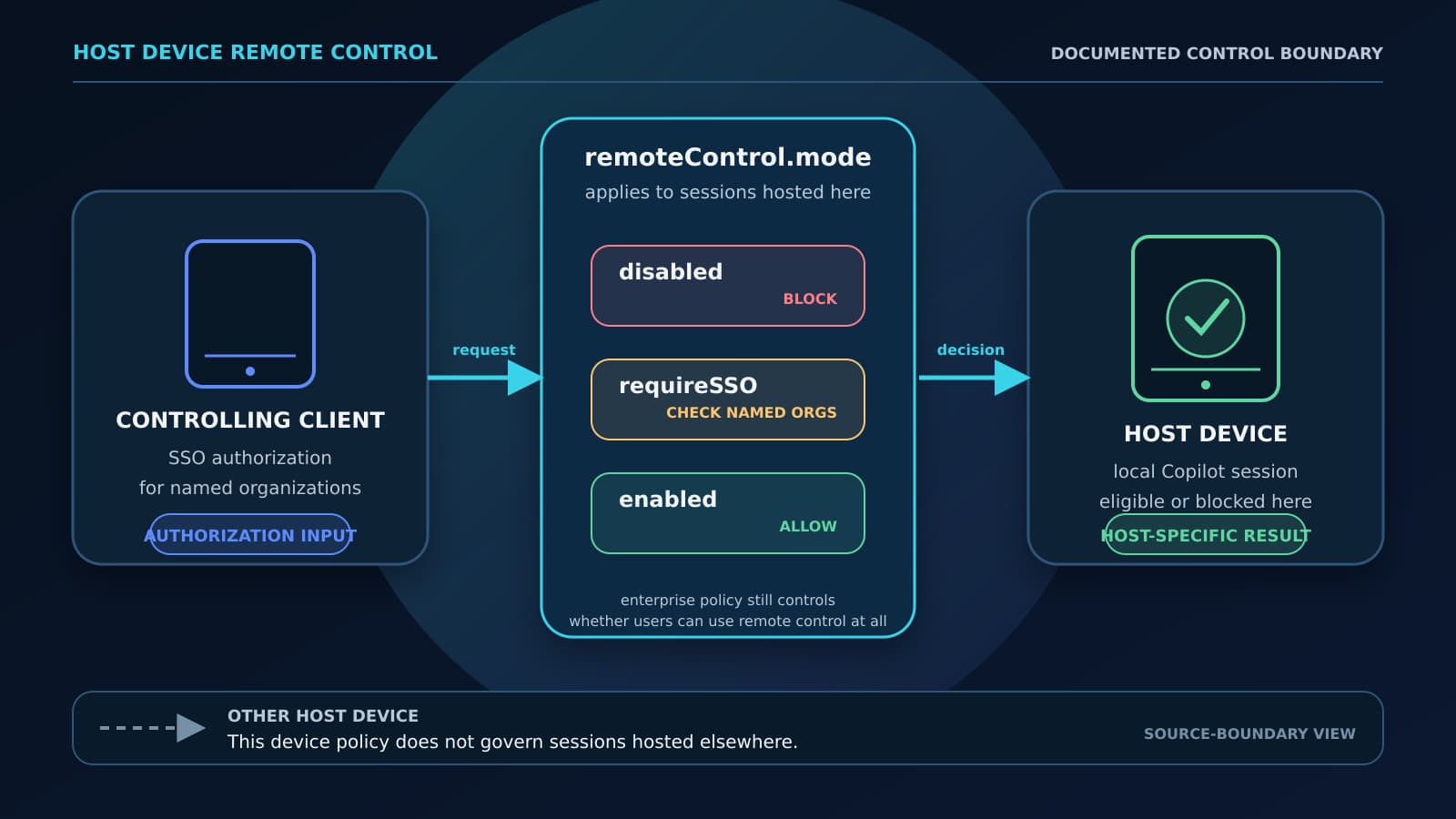
GitHub added an enterprise-managed remoteControl setting on July 30, 2026. Enterprises and organizations can now restrict which devices may host remotely controlled Copilot sessions. The setting matters because a remote controller can view and steer a session, send more instructions, review plans, stop work, answer questions, and approve or deny permission requests on the host.
For an engineering, IT, security, or operations owner, the immediate decision is local and specific: should one fleet segment use disabled, requireSSO, or enabled? The answer depends on which devices may host remote sessions and what authorization the controlling client must present. This article explains those boundaries and gives you a small deployment test that checks the effective result on real clients before you widen coverage.
The host device and the controlling client have different roles
GitHub already has an enterprise policy that controls whether remote control is available to users at all. The new remoteControl managed setting works beside that broad policy. The broad policy opens or closes the feature for a user population; the managed setting restricts whether a particular device may host a remotely controlled session.
That distinction prevents two common scope errors. A device with remoteControl.mode set to disabled cannot host a remotely controlled session, but the user can still control an eligible session hosted on another device. Conversely, allowing a device to host does not override an enterprise policy that makes remote control unavailable to the user.
The host is the machine where the Copilot session runs. The controlling client connects to that host and sends decisions back to the session. GitHub's May 18 changelog establishes why host eligibility deserves a separate setting: remote control can stream session activity and let the controller steer work or respond to permission requests. It does not establish how well the July policy works across a managed fleet.
GitHub's current enterprise-managed settings reference lists remoteControl as supported in Copilot CLI, VS Code, and the GitHub Copilot app. It lists Copilot cloud agent as unsupported for this key. Treat that table as the current compatibility boundary and check it again before a rollout; it can change as GitHub updates clients. The table does not currently establish support for this managed setting in JetBrains products.
Each mode answers a different host-device question
The three modes control hosting on the device that receives the effective setting. They do not replace the broad user policy, and they do not prove that a device or controller meets controls outside the stated rule.
Scroll sideways to see all 3 columns.
remoteControl.mode | What the host device permits | What it does not prove |
|---|---|---|
disabled | Prevents remote control of sessions hosted on the device. | It does not disable Copilot, block local Copilot sessions, or stop the user from controlling eligible sessions on another host. |
requireSSO | Allows a controlling client only when it is SSO-authorized for an organization listed in githubDotComOrganizations. | It does not attest to device health, MDM compliance, location, or corporate ownership of the controller. |
enabled | Adds no remoteControl restriction to sessions hosted on the device. | It does not override the broad enterprise policy or establish that unrestricted hosting is appropriate for the device. |
requireSSO needs a githubDotComOrganizations array containing the GitHub organization logins that the controlling client must be authorized to access through single sign-on. This is a check on the controlling client's SSO authorization for those named organizations. It is not a check that the controller is enrolled in MDM, compliant with endpoint policy, on a corporate network, in an approved country, or operated from a company-owned device.
That makes requireSSO useful when organization SSO authorization is the intended admission rule for a controller. It is too narrow if your policy says that only healthy, corporate-managed controllers may connect. GitHub's documented setting does not express that broader condition, so an owner must not describe SSO success as device attestation.
disabled has the smallest host scope. It fits a fleet segment that should run Copilot locally but should never expose those sessions to remote control.
enabled removes the device-level restriction. It means unrestricted by this remoteControl key, not unrestricted by every Copilot policy or local permission.
GitHub's documentation defines these semantics. It does not provide an independent field test, adoption count, incident history, bypass analysis, or cross-client enforcement benchmark. A team can use the documented behavior to design a test, but it should describe the result as evidence for the clients and cases it actually exercised.
Deployment precedence determines which setting a client receives
GitHub documents four setting sources in descending precedence: MDM-managed, server-managed, file-based, then user-level settings. If more than one source supplies a value, the higher source controls the effective setting. A correct JSON value in a lower source can therefore be present and still have no effect.
Server-managed settings are the default choice for most enterprises, according to GitHub, and provide the best review history. An enterprise owner places copilot/managed-settings.json in the enterprise .github-private repository. Supported clients normally receive updates within about an hour; a restart or a new sign-in can apply the latest server setting immediately. This method follows enterprise users, so it is useful when policy should follow the account across supported clients.
MDM-managed settings use the same JSON schema but let IT target device groups on macOS and Windows local clients. Clients check for MDM policy updates hourly without a restart. During a VS Code test, an administrator can run Developer: Sync Account Policy to force a check. MDM targeting tells you where the policy was assigned; it is not proof that every endpoint installed or enforced the setting.
File-based deployment is available for local clients on all platforms. GitHub identifies it as an option for environments where server or MDM delivery is unavailable, including containers and Codespaces. Its coverage ends at the machines that receive the file. A file in a build image, repository, or distribution location is not evidence that every intended runtime has loaded it.
Choose the delivery path from the fleet boundary you need. Server-managed delivery fits an account-wide rule; MDM fits a targeted macOS or Windows device group; file delivery fits other local environments. For broader treatment of local AI setting ownership and drift, see The AI coding tool is now an endpoint setting.

Test four cases on a small device group
GitHub advises enterprises to pilot each deployment method on a small device group. Start with one fleet segment, one current supported client type, and a small number of test accounts. Record the broad user policy, intended remoteControl value, possible higher-precedence sources, and expected results.
Deploy the setting, then wait for the documented update interval or force a supported refresh. For server-managed settings, restart the client or sign in again if you need an immediate check. For MDM-managed VS Code, use Developer: Sync Account Policy. Do not treat the committed file, MDM assignment, or elapsed hour as the result; exercise the behavior on the host and controlling clients.
Run these four cases directly:
- Intended host: On a device inside the pilot segment, start a session in the supported Copilot client and attempt to make it available for remote control. Under
disabled, the host should refuse remote control. UnderrequireSSOorenabled, continue with the controller cases below. - Blocked or non-covered host: Use a comparison device with a known effective policy. A host explicitly assigned
disabledshould refuse remote control. If the device is only outside the MDM group or did not receive the file, first identify the server-managed, file-based, or user setting that should apply. Lack of delivery does not meandisabled. - SSO-authorized controller: Connect to the intended host from a controlling client that is SSO-authorized for an organization named in
githubDotComOrganizations. The connection should succeed underrequireSSOandenabled, subject to the broad user policy. It should fail underdisabled. - Controller that should fail: Repeat the attempt with a controlling client that is not SSO-authorized for any listed organization. It should fail under
requireSSOanddisabled. Underenabled, this managed key does not supply an SSO restriction, so the broad user policy and other applicable controls determine availability.
A failed expected case is as useful as a successful one because it identifies the mismatch to investigate. Check client support and version, the user's enterprise Copilot plan and active billing entity, the exact organization logins, SSO authorization, delivery scope, and higher-precedence settings. Stop the pilot if an unauthorized controller succeeds under requireSSO or a host with an effective disabled setting accepts remote control.
Passing all four cases shows that one policy path behaved as expected for the tested clients and accounts. It does not prove installation across the fleet or enforcement in unsupported clients. Repeat the positive and negative cases for each added operating system, client type, or deployment source.
Choose one mode, prove it locally, then widen coverage
Use disabled when a fleet segment should not host remote sessions. Use requireSSO when named GitHub organization SSO authorization is the correct requirement for the controlling client. Use enabled only when the device needs no additional host restriction beyond the broad user policy and other controls. The larger AI workflow control system still has to cover local permissions, identity, review, and recovery where those concerns apply.
Record the host-device decision in the GitHub Copilot enterprise-controls guide beside the licensed population, product surface, delivery source, representative-device evidence, owner, and next review trigger. That inventory keeps this one managed setting connected to the wider rollout without treating an SSO check as device attestation.
Choose the mode for one segment, deploy it through the highest-priority path that matches that segment, and verify the effective behavior on real hosts and controllers. Widen the rollout only after the intended success and failure cases match the decision. BaristaLabs can help a team choose where an AI control belongs, deploy it through the right path, and verify it on the clients that should receive it through a broader process automation review.
Sources
Copilot host-device policy review
Verify one remote-control policy before wider deployment
BaristaLabs can help choose a mode for one fleet segment, deploy it through the right settings source, and verify the intended host and controller outcomes.
Best fit for teams using Copilot CLI, VS Code, or the GitHub Copilot app on devices covered by enterprise, MDM, or file-based settings.
Turn this idea into a pilot
Which workflow should go first?
Use the readiness check to compare impact, effort, risk, owner, and next step before requesting a review.
- 3-5 minutes
- Deterministic score
- No sensitive data
Practical AI Workflow Notes
Want more practical AI operations ideas?
Get short notes on applying AI inside real small-business workflows — from document handling and customer follow-up to internal reporting, compliance, and automation guardrails.