

Ask a Mac admin which AWS account a developer's Claude Code install is authenticating against, and watch what actually happens. They open a terminal, guess at a file path, and read back whatever is sitting in a config file nobody has touched since setup day. That is not an answer. That is an archaeology dig.
Nobody planned it this way. A developer opened Claude Code, pointed it at Amazon Bedrock instead of the public API, picked a Region, and got back to work. It took ten minutes and worked on the first try, so nothing got written down. The edit lives in a local settings file that exists on exactly one machine, in exactly one person's memory.
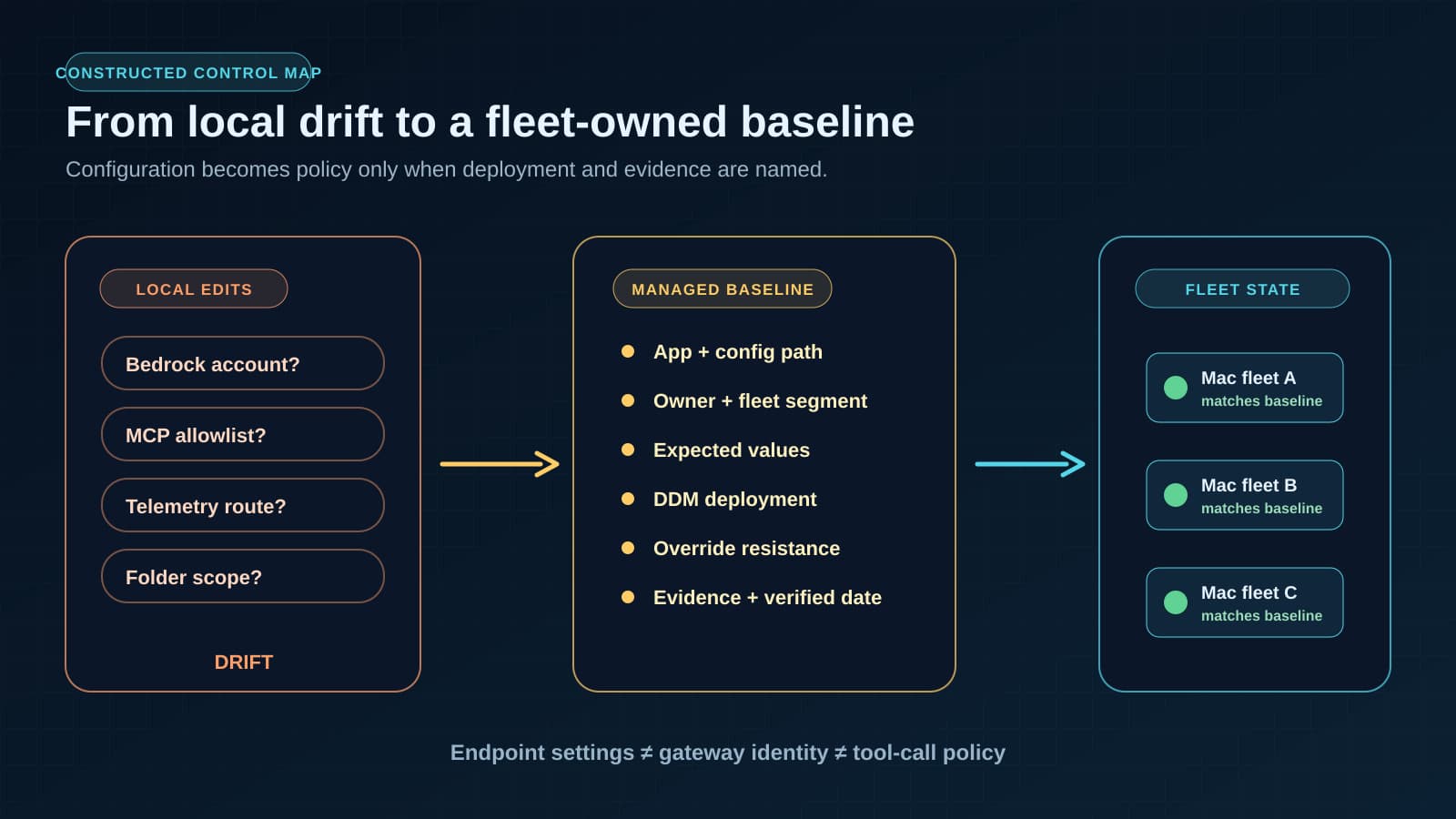
Multiply that by a fleet and the shrug becomes the problem. Twenty Macs means twenty private edits: one has prompt caching on, one does not; one has an MCP server pointed at a staging database, another at production, because that was easiest that afternoon; telemetry is on for some machines and quietly off for others. None of it looks like a security incident on any single laptop. It reads as drift: slow, cumulative, and invisible right up until someone needs a straight answer and nobody can produce one.
That is the gap AWS and Jamf addressed in a July 8 AWS Machine Learning Blog post: local AI applications on Mac now have a path to be configured, deployed, and checked like managed device policy, instead of like a developer's personal dotfiles.
What changed: the config file becomes a managed setting
AWS frames the problem plainly. Organizations need a scalable way to manage how AI applications are configured and used on employee devices, and the examples it names are ones many engineering teams already have installed: Claude Code, Claude Desktop, and OpenAI Codex.
Here is the detail worth sitting with. AWS points out that these apps run locally on the user's device and rely on local configuration files for inference provider authentication, Model Context Protocol server connections, and observability configuration. That is not a minor implementation detail. It is the operations surface and the audit gap, both at once. The file sitting on the laptop decides which cloud account the tool talks to, which external servers it can reach, and whether anyone downstream can see what it did.
Amazon Bedrock handles the inference side: model access through the organization's own AWS account, in the AWS Regions the organization chooses, rather than whatever endpoint a developer's local install happens to default to.
Jamf AI Governance handles the device-management side. AWS describes it as a way to define settings that connect each application to Bedrock, then deliver those settings across a Mac fleet through Declarative Device Management, Apple's standard for pushing configuration that persists and self-corrects rather than running once and drifting. AWS says the configuration ships through Jamf Blueprints and DDM in a way built to resist local tampering, and that the end result for the user is simple: open the application, and it is already pointed where it should be. No manual editing of a local file required.
AWS built its walkthrough around Claude Code talking to Bedrock but says the same pattern extends to Claude Desktop and OpenAI Codex. Fair to flag plainly: that is AWS's stated design intent for the pattern, not three separately documented walkthroughs. Treat the Codex and Claude Desktop coverage as directional until you have actually configured it yourself.
This is not the gateway story again
Readers of our earlier piece on putting the Claude Code gateway in writing might file this under the same heading. It isn't. The two solve different problems, and the difference matters.
That gateway post was about the shared door: a service sitting between every developer's Claude Code client and Google Cloud, centralizing identity, spend caps, and revocation for the inference path everyone shares. It answers who is allowed through, and how you cut them off.
This is about what happens before any request reaches a door. The Bedrock authentication method, the MCP servers an app is allowed to see, the folders a sandbox can touch, whether telemetry leaves the machine at all: those are properties of the local application sitting on a laptop, and they determine what the app is even capable of attempting. A perfectly locked-down gateway will not save you if the local config file has an MCP server pointed at the wrong database, because that traffic may never touch the gateway the way you assumed it would.
Gateway controls govern the shared path once a request leaves the machine. Managed settings govern the machine itself, before that. You need both; neither substitutes for the other. Tool-call gates, the kind we covered in AWS AgentCore Gateway's policy interceptors, are a third and separate layer again, sitting between an agent's decision and the action it is about to take. Endpoint settings, gateway identity, and tool-call policy are three different checkpoints. This article only covers the first one.
For a GitHub Copilot rollout, the enterprise-controls guide adds the separate enterprise, repository, and product-surface checks around this endpoint baseline. This Mac-fleet article remains an adjacent device-control example rather than a GitHub-specific administration standard.
The artifact: an AI app settings baseline
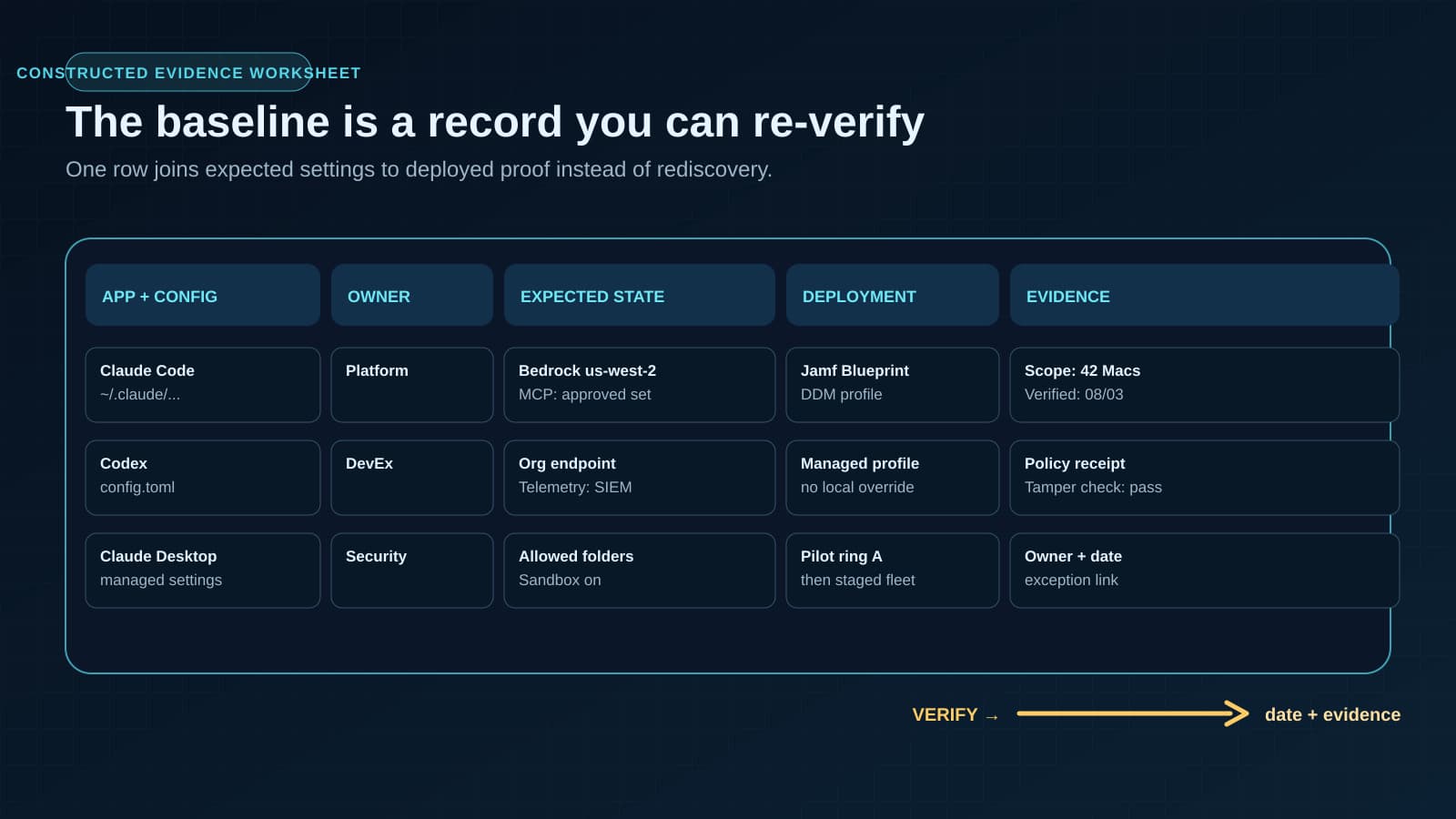
No one wrote down what should be true before the fleet grew past one machine. Before rolling Jamf AI Governance, Bedrock, or any equivalent past a pilot, write an AI app settings baseline: one document per application, recording what configuration belongs on which Macs, who is accountable for it, and how you would prove, this week and not in theory, that it is still deployed the way you think it is.
A working baseline needs these fields, one row per application per fleet segment:
- Application: Claude Code, Claude Desktop, Codex, or another local AI app
- Config file location: the exact path and what it controls on this app
- Owner: the named person accountable for this app's settings, not "the team"
- Bedrock account and Region: which AWS account and Region this app should authenticate against
- Auth method: how the app proves itself to Bedrock
- Allowed MCP servers: the explicit list, not "whatever is convenient"
- Sandbox and folder scope: what the app can read or write on disk
- Telemetry destination: where observability data goes, and whether that is even on for this fleet segment
- Prompt caching and effort level: the performance settings, and why they are set that way for this group of users
- Deployment mechanism: Jamf Blueprint, DDM profile, or equivalent, named specifically
- Tamper resistance: what stops a local edit from silently overriding the managed setting
- Last verified date: when someone last confirmed deployed state matches the baseline, not when it was first set up
- Evidence source: where the proof lives: policy scope and deployment status, an AI Visibility report, or equivalent
That last field gets skipped most, and it is the one that matters. AWS notes that after deployment, Jamf AI Governance lets you review policy scope and deployment status, and that AI Visibility can show which AI applications are active across the fleet and generate governance evidence. A baseline with no evidence source is a document about intentions. A baseline with one is a document you can defend in an audit.
The specific knobs worth writing down
For Claude Code specifically, AWS says the policy builder can configure Bedrock provider settings (authentication method, AWS Region, model access) along with prompt caching, effort levels, MCP server access, local folder permissions, sandbox settings, and telemetry. Every one of those belongs in the baseline as a written line, not a default left over from whoever installed the app first.
The prompt caching setting deserves its own note, because it is easy to treat as a pure performance knob rather than a policy decision. AWS states that prompt caching can reduce costs by up to 90% and latency by up to 85% for supported models. Those are AWS's numbers for supported models under favorable conditions, not a guarantee across every workload, but they are a real enough incentive that someone will flip caching on for a good reason. The baseline is where that reason gets written down, so the next person does not have to guess whether it was deliberate.
What this does not solve
A settings baseline tells you what should be deployed and gives you a way to check it. It does not replace identity and spend management at the gateway level, and it does not gate what an agent does with a tool once a request is already in flight. Local Mac policy plus DDM enforcement solves one problem, and only one: keeping local AI application configuration from drifting quietly across a device fleet. It belongs as one row in a larger responsible AI plan, not the whole plan.
One more thing to be honest about: this is young. This is a July 8 announcement describing a new integration pattern, not a feature with a year of enterprise field reports behind it. Pilot it on a small fleet segment first. Confirm the DDM profile actually survives a restart and a local override attempt. Only then write it into the baseline as the standard for a wider rollout.
Before the second Mac gets configured
If you are the one who set up the first Claude Code or Codex install on a company Mac, you already have everything you need to start the baseline: open the config file and write down what is in it. Do that before a second machine gets configured differently, because the baseline is far easier to write with one row than with twelve, when nobody remembers which one was ever authoritative.
Want a second set of eyes on the baseline before it goes into a Jamf Blueprint, or help mapping which settings belong at the endpoint versus the gateway versus the tool-call layer? Our process automation team can walk through the first fleet segment with you.
Get the AI app settings baseline template
Get the AI app settings baseline template
A one-page baseline for app, config location, owner, Bedrock account and Region, deployment method, tamper resistance, and last-verified evidence.
Turn this idea into a pilot
Which workflow should go first?
Use the readiness check to compare impact, effort, risk, owner, and next step before requesting a review.
- 3-5 minutes
- Deterministic score
- No sensitive data
Practical AI Workflow Notes
Want more practical AI operations ideas?
Get short notes on applying AI inside real small-business workflows — from document handling and customer follow-up to internal reporting, compliance, and automation guardrails.