Should you switch GitHub Copilot model access to enterprise teams?
GitHub's enterprise teams mode replaces organization-level Copilot model policy with additive team grants. Verify effective access and rollback limits before switching.

Sean McLellan
Lead Architect & Founder

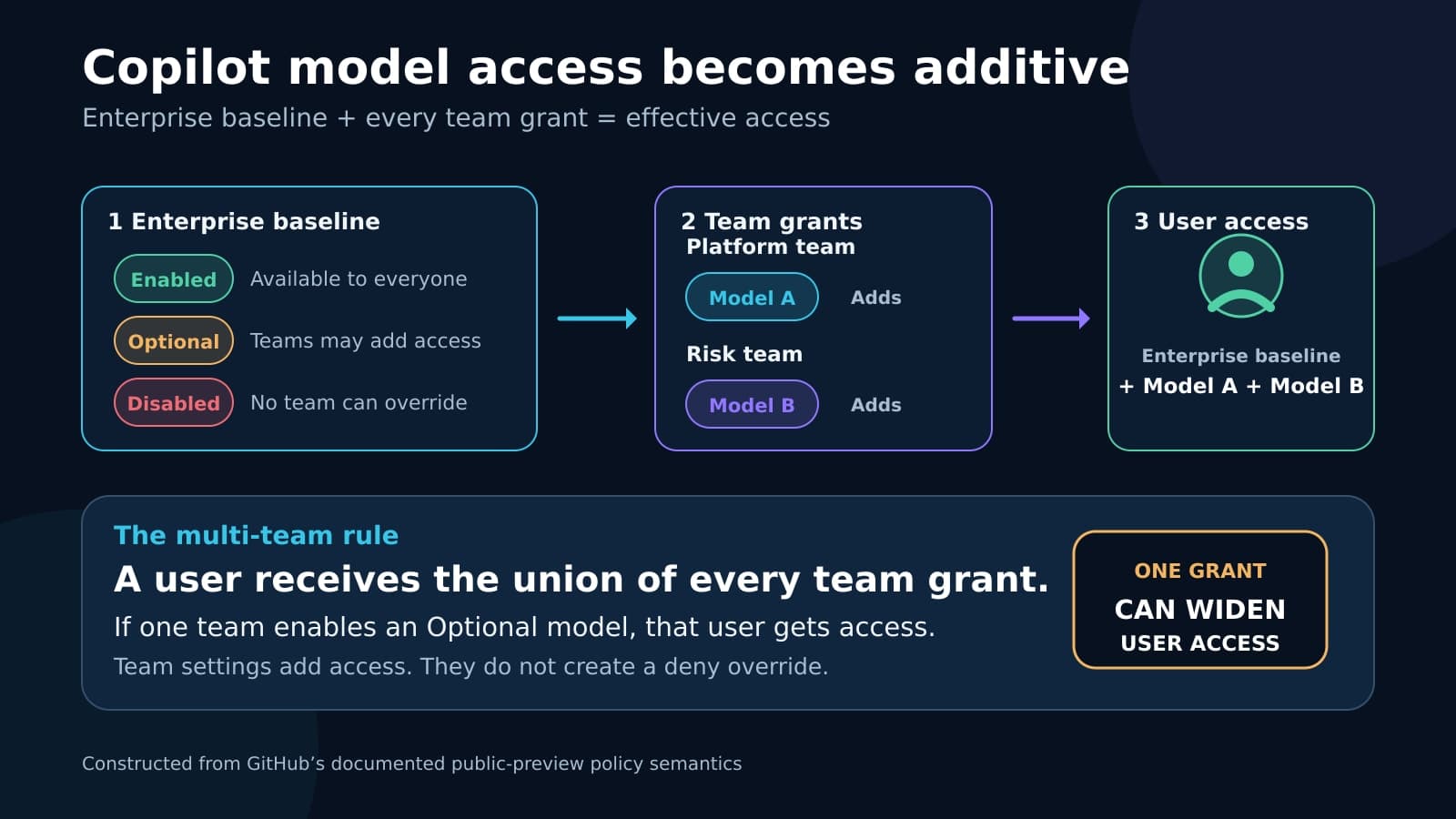
GitHub is adding a public-preview option that moves granular Copilot model access from organizations to enterprise teams. For GitHub Enterprise Cloud administrators using Copilot Business or Copilot Enterprise, the switch changes who controls model policy and how GitHub combines permissions. Organization-level settings stop applying, while one permissive team membership can give a user access to a model.
Opt in only if enterprise teams match the people your policy must govern. Verify effective access before and after the switch. This article explains additive policy, migration access loss, and the rollback boundary.
Opt-in replaces organization targeting with team targeting
GitHub announced enterprise teams model policy targeting on July 31, 2026. The feature is in public preview. GitHub said it will roll out gradually, with most enterprises expected to gain access to the preview opt-in on August 3. On August 2, the toggle is not expected to be universal.
The eligible scope is specific. It covers GitHub Enterprise Cloud customers with Copilot Business or Copilot Enterprise. Enterprise Managed Users are accounts provisioned and controlled through an enterprise identity system, but the preview does not require these accounts or synchronized team membership. Enterprise teams can contain members added manually or through GitHub's REST API. Identity-provider group synchronization is available only to enterprises that use Enterprise Managed Users. GitHub uses the enterprise team to grant model access.
Today, the default mode keeps granular model access at the organization level. Organization owners can manage models that the enterprise marks Optional, and enterprise owners can use targeted organization rules. The organization-targeted controls discussed in our Copilot cohorts analysis belong to this default mode.
When an enterprise owner enables enterprise teams mode, granular access moves exclusively to enterprise teams. Existing organization-level model settings are deactivated, and organization owners can no longer manage model policies. The toggle therefore changes the active policy source. It does not add team targeting beside the existing organization rules.
Model access is additive across enterprise teams
The enterprise model list sets the baseline. Enabled gives the model to everyone in the enterprise. Disabled blocks it for everyone. Optional makes the model eligible for a narrower grant through an organization in the default mode or an enterprise team after opt-in. Optional does not grant access by itself.
GitHub's model availability documentation describes team settings as additive to that baseline. A team cannot enable an enterprise-disabled model. A model enabled for the enterprise stays enabled for every team. A team can add an Optional model for its members.
Scroll sideways to see all 3 columns.
| Enterprise state | Enterprise-team setting | Effective result after opt-in |
|---|---|---|
| Enabled | Any setting | The user has the model through the enterprise baseline. |
| Disabled | Any setting | The model remains unavailable and cannot be enabled for a team. |
| Optional | Enabled for any team the user belongs to | The user has the model. |
| Optional | Optional or unset for all of the user's teams | The user does not have the model. |
| Unconfigured | No applicable team grant | The model is unavailable by default after migration. |
Enterprise-team settings have no explicit Disabled state. Optional in a team's settings means that the model is not enabled for that team. It is not a denial that can cancel access from another team.
This distinction controls the multi-team case. A user's effective access is the union of the enterprise baseline and every model enabled by every enterprise team they belong to. If one team enables an Optional model and another team leaves it Optional, the user gets the model. GitHub calls this least-restrictive evaluation. Administrators should read it as additive permission, with no team-level deny override.
The enterprise that supplies the active Copilot license also sets the policy boundary. In an enterprise that does not use Enterprise Managed Users, a member may receive a Copilot license from more than one enterprise. When that person uses a license assigned by one enterprise, only that enterprise's model policies apply. Restrictions from another enterprise do not apply.
Optional and unconfigured models can disappear at the switch
Administrators can create enterprise teams and configure model access before opting in. Those settings remain inactive until enterprise teams mode is enabled. This preparation period lets the enterprise reproduce intended grants before it turns off the organization policy source.
At the switch, explicit enterprise Enabled and Disabled states persist. Optional and unconfigured models follow a different path. They become unavailable by default unless an enterprise team enables them. A user who received an Optional model through an organization setting or targeted organization rule can lose it if no enterprise team recreates that grant.
This is the central migration risk. The feature does not translate organization membership and organization rules into equivalent team permissions. Enterprise owners must make that translation and account for users who belong to several teams. Model-specific approval remains separate, as described in our Copilot model exception guide.

Rehearse effective access before opting in
Start with the enterprise model list. Record every model as Enabled, Disabled, Optional, or unconfigured. Then capture the organization policy state that is active before the switch, including organization-owner choices and targeted organization rules. This gives the migration owner a clear account of the access that enterprise teams must replace and the state that rollback should restore.
Next, recreate the intended narrower grants on enterprise teams. Do this before opt-in, while the settings are still inactive. For each representative user, calculate the expected model set from the enterprise baseline plus all of that user's team grants. Include people with one team, several teams, and no team that grants an Optional model.
Use the GitHub Copilot enterprise-controls guide to place that migration rehearsal beside the licensed population, product surfaces, setting owner, verification evidence, and next review trigger. This preview-specific article remains the dated implementation detail; the guide is the stable parent inventory.
Use at least one user whose teams disagree about the same Optional model. The expected result is access if any team enables it. If your policy intent expects a restrictive team to cancel a permissive team, enterprise teams mode cannot express that rule through team model settings. Change the team structure or defer the switch.
If an account can consume a Copilot license from more than one enterprise, check one such user as well. Verify which enterprise supplies the active license and confirm the model set against that enterprise alone. Do not combine restrictions from every enterprise where the account exists.
Finally, name the person who will verify access after the toggle. That person must compare actual access for the representative users with the expected sets and record any unexpected gain or loss. An enterprise owner must make the continue-or-rollback decision because organization owners lose model-policy control after the switch.
Rollback restores the old state, not later enterprise edits
During the preview, GitHub says enterprise owners can switch back to the prior organization policy state. That rollback is useful, but its restoration boundary is narrow. Changes made to enterprise-level model policies after entering enterprise teams mode are not preserved after rollback.
Suppose an administrator changes a model from Optional to Enabled while team mode is active, then rolls back. The enterprise returns to the policy state from before opt-in rather than carrying that later enterprise edit into organization mode. The migration owner should therefore retain the pre-switch capture and separately note any enterprise-level changes made during the preview. After rollback, verify the restored organization rules and representative users instead of assuming the toggle reversed every change in place.
Proceed only when team membership matches policy intent
GitHub's announcement and documentation explain the policy semantics, but they do not show whether the design fits a given enterprise's identity and team structure. GitHub has not published a rollout-completion date. A bounded rehearsal and a named rollback decision are especially useful when enterprise teams were created for administration rather than model access.
BaristaLabs can review one Copilot model-policy migration through our process automation and integration service. The review covers effective access, conflicting team membership, verification ownership, and recovery.
Proceed when enterprise teams are the correct source for user-level model grants and additive access matches your policy intent. For each Optional or unconfigured model, record which teams should receive it or that it should remain unavailable. Name the verification owner, and ensure an enterprise owner is ready to decide whether to roll back. Defer if organization owners still need model-policy authority, if a restrictive team must override a permissive team, or if you cannot explain effective access for a representative multi-team user before the switch.
Copilot model-policy migration review
Review one enterprise-teams switch before it changes access
BaristaLabs can trace the current organization policy into enterprise and team settings, calculate access for representative users, and define the post-toggle verification and rollback decision.
Best fit for GitHub Enterprise Cloud teams that use Copilot Business or Copilot Enterprise and have enterprise-team membership that matches the intended model grants.
Turn this idea into a pilot
Which workflow should go first?
Use the readiness check to compare impact, effort, risk, owner, and next step before requesting a review.
- 3-5 minutes
- Deterministic score
- No sensitive data
Practical AI Workflow Notes
Want more practical AI operations ideas?
Get short notes on applying AI inside real small-business workflows — from document handling and customer follow-up to internal reporting, compliance, and automation guardrails.