


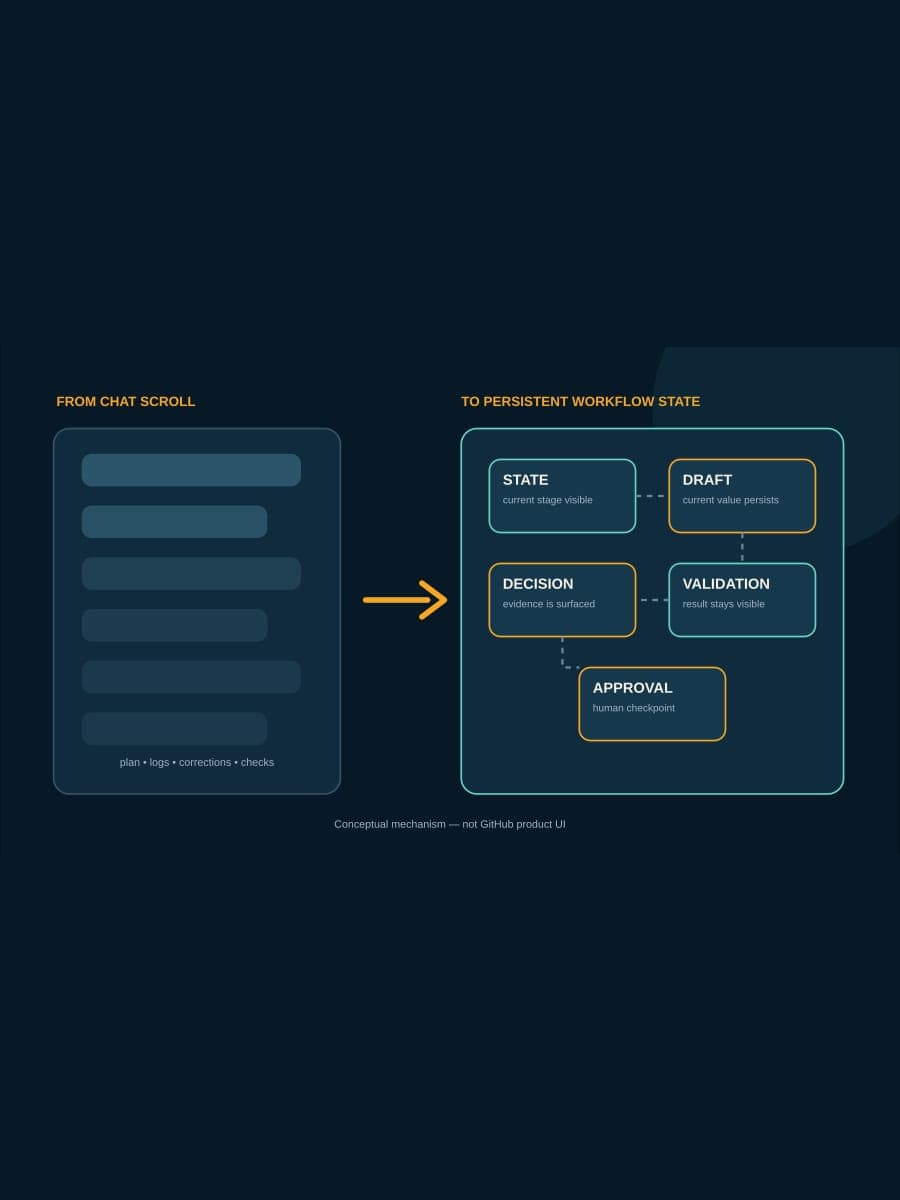
GitHub has published a practical account of building canvases for the GitHub Copilot app: persistent surfaces where a person and an agent can see workflow state, drafts, decisions, validation, and approvals outside a scrolling chat. The useful detail is not only the interface. The author says Site Studio cost about 2,000 AI credits to build, while Java Modernization Studio cost about 3,000.
Those figures are not prices or benchmarks; they are one practitioner’s reported build experience. They still expose the business decision clearly: a custom canvas starts with a real setup cost, so it should be reserved for repeated work where lower context recovery, review effort, or rework can plausibly repay that investment. This article explains what GitHub showed and how to measure that break-even point without assuming a return.
What changed in GitHub Copilot?
In its August 17 article, GitHub describes chat as strong for expressing intent but weak as the only home for long-running agent work. Plans, corrections, logs, decisions, and validation can remain in the conversation while becoming difficult to reconstruct from the scroll.
A canvas gives that work a persistent surface. GitHub’s stated pattern is to define workflow states, surface important decisions, persist progress and drafts immediately, and keep explicit human approval points. The agent can continue between checkpoints while a reviewer sees the current state rather than replaying the whole conversation.
The article offers two examples. Java Modernization Studio exposes assessment, planning, migration tasks, validation gates, and readiness to ship. Site Studio tracks sections, draft values, review points, and status transitions for website content. On August 22, the public Canvas Extensions catalog listed both among 30 extensions, although that count will change as the catalog does.

Why do the credit figures matter?
GitHub’s author reports approximately 2,000 AI credits for Site Studio and 3,000 for Java Modernization Studio. The source does not convert those credits into dollars, labor hours, or a standard expected build cost. It also does not publish before-and-after measurements for review time, quality, throughput, or total cost.
That limits the claim but sharpens the decision. “A canvas feels more organized” is not enough. A team has to compare one-time design and build effort with costs that recur every time the workflow runs.
Those recurring costs may include re-explaining the task, finding the current draft, reconstructing why a choice was made, checking which validation ran, and reviewing duplicate or stale output. GitHub argues that a durable surface can reduce repeated prompting, context loss, back-and-forth, and rework. Whether it does so for your workflow is an implementation result to measure, not a vendor fact to repeat.
Which workflow deserves a canvas?
Start with repetition. A one-off migration investigation may benefit from a clear plan, but it has little opportunity to repay custom interface work. A release process, dependency-upgrade lane, content operation, or recurring modernization program has many runs over which saved effort can accumulate.
Next, look for state that people currently reconstruct by hand. If every run requires someone to ask which stage is current, locate the latest draft, identify the blocker, or discover whether checks passed, the workflow has a persistence problem. A canvas may help when it makes those particular facts visible without another round of prompting.
Finally, identify decisions that are expensive to review in chat. A persistent surface can present a decision and its evidence consistently. It does not automatically enforce authority, preserve an audit record, or prove that an approval control ran. Keep repository rules, change tickets, access controls, and other systems of record in their proper roles.
A workflow is a weak candidate when it runs rarely, changes shape every time, has no stable stages, or already has an effective system of record. In those cases, improving the prompt or linking the agent to the existing issue, pull request, or ticket may be cheaper than building another surface.
How do you measure break-even?
Measure five to ten representative runs in the current process before building anything. For each run, capture human minutes spent on prompting, context recovery, review, and rework. Also record elapsed time, but do not confuse waiting on an agent with labor the team actually paid.
Use the workflow baseline worksheet to record current active work, elapsed time, review, rework, exceptions, quality, and direct per-run cost before adding canvas setup cost.
Then build the smallest canvas that exposes one stable state sequence and one consequential review point. Include the time and AI credits used to design, implement, test, and revise it. That is the setup side of the comparison.
Run the same class of work through the canvas. Use this relationship rather than a promised ROI number:
setup investment
÷
(current human cost per run − canvas human cost per run)
=
measured runs to break even
Do the calculation separately for AI-credit use if your account makes that cost visible. A surface can reduce human review while consuming more agent capacity, or the reverse. Combining both into a single flattering productivity percentage hides the trade-off.
Stop if the denominator is zero or negative. If people spend the same or more time per run, the canvas has not demonstrated operational payback even if the interface looks better. Keep it only if another measured benefit—such as fewer missed validations or fewer stale drafts—justifies the cost.
What should the pilot prove?
The pilot should prove that the surface changes the repeated workflow, not merely that the team can build it. Before the test, choose one state sequence, one review moment, one source of truth, and one outcome that can be compared across runs.
For a dependency-update workflow, the states might be intake, compatibility review, patch, tests, and merge review. The canvas could expose the current stage, package evidence, changed files, test status, and reviewer decision. The pull request remains the durable code-review record; the canvas helps operators reach it with less reconstruction.
Use a stop rule such as: retire the canvas after ten comparable runs if it does not reduce median hands-on review and recovery time, or if operators still have to inspect the full conversation to understand current state. Choose the threshold before seeing the results.
BaristaLabs recommendation: do not begin with the most consequential workflow. Begin with repeated, reviewable work where the existing process already produces evidence and a mistaken run is easy to contain. The goal is to test whether persistence saves effort, not to use a new interface as permission for greater autonomy.
A durable surface has to earn its durability
GitHub’s canvas examples make an important product direction tangible: agent work is moving from transient conversation toward persistent, steerable workflow surfaces. The disclosed 2,000- and 3,000-credit builds are useful precisely because they prevent the surface from sounding free.
Baseline one repeated workflow, build the smallest useful state view, and compare real runs. If prompting, recovery, review, and rework fall enough to repay setup, expand carefully. If not, keep the existing review surface and spend the credits elsewhere. Teams deciding where persistent agent interfaces belong can review one repeated workflow with BaristaLabs.
Use the GitHub Copilot enterprise-controls guide to record the canvas owner, inputs, execution permissions, meters, review points, evidence, and disable or recovery path before widening the pilot.
Sources
- GitHub Blog, “How canvases make agentic workflows visible, steerable, and cost-efficient”, published August 17, 2026.
- Awesome GitHub Copilot, “Canvas Extensions”, accessed August 22, 2026.
Repeated agent workflow review
Measure one workflow before building its custom surface
BaristaLabs can help baseline one repeated agent workflow, separate setup cost from run cost, and define a small pilot with a defensible stop rule.
Best fit when a team repeatedly rebuilds context, reviews agent output, or loses workflow state across chat sessions.
Turn this idea into a pilot
Which workflow should go first?
Use the readiness check to compare impact, effort, risk, owner, and next step before requesting a review.
- 3-5 minutes
- Deterministic score
- No sensitive data
Practical AI Workflow Notes
Want more practical AI operations ideas?
Get short notes on applying AI inside real small-business workflows — from document handling and customer follow-up to internal reporting, compliance, and automation guardrails.