
OpenAI Decisions API: which calls to move off Responses
OpenAI's Decisions API went GA on Oct. 22, 2026. It answers classify, route and score questions faster than Responses, with no output-token charges.

Sean McLellan
Lead Architect & Founder

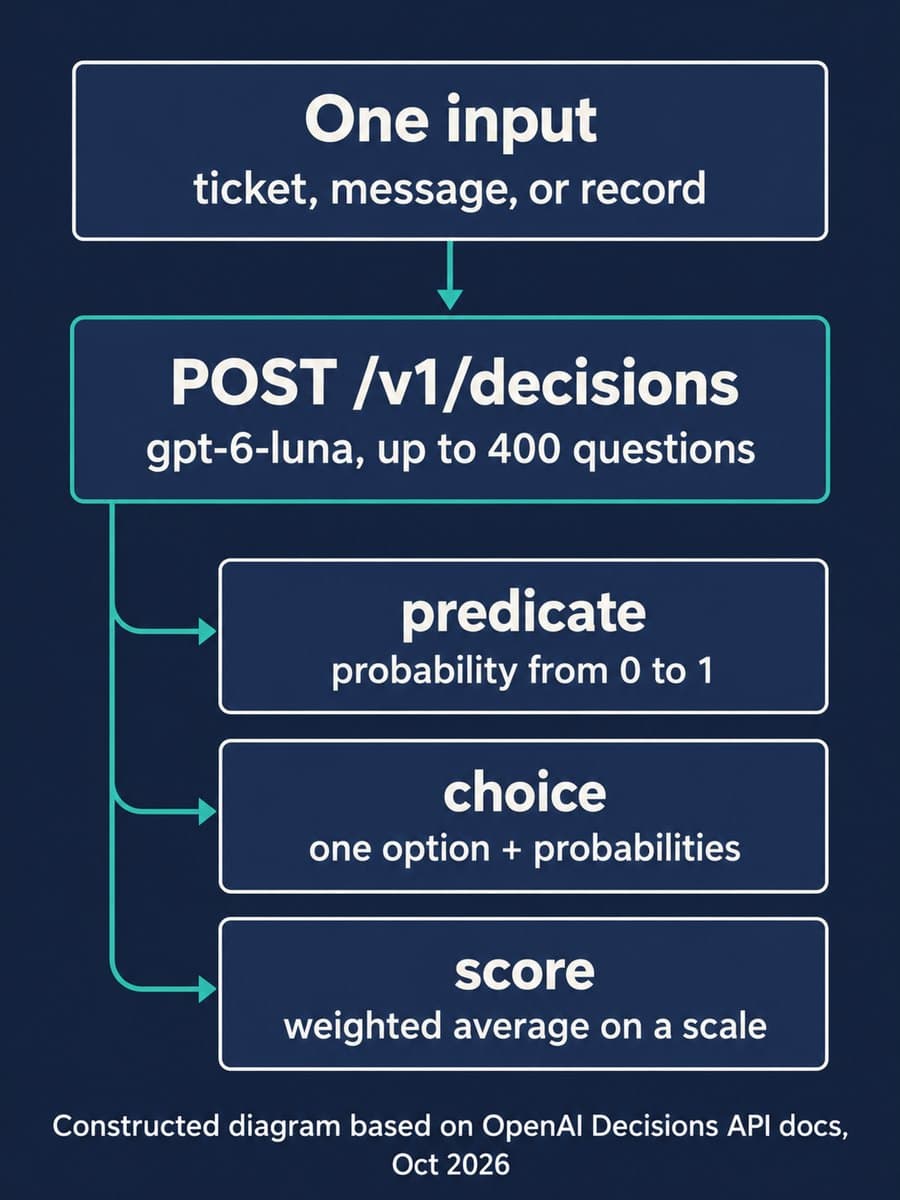
OpenAI made its Decisions API generally available on October 22, 2026. It's a dedicated endpoint, POST /v1/decisions, that runs GPT-6 Luna on questions with bounded answers: is this true, which of these options, how severe is it. OpenAI says it answers "up to 10x faster than GPT‑6 Luna through the Responses API," and you pay only for input tokens. If your app makes the same small classification or routing call thousands of times a day, the decision is whether to move that call off Responses.
For most teams the answer is to move one call, measure it, and keep Responses for everything that writes text or calls tools. Python teams should also upgrade the SDK first. Our local check found that the openai-python release published the night before still describes the beta's 200-question limit.
What is the OpenAI Decisions API?
It's an API for typed answers, not generated text. You send three things: the model (gpt-6-luna is the only one listed), the shared input, and a questions array. Input can be text, images, JSON, or a conversation with tool calls. Each question has a name, instructions, and one of three types:
Scroll sideways to see all 3 columns.
| Question type | What you get back | Example from OpenAI's guide |
|---|---|---|
predicate | A probability from 0 to 1 that a condition is true | Does this product photo show visible damage? |
choice | One of your supplied values, plus probabilities and a confidence field | Which department should handle this complaint? |
score | A probability-weighted average across 2 to 10 ordered levels | How severe is this issue? |
The score type needs care. Levels are indexed from 0, and the result can fall between them. In the guide's example, probabilities of 0.1, 0.7 and 0.2 across three levels give a score of 1.1. Treat it as a number to threshold, not a label.
Since the public beta, OpenAI has added prompt caching, native JSON inputs, images inside question instructions, a GPT-Live voice integration, and inference residency in the US and EU. It also doubled the limit to 400 questions per request.
When should you use Decisions instead of Responses?
Use Decisions when the output is a probability, a pick from a fixed list, or a rubric score. OpenAI's guide is specific about the boundary. Use Structured Outputs with Responses when you need a generated object, such as extracted fields or a written explanation. Use function calling when you need the model to request a tool call. Decisions returns answers; your code runs whatever action they select. That's the same split as moving predictable tool work into code: the model makes the judgment and your application does the work.
Good first candidates are calls your app already makes in a loop: ticket routing, a content-policy check before publishing, "continue, retry or ask the user" in an agent, or flagging which records need a person. Datadog told OpenAI it uses Decisions to score the risk of agent-generated shell commands before running them. Sierra said it picks the next action in live customer conversations at under 280 ms p95. These are vendor-reported numbers from OpenAI's launch post, not independent benchmarks.
A few things don't fit. The guide says files, audio and item references aren't supported, and file_id image inputs aren't either. Pass images as base64 data URLs or public URLs instead. The guide also says decisions that depend on an earlier answer need separate requests.

How much does the Decisions API cost?
Uncached input costs $0.10 per million tokens, and cached input costs $0.01 per million. Output tokens aren't charged. OpenAI's guide says cache writes follow the standard gpt-6-luna caching rates, and regional processing premiums and long-context multipliers still apply.
The comparison that matters is with GPT-6 Luna on Responses. OpenAI's pricing page lists the same $0.10 input rate there, plus $0.50 per million output tokens. So on price alone, the savings come from the output side. Here's an illustration at standard short-context rates:
Scroll sideways to see all 3 columns.
| 1 million calls, 2,000 input tokens each | Decisions | Responses, 50-token answer |
|---|---|---|
| Input | $200 | $200 |
| Output | $0 | $25 |
| Total | $200 | $225 |
That's our arithmetic, not an OpenAI figure, and it leaves out caching and any extra output tokens a Responses call might produce. The lesson is that for a short label, speed is the bigger reason to switch. Ramp told OpenAI its cost-attribution work got 4x faster and 30% cheaper than with GPT-6 Luna, so your savings depend on how much output your current calls generate.
Caching is where input costs drop. Decisions caches the shared input automatically, but only when the reusable prefix is at least 1,024 tokens, and question text doesn't count toward that. If you ask many questions about the same long policy document or reference image, put that material in input and keep it identical across requests. Our post on GPT-6 prompt caching covers how to measure whether reuse is actually happening.
What our local check of the Python SDK showed
BaristaLabs ran a small check on October 22, 2026. We installed openai-python 3.36.1, published the night before, and 3.37.0, which shipped about an hour after the GA announcement, and pointed each client at a local stub server with a fake key. Nothing was sent to OpenAI, so this shows what the SDK sends and how it types requests, not how the API responds.
Scroll sideways to see all 3 columns.
| What we checked | 3.36.1 | 3.37.0 |
|---|---|---|
client.decisions.create() posts to /v1/decisions | Yes | Yes |
| Question limit in the SDK's type docs | "1–200 questions" | "1–400 questions" |
| Typed input beyond a user message | No | Yes: assistant, system and developer messages, tool calls, JSON |
| 401 questions in one call | Sent unchanged | Sent unchanged |
| A misspelled model ID | Sent unchanged | Sent unchanged |
Two results matter. First, if you pin 3.36.1, your editor and type checker describe the beta, not GA. Conversation-history and JSON inputs aren't in its types. OpenAI's release notes call 3.37.0 a breaking change to Decisions types, though existing string instructions and user-message inputs still work. Second, the SDK doesn't check the question count or the model name. Your own code should enforce the 400 limit and split dependent questions before they reach the API.
How should you set thresholds for Decisions answers?
Use your own labeled examples. OpenAI's guide says to choose thresholds "based on the cost of false positives and false negatives," and that matches what we've seen in approval workflows. A 0.8 probability doesn't mean the same thing for every question. Before you route real traffic, collect a few hundred cases your team has already decided, run them through the question, and pick the cutoff that sends the right share to people.
Two more details from the guide belong in the first version of your code:
- Add a fallback choice. Include an option such as
"other"when your categories don't cover every input, and send it to a general review queue. - Handle refusals. An answer can come back with type
refusalinstead of a result. Treat it as "needs a person," not as an error to retry.
For monitoring, GET /v1/organization/usage/decisions reports token usage and request counts. It needs an admin key with the api.usage.read permission, and num_model_requests counts requests, not questions. A call with 40 questions counts once.
Start with one high-volume decision
OpenAI's own advice is to "start with one recurring decision your application makes often." BaristaLabs recommends this order:
- Pick the call. Choose a classify, route or score call that runs often and already has a fixed answer set.
- Upgrade the SDK. On Python, move to 3.37.0 or later before you write new Decisions code.
- Build the test set. Pull labeled examples from production and compare Decisions with your current call on accuracy and p95 latency.
- Set the cutoff. Choose thresholds from those examples and send low-confidence,
"other"and refusal answers to review. - Move shared context into
input. If it's 1,024 tokens or more, check cache hits in your usage data.
For help choosing that first decision and building the test set, see our AI consulting services.
Sources and scope
- Build more responsive apps with the Decisions API, OpenAI, October 22, 2026: general availability, new features since beta, pricing, and customer quotes.
- Decisions API developer guide, OpenAI: question types, limits, unsupported inputs, thresholds, caching, usage reporting, and data controls.
- API pricing, OpenAI: standard GPT-6 Luna rates used in our cost illustration.
- openai-python v3.37.0 release, GitHub, October 22, 2026: the Decisions type changes.
Our local check covered the Python SDK only and didn't call the OpenAI API. The latency and cost figures from Box, Datadog, Ramp, Sierra and Speak are customer statements in OpenAI's announcement, and these sources don't publish an accuracy comparison against Responses that you can reproduce.
OpenAI Decisions API
Pick the first decision to move
Bring one workflow where a model labels, routes or scores something many times a day. BaristaLabs can help you choose the question, build a labeled test set, and set thresholds you can defend.
Start with the decision your app makes most often.
Turn this idea into a pilot
Which workflow should go first?
Use the readiness check to compare impact, effort, risk, owner, and next step before requesting a review.
- 3-5 minutes
- Deterministic score
- No sensitive data
Practical AI Workflow Notes
Want more practical AI operations ideas?
Get short notes on applying AI inside real small-business workflows — from document handling and customer follow-up to internal reporting, compliance, and automation guardrails.