
Claude API user profiles can confine a ban to one customer
Anthropic's new user profiles let platforms tag each Claude API request with an end customer, so a restriction or ban can hit that customer, not your whole org.

Sean McLellan
Lead Architect & Founder

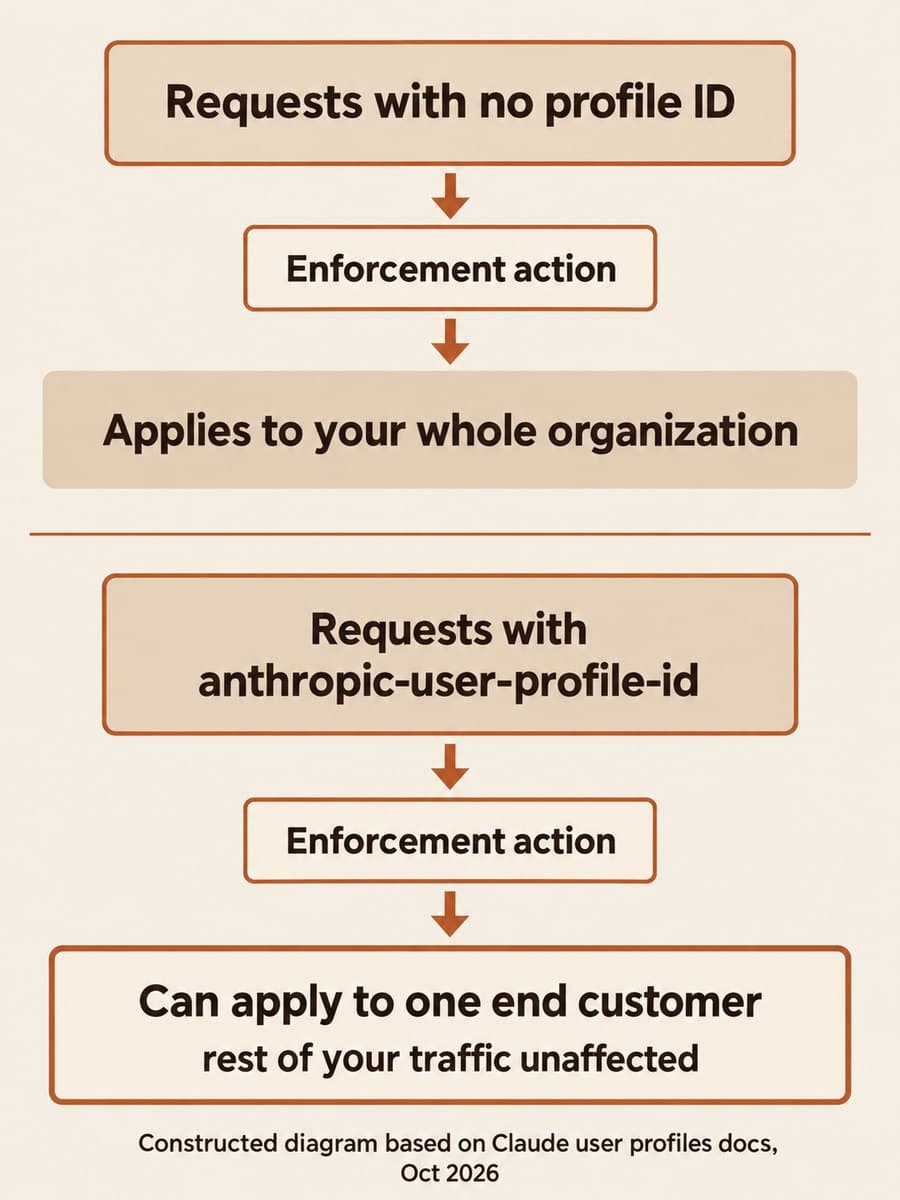
Anthropic launched user profiles for the Claude API on October 20, 2026. A profile tells Anthropic which of your end customers a request is for, so a safety restriction or ban can apply to that one customer instead of your whole organization. If you run a product, gateway, or reseller service on Claude, the decision is whether to register your customers and tag their traffic before one of them trips Anthropic's classifiers.
The catch is the default. Anthropic's guide says that without a profile on the request, "one end customer can trigger an enforcement action that applies to your whole organization." Profiles cost nothing: Anthropic says they aren't billable and don't affect pricing. On October 21, Anthropic also added enforcement_status and enforcement_actions fields, so you can see when it has restricted or banned one of your customers.
What are Claude API user profiles?
A user profile is a record of one end customer that you create with POST /v1/user_profiles. The API returns an ID that starts with uprof_. You then send that ID in the anthropic-user-profile-id header on every request you make for that customer. According to Anthropic, the header works the same way on Messages, token counting, Message Batches, and OpenAI SDK compatibility requests.
A profile holds only what you send about the customer, such as a name, country, and your own reference ID, plus any status Anthropic sets. It doesn't contain conversation content, and Anthropic says it doesn't verify the details. Every field is optional. If you can't share a name or email address, the guide says to send hashes you compute yourself.
Who needs a user profile for each customer?
Any organization that sends Claude traffic on behalf of other people or companies. The profile's access_type field covers the two common cases:
Scroll sideways to see all 3 columns.
| Who the traffic is for | access_type | How many profiles |
|---|---|---|
| A signed-up user of your product | application (the default) | One per user, created at sign-up |
| A company you resell API access to, for example through a gateway | passthrough (must be sent) | One per company, not per person |
| Your own organization | No profile | Anthropic counts it as your own usage |
Anthropic recommends keeping end-customer traffic in one organization and your own internal usage in another. Profiles belong to an organization, not a workspace, so separate workspaces in one organization aren't enough. For a passthrough profile, the guide also suggests sending an identifier for the individual person in the request's metadata.user_id field when you know who made the request.

Three details that change how you build it
Most of the work is plumbing, but three documented behaviors shape the design.
- Creation isn't idempotent. Each
POST /v1/user_profilescall creates a new profile, even when thereference_idmatches an existing one. Create the profile once in your onboarding flow, store the ID on the customer record, and have services read it from there. - A wrong ID fails the request. On the Claude API, a malformed ID or one from another organization returns a 400
invalid_request_error. In a Message Batch, the batch is still created, but each request in it fails. - Bulk backfill is rate limited. There is no cap on the number of profiles, but creation is rate limited. Anthropic asks you to contact your account team before registering an existing customer base in bulk.
Deleting a profile has a delay too. Anthropic says requests that carry a deleted ID can still succeed for about 10 minutes before the API starts rejecting them.
What our local check of the Python SDK showed
BaristaLabs ran a small check on October 22, 2026. We installed the anthropic Python SDK at 1.17.0 (the last 1.x release) and 2.1.0 (the current release) and pointed each client at a local stub server with a fake key and a made-up profile ID. Nothing was sent to Anthropic, so this shows what the SDK sends, not how the API responds.
Scroll sideways to see all 3 columns.
| What we checked | 1.17.0 | 2.1.0 |
|---|---|---|
client.user_profiles available | Yes | Yes |
user_profile_id on messages.create() | Sent as anthropic-user-profile-id | Sent as anthropic-user-profile-id |
user_profile_id on messages.count_tokens() | Sent | Sent |
Malformed ID such as not-a-profile | Sent unchanged | Sent unchanged |
enforcement_status filter on user_profiles.list() | TypeError | Sends enforcement_status[] |
Two results matter. First, you don't need the 2.x SDK major to start attributing traffic. That's useful because 2.x also moves requests to API version 2026-10-21, which rejects temperature, top_p and top_k. A team can add profiles now and schedule that upgrade separately. On 1.17.0, passing extra_query={"enforcement_status": ["restricted", "banned"]} to list() produced the same query string in our check.
Second, the SDK doesn't validate the ID's format. A typo or a stale ID reaches the API, so test the lookup path with real IDs before you rely on it.
How do you know if Anthropic restricted a customer?
Read the profile. Since October 21, every response that returns a profile includes enforcement_status, which is unrestricted, restricted, or banned, and an enforcement_actions list with a reason, an opening time, and an expiry time if there is one. While an action is open, Anthropic says it refuses some or all inference requests that carry that profile's ID.
To find affected customers, list profiles with enforcement_status[]=restricted and enforcement_status[]=banned. Two caveats come from the docs. Requests that still send the user-profiles-2026-09-04 beta header, or an earlier one, don't get these fields, so remove that header. And a change doesn't reliably move updated_at, so compare the enforcement fields themselves with the values you last saw.
Anthropic also added organization webhooks for these events, in beta and by request through your account team. The webhooks page currently says event delivery isn't live, so an endpoint you register receives nothing yet. Plan on polling for now.
Bedrock, Google Cloud, and Claude Platform on AWS have gaps
Where your inference runs changes what a profile does.
- Google Cloud and Claude in Amazon Bedrock accept the profile ID, in the header on Google Cloud and in a
user_profile_idbody field on Bedrock. Neither has the/v1/user_profilesendpoints, so you create profiles in an organization on the Claude API or Claude Platform on AWS and link each AWS account or Google Cloud project to it. These platforms check only the ID's format, so a successful response doesn't confirm the profile exists. - The earlier Bedrock integration that uses
InvokeModelorConversedoesn't support profile IDs. - Claude Platform on AWS always reports
unrestrictedwith no actions, and Anthropic says it doesn't refuse requests there because of an open action.
Why it matters for teams building on Claude
BaristaLabs interpretation: for a SaaS product or internal platform that serves many customers from one Anthropic organization, a single abusive account is a shared risk. Without profiles, an action against your organization reaches every customer at once. Profiles make it possible for that to become a per-customer event you can detect and handle in your own product, for example by pausing one account and telling that customer why. The work is a few API calls and one stored ID per customer, and it sits naturally next to per-customer cost tracking. Our article on OpenAI API-key cost reporting covers the same ownership problem on the billing side.
If you are also weighing Anthropic's Enterprise Frontier Safeguards, which put misuse review in the customer's queue, note that profiles carry a read-only programs field showing a customer's status in that program and the Cyber Verification Program.
Start with the organization split and new sign-ups
BaristaLabs recommends this order:
- Separate your own usage. Move internal and staff traffic to its own Anthropic organization so end-customer traffic is the only thing in the profiled one.
- Create profiles at sign-up. Add one
POST /v1/user_profilescall to onboarding, store theuprof_ID, and passuser_profile_idon every request for that customer. - Backfill carefully. Talk to your Anthropic account team before registering existing customers in bulk.
- Poll enforcement status on a schedule with the
enforcement_status[]filter, and decide in advance what your product does when a customer is restricted or banned.
For help planning this inside a larger Claude rollout, see our AI consulting services.
Sources and scope
- Claude Platform release notes, Anthropic, entries dated October 20 and October 21, 2026: user profiles, organization webhooks, and the enforcement fields.
- User profiles for end-customer attribution, Anthropic: access types, request attribution, platform support, and enforcement status.
- Organization webhooks, Anthropic: event types and the note that event delivery isn't live.
- User profiles API reference, Anthropic: endpoints and object fields.
Our local check covered the Python SDK only and did not call the Claude API. These sources do not say how often Anthropic's classifiers act on a single end customer, or how quickly a restriction is reviewed or lifted.
Claude user profiles
Plan per-customer attribution for Claude
Bring one product or gateway that sends Claude requests for your customers. BaristaLabs can help map where a profile ID should be created and sent, and what your product should do when a customer is restricted.
Start with the service that handles the most customer traffic.
Turn this idea into a pilot
Which workflow should go first?
Use the readiness check to compare impact, effort, risk, owner, and next step before requesting a review.
- 3-5 minutes
- Deterministic score
- No sensitive data
Practical AI Workflow Notes
Want more practical AI operations ideas?
Get short notes on applying AI inside real small-business workflows — from document handling and customer follow-up to internal reporting, compliance, and automation guardrails.