
Ollama d3 decision models: route and score tickets locally
Ollama now runs d3, a model family that answers choice, yes/no and score questions with probabilities instead of chat. Here's when local routing beats a hosted API.

Sean McLellan
Lead Architect & Founder

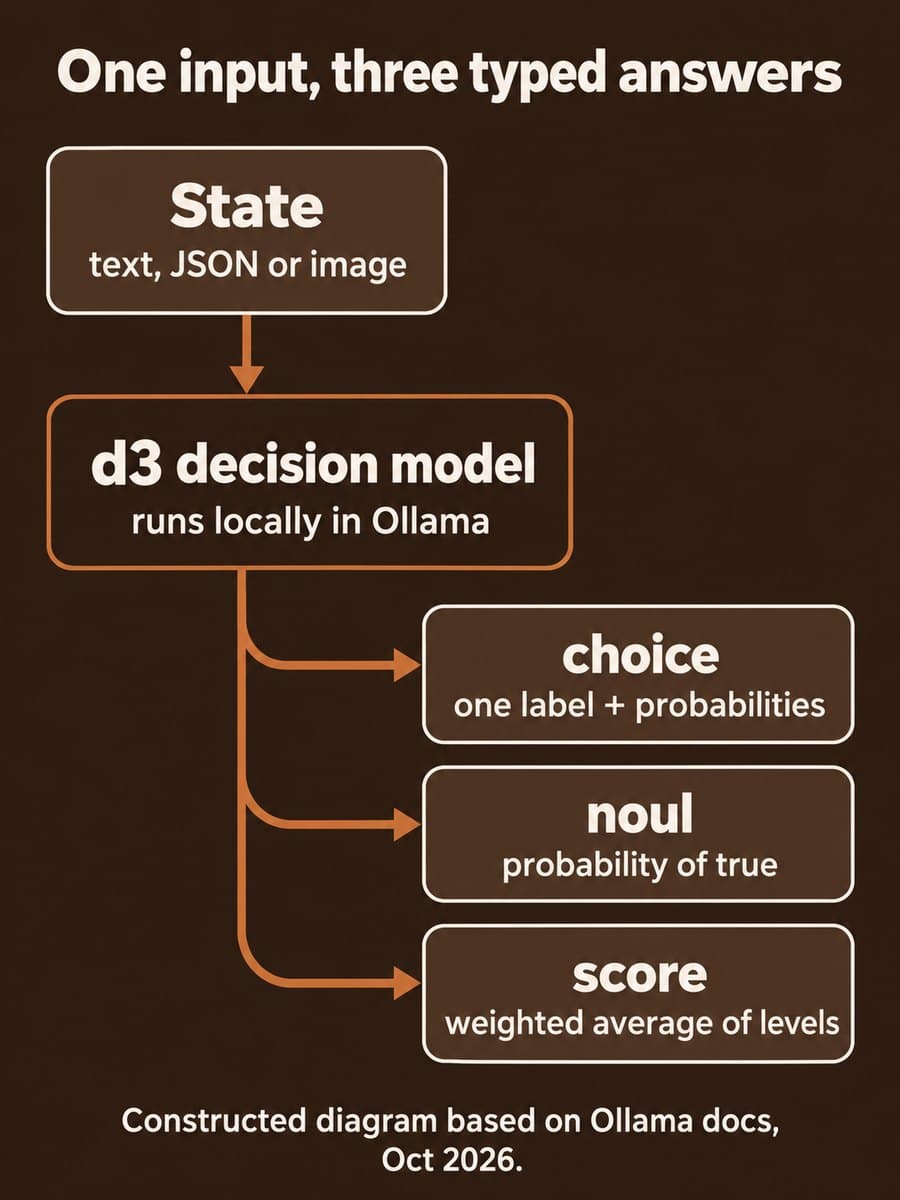
Ollama's v0.40.11 release, published October 24, 2026 (UTC), added d3, a family of decision models from vLLM Semantic Router. You give d3 a support ticket, a JSON record or a still image, ask a typed question, and get back probabilities instead of a written reply. Teams that route, triage or score work with a chat model can now test that step on their own hardware, with no API key for local requests.
What changed in Ollama v0.40.11?
The release notes say d3 lets you "classify, answer yes or no, or score options with probabilities," in 2B, 4B, 9B and 27B sizes. The d3 model page is blunt about the trade-off: the model "returns scores and probabilities for the options you provide. It does not write a conversational answer." It needs Ollama 0.40.9 or later.
You call it through Ollama's System One endpoint, POST /v1/systemone, or from the command line. Ollama's own example routes a ticket:
ollama run d3 "A customer says their card was charged twice." \
  --ask "Which team should handle this?" \
  --choice 'billing=Invoices and charges' \
  --choice 'returns=Refunds and replacements' \
  --choice 'technical=App errors'
The decision guide defines three question types:
- choice picks one of the labels you supply and returns a probability for each.
- noul is the yes/no type. It returns the probability that your "true" description fits.
- score rates the input on ordered levels and returns "the probability-weighted average of the zero-based levels."
You can ask several questions about the same input in one request. The endpoint returns one JSON response and doesn't support streaming, tools or generation controls. Local requests cap text and schema at 64 KiB, and Ollama says input "is never truncated," so an oversized ticket fails instead of being silently cut.
How does d3 compare with a hosted decisions API or a chat model?
On October 22, OpenAI made its Decisions API generally available for the same kind of job. Here's how the options line up, based on each vendor's docs:
Scroll sideways to see all 4 columns.
| Comparison dimension | Ollama d3 (local) | OpenAI Decisions API | Chat model with a prompt |
|---|---|---|---|
| Where it runs | Your machine | OpenAI's servers | Either |
| Output | Probabilities for your labels, yes/no or levels | Probabilities for predicate, choice or score questions | Free text you have to parse |
| Cost per call | Your hardware and power | $0.10 per 1M uncached input tokens; output not charged | Input and output tokens, or your hardware |
| Input limits | Text, JSON or still images; 4,096-token package context | Up to 400 questions per request | Model context window |
| License | Apache 2.0 | Hosted service | Varies |
| Best fit | Private data, high volume, offline or edge | No hardware to run, many questions per item | Cases that need a written answer |
The local option matters most when tickets carry customer data you'd rather not send out, or when volume makes per-token pricing add up. The hosted API makes more sense when you don't want to run machines or need hundreds of questions per item.
Which d3 size should you run?
Ollama publishes measured memory for each size on Apple Silicon:

Those figures are peak loaded memory for the default MXFP8 packages at a 4,096-token context. On other systems the same names pull Q8_0 packages, and memory use will differ. The default d3 tag is the 4B model, which Ollama calls "a good starting point on a 16 GB machine."
The publisher's Jev Decision Index 0.3.2 text scores rise from 38.9 for 2B to 52.6 for 4B, 55.8 for 9B and 66.3 for 27B. Ollama notes these are scores "for the original checkpoints," not for its quantized packages, so treat them as a rough ranking, not a forecast for your workload.
Who does this affect?
- Support and operations teams that send every ticket through a chat model just to pick a queue.
- Teams with private data in tickets, claims or case notes, where a hosted call needs a data review first.
- Builders on Ollama already, such as teams running small Qwen models on-prem. d3 fits the same server.
It doesn't help with video, which Ollama says is unavailable for d3, or with steps that need a written answer.
Why it matters for teams routing work with AI
BaristaLabs' interpretation: the useful change isn't that a small model can classify text. It's that the output is a number you can set a policy on. A chat model that writes "probably billing" gives you nothing to threshold. A probability such as 0.93 lets you auto-route above one line and send everything else to a person.
That number still needs checking. Ollama's own limits section says the scores "are model outputs, not guaranteed real-world frequencies," and tells you to "check performance on examples from your own workflow before setting thresholds." A model that says 0.9 might be right far less than 90% of the time on your tickets. We covered how to calibrate scores before setting an approval threshold in more detail.
Recommended first step for d3
Pick one routing decision you already make by hand or with a chat model, such as which queue a ticket goes to.
- Pull 200 to 500 past items with the label a person gave them.
- Run them through
d3(4B) with the same labels, written as short, distinct criteria. - For each probability band, check how often d3 matched the human label.
- Set the auto-route line where errors cost less than the manual work they save, and send the rest to review.
- Rerun the same set before moving to
d3:9bord3:27b, so you know a bigger model actually helps.
If d3 can't beat your current method on that set, you've lost an afternoon, not a migration.
Sources and scope
This post is based on Ollama's v0.40.11 release notes, the d3 model page, the System One API reference and decision guide, and OpenAI's Decisions API guide, all accessed October 25, 2026. BaristaLabs did not benchmark d3 for this post. Memory figures and quality scores are as published by Ollama and the model's publisher.
AI routing and triage
Find out if local routing beats your current setup
Bring one routing decision and a few hundred past examples. BaristaLabs can help you run them through d3 or a hosted option, compare the results with your current method, and set the line between auto-route and human review.
Start with the queue that gets the most tickets.
Turn this idea into a pilot
Which workflow should go first?
Use the readiness check to compare impact, effort, risk, owner, and next step before requesting a review.
- 3-5 minutes
- Deterministic score
- No sensitive data
Practical AI Workflow Notes
Want more practical AI operations ideas?
Get short notes on applying AI inside real small-business workflows — from document handling and customer follow-up to internal reporting, compliance, and automation guardrails.