
Claude Code custom roles now split cloud and Remote Control
Enterprise Owners can now grant Claude Code without cloud sessions or Remote Control. Existing roles keep both on, so restricting them takes a deliberate edit.

Sean McLellan
Lead Architect & Founder

Anthropic's Claude Code v2.1.310 release, published October 23, 2026, added cloud sessions and Remote Control as separate permissions in Claude Enterprise custom roles. Owners can now give a group Claude Code without letting it start cloud sessions or drive a local session from a phone or browser. Any Enterprise organization that uses custom roles now has to decide which groups keep each one.
The catch is the default. Anthropic's custom roles article says roles that already granted Claude Code have both new permissions turned on, so nobody's access changes on its own. If you want to restrict either one, you have to edit each role.
What changed in Claude Code custom roles?
Claude Code used to be one switch in a custom role. It is now three related switches, and the third depends on the second.
The help center lists them on a role's Capabilities tab:
- Claude Code: access to Claude Code.
- Cloud sessions: the ability to run Claude Code sessions in the cloud. Anthropic says that when this is off, users also can't use Remote Control or start fixes in Claude Security.
- Claude Code remote control: the ability to control Claude Code sessions running on the user's own computer from claude.ai/code or Claude Mobile. It requires Cloud sessions.
The same release changed the admin settings flow. Turning on Cloud sessions or Remote Control for the organization now asks for confirmation and lists the custom roles that already have that permission. That list shows you who gains access the moment you flip the organization switch.
How Claude feature access is decided

Access runs through four levels, and the most restrictive one wins. Anthropic lists them as platform overrides set by contract, the organization-level setting, custom role permissions, and the member's own setting.
Two details from the same article decide how a rollout behaves:
- Roles add up. A member in several groups gets the union of every role's permissions. Turning off Remote Control in one role does nothing if another role the person holds still grants it.
- Custom roles only govern members set to "Custom." Members with the built-in User, Admin or Owner roles get their permissions from those roles directly.
Anthropic adds one more warning for SCIM users. With directory sync and group mappings on, a member set to "Custom" before mappings were enabled reverts to their mapped role on the next full sync, unless an identity provider group maps them to "Custom." Check this before you rely on a role edit.
Cloud sessions vs Remote Control: what is the difference?
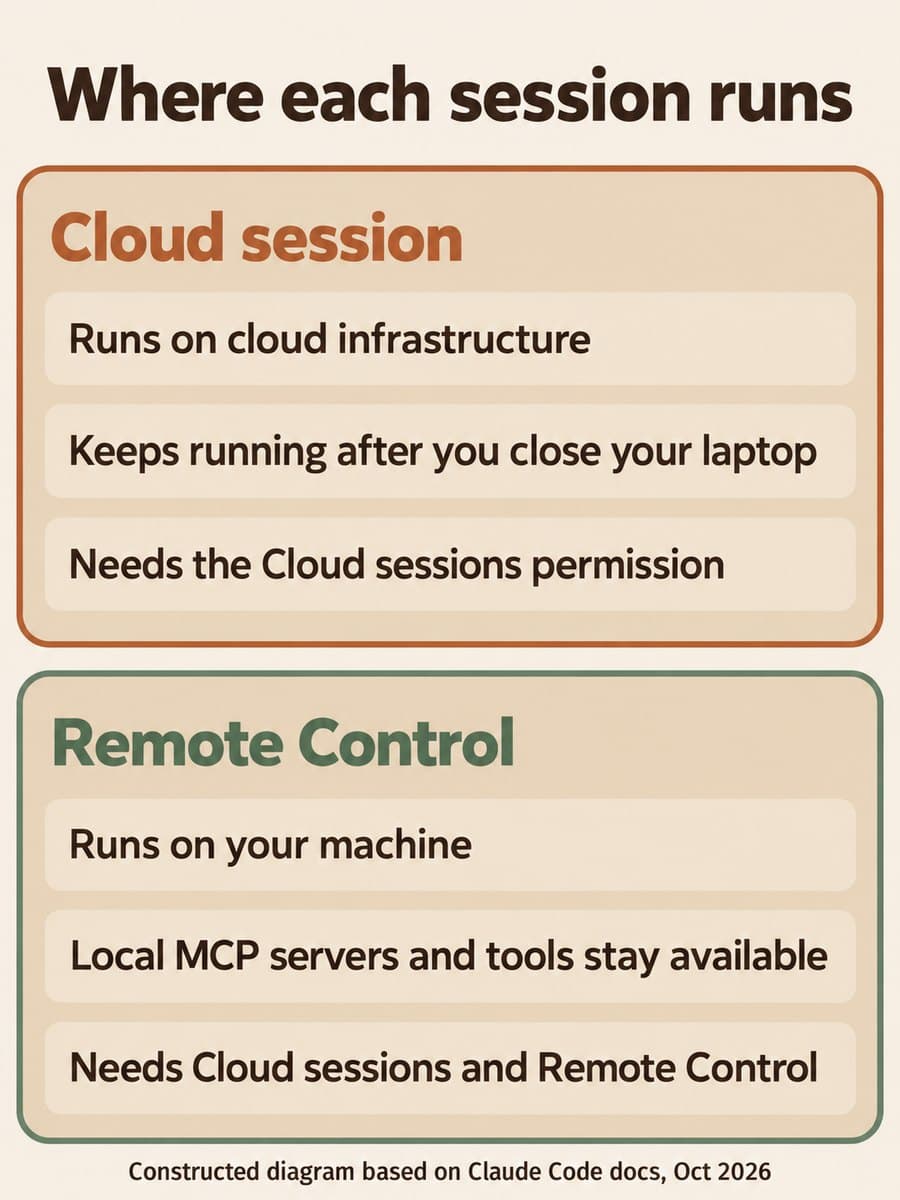
The difference is where the code runs. The Remote Control docs say a cloud session runs on cloud infrastructure, Anthropic-managed by default, while Remote Control runs on the developer's own machine, so local MCP servers, tools and project configuration stay available.
Scroll sideways to see all 3 columns.
| Comparison dimension | Cloud session | Remote Control |
|---|---|---|
| Where it runs | Cloud infrastructure, Anthropic-managed by default | The developer's own computer |
| Permissions needed under custom roles | Cloud sessions | Cloud sessions and Claude Code remote control |
| What it works on | Repositories it clones, for example from GitHub | Local MCP servers, tools and project configuration |
| Organization switch | Cloud sessions toggle in admin settings | Remote Control toggle, off by default on Team and Enterprise |
The cloud sessions docs add that a cloud session keeps running after you close your laptop. Usage counts toward the plan's limits, and Anthropic says there's no separate charge for the cloud VM. On Enterprise, cloud sessions need premium seats or Chat + Claude Code seats.
If a member lacks either permission, Remote Control fails with "Remote Control is disabled by your organization's policy." That's the message your help desk will see.
Who does this affect?
It affects Claude Enterprise organizations that manage access with custom roles. Custom roles are Enterprise-only, so Team plans still turn Remote Control on or off with the organization toggle.
There's a second group to check: roles set to "All capabilities" or "All generally available." Anthropic says those roles pick up new capabilities automatically as they launch. Only roles set to "Only selected" leave a new permission off until someone adds it.
Why it matters for teams with mixed Claude Code users
BaristaLabs' interpretation: with this change, an Enterprise admin can let a contractor or a regulated team use Claude Code on their own machines while keeping their sessions from running on cloud infrastructure, without removing Claude Code entirely. It also gives Remote Control its own approval step. That matters because Remote Control lets a phone or browser drive a session that can reach local MCP servers and tools.
The cost is a dependency you need to know about. Turning off Cloud sessions also blocks Remote Control and starting fixes in Claude Security. Teams that budgeted Claude Security launch credits for a first project should keep Cloud sessions on for the people who will run those fixes. If you run Claude Code through a cloud provider, as in our Claude Code gateway control sheet, the admin setup docs note that cloud sessions and Remote Control need a claude.ai account and aren't available through cloud-provider credentials alone.
The pattern resembles GitHub's split for which devices may host a remotely controlled Copilot session: remote steering is becoming its own policy line, separate from access to the coding agent.
Recommended first step: audit roles that grant Claude Code
BaristaLabs recommends one bounded pass before you change anything:
- In Organization settings > Roles, list every role that grants Claude Code. Note whether each one is set to "Only selected" or to one of the automatic options.
- For each role, write down whether its members need cloud sessions, Remote Control, both or neither. Use the table above as the test.
- Because roles add up, check members who hold several roles. One permissive role keeps the permission on.
- If you use SCIM group mappings, confirm the members you plan to restrict are mapped to "Custom."
- Change one role first and have one member confirm the expected result before you edit the rest.
For a device-level block that doesn't depend on roles, the Remote Control docs describe a disableRemoteControl managed setting. Your IT team can apply it independently of the organization toggle.
Sources and scope
- Anthropic, Claude Code v2.1.310 release notes, October 23, 2026.
- Claude Help Center, Manage custom roles on Enterprise plans, accessed October 24, 2026.
- Claude Code Docs, Continue local sessions from any device with Remote Control, accessed October 24, 2026.
- Claude Code Docs, Use Claude Code in the cloud, accessed October 24, 2026.
- Claude Code Docs, Set up Claude Code for your organization, accessed October 24, 2026.
These sources describe the permissions and how they combine. They don't say how many organizations use custom roles, and BaristaLabs hasn't tested the role editor directly.
Claude Code governance
Decide who gets Claude Code cloud sessions
Bring your current list of Claude custom roles. BaristaLabs can help you decide which groups need cloud sessions or Remote Control, write the change, and plan how to test it with one group first.
Start with the role that covers the most Claude Code users.
Turn this idea into a pilot
Which workflow should go first?
Use the readiness check to compare impact, effort, risk, owner, and next step before requesting a review.
- 3-5 minutes
- Deterministic score
- No sensitive data
Practical AI Workflow Notes
Want more practical AI operations ideas?
Get short notes on applying AI inside real small-business workflows — from document handling and customer follow-up to internal reporting, compliance, and automation guardrails.