
Copilot usage metrics now count Claude Code and OpenCode
Copilot reports now break out model requests by tool, including OpenCode, Claude Code and Codex. Use them for tool decisions, not as prompt counts.

Sean McLellan
Lead Architect & Founder

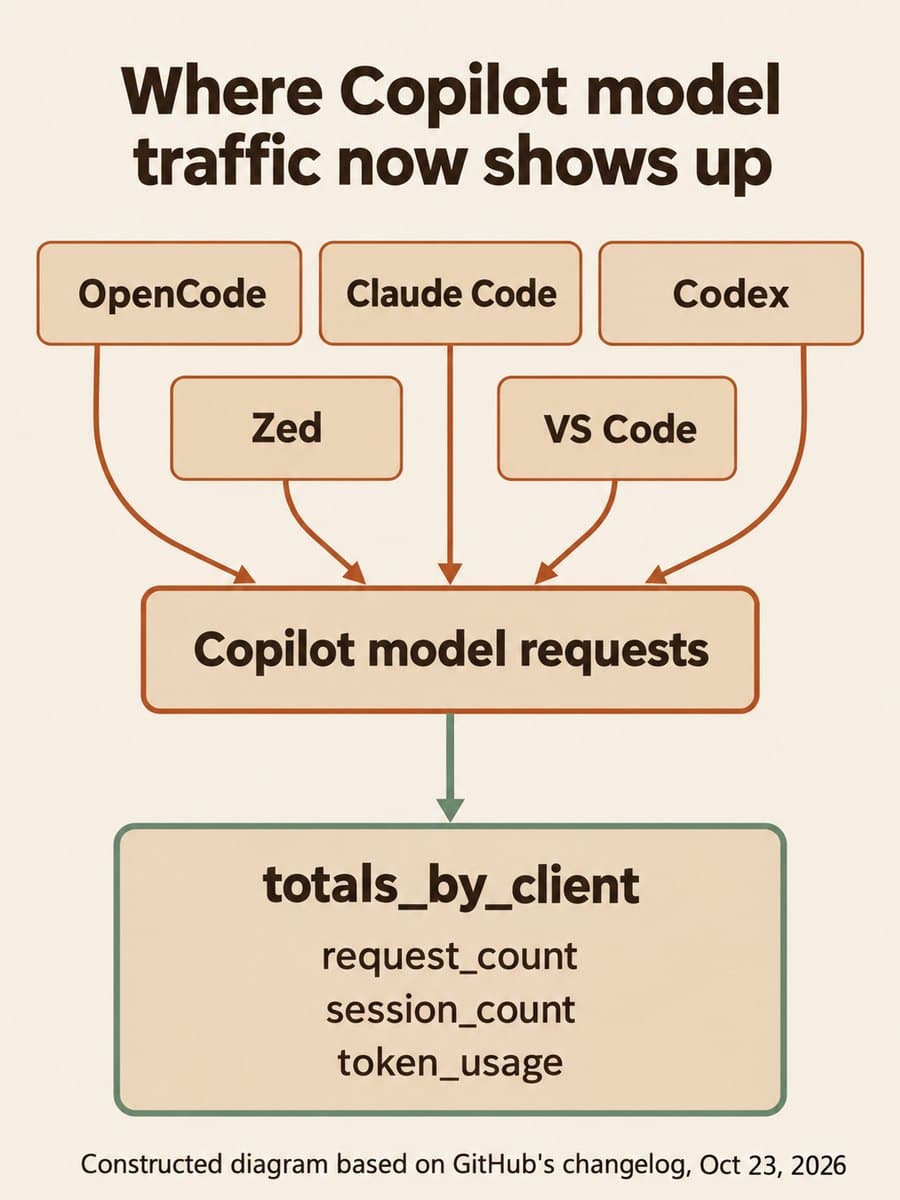
GitHub added a totals_by_client array to the Copilot usage metrics API on October 23, 2026. It reports Copilot model requests, sessions and tokens for each tool that sent them, including OpenCode, Claude Code, Codex and Zed. Teams that use Copilot as the model provider behind tools outside the IDE can now see which of those tools carry the traffic before deciding which ones to support.
The catch is in what the numbers count. request_count counts model calls, not prompts, and GitHub says the client label is a best-effort grouping, not a verified identity. Treat the new data as evidence for tool and governance decisions, not as a productivity score or a per-person audit trail.
What changed in the Copilot usage metrics API?
The API now reports usage from tools it previously missed. GitHub says many of these tools don't send editor telemetry, so their usage never showed up in totals_by_ide. The new breakdown counts requests on the server instead.
totals_by_client appears in the enterprise, organization, enterprise-user and organization-user reports, in both the 1-day and 28-day versions. In the aggregated 28-day reports it sits inside each day_totals entry. GitHub calls the change additive: existing fields are unchanged, and the array is empty when there's nothing to report. Dashboards that read totals_by_ide keep working.
Each entry carries four things:
client: the tool that sent the requests. GitHub listsopencode,claude_code,codex,zed,copilot_cli,github_app,cloud_agent,code_review,vscodeandjetbrainsas examples. Unrecognized clients are grouped underother.request_count: successful model requests from that client.session_count: distinct sessions from that client.token_usage: prompt tokens, output tokens and average tokens per request.
A nested totals_by_model repeats those metrics per model and adds model_selection_mode. That field says whether the person picked the model (user_selected), Copilot Auto picked it (auto), or the product picked it (product_selected).
How totals_by_client differs from the metrics you already have

Copilot reports now have three views of "which tool", and they answer different questions.
Scroll sideways to see all 3 columns.
| Field | What it counts | Good for |
|---|---|---|
totals_by_ide | Editor-reported activity | IDE adoption trends you already track |
totals_by_client | Model requests and tokens, counted on the server, per tool | Which tools use Copilot as a model provider, and how heavily |
totals_by_3rd_party_agent | Job starts and sessions for agent apps on GitHub | Adoption of agent apps such as Claude and Codex running in GitHub workflows |
GitHub draws the last line itself. The agent app activity breakdown, added in August, counts jobs started by agent apps on GitHub. totals_by_client measures model traffic from any tool that uses Copilot. A developer running Claude Code in a terminal against Copilot shows up in the new field. A Claude agent app job started from GitHub shows up in the agent app array.
If you already adjusted your trend lines when Copilot app activity joined the existing totals, this change is gentler. It adds a field rather than changing what an old one means.
What the numbers can't tell you
Each limit below comes from GitHub's own notes, and each one rules out a tempting use.
- Requests aren't prompts. One prompt can trigger several model calls. A tool with a high
request_countmay be chattier, not more used. Don't compare this field with prompt or interaction counts. - The client label isn't proof of identity. GitHub identifies a client by the integration ID sent with each request. GitHub says to treat it as a best-effort grouping, and unrecognized tools fall into
other. - Code review and cloud agent hide the model choice. Requests from those clients report
product_selected, and Copilot code review models are reported asunknown. - Missing data isn't zero. An empty array means no usage to report. As with the VS Code Agents fields, keep "no data" and "zero" apart in your importer.
Who can read the new data?
Enterprise owners, billing managers and organization owners can read the reports. So can anyone with a custom role that grants the View Copilot Metrics permission. The Copilot usage metrics policy must be enabled. The REST documentation says the policy must be set to "Enabled everywhere" for the enterprise.
For automation, a fine-grained token needs the "Organization Copilot metrics" organization permission (read). Classic personal access tokens and OAuth app tokens need the read:org scope. The endpoints return signed download links to NDJSON report files, and those links expire.
Why it matters for teams running several coding tools
BaristaLabs' interpretation: this closes a real gap for teams that let developers bring their own agent or editor. Until now, usage through OpenCode, Claude Code or Codex on a Copilot subscription could look like no usage at all. That made it hard to tell whether a tool deserved a support policy, a security review or a polite retirement.
With per-tool requests and tokens, a platform lead can rank tools by actual traffic and token volume. Token volume is the closer proxy for model cost, though GitHub's note doesn't tie the field to billing. Pair it with the Copilot model-policy API and you can check whether the tools people use match the models you allow.
Recommended first step: build one per-tool table from a 28-day report
BaristaLabs recommends one bounded exercise before anyone builds a dashboard. Pull the latest 28-day organization report, total request_count and tokens by client, and review the top five tools with their owners.
curl -sL \
  -H "Accept: application/vnd.github+json" \
  -H "Authorization: Bearer $TOKEN" \
  -H "X-GitHub-Api-Version: 2026-03-10" \
  "https://api.github.com/orgs/ORG/copilot/metrics/reports/organization-28-day/latest"
# Download each URL in download_links (they expire), then:
jq -s '[.[].day_totals[]?.totals_by_client[]?]
  | group_by(.client)
  | map({client: .[0].client, requests: (map(.request_count) | add)})
  | sort_by(-.requests)' report-*.ndjson
This is a sketch. We haven't run it against a live report, and the report layout may need a different path. Don't sum session_count across days, because a session can span more than one day. For each tool in the table, write down three things: who owns support for it, whether its models fit your policy, and when you'll look again. Anything sitting in other deserves a question before it gets a policy.
Sources and scope
- GitHub Changelog, Usage metrics API adds usage from tools like OpenCode, October 23, 2026.
- GitHub Docs, REST API endpoints for Copilot usage metrics, accessed October 24, 2026.
- GitHub Changelog, Copilot usage metrics API adds agent app activity, August 7, 2026.
These sources describe the new fields and access rules. They don't give adoption figures, list every recognized client, or say how the new fields relate to Copilot billing.
Copilot governance
Decide which Copilot tools you support
Bring one 28-day Copilot usage report. BaristaLabs can help you read the per-tool breakdown, separate it from agent app activity, and set a support policy your team can keep.
Start with the organization that has the most tools outside the IDE.
Turn this idea into a pilot
Which workflow should go first?
Use the readiness check to compare impact, effort, risk, owner, and next step before requesting a review.
- 3-5 minutes
- Deterministic score
- No sensitive data
Practical AI Workflow Notes
Want more practical AI operations ideas?
Get short notes on applying AI inside real small-business workflows — from document handling and customer follow-up to internal reporting, compliance, and automation guardrails.