


GitHub’s October 15 general availability announcement removes two reasons teams may have dismissed AI Scan during preview: it needs neither a Copilot license nor CodeQL default setup. That changes the purchasing and configuration decision. A team should not buy Copilot seats or rebuild its CodeQL setup solely to satisfy requirements that no longer apply.
The release also deserves a careful reading before an organization switches it on. GitHub’s documentation says that action takes effect immediately across eligible code-scanning repositories. A staged adoption plan must account for that initial scope and potential charges, even if individual administrators intend to opt out afterward.
The new eligibility boundary follows ownership and visibility
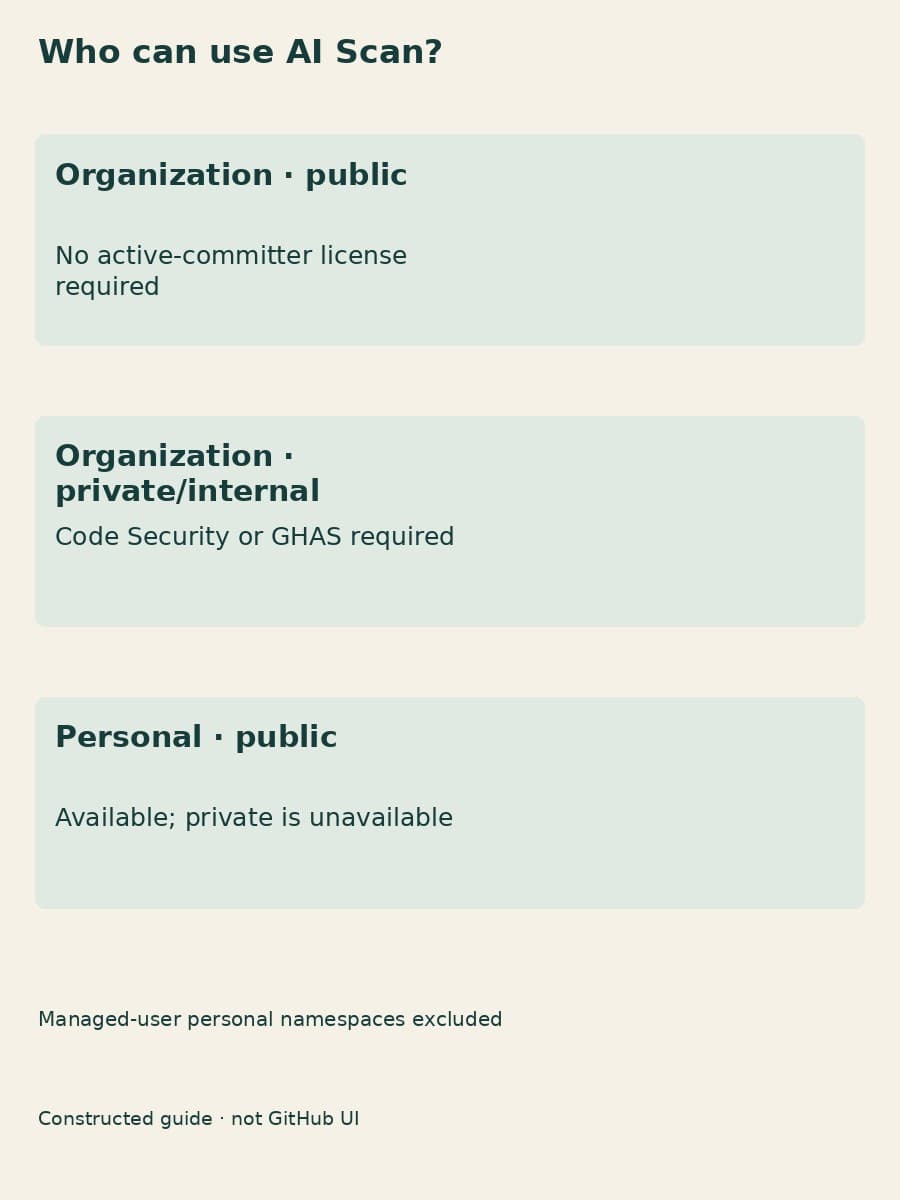
The GA announcement makes public projects available whether an organization or a personal account owns them. The current documentation adds an important qualification for organization-owned public projects: no active-committer license is required. That removes a licensing assumption, not the usage charge described later.
For private or internal organization projects, GitHub Code Security or GitHub Advanced Security is required. Those product entitlements remain relevant even though a Copilot subscription is unnecessary. A private project under a personal account is unavailable, and a managed user’s personal namespace is excluded even when code scanning is present.
These distinctions change how to revisit a previous rejection. If missing Copilot seats stopped the proposal, check again without assuming a seat purchase. If the obstacle was a private personal project, the GA announcement does not solve it. If the code belongs to a private organization project, establish the security-product entitlement before planning adoption.
Our preview-era explanation contains historical licensing and setup qualifications that differ from GA. The earlier coverage article explains the exported adoption state. Neither should substitute for the current eligibility table when making a purchasing decision.
CodeQL default setup is no longer a prerequisite
Code scanning must still be present, and the effective AI Scan setting must permit the feature. GitHub now explicitly says CodeQL default setup is unnecessary. The AI engine also works independently of CodeQL analysis being successful: a failed or waiting CodeQL analysis does not stop it from running.
That separation fits the technical purpose. The engine examines changes in languages and frameworks outside CodeQL’s coverage, such as PHP, Shell/Bash, Terraform configuration, Dockerfiles, JSP for Java and Blazor for C#. It needs no build system and may use code search to gather surrounding context. It uses specialized prompts, rather than custom instruction files such as /.github/copilot-instructions.md or /CLAUDE.md.
For a team already maintaining a different code-scanning configuration, this means there is no documented need to move to default setup just to gain the feature. It also means instructions written for a coding assistant are not the documented way to customize this security engine. Treat its findings as another security input with its own limitations.
An organization switch can create usage before opt-outs
Enterprise policy and organization activation are different decisions. An enterprise owner can permit the feature without activating it; the documented default policy is “Not allowed.” Organization owners and security managers can then enable it, immediately including eligible code-scanning repositories. Individual administrators may opt out afterward, but cannot opt in while the organization has it disabled.
The timing makes “we will exclude projects later” a spending decision. Qualifying changes can consume Code Security AI Credits before those exclusions are made. BaristaLabs recommends agreeing on the initial scope, the person who will read findings and the relevant budget before activation. Do not describe an organization-wide switch as a narrow trial unless the actual configuration supports that claim.
Additional detection does not create a merge requirement
The engine examines qualifying pull requests when created and after new commits. Fork submissions and Dependabot-created requests are excluded. Its output appears on the Conversation and Files changed tabs with an “AI” indicator; it can explain a concern and suggest remediation.

Those suggestions are advisory. They neither fail the Code scanning check nor enforce a ruleset merge requirement, and false positives are possible. The assigned reviewer must decide whether a concern is valid and whether the suggested fix is appropriate. This feature also supplies no full-project scan or backlog alerts in the security view.
Availability does not mean unmetered use
Charges use the Code Security AI Credits SKU, separately from active-committer licensing. Included credits and applicable budgets govern consumption. If a hard budget leaves no credits available, the engine cannot produce findings; increasing the limiting budget or reaching a new billing cycle allows scanning to resume.
A quiet result therefore offers no clean bill of health. Confirm that the intended workload qualifies and that funding permits execution before drawing conclusions from an empty view. Then have a person assess any actual findings through the existing development process. This is documentation-based guidance, not a report of hands-on testing.
BaristaLabs can help fit that review handoff into an existing workflow. Bring a sanitized process outline rather than proprietary source code.
Sources and scope
Product facts come from GitHub’s October 15, 2026 GA announcement and its AI Scan documentation, checked October 19, 2026 and linked above. Configuration and review recommendations are BaristaLabs guidance. Supported languages and detection coverage can change; recheck the current documentation before adoption.
AI-assisted code review
Connect AI Scan findings to human review
BaristaLabs can help fit AI-assisted code review into an existing development workflow, with clear review ownership and spending boundaries.
Bring a sanitized workflow outline, not proprietary code.
Turn this idea into a pilot
Which workflow should go first?
Use the readiness check to compare impact, effort, risk, owner, and next step before requesting a review.
- 3-5 minutes
- Deterministic score
- No sensitive data
Practical AI Workflow Notes
Want more practical AI operations ideas?
Get short notes on applying AI inside real small-business workflows — from document handling and customer follow-up to internal reporting, compliance, and automation guardrails.