
Claude on Google Cloud: Anthropic managed vs Vertex
Anthropic managed Claude on Google Cloud went GA on Oct. 22, 2026. It's the full Claude API behind Google IAM and billing, with Anthropic as the data processor.

Sean McLellan
Lead Architect & Founder

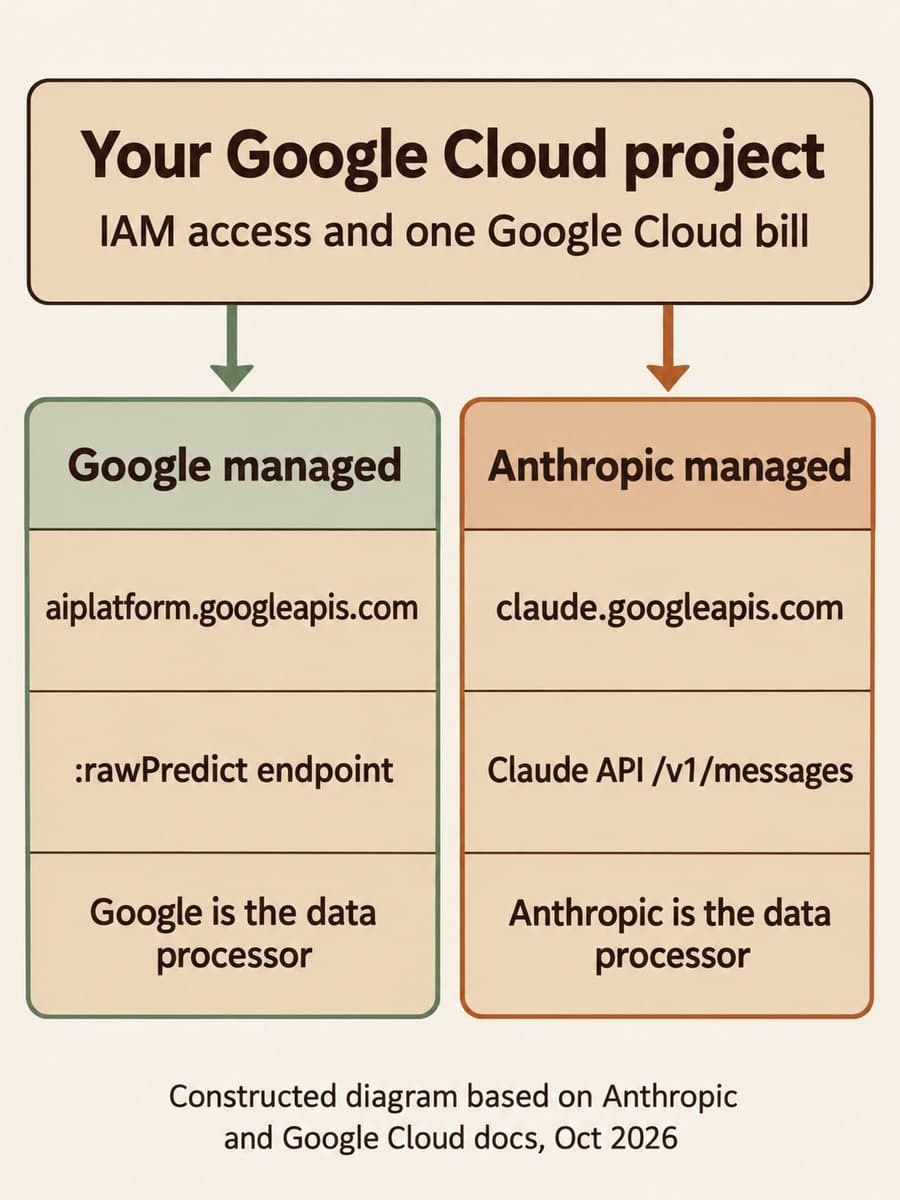
Anthropic made Claude Models on Google Cloud (Anthropic managed) generally available on October 22, 2026. It's the regular Claude API, run by Anthropic, that you reach through your own GCP project. IAM controls who can call it, and charges land on your existing cloud bill. That gives GCP teams a second way to buy Claude alongside the existing Google managed route, which Anthropic's SDKs reach through Vertex clients such as AnthropicVertex.
The choice comes down to two questions. Who should process your data, Google or Anthropic? And do you need Claude Platform features on the day they ship? If Google must be the data processor, or you need regional residency or VPC Service Controls, stay on Google managed. If you want Managed Agents, skills, code execution and new betas without waiting, Anthropic managed is the better fit. Plan it as a move to a new Anthropic organization, not as a settings change.
What changed for Claude on Google Cloud?
Until this week, Claude on GCP meant the Vertex model platform. Google hosts the models and acts as the data processor, and you call Agent Platform prediction endpoints such as :rawPredict. Anthropic's new offering keeps GCP as the access and billing layer but swaps in the native Claude API underneath.
Anthropic's launch article says customers on this route get "new features and betas shipping the same day they go live on the native Claude Platform." That includes Claude Managed Agents (beta), code execution, computer use, agent skills, the Files API, web search and fetch, the MCP connector, prompt caching and batches. Fast mode for Claude Opus 5.5 is also available there, at $8 per million input tokens and $40 per million output tokens. Admins also get the Claude Console for workspaces, usage and agent tooling.
Google's announcement frames the two routes as equals on models and price. "Both options deliver the same frontier models on day zero, the same pricing, and the same Google Cloud billing," it says. Usage on either route counts toward eligible cloud commitments.
How is Anthropic managed different from Vertex?
The request format and the operator are different. Here's how the two routes compare, based on Anthropic's comparison page and the launch announcement:
Scroll sideways to see all 3 columns.
| Comparison dimension | Google managed (Vertex route) | Anthropic managed |
|---|---|---|
| Endpoint | aiplatform.googleapis.com, :rawPredict and :streamRawPredict | claude.googleapis.com, Claude API paths such as /v1/messages |
| Model and version | Model in the URL, anthropic_version in the body | Model in the body, anthropic-version header |
| Data processor | Google, under your existing cloud agreements | Anthropic, under Anthropic's Commercial Terms |
| Location | Global, multi-region or regional endpoints | global, with inference_geo: "us" for US-only inference |
| New Claude features | Roll out once Google integrates them | Same day as the Claude API |
| Rate limits | Set by Google | Set by Anthropic |
| Billing | Agent Platform usage | Google Cloud Marketplace |
| Anthropic organization | None | A new one per project |
The announcement lists what the Google managed route keeps: VPC Service Controls, customer-managed encryption keys, data residency in the U.S., EU and APAC, and integrations such as BigQuery and Model Armor. Anthropic managed supports CMEK with Cloud KMS keys, but Anthropic's docs say "some supporting services, such as Anthropic's trust and safety systems, process data outside Google Cloud." If your compliance review assumed Google was the only processor, this route needs a new review.
There's also a third option that skips GCP entirely. If you call api.anthropic.com with an API key, you're on the direct Claude API, and neither offering applies.
What our local check of the SDK showed
BaristaLabs ran a small offline check on October 23, 2026. We installed anthropic[google-cloud] 2.1.0 for Python, published October 21, and pointed both cloud clients at a mock transport with a fake project, a fake workspace and a fake token. Nothing left the machine, so this shows what the SDK sends, not how either service responds.
Scroll sideways to see all 2 columns.
| What we checked | Result |
|---|---|
AnthropicGoogleCloud request URL | claude.googleapis.com/v1/projects/{project}/locations/global/workspaces/{workspace}/invoke/v1/messages |
| Auth and version headers | Authorization: Bearer with the Google token, anthropic-version: 2026-10-21 |
ANTHROPIC_API_KEY, ANTHROPIC_BASE_URL and ANTHROPIC_WORKSPACE_ID set | Ignored. No x-api-key header was sent |
| No workspace ID | The client was created, then failed on the first request: "No workspace ID found" |
location="us" passed to the client | Accepted, and built a /locations/us/ URL |
AnthropicVertex in the same package | Posted to aiplatform.googleapis.com/.../claude-opus-5-5:rawPredict with anthropic_version in the body |
Three results matter. First, a missing workspace ID won't show up at startup, so add a check to your deploy health probe. Second, leftover API key variables are silently ignored, which is safe but can confuse anyone debugging auth. Third, the client accepted a us location even though Anthropic's docs say to "leave the location at global" and use inference_geo for US-only inference. Don't rely on the client to catch that.
The SDK also sends API version 2026-10-21 by default. If your code still sets temperature, top_p or top_k, read our post on what that Claude API version rejects before you upgrade.
What do you need before you switch?
Most of the work is access and accounts, not code. Anthropic's setup guide lists these requirements and caveats:
- Talk to your rep about discounts first. Anthropic says to contact your Anthropic or cloud account representative before setup if you have a discount, because "discounts can't be applied to past usage."
- Get purchase rights. Setup runs through Google Cloud Marketplace, so someone needs permission to buy on the billing account. Then enable
claude.googleapis.comandanthropic-managed-claude.cloudpartnerservices.googon the project. - Map IAM roles. There are three:
roles/claude.viewer,roles/claude.userandroles/claude.admin. Callers needclaude.user. Onlyclaude.admincan open the Claude Console. Roles apply to every workspace in a project, so teams that need separate access need separate projects. - Turn on Data Access audit logs. Cloud Audit Logs records requests under
claude.googleapis.com, but Data Access logs, which cover messages, batches and files, are off by default. - Re-request zero data retention. A ZDR arrangement on another Anthropic organization doesn't carry over.

Some features aren't available on this route, including API keys and MCP tunnels. If an agent reaches internal tools through an MCP tunnel today, keep that workload where it is. Our gateway control sheet is a useful way to list which tools each agent touches before you move it.
How do you migrate an existing Claude workload?
Treat it as a cutover to a new organization. Anthropic's docs say you can't convert an existing Anthropic organization, including one you use with the Claude API directly. API keys, workspaces and Console settings don't carry over. Files, skills, batches and Managed Agents resources stay in the old organization. The two can run side by side, so you can move traffic gradually.
From the direct Claude API, the change is mostly auth and routing. Replace the API key with IAM roles, set ANTHROPIC_GOOGLE_CLOUD_PROJECT and ANTHROPIC_GOOGLE_CLOUD_WORKSPACE_ID, and create the client with AnthropicGoogleCloud. Request bodies stay the same. Check this offering's rate limits before you shift production traffic. If you rely on per-customer controls such as Claude API user profiles, confirm they're supported and plan to set them up again in the new organization.
From the Vertex route, swap AnthropicVertex for AnthropicGoogleCloud. Claude 4.6 and later models use the same IDs on both routes. For older models, change the @ before the snapshot date to a hyphen. Check model access too: a model your new organization can't use returns "Model {model} is not available for this organization's inference configuration."
This is the same kind of choice we covered when OpenAI models arrived in Model Garden: the bill stays in one place, but the operator, terms and feature timing change.
Choose by data processor, then by features
BaristaLabs recommends this order:
- Decide who processes your data. If it must be Google, or you need EU or APAC residency or VPC Service Controls, stay on Google managed.
- List the features you're waiting for. If a workload needs Managed Agents, skills or a new beta now, it's a candidate for Anthropic managed.
- Call your account rep before setup. Protect any discounts and confirm rate limits.
- Start one project and one workload. Grant roles, turn on Data Access logs, and run it next to the current route.
- Move traffic gradually. Keep the old organization running until the new one has handled real load.
For help choosing a route and planning the cutover, see our AI consulting services.
Sources and scope
- Claude Models on Google Cloud (Anthropic managed), Anthropic documentation: setup, IAM roles, workspaces, location, unsupported features, billing, data processing, audit logs and migration.
- Claude Models on Google Cloud, Anthropic documentation: comparison of the two offerings.
- Claude Platform release notes, Anthropic, October 22, 2026: launch entry and fast mode availability.
- The full Claude Platform, available on Google Cloud, Anthropic, October 22, 2026: general availability, feature list, models and fast mode pricing.
- Expanding Claude availability and deployment choice on Google Cloud, Google Cloud, October 22, 2026: pricing parity and what the Google managed route keeps.
Our local check covered the Python SDK 2.1.0 only and made no live API calls. This post doesn't compare latency or rate limits between the two routes, so test with your own workload before moving production traffic.
Claude on Google Cloud
Pick the right Claude route
Bring the Claude workloads you run today and your data residency and compliance requirements. BaristaLabs can help you choose a route, map IAM roles, and plan a staged cutover.
Start with the workload that needs a feature Vertex doesn't have yet.
Turn this idea into a pilot
Which workflow should go first?
Use the readiness check to compare impact, effort, risk, owner, and next step before requesting a review.
- 3-5 minutes
- Deterministic score
- No sensitive data
Practical AI Workflow Notes
Want more practical AI operations ideas?
Get short notes on applying AI inside real small-business workflows — from document handling and customer follow-up to internal reporting, compliance, and automation guardrails.