


The following freeze-frame is illustrative. AWS documents the case lifecycle and treasury sample behind it. AWS does not report these three transactions or the lost browser session described for Transaction C.
At 10:17:42, three transactions enter the same automated process.
Scroll sideways to see all 4 columns.
| Comparison dimension | Transaction A | Transaction B | Transaction C |
|---|---|---|---|
| What happens | The workflow enters an ordinary transaction and validates the result. | A transaction the AWS sample classifies as a payment (Credit type) is $200 or more, so it goes to a treasury analyst. The threshold is part of the sample, not a recommended control. | In this illustrative branch, the portal session disappears before the workflow captures confirmation. |
| Case state | Successful | Pending Resolution | Failed with a System Exception |
| Immediate question | What evidence shows that the destination accepted the entry? | What decision must the analyst return, and which prior actions must the workflow avoid repeating? | Did the destination accept the entry before the session failed? |
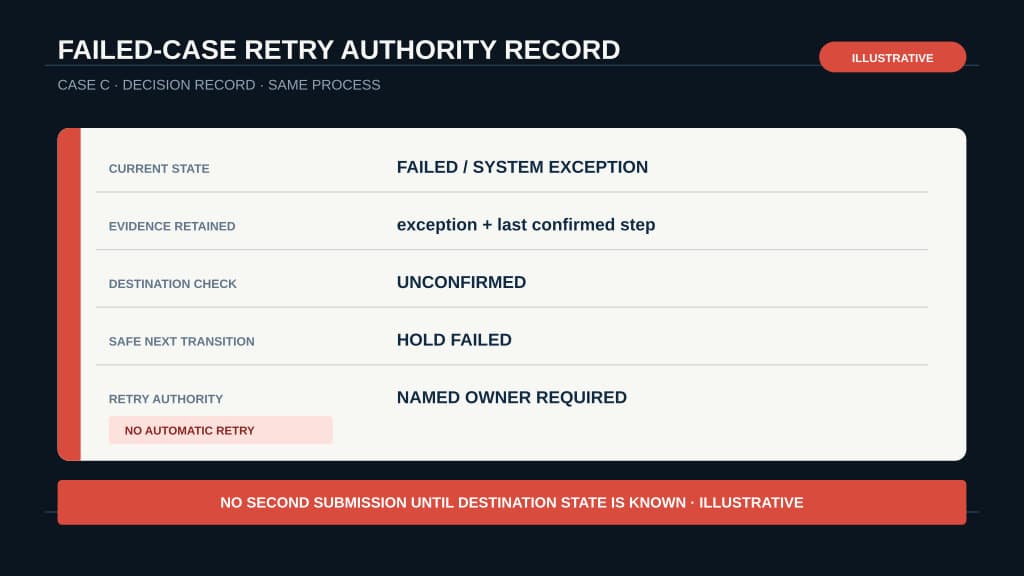
The shared timestamp makes the comparison useful. A manager should be able to read each item's state, find the person or system responsible for the next decision, and see which transition is safe. Reconstructing those answers from an agent transcript is too slow for recurring operations.
Copy the AI workflow case record to retain the state, evidence, owner, safe next transition, and retry or rollback authority for each work item before running the three-outcome replay.
AWS's July 10 article on native case management in Amazon Quick Automate supplies the underlying model: one persistent case per work item, with a case type, reference name, custom data, status, exception details, and execution logs.
The state says where each transaction is
Quick Automate uses five lifecycle states: Ready, In Progress, Successful, Failed, and Pending Resolution. Each state describes the position of one case in the processing loop.
Scroll sideways to see all 3 columns.
| Case | What the state establishes | What the state leaves open |
|---|---|---|
A: Successful | Every step inside Process cases completed without an exception. No further case processing occurs. | The workflow still needs a business definition of completion. In the treasury sample, the UI agent validates that the entry succeeded. Another implementation might require a destination confirmation ID or a verified read-back. |
B: Pending Resolution | A user task is waiting in Task Center. The processor can move to another ready case. | The case still needs a structured decision, an eligible reviewer, and a rule for resuming safely. |
C: Failed / System Exception | A technical error stopped this case. An uncaught exception carries error details into the failed record, and the loop moves to the next case. | Failure alone cannot show whether an external action started, finished, or finished without a captured confirmation. |
AWS separates case creation from case processing in its treasury sample. One automation retrieves a statement, extracts the transactions, and creates a case for each row. A second automation processes ready cases. Multiple processor instances can run concurrently.
That separation allows A to finish while B waits and C fails. It also lets intake and processor capacity change independently. The durable case record keeps the three outcomes visible after their execution paths diverge.
Successful deserves careful interpretation. It is an execution state. The team defines the business evidence required before that state counts as a completed transaction.
The next transition carries a different risk for each case
AWS's orchestration documentation describes the status changes and the exception types. The safe transition still depends on the work surrounding the case.
Scroll sideways to see all 3 columns.
| Case | Next transition | Control to verify first |
|---|---|---|
| A | Remain terminal. | Store the confirmation or read-back that satisfies the process's completion rule. |
| B | Return to Ready after the analyst resolves the task, then choose a branch from latest_task_resolution. | Check the human decision and the record of prior external actions before any step can run again. |
| C | Stay failed until the technical fault and destination state have been checked. | Establish whether the portal accepted the transaction before authorizing a retry. |
B's return path is easy to misread. Quick Automate puts the resolved case back in Ready, and AWS says processing resumes from the beginning. The workflow should inspect latest_task_resolution, which contains the form inputs and decision.
A reviewer rejection in the AWS sample raises a Business Exception with the reason code and comments. That is a handled process outcome. A System Exception records a technical failure. Both can produce Failed, but they call for different decisions.
Case management does not establish that a repeated external action is safe. If the workflow acted before creating the user task, B may encounter that step again. If C's portal accepted the entry before confirmation failed, a retry may create a duplicate.
A durable pause needs an explicit resume rule, and a rollback path belongs in the workflow spec. For this process, those rules should identify the prior-action evidence, the retry authority, and the destination check that blocks a second submission.
The manager's view needs evidence beside status
A state label routes attention. Evidence determines what someone can safely do next.
Scroll sideways to see all 3 columns.
| Case | Evidence to retain | Responsibility the process must name |
|---|---|---|
| A | Reference name, destination confirmation, completion timestamp, workflow version | Who handles a later reconciliation mismatch, if the operating policy requires one |
| B | Task inputs, eligible reviewer, decision, reason or comments, prior-action record | Who may approve or reject, and who receives an overdue task |
| C | Exception type, error details, last confirmed step, destination lookup result | Who investigates the technical fault and who may authorize a retry |
Quick Automate's execution logs can provide timestamps, exception messages, screenshots where available, and processing detail. Those records can support an audit process. The organization still has to set retention, access, reviewer authority, required evidence, and control-testing rules.
The lost-session branch remains illustrative. The AWS sources support the handling rule: an uncaught technical exception marks the case failed with error details, then processing moves to the next case. They do not report that this browser-session event occurred in the treasury sample.
Read dashboard counts as workflow measures
AWS says the monitoring view shows successful completion rates, business exceptions, system exceptions, incomplete cases, and cases pending human resolution. These measures describe workflow state and routing.
They do not establish transaction accuracy, cost savings, cycle-time reduction, or the safety of a retry. A Successful count is useful only when the completion rule captures the business evidence the team cares about.
AWS presents first-party architecture guidance and a treasury sample. The article does not publish independently measured throughput, cost, error-rate, or time-saving results for this design. Its reference to thousands or millions of work items describes the scale problem Quick Automate targets, not a customer result.
On July 10, AWS presented case management as an available Quick Automate capability and directed readers to open the product and use two pre-built treasury automations. Workflow authoring requires an Enterprise license, and workflows are Region-specific.
Teams should verify both prerequisites in their own Amazon Quick environment before planning a rollout.
Replay the split screen before expanding the workflow
Choose three historical work items from the same process: one clean completion, one human decision, and one technical failure. Run them close together in a safe test environment so the three states remain visible at the same time.
Scroll sideways to see all 3 columns.
| Clean completion | Human decision | Technical failure |
|---|---|---|
| Capture the evidence that earns the terminal state. | Leave the case pending while other work continues, then resolve it and inspect where processing restarts. | Confirm that the case records a system exception, then check the destination before attempting any retry. |
| Verify that no further processing occurs. | Verify that the returned decision is structured and prior external actions are guarded. | Verify that the process names who can investigate and who can authorize the next transition. |
Save the three case records, their logs, and the decisions made during the replay. The result is a test record for those examples. It is not a reliability rate or proof of production performance.
Agent evals should test workflow receipts because the manager's question extends past model output: what happened, what evidence remains, and what can happen next?
BaristaLabs process automation services help teams design persistent work-item state, human decisions, and recovery paths around the same workflow.
Process automation consultation
Replay three outcomes before you automate more work
BaristaLabs helps operations teams test clean completion, human review, and failure recovery against the same workflow before expanding its reach.
Best fit for teams moving an AI-assisted process from a controlled pilot into recurring operations.
Turn this idea into a pilot
Which workflow should go first?
Use the readiness check to compare impact, effort, risk, owner, and next step before requesting a review.
- 3-5 minutes
- Deterministic score
- No sensitive data
Practical AI Workflow Notes
Want more practical AI operations ideas?
Get short notes on applying AI inside real small-business workflows — from document handling and customer follow-up to internal reporting, compliance, and automation guardrails.