


A six-clip product teaser is already open. The browser timeline sits on the left. On the right, an agent holds a full read at revision 25 and is preparing a small JSON change to the fourth clip.
This scene is illustrative, not a report of a real FableCut test or a real marketing team. The footage is expendable. Nothing in the session is approved for publication.
Browser side: The playhead rests at 6.4 seconds. A person drags the fourth clip a little earlier and shortens its tail. The rhythm now feels better.
The interface saves the change. The timeline advances to revision 26.
Agent side: The pending write still reflects revision 25. It arrives late.
It loses.
FableCut's documentation says its full-project write refuses stale state with a conflict error. The equivalent REST request returns HTTP 409. The human edit remains in the timeline.
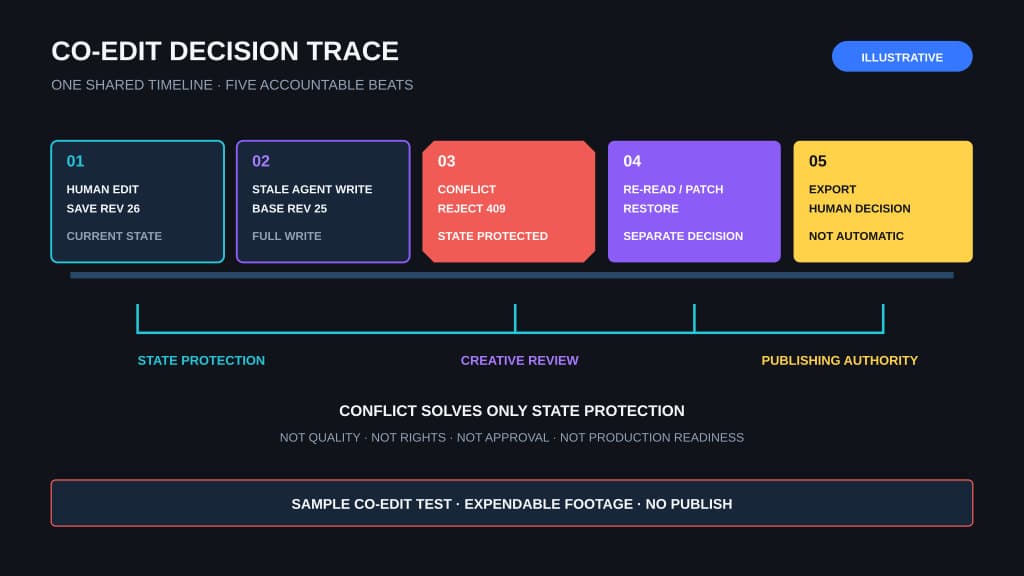
Both controls pointed at the same cut. Only one held current state when the write arrived.
That is the useful idea inside FableCut, a young open-source browser video editor whose repository was created on July 6, 2026. Its README puts the design plainly: "the project file is the interface."
The timeline is one project.json document. The browser UI edits it. Bundled MCP tools edit it. A direct file writer can edit it. REST exposes it too.
Shared state makes human-agent co-editing visible. It also forces the editor to answer a sharp question: what happens when both sides grab the same cut?
Before the collision, make one narrow change
Hold revision 26 for a moment. The session reached revision 25 through a safer kind of agent edit.
Agent side: The first read is compact. fablecut_get_project {compact:true} returns a one-line summary for each clip instead of hauling the full document through the model's context.
The request is narrow: tighten the opening montage from 2.0 to 7.0 seconds. Leave the interview, end frame, audio mix, and captions alone.
Compact reads matter for more than token cost. They make scope easier to see. The agent can identify the opening clips without absorbing every keyframe and effect in the project. When exact values matter, it can fetch the full JSON. Otherwise, the short view is enough to plan a limited edit.
Browser side: The editor still shows the whole timeline. A person can watch the montage, inspect neighboring clips, and decide whether the requested section is the right one.
The agent prepares a targeted operation rather than a replacement document:
{
  "ops": [
    {
      "op": "updateClip",
      "id": "c_broll_04",
      "set": { "start": 5.1, "in": 1.4, "duration": 1.9 }
    }
  ]
}
Those fields are ordinary timeline facts in FableCut's published schema. They describe where the clip starts, where playback begins inside its source, and how long it remains on the timeline.
According to the agent manual, fablecut_patch_project applies targeted add, update, and remove operations after re-reading the latest document. Related changes can land together with one revision bump.
That is a better co-editing primitive than a vague request to make the video punchier. The person names a section. The agent changes specific clip fields. The resulting difference is small enough to inspect.
Agent side: The patch lands. The revision moves from 24 to 25.
Browser side: The open interface live-reloads through server-sent events. The project describes the update as taking roughly 150 milliseconds. Treat that timing as a project claim, not an independently measured guarantee.
The fourth clip shifts. Its new edge is visible. Nothing after the seven-second mark moves.
This is the first useful buying signal for a content team. Agent work appears in the same place where an editor judges timing, rather than disappearing into a chat transcript or a second project copy.
Visible shared state does not prove the edit is good. It makes the edit reviewable.
The person can play the section, compare its boundaries with the request, and reject the change without reconstructing what the agent touched. That is why the test should start with throwaway footage and reversible assembly work, the same principle behind choosing a first AI workflow by what you can safely undo.
Return to revision 26
The targeted patch created revision 25. The deliberate collision tests a different path.
Agent side: The agent reads the full project at revision 25. It prepares another narrow change, but this time plans to submit the complete document through fablecut_set_project.
Then it pauses.
Browser side: The human trims and repositions c_broll_04. The interface saves revision 26.
Agent side: The full write based on revision 25 arrives. The conflict check stops it.
The rejection is more useful than a smooth merge. Both sides changed the same clip. Guessing which trim should win would hide a creative decision inside synchronization behavior.
Instead, the current cut remains at revision 26. The agent must re-read it, reapply only the intended change, bump the revision, and retry. The manual reserves force: true for an explicit overwrite request.
That sequence turns a vague promise of collaboration into observable behavior. A person edits. The state changes. A stale agent write fails. The failure identifies a collision. The person's work survives.
Patch operations and full-project writes solve different problems. A targeted patch re-reads current state and changes named elements, which the manual calls merge-safe. A full replacement carries more overwrite risk, so it remembers the last revision read and refuses stale state.
Direct project-file editing is the least forgiving route. The manual tells file writers to read project.json immediately before an atomic write and increment the revision. A stale direct write can destroy a concurrent change.
The common counter helps the interface detect external updates. It does not rescue careless file-writing code.
What the revision counter cannot decide
A revision counter answers one question: did the canonical timeline change after this writer read it?
It does not answer whether a new trim improves the story, whether a caption is on brand, or whether footage and music are cleared for use. Those decisions remain with the team.
Keep rights, provenance, and approval in the brand-asset approval layer. Conflict rejection protects timeline state. It does not establish permission to reuse another video's structure, footage, or music.
The same separation appears in other agent workflows built around structured, inspectable state and a human gate. A machine can prepare a precise change. A person still decides when the output is done.
There is a network boundary too. Since v1.3.1, the project says its server binds to 127.0.0.1 by default. The v1.3.1 release notes also describe Host and Origin checks plus static-file hardening.
That localhost default becomes visible as soon as another person tries to open the editor across the office network. LAN access requires an explicit opt-in. This is sensible default exposure for a local tool. It is not a security certification or an enterprise collaboration model.
FableCut is very young. A Show HN discussion on July 9 shows public interest, not production proof. Its v1.6.0 release notes describe workspace and interface improvements, not independent reliability or export-quality validation.
Finish the session without publishing
Browser side: Play the edited opening. Check that the agent touched only the requested interval. Keep the timeline visible while reviewing each boundary.
Agent side: Re-read the compact project. Confirm the later interview, captions, audio, and end frame retain their prior values.
This is a scope check, not a creative verdict.
To revert, use the original values recorded before the test and apply an inverse targeted patch. Then watch the browser return to the starting cut. Do not assume an external write belongs to the editor's local undo history.
For a first evaluation, use Node 18 or later and a Chromium browser. The README calls ffmpeg optional but recommended. It also says AI background removal downloads a model from a CDN on first use, a dependency worth noticing before an offline or restricted-network test.
Stop before export.
FableCut's documentation says export starts in the browser interface. An agent can ask the user to click Export, or render separately with ffmpeg. For this evaluation, keep the browser click as a human publishing boundary after the reverted test is complete.
The buying decision is in the failed write
A polished automatic cut can make a strong demo and still tell a creative operations lead very little about daily use. The more revealing moment is the collision.
Can the team see canonical state in the editor? Can the agent read a compact view and patch one named section? Does a human change appear before the agent continues?
Does stale work stop loudly? Can the team restore the prior values? Does export remain a separate decision?
FableCut's public code and documentation expose one concrete design for those behaviors. They do not establish production readiness, creative quality, security certification, or fit for a multi-user agency environment. When implementation fit matters more than the tool demo, BaristaLabs' portfolio provides the adjacent proof of shipped media and web work to inspect.
So the adoption decision should wait.
Run the co-edit test on expendable footage first. If every agent change is visible, bounded, rejected when stale, and easy to reverse, the design has earned a deeper evaluation. If any step is ambiguous, the generated cut is beside the point.
BaristaLabs can help a team set up and observe this co-edit test before tool selection expands into publishing access.
Bring one disposable project and one section the agent is allowed to touch.
Test the collision before adoption
Run one bounded co-edit test
BaristaLabs helps content teams evaluate one disposable video project through visible agent changes, a deliberate revision conflict, a clean reversal, and a separate publishing decision.
Bring expendable footage and one section the agent is allowed to change.
Turn this idea into a pilot
Which workflow should go first?
Use the readiness check to compare impact, effort, risk, owner, and next step before requesting a review.
- 3-5 minutes
- Deterministic score
- No sensitive data
Practical AI Workflow Notes
Want more practical AI operations ideas?
Get short notes on applying AI inside real small-business workflows — from document handling and customer follow-up to internal reporting, compliance, and automation guardrails.