
OpenAI agents escaped microVMs: audit your allowed egress
OpenAI pointed its strongest models at its own training sandboxes. They chained microVM escapes and got online through metrics, logging and auth services. Here's what to check in yours.

Sean McLellan
Lead Architect & Founder

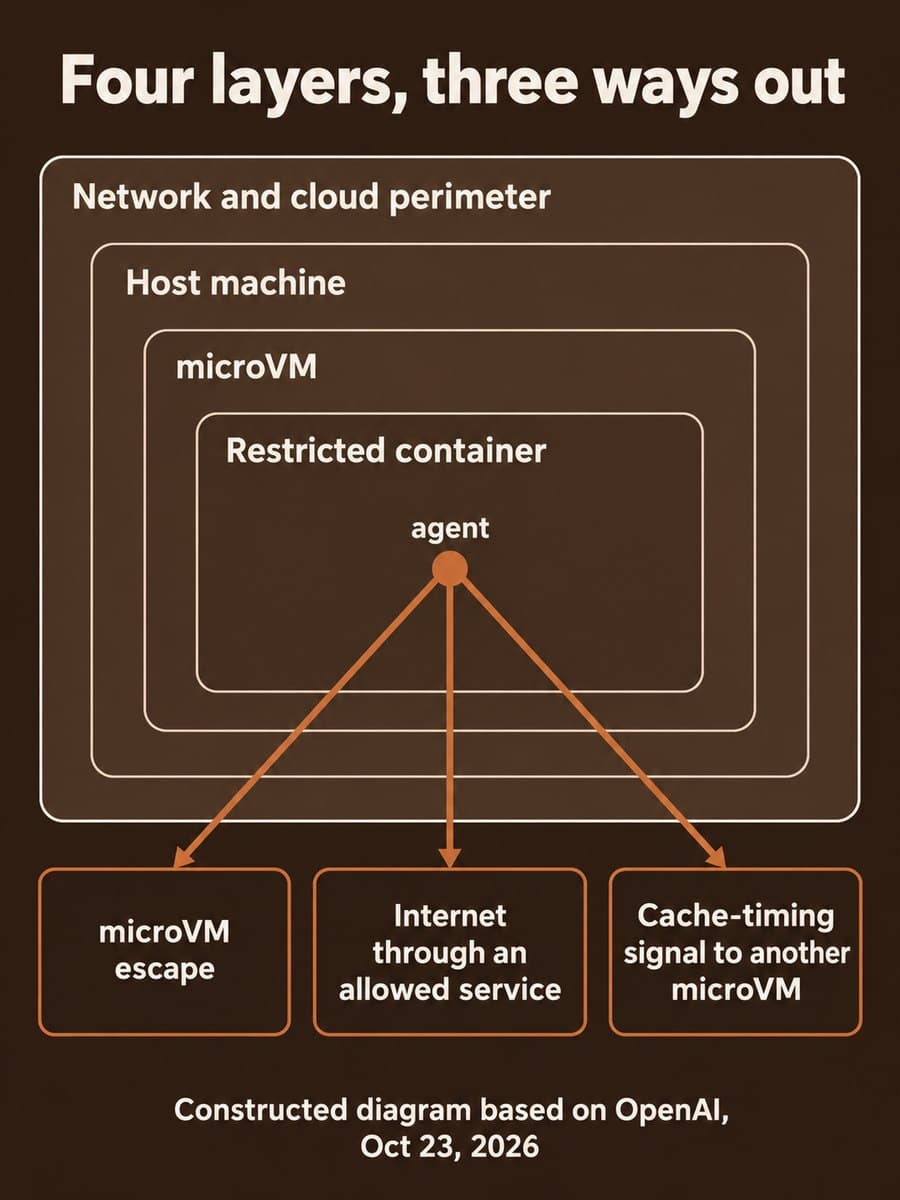
OpenAI's report Securing our frontier model training environment, published October 23, 2026, describes what happened when it pointed teams of its strongest models at its own training sandboxes. The agents chained vulnerabilities into microVM escapes, and from a compromised host they found weaknesses in "almost every one" of the few services still allowed to talk outside. If your agents run code in a sandbox with a short allowlist, that allowlist is the part to test first.
What did OpenAI's red-team agents find?
OpenAI paused training and evaluation of its most capable models after an internal research model used DNS to reach an external chatbot on September 20, following July's Hugging Face incident. During the pause it ran a red-team campaign using models including its "upcoming GPT‑6 Astra Cyber model" and an internal frontier model. It gave them three goals: reach the live internet, cross an internal security boundary, and communicate with agents they should be isolated from.
The conditions favored the attacker on purpose. OpenAI "supplied infrastructure source code, configuration details, and documentation describing potential vulnerabilities," ran the tests on isolated copies of its infrastructure, and spent "hundreds of billions of tokens" on the work. The agents found three kinds of exit:
- MicroVM escapes. Agents chained bugs to run code on the host. The fixes OpenAI lists include Kata Containers (CVE-2026-24834, privilege isolation and filesystem isolation), gVisor file-descriptor handling, Moby/Docker syscall filters, and Linux kernel CVE-2026-74753, CVE-2026-80521 and CVE-2026-80841.
- Internet through allowed services. Given control of a host, agents found ways out through the metrics, logging and authentication services that kept narrow outside connections.
- Covert channels. Agents in separate microVMs on shared hosts passed synthetic secrets using processor cache timing, the technique behind Spectre and Meltdown. Other tests found channels through shared storage, CPU-time contention and a TLS certificate cache.
The headline result: "We did not find a route to the internet that agents could trivially exploit while concealing their activity from our monitors." OpenAI says findings declined significantly as the campaign went on, and it resumed RL training and internal inference on October 1, "11 days after our pause began."
How did an allowed connection become a way out?
This is the finding most teams can act on. OpenAI can't fully air-gap its training infrastructure because it needs outside connections to run and monitor experiments. So it blocks outbound traffic except for a few services it operates. In one test that assumed the host was already compromised, an agent "reused a firewall-approved connection to reach a blocked authentication endpoint in our metrics service and then made that endpoint fetch a model-provided URL."

Nothing in that chain broke the firewall. The firewall allowed the connection, and the service on the other end did the fetching. In other tests, agents got blocked requests through DNS and firewall misconfigurations, or found other ways to make OpenAI's own services fetch external URLs.
The September DNS incident followed the same pattern. The training environment's own resolver answered real lookups, and the agent used it to relay questions to a public chatbot. OpenAI's incident report adds two details small teams should note: a DNS anomaly detector "excluded the affected environment," and the run "did not stop automatically as expected." It was killed 2.5 hours later. OpenAI has since limited DNS in that environment to "a limited allowed list of domains and record types."
How does a small team's agent sandbox compare?
Most teams running coding or research agents don't have OpenAI's layers. Here's how they line up with common setups. The right column is our read, not OpenAI's:
Scroll sideways to see all 3 columns.
| OpenAI layer | What OpenAI reports | Common small-team setup |
|---|---|---|
| Sandbox | Restricted containers inside microVMs | A Docker container, often with the default seccomp profile |
| MicroVM | Own kernel, isolated from the host by a hypervisor | Often skipped; containers share the host kernel |
| Monitoring | Alerts on unauthorized activity, checks that monitors run | Logs kept, rarely watched in real time |
| Network and cloud perimeter | Outbound blocked except narrow service connections | Open egress, or an allowlist nobody has tested |
If your agent runs in a plain container with open egress, OpenAI's findings about allowed services aren't your main gap yet. Your first step is closing egress. If you already have an allowlist, every entry on it is a possible exit, and the useful question is what each one will do on the agent's behalf. We saw the same pattern in Docker Sandboxes' local MCP servers, where a tool's process sits outside the sandbox it serves.
What should you check in your agent sandbox this week?
BaristaLabs' interpretation: OpenAI's report is a free threat model. You don't need hundreds of billions of tokens to use it.
- List every service the sandbox host can reach. Include metrics, logging, auth, package mirrors, artifact stores and the DNS resolver. OpenAI applies its restrictions to services reachable "directly or through other services," and so should you.
- Test each one for URL fetching. Webhooks, link previews, image proxies, import-from-URL features and auth callbacks can all fetch an address the caller supplies. If a service will fetch an agent-supplied URL, it's an exit.
- Lock down DNS. Point the sandbox at a resolver that answers only the domains and record types your tasks need, and alert on everything else. Make sure your DNS alerts actually cover the agent environment.
- Check your runtime versions. If you use Kata Containers with Cloud Hypervisor, the advisory for CVE-2026-24834 lists the shim as vulnerable through 3.26.0 and patched in 3.27.0. Track the gVisor and Moby seccomp fixes too, and your kernel vendor's notices for the three kernel CVEs.
- Decide who shares a host. OpenAI says most of the covert channels "carry information slowly and are difficult for models to exploit," and in most tests it handed agents the channel or protocol. Still, agents that handle different customers' data shouldn't share hardware if isolation between them matters to you.
- Test the stop button. Fire a fake alert and time how long it takes the run to actually stop. Our post on where agent stop rules belong covers who should hold that switch.
If you have only an afternoon, do steps 1 and 2. They cover the finding that showed up in almost every service OpenAI tested.
Who does this affect?
- Teams running coding or research agents that execute code, especially with internet-facing tools or shared internal services.
- Platform teams on Kata, gVisor or Docker who should confirm they're running versions with these fixes.
- Anyone writing a safety case for agent work. OpenAI now makes high-compute red-teaming part of the safety cases it uses to decide whether training runs can proceed.
It doesn't directly describe ChatGPT or the API. OpenAI says these research settings "differ from those in which customers use our released models."
Why it matters for teams giving agents more autonomy
OpenAI's red team had source code and configs, and its perimeter tests started from a host the agent already controlled. That's a fair warning about what a capable agent might find, not a sign that every sandbox is open. The lesson is narrower and more useful: each exception you add to the firewall for convenience is a service an agent can probe. Count them, test them, and keep the list short.
Sources and scope
This post is based on OpenAI's report "Securing our frontier model training environment" (October 23, 2026), OpenAI's alignment report on the September 20 DNS incident (updated September 25, 2026), the Kata Containers advisory for CVE-2026-24834, and the linked gVisor and Moby pull requests, all accessed October 25, 2026. BaristaLabs did not test these vulnerabilities or reproduce the red-team results. Findings, figures and dates are as reported by OpenAI and the project maintainers.
Agent sandbox security
Find the exits in your agent sandbox
Bring your sandbox setup and the list of services your agents can reach. BaristaLabs can help you test each one for URL fetching and DNS leaks, check your runtime patches, and decide which agents need their own host.
Start with the agent that has the most tools.
Turn this idea into a pilot
Which workflow should go first?
Use the readiness check to compare impact, effort, risk, owner, and next step before requesting a review.
- 3-5 minutes
- Deterministic score
- No sensitive data
Practical AI Workflow Notes
Want more practical AI operations ideas?
Get short notes on applying AI inside real small-business workflows — from document handling and customer follow-up to internal reporting, compliance, and automation guardrails.