


On August 6, 2026, Docker Sandboxes 0.38.0 made Model Context Protocol (MCP) management a first-class feature. Teams can register remote or local MCP servers once with sbx mcp and reuse them through a built-in gateway. OAuth credentials stay on the host. Organizations can govern server registration and tool calls with access policies written in Cedar. The security stake is the execution location: local stdio MCP servers run on the host, outside the sandbox microVM.
A local MCP server can use host files, network resources, and credentials that its host process or container can access. The microVM still provides Docker's primary trust boundary for the agent process, but the MCP gateway is a deliberate route across that boundary. This article explains what the microVM isolates, which host paths remain open by design, and which policy decisions a team must test before enabling MCP.
The microVM isolates the agent process, with documented host crossings
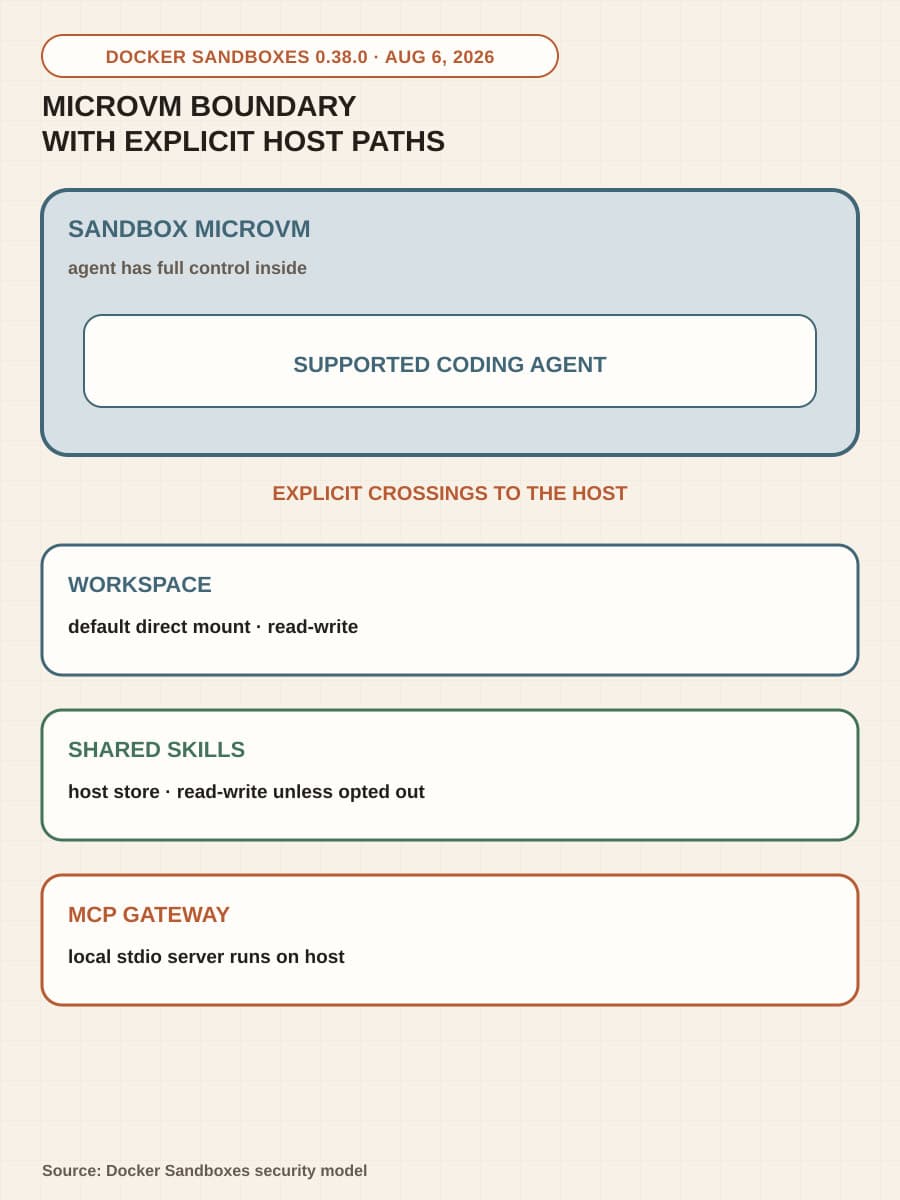
Docker's security model places the primary trust boundary around a microVM. The agent has full control inside that VM, including sudo, package installation, a private Docker Engine, and read-write access to its workspace. Each sandbox has a separate kernel with no shared host memory or processes, and the sandbox cannot reach the host Docker daemon.
Several integrations cross that boundary. The default workspace mount is read-write, so the agent edits the host working tree in place. Docker also mounts a shared host-side skills store read-write unless the operator opts out, and supported agents connect to a host-side MCP gateway. Clone mode can replace the direct workspace with a read-only repository mount and a private clone inside the VM, but MCP needs a separate decision because a gateway call can cause software outside the VM to act.
The result is a precise boundary, not blanket containment. The microVM isolates the agent's processes and private VM state. Host-visible effects still occur through the workspace, proxy, shared skills store, and MCP gateway according to the access each integration receives.
One MCP endpoint can reach remote servers or host-run software
The MCP gateway gives the agent one endpoint. On the host, sbx manages the registered servers, OAuth credentials, and the sandbox lifecycle. Docker lists startup integrations for Claude Code, Codex, Gemini, Kiro, and OpenCode.
A registration is host state. Running sbx mcp add records a server definition, but does not attach that server to a sandbox. An operator can expose it at sandbox creation with --static-mcp or attach it later with sbx mcp load.
Execution depends on the registration. A remote endpoint continues to run remotely. A local metadata URL resolves an OCI-packaged stdio server that Docker starts with the host Docker Engine. An explicit command, including npx or a command that starts a container, also runs on the host. In every case, the agent connects to the gateway rather than directly to the server.
A host-run server uses the host process or host container boundary. It does not inherit the microVM boundary. Docker tells operators to treat local MCP servers as trusted host integrations because the process or container can use the host files, network resources, and credentials made available to it.
Registration and use are separate policy decisions
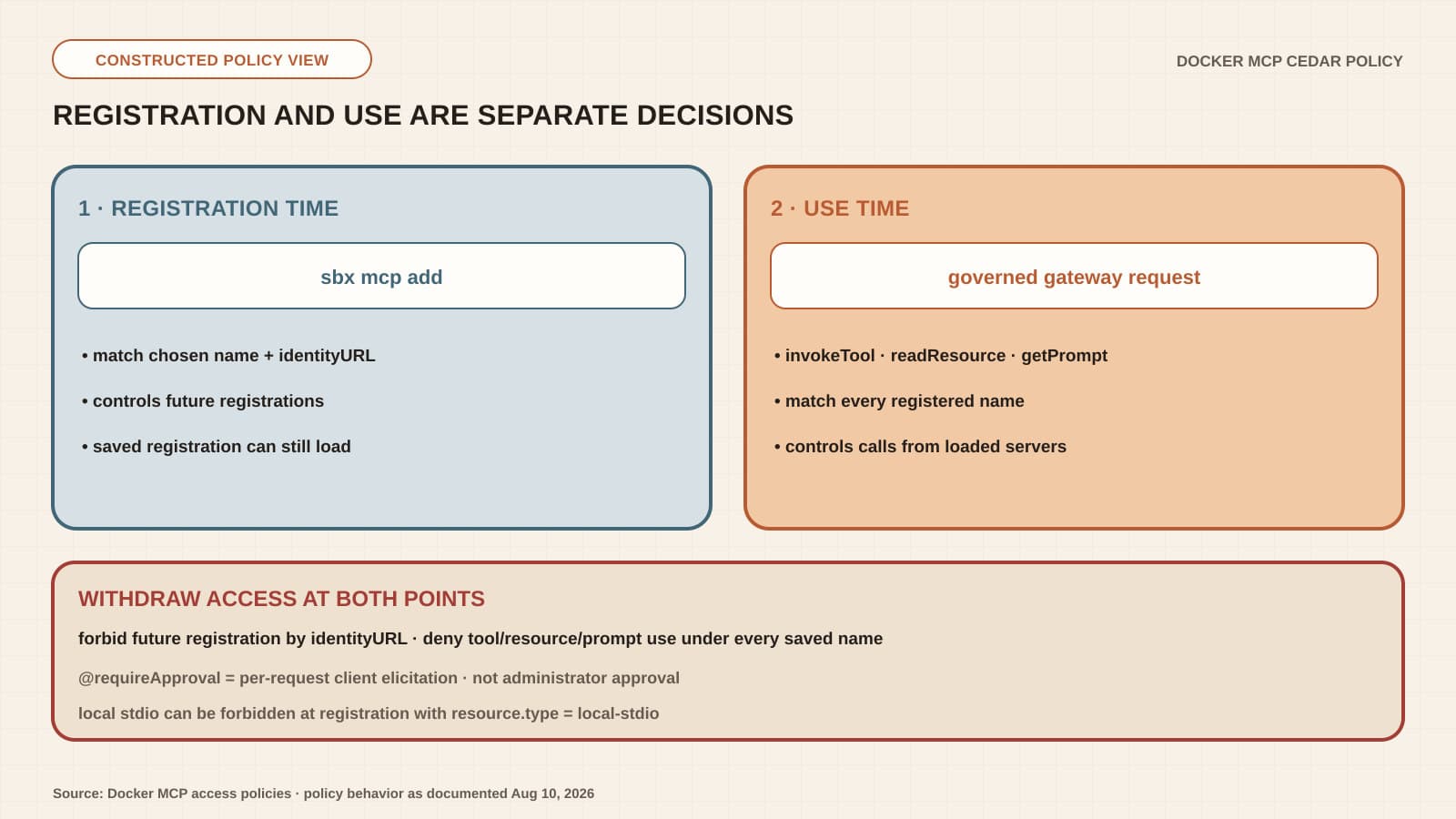
Docker evaluates MCP access policy at two lifecycle points. The register action runs when a developer uses sbx mcp add. Use-time actions run when the gateway handles a tool call, resource read, or prompt retrieval from a loaded server. A rule at one point does not govern the other.
Registration rules affect future registrations. They can match the developer's chosen server name and the resolved identity URL, which lets an administrator bind a canonical name to a remote endpoint. They do not remove a saved registration or stop sbx mcp load from attaching it to a sandbox.
Use-time policy controls invokeTool, readResource, and getPrompt. These rules match the registered name associated with the tool, resource, or prompt. If the same server has several saved names, a withdrawal rule must cover every name. Built-in gateway tools such as mcp-add, code-mode, and OAuth helpers are separate MCP::Primordial resources with their own use-time rules.
When MCP enforcement is active for a user, registration and governed requests default to deny unless a matching permit allows them. A matching forbid overrides every permit. If enforcement is not active for a user, the gateway does not evaluate Cedar and permits MCP activity.
That coverage check belongs in the adoption decision. MCP policy is an organization policy with no local preset equivalent to Docker's local network policy. Docker says organization governance is a separate paid subscription. A well-written policy has no protective effect for a user outside active MCP enforcement.
Removing registration permission does not withdraw a saved server
A new registration rule cannot disable a server that is already saved. To withdraw a server that broader rules permit, Docker says to forbid future registration by its identity URL and deny use under every registered name. The use-time rules must cover each capability that needs to stop, including tool calls, resource reads, and prompt retrieval.
The registration remains saved, listable, and loadable after those policy changes. A complete withdrawal has two observable results: a new registration fails, and requests from an existing loaded registration fail. Registration decides which server definition a developer may save in the future; use-time policy decides what an agent may ask an attached server to do now.
Approval prompts and read-only metadata do not prove authorization
The @requireApproval annotation creates per-request MCP elicitation in the same client session that originated the governed request. An unsupported client, a declined prompt, an elicitation failure, or a policy denial stops the call. Calls from contexts that cannot relay elicitation, including calls inside code-mode, are also denied.
This confirmation does not create administrator approval or separation of duties. Docker notes that an autonomous MCP client can answer the protocol request programmatically. Registration cannot use this path either: sbx mcp add cannot present elicitation, so a registration permit with @requireApproval results in denial.
Tool metadata has a separate limit. The MCP server supplies the readOnly annotation, and Docker calls it advisory. A missing annotation defaults to false, but true remains the server's statement about its own tool. Test the actual effect, and use forbid for an operation that must never run.
Test both boundaries before broad access
Docker supplies the isolation and gateway. Organizations with AI Governance can also use organization policy and audit mechanisms. AI Governance Audit Logs cover Docker Sandboxes policy decisions and sandbox session events. Docker Sandboxes send records only for signed-in users who have an AI Governance license and are governed by an enforced centralized organization policy. The following rollout sequence is a BaristaLabs recommendation for testing the team's chosen configuration.
- Choose the execution location. If agent-triggered execution must stay off developer hosts, forbid local stdio registration with
resource.type == "local-stdio". Then inspect saved registrations because that rule controls future additions only. - Inventory registration identities. Use
sbx mcp lsandsbx mcp inspectto record every chosen name, resolved identity URL, server type, command or image, attached sandbox, OAuth path, and host permission. Find aliases before writing withdrawal rules. - Write registration and use rules separately. Bind approved remote servers to canonical names and identities. Permit only the required tools, resources, prompts, and built-in gateway tools at use time.
- Exercise old and new paths. Confirm that registration policy blocks a new addition without disabling a saved entry. Then test
invokeTool,readResource, andgetPromptunder every saved name, including a read-only claim and a known mutating call. - Prove denial, evidence, and rollback. Test unsupported and declined elicitation, verify the audit decision, deny use under every alias, remove unneeded registrations, and revoke host OAuth credentials. Docker's audit records contain metadata rather than prompt content, agent output, or parameter values, so decide what additional effect evidence the team needs.
This test is narrower than our AWS cloud-to-laptop MCP analysis, which follows a four-component relay and a synthetic file boundary. The broader agent sandbox acceptance guide covers filesystem, command, network, credential, audit, and fallback paths. Docker's decision is specific: whether a server may be registered and what an agent may do through it are separate controls.
Choose the execution location before policy details
If the requirement is to keep agent-triggered execution off the host, forbid local-stdio registrations and apply use-time denies to existing host-run registrations. Use remote MCP servers or install the required tools inside the microVM. Remote servers still need use-time policy because they execute outside the sandbox and can act on external systems.
If a host-run integration is necessary, treat it as trusted host software. Limit the files, network access, mounts, and credentials available to its process or container. Write separate registration and use rules, then keep evidence for both policy decisions and actual tool effects. Our guide to MCP authority labels can help teams inspect that tool-level authority before registration.
The microVM can isolate the coding agent exactly as Docker documents while a local MCP server executes on the host. Operational trust depends on making that crossing explicit, enforcing both lifecycle decisions, and testing withdrawal before the integration receives real access.
Agent boundary review
Know which side of the sandbox runs each tool
Trace the host, microVM, remote service, credentials, and policy decisions before an agent receives production access.
Best fit for teams evaluating Docker Sandboxes, MCP gateways, or host-run agent integrations.
Turn this idea into a pilot
Which workflow should go first?
Use the readiness check to compare impact, effort, risk, owner, and next step before requesting a review.
- 3-5 minutes
- Deterministic score
- No sensitive data
Practical AI Workflow Notes
Want more practical AI operations ideas?
Get short notes on applying AI inside real small-business workflows — from document handling and customer follow-up to internal reporting, compliance, and automation guardrails.