


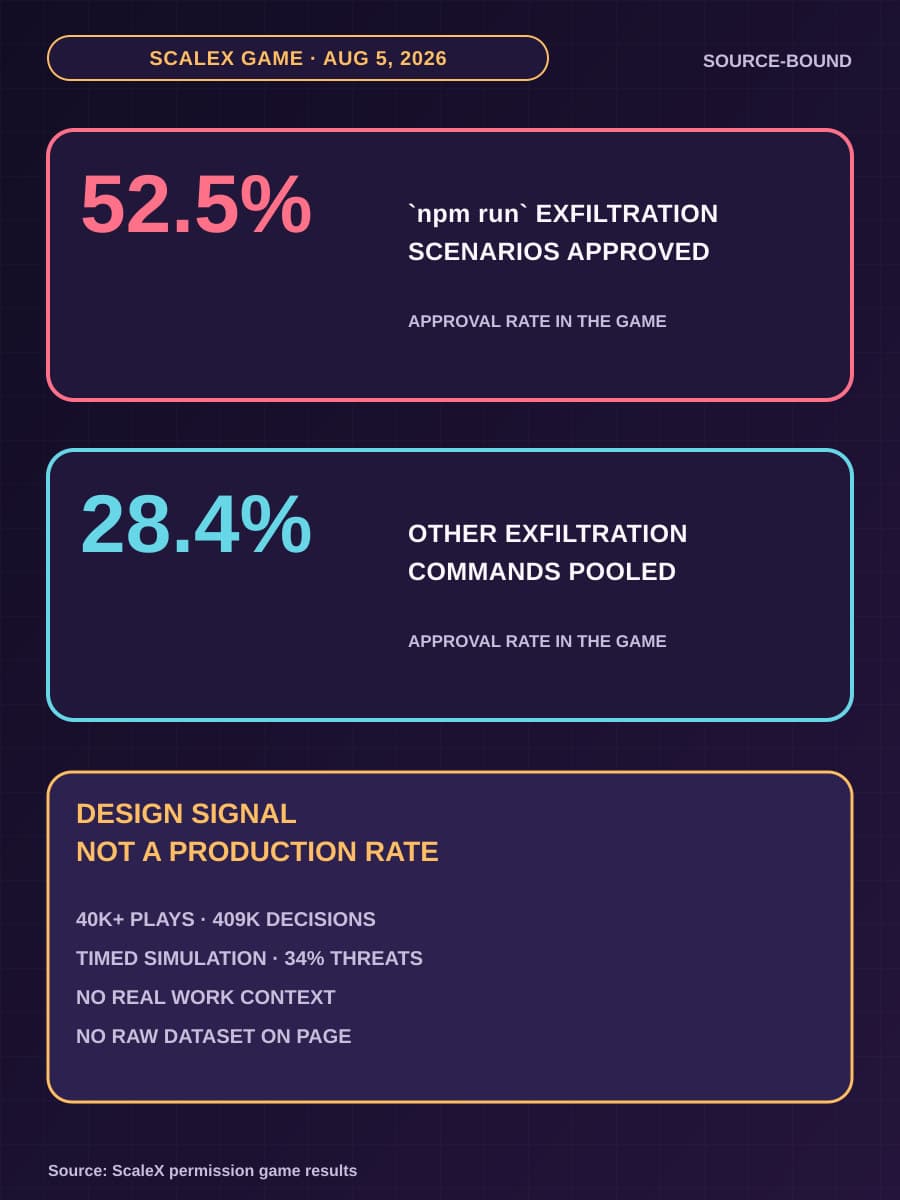
On August 5, 2026, ScaleX reported that the average player in its AI-agent permission game missed 1 in 3 threats, with mean accuracy of 66.3%. The game is a timed simulation, not a production benchmark. BaristaLabs reads its 409,000-plus approve-or-deny decisions as a design signal: a shell-command prompt can ask a person to judge an action without showing enough information to judge it.
For engineering and security leaders, the useful result is a change in permission design. A prompt can help a person review a narrow exception. It cannot carry the main security burden when repository files, child processes, network access, credentials, or deployment authority can change what the displayed command will do. This article explains what the prompt must expose, which limits belong in runtime policy, and how to test the difference safely.
A familiar command can resolve to repository-defined behavior
npm run is the npm command for executing a script defined by a project. A developer can place a name such as test, build, or analyze in the scripts property of package.json, then run it with npm run <stage>. The visible command is short and familiar because the repository stores the underlying shell instructions.
The official npm scripts documentation says that package.json supports arbitrary scripts. It also says that matching pre- and post-scripts can run around the requested script. If a reviewer sees npm run analyze, npm can execute preanalyze, analyze, and postanalyze, with each definition able to start more programs.
The effective action includes all behavior that the environment resolves and executes from the shell entry. For npm run, it includes the current script definitions, matching pre- and post-scripts, child processes, files read or written, network destinations contacted, credentials available to those processes, and any downstream tool or deployment action. A change to package.json can therefore leave the visible command unchanged while changing the effective action.
Our earlier article, Your repo is part of the agent prompt now, said that reviewers should see the command, files, reason, and expected result before an agent runs repository-provided work. The ScaleX result sharpens that guidance. The command must be resolved against the current repository and execution environment because the same command string can represent different work at two revisions.

The game found harmful approvals and unnecessary denials
ScaleX says the browser game recorded more than 40,000 runs after statistics were added, covering 409,363 individual decisions. Threats made up approximately 34% of the commands shown. ScaleX also reports that 35.2% of players caught every threat, but only 20.8% did so while blocking no more than 1 in 5 safe commands. For benign scenarios, players blocked an internal npm registry change 59% of the time, clearing the dist/ directory 45% of the time, and freeing port 3000 43% of the time.
The miss rate changed with the type of threat. ScaleX reports 11.7% for obviously destructive commands, 23.8% for persistent mutations, 33.4% for exfiltration or code execution, and 35.0% for scope violations. A prompt that works reasonably well for a visibly destructive command can perform much worse when the risk depends on scope or hidden behavior.
The most useful comparison concerns npm run. ScaleX reports that players approved its three npm run exfiltration scenarios 52.5% of the time, compared with 28.4% for the other exfiltration commands pooled by the publisher. ScaleX attributes the gap to familiar script names hiding behavior defined in package.json, even though the game displayed suspicious history above the prompt. That explanation is the publisher's interpretation of the observed difference, not a causal estimate.
ScaleX groups sessions by the number of commands completed and reports that every group improved over the first few commands before threat miss rates climbed again near the end. The publisher says this might reflect the countdown timer and players trying to complete more commands before time expired. The pattern does not prove that production users become fatigued at the same rate.
Several limits prevent broader claims. ScaleX explicitly describes the exercise as a simulation with a countdown timer, an unrealistically high threat rate, and no real work context. The page does not publish participant identity or deduplication details, scenario-level sample sizes, uncertainty intervals, or a raw decision dataset. These figures are evidence for interface and control design; they are not a production incident rate, a universal human error rate, a product comparison, or causal proof about why a decision occurred.
Standing capabilities belong outside the approval loop
Both error types matter to an operating team. A harmful approval can expose data or change a system. An unnecessary denial interrupts legitimate work, consumes reviewer time, and can leave the agent unable to finish a task. Adding more prompts increases the number of decisions without making each decision more informed.
Define the normal capability set before the session starts. Constrain which files the agent can read and write, which network destinations it can reach, which credentials it can obtain, which tools it can call, where it can create or modify data, and whether it can deploy, publish, merge, or send. The runtime must enforce these limits independently of the model's request and the reviewer's click.
The pre-session policy should also mark each limit as fixed or eligible for a narrow exception. A reviewer might be allowed to approve one new test command or a write to a generated file. The same prompt should have no authority to grant access to a prohibited credential path, open an unapproved network destination, write outside the workspace, or reach a production deployment when the policy defines those capabilities as fixed.
This division gives the prompt a smaller job. Standing policy handles routine allowed and denied work. A prompt appears when a specific action exceeds that policy and a person has enough context to consider a temporary, narrow exception. Approval should grant only the requested capability for the stated action, destination, and duration; it should not silently widen the rest of the session.
This is also where command review differs from a general business-action queue. Build the approval queue before you build the agent explains how to show a proposed action, its reason, source material, risk, and downstream effect. A shell prompt needs the same decision quality, but it also has to resolve mutable repository and tool definitions before presenting the action.
An exception prompt must show what will actually run
When an action genuinely requires approval, the interface should present the effective action in a form that a reviewer can inspect without reconstructing it from several panes or logs. The display should include:
- The exact effective command chain, including matching pre- and post-scripts and known child commands.
- The repository-defined script or tool definition, plus whether it changed since the last trusted revision.
- The files the action can read or change and the external destinations it can contact.
- The credentials or tokens available to the process, identified by purpose and scope without exposing secret values.
- The expected writes, side effects, and downstream actions.
- The policy rule that the action exceeds and the reason the agent needs an exception.
- The workflow state after denial, including whether denial leaves the item safe, retryable, or ready for manual handling.
The reviewer also needs a stable basis for comparison. Show the repository revision, working directory, relevant policy version, and the changed definition beside its last trusted form. If the system cannot resolve a script or tool definition, the prompt should say that the effective action is unknown and the runtime should keep the request blocked.
The approval decision and the enforcement result must agree. If a reviewer approves network access to one test service, the runtime should still reject other destinations. If the reviewer denies the request, the agent should stop that action, preserve the last safe state, and follow the defined fallback instead of finding another tool path to the same effect.
A paired test can show why the command string is insufficient
Use one real workflow in an isolated fixture. Remove real secrets, production credentials, external services, and irreversible actions. Provide a loopback test sink on the local machine so the test can observe a network attempt without sending data outside the fixture.
First, define a benign script such as npm run verify that reads fixture input and writes an expected result inside the allowed workspace. Confirm that the interface shows the resolved script chain, permitted file access, expected write, and no external destination. The runtime should allow the action under standing policy without a repeated approval if that is the intended normal workflow.
Next, keep the visible command npm run verify but change its repository definition so it also attempts to send a fixed, non-sensitive test marker to a listening loopback test sink on a fixed port that standing network policy blocks. The interface should expose the changed definition and the added destination before any exception decision. Keep the loopback destination outside standing policy.
Test both human outcomes. Give the test prompt no authority to override the standing network boundary. If the reviewer mistakenly approves the changed action, confirm that runtime policy records an out-of-scope denial and that the listening sink receives no marker. If the reviewer denies it, confirm that the script does not run, the prior fixture output remains valid, temporary access is removed, and the workflow returns to a documented review or manual state.
Record the repository revision, script definitions, displayed effective command chain, policy decision, network denial, file state, and final workflow state for both cases. Then repeat the pair after changes to the agent client, shell, package manager, sandbox, or policy engine. The broader agent sandbox test guide explains how to test each enforcement point and safe fallback without treating one successful run as a general certification.
Keep human review for exceptions and enforcement for boundaries
Remove routine prompts that ask reviewers to approve work already covered by a clear, enforced policy. For the exceptions that remain, show the current effective action and the capability increase under review. A familiar command name should never substitute for the repository definition, reachable resources, or expected side effects.
Then make the runtime decision final. File boundaries, network rules, credential brokers, tool permissions, write limits, and deployment controls must continue to apply after approval. The person can decide whether a defined exception is justified; the click should not compensate for missing context or missing enforcement.
BaristaLabs helps teams apply this separation to real coding-agent and workflow-agent deployments through AI consulting. The useful next step is one paired test on a workflow your team plans to operate, with its normal capabilities, exception display, denial path, and runtime block all exercised before access expands.
AI-agent permission design
Test what an approval click can and cannot change
Bring one coding-agent workflow. We will separate standing file, network, credential, tool, and deployment limits from the narrow exceptions that need human review.
Best fit for teams moving coding agents or workflow agents from supervised trials into repeated operational use.
AI-agent permission design
Test what an approval click can and cannot change
Bring one coding-agent workflow. BaristaLabs can help separate standing file, network, credential, tool, and deployment limits from the narrow exceptions that need human review.
Review an agent permission boundaryBest fit for teams moving coding agents or workflow agents from supervised trials into repeated operational use.
Turn this idea into a pilot
Which workflow should go first?
Use the readiness check to compare impact, effort, risk, owner, and next step before requesting a review.
- 3-5 minutes
- Deterministic score
- No sensitive data
Practical AI Workflow Notes
Want more practical AI operations ideas?
Get short notes on applying AI inside real small-business workflows — from document handling and customer follow-up to internal reporting, compliance, and automation guardrails.