


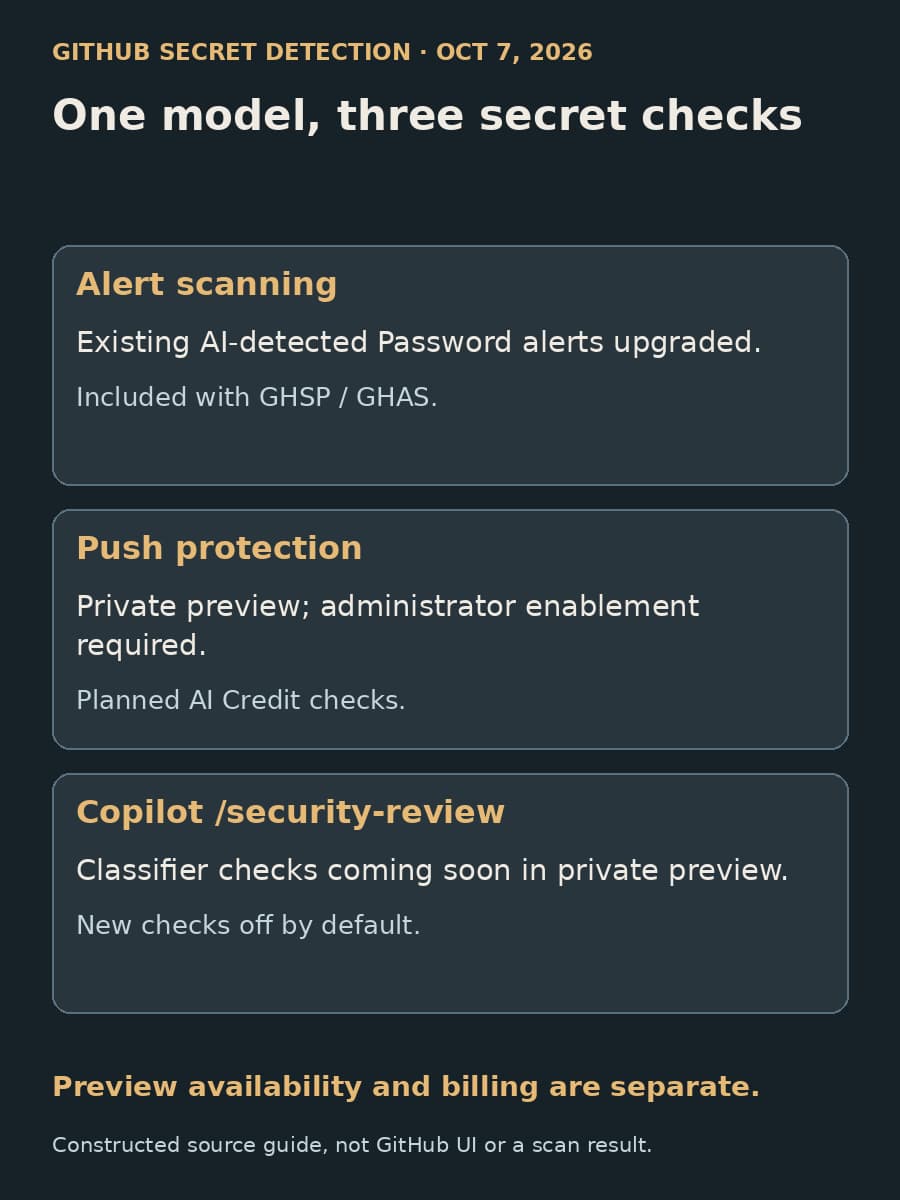
GitHub’s October 7 secret-detection announcement describes a fine-tuned model that reads surrounding code to identify likely credentials, including passwords without a recognizable token format. It connects that model to three different places: existing secret alerts, checks at push time and checks within Copilot security review. Those places do not share one release state or one bill.
For a team using coding agents, the immediate decision is whether an existing included scan has changed or a new opt-in check is being added. Existing AI-detected Password alerts have already moved to the new model. Push protection is in private preview, while the classifier checks for Copilot security review are coming soon in private preview. Treating all three as an available paid feature would misstate both access and cost.
Existing alerts keep their included pricing
GitHub says AI-detected secret alert scans remain included with GitHub Secret Protection (GHSP) and GitHub Advanced Security (GHAS) at no additional charge. Customers with AI-detected Password alerts were automatically upgraded to the new model. That upgrade is separate from the new checks that will consume GitHub AI Credits.
The model is a classifier: it identifies likely credentials rather than generating code or prose. Context can help identify a password that lacks a known token pattern, but the announcement does not establish that every credential will be detected. A model upgrade should not become a claim that the repository is free of secrets.
GitHub also plans AI-detected alerts for GitHub Enterprise Server 3.23 in public preview, included with existing GHSP or GHAS purchases. That Server release does not include AI push protection or the Copilot security review command. Cloud preview eligibility should not be carried over to Server merely because the underlying model is the same.
Push checks and Copilot checks require separate opt-ins
AI push protection checks unstructured credentials at push time, before they enter repository history. It is currently in private preview. GitHub says it will be available to GitHub Team and GitHub Enterprise Cloud customers on github.com with paid GHSP or GHAS coverage; support for Enterprise Cloud with data residency on ghe.com is planned. An administrator must enable it, subject to organization or enterprise policies. The announcement says billing begins when an organization opts into public preview and enables the feature. That planned billing stage does not establish that public preview is already open.
The existing Copilot /security-review command reviews active changes for vulnerabilities and returns prioritized findings with remediation suggestions. Its review is read-only and existing Copilot policies and billing apply. GitHub is adding the secret classifier alongside that review, but those new classifier checks are coming soon, will be off by default and will add AI Credit consumption to the review’s existing usage.
Running /security-review does not enable the new checks. GitHub explicitly says agents should not enable credit-consuming features or change policies or budgets without authorization. A request to review code is therefore not permission to enroll an account in another billed capability.
The new Copilot classifier checks do not require a GHSP or GHAS license. That does not remove the GHSP or GHAS requirement for AI push protection. GitHub hosting plans, security licenses and Copilot subscriptions are separate purchases; a Copilot Enterprise subscription should not be treated as a replacement security license.
The billing account depends on the surface
For AI push protection, GitHub says planned AI Credit usage is billed to the organization that owns the repository. A check can consume credits even if it does not block the push. Estimating spend from blocked pushes alone would miss checks that ran without blocking.
There is an explicit attribution exception for user-namespace repositories belonging to enterprise-managed users (EMUs): usage is attributed to the pusher and applies to that user’s allocated credits. Outside that exception, the announcement attributes push-check usage to the organization rather than a specific user’s allocated credits. Billing ownership and user-credit allocation need to remain separate in the rollout plan.

For the new Copilot security-review checks, the billing account for the active Copilot plan will receive the usage. GitHub says billing begins once you opt into public preview and enable the feature, and usage will appear under GHSP in AI usage insights. That reporting label does not mean a GHSP license is required for these Copilot checks. The classifier checks are coming soon in private preview; the public-preview billing condition is a separate, later stage.
The announcement says AI Credit usage for the opt-in checks will be introduced in the coming weeks. Teams already using AI push protection in private preview should inspect the billing transition rather than assume their existing use will stay uncharged. GitHub says to disable it beforehand if they do not want the new usage; included AI-detected alert scanning remains separate.
A budget alert is not a spending cap
GitHub describes a dedicated budget under Billing and licensing, then Budgets and alerts: choose a SKU-level budget, Advanced Security as the product and Secret Protection AI Credits as the SKU. An all-AI-Credits budget can cover multiple credit-consuming SKUs. Check the intended coverage rather than assuming one budget applies identically to every AI feature.
Budget alerts alone do not stop usage. GitHub directs administrators to configure “Stop usage when budget limit is reached” where available if they want a cap. The relevant question is whether the intended account and SKU have that control enabled, not simply whether an email notification exists.
Before an authorized pilot, have the administrator confirm the available preview, the required license, the billing account and the applicable budget behavior in that account. Use approved nonproduction test inputs without live credentials. Observe whether the intended check ran, how findings were handled and where usage appeared. These are BaristaLabs recommendations; the source does not prescribe this as a GitHub acceptance protocol.
Our AI Scan coverage guide explains a separate code-scanning adoption field. It cannot establish access to these secret-classifier checks. The useful next step here is to identify the particular secret-detection surface being changed and obtain authorization for its access and spending consequences before enabling it.
Source and scope
- GitHub: Purpose-built model for leaked secret detection, October 7, 2026; accessed October 8, 2026.
Availability, account attribution and budget-control statements above come from that announcement. Local pilot suggestions are BaristaLabs guidance. We have not tested the preview, measured classifier accuracy or observed a customer’s bill.
AI-assisted development
Plan one bounded AI check
BaristaLabs can help define where a new AI check belongs and what evidence your team needs before expanding it. Your GitHub administrator owns licensing, access and spending changes.
Bring a sanitized workflow description, never credentials or proprietary code.
Turn this idea into a pilot
Which workflow should go first?
Use the readiness check to compare impact, effort, risk, owner, and next step before requesting a review.
- 3-5 minutes
- Deterministic score
- No sensitive data
Practical AI Workflow Notes
Want more practical AI operations ideas?
Get short notes on applying AI inside real small-business workflows — from document handling and customer follow-up to internal reporting, compliance, and automation guardrails.