


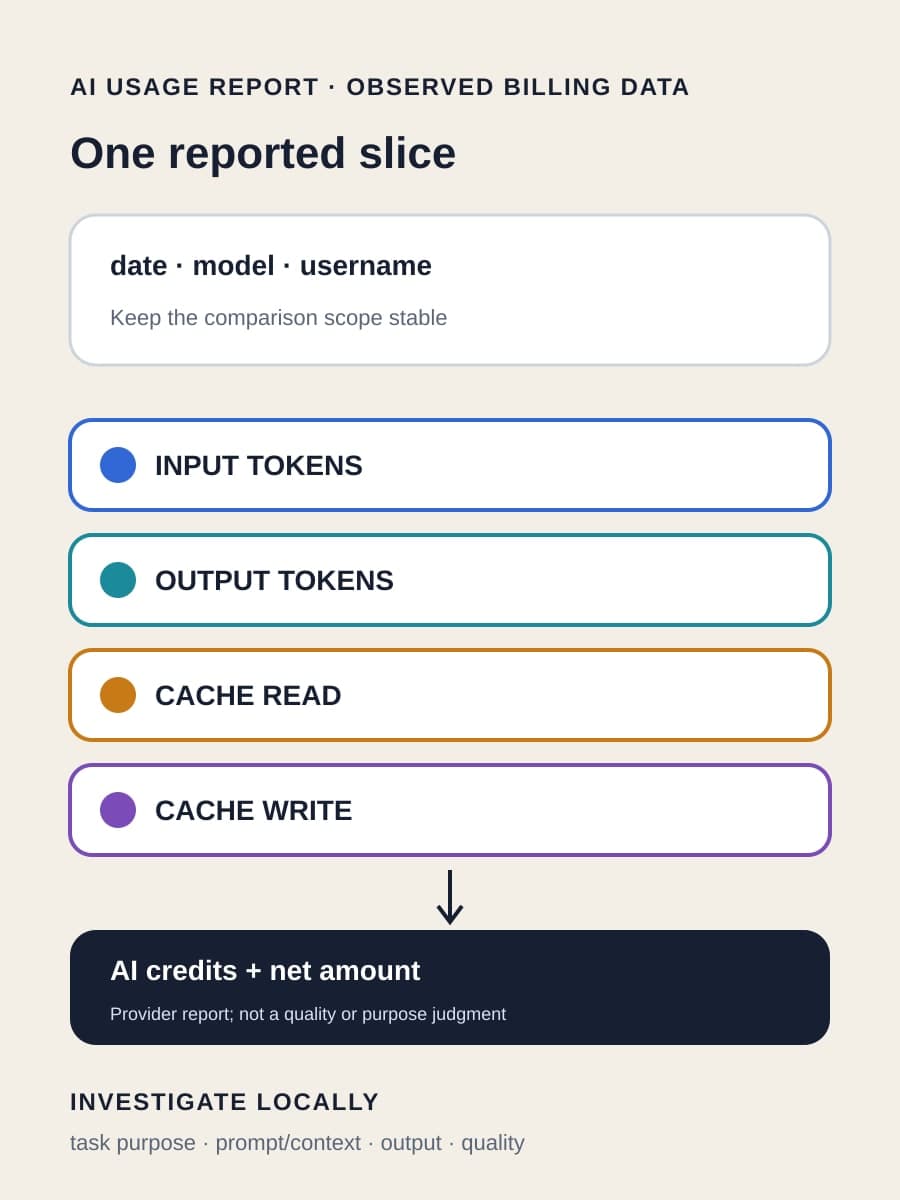
GitHub added a per-model token breakdown to the Copilot AI usage report on August 11, 2026. Administrators can now see input, output, cache-read, and cache-write tokens beside the AI credits each model consumed. That detail can locate where reported cost accumulated, but it cannot explain whether the work was necessary, efficient, or valuable.
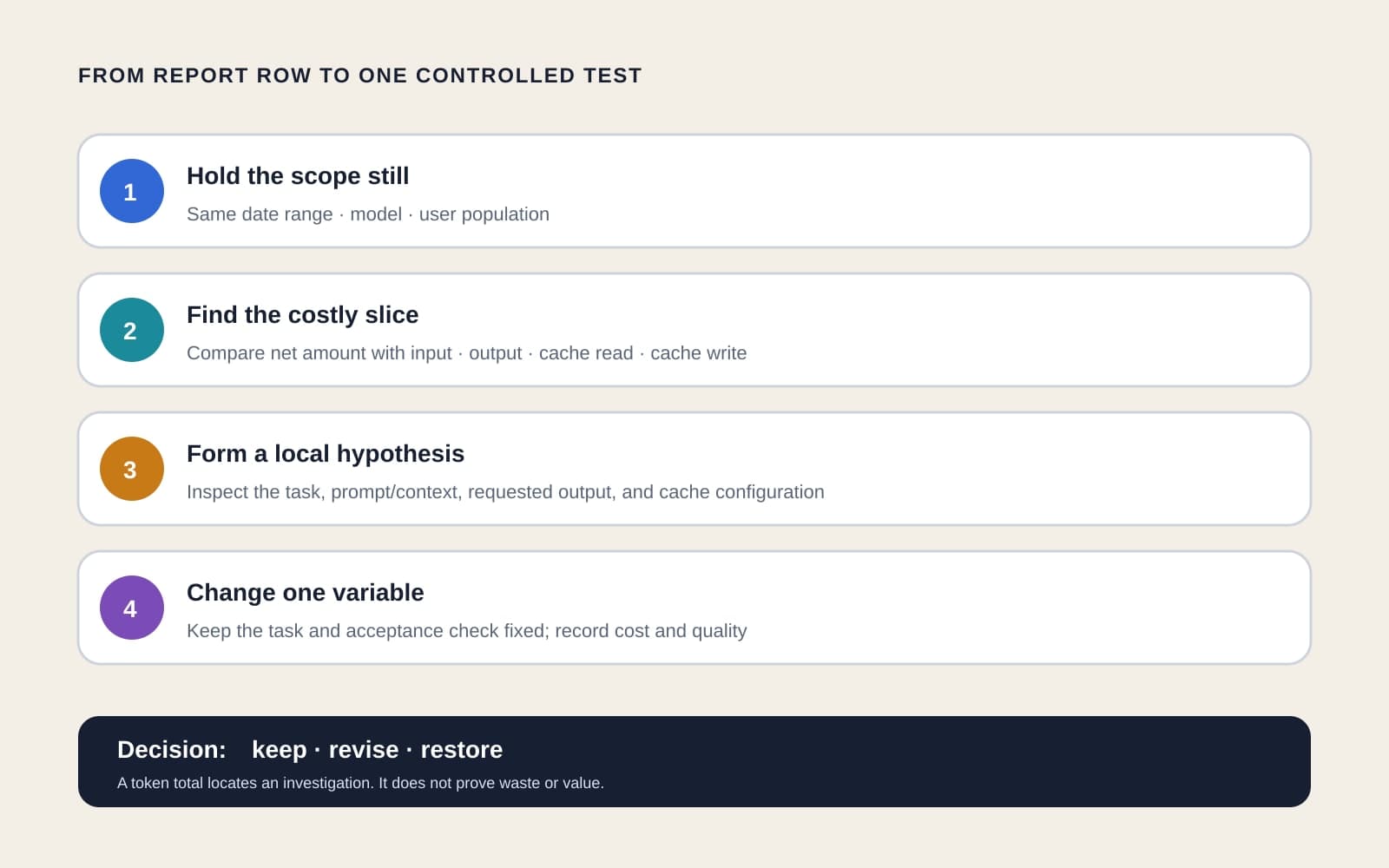
The useful next step is therefore smaller than “optimize Copilot.” Hold one report scope stable, choose one model and token class worth investigating, then test one local change against both cost and an acceptance check. This article explains what the export establishes, what remains outside it, and how to reach that bounded decision.
What does the new Copilot report contain?
GitHub’s August 11 changelog says the AI usage report now places four token counts beside AI credits for each model: input, output, cache_read, and cache_write. Before this change, the report showed AI credits without that underlying token detail.
The billing reports reference adds the grouping and accounting context. The AI usage report sums quantity, gross amount, discount amount, and net amount for each combination of date, model, and username. GitHub defines net amount as the billable amount after discounts, with gross amount minus discount amount equaling net amount.
Those fields describe recorded provider usage and billing. They do not contain the prompt, attached context, requested task, response, repository, workflow path, latency, acceptance result, or delivered business outcome. A row can identify a costly model/user/date slice while leaving the reason for that cost unknown.
The breakdown is available to administrators on Copilot Business and Copilot Enterprise, according to the announcement. GitHub also makes it available to Copilot for individuals users. Access roles and account scope still determine which usage a person can retrieve.
Why don’t token totals prove waste?
Each token class points to a different part of model use, but a count alone has no task context. A large input total may reflect an oversized instruction set, or it may reflect source material the task genuinely needs. A large output total may reflect avoidable verbosity, or a required code change, test, or explanation.
Cache fields need the same restraint. cache_read and cache_write show recorded token classes for the model. The inspected public documentation does not provide enough account-specific pricing and task evidence to conclude that a higher value in either field is good or bad. Treat cache composition as a clue to investigate, not a verdict on efficiency.
Comparisons also need a stable denominator. A model can show more tokens because more people used it, the work mix changed, or the reporting window included a release. Comparing token totals without holding date range, model, and user population steady blends usage volume with behavior.
Do not turn the export into a developer ranking. Username is an allocation dimension, not a measure of productivity, judgment, or value. The same person may work on tasks with very different context and output requirements.
How should a team choose its first cost investigation?
Start with the net amount, not the largest raw token count across unrelated models. The report gives token detail alongside AI credits and billing fields, but the four classes should not be assumed to share one universal unit cost. Select a date/model/username slice that materially affects the account’s reported net amount, then inspect its token composition.
Preserve the original export and record the exact period. GitHub documents a maximum 31-day period for the AI usage report. If the review compares two periods, use equal windows and note changes in the user population, enabled models, or major engineering work.
Next, connect the selected slice to local evidence. Identify the tasks performed during that period, the instructions and context commonly supplied, the expected output, and the acceptance check. If several workflows share the same model and user, the provider row cannot allocate tokens among them by itself; local logs or a narrower test must supply that boundary.
Use the dominant token class to form a hypothesis rather than an answer:
- For input tokens, inspect repeated instructions, attached files, conversation history, and repository context. Remove something only if the fixed task still has the information it needs.
- For output tokens, inspect requested response length and repeated generated material. Shorten the instruction only when the acceptance check does not require the omitted output.
- For cache-read or cache-write tokens, inspect the model and client configuration that produced them. Verify the account’s applicable rates and observed behavior before treating either total as a saving or a problem.
What makes the test decision-safe?
Run the same representative task before and after one change. Keep the model, task input, tool access, and acceptance check fixed unless one of those is the variable under test. Record token composition, AI credits or applicable cost, completion status, latency if it matters, and whether the result passes review.
One variable might be the amount of attached repository context. Another might be the requested answer format. A third might be a model choice that the organization already permits. Changing several at once can lower cost while hiding which change caused a quality loss.
BaristaLabs interpretation is that the report supports three outcomes for the tested scope: keep the current setup when the extra context or output is justified; revise it when one change lowers cost without losing the required result; or restore it when the cheaper setup fails the acceptance check. None of those outcomes should be generalized to every Copilot task from one user or one period.
Cost is not return. GitHub’s separate impact dashboard pairs estimated Copilot cost with pull-request output, but our Copilot potential-ROI analysis explains why that still does not prove financial value or causality. The token report answers an earlier operational question: where should the team look first?
What operating limits should administrators plan around?
The billing reference says the detailed report is available through the GitHub web interface and not through the REST /usage endpoint, which provides summarized billing information. Reports are delivered to the account’s default email address, and only one usage report per account can be requested at a time. Teams building a recurring review should account for that retrieval process instead of assuming a detailed API feed exists.
No authenticated GitHub account was used for this source review. We did not exercise the generated CSV, export timing, historical backfill, empty-field behavior, or invoice reconciliation. Confirm those details in your own account before depending on an automated parser or finance close process.
Keep a definition note beside each stored export. GitHub says report structures can change, and the token fields themselves are new. Our analysis of Copilot app metric definition changes shows why a pipeline can remain technically valid while a comparison changes meaning.
Use the report to narrow the question
Download a fixed-period AI usage report, identify one date/model/user slice with meaningful net amount, and inspect which token class dominates that slice. Then map it to one representative local task and change one variable while holding the acceptance check still.
That process turns new billing detail into a testable operating decision without pretending the CSV knows the purpose or quality of the work. BaristaLabs helps teams connect provider usage data to task evidence through AI consulting. If one Copilot cost slice needs a defensible test, bring the export and task boundary to a focused review.
Use the GitHub Copilot enterprise-controls guide to keep the report definition, budget owner, local delivery evidence, and review date in the same control inventory.
AI cost review
Turn one token-cost slice into a controlled test
Bring one Copilot AI usage export and the task behind a costly model/user segment. BaristaLabs will help define a stable comparison, one change, and the quality check needed before rollout.
Best fit for Copilot Business or Enterprise teams reviewing AI-credit consumption without task-level context in the provider report.
Turn this idea into a pilot
Which workflow should go first?
Use the readiness check to compare impact, effort, risk, owner, and next step before requesting a review.
- 3-5 minutes
- Deterministic score
- No sensitive data
Practical AI Workflow Notes
Want more practical AI operations ideas?
Get short notes on applying AI inside real small-business workflows — from document handling and customer follow-up to internal reporting, compliance, and automation guardrails.