


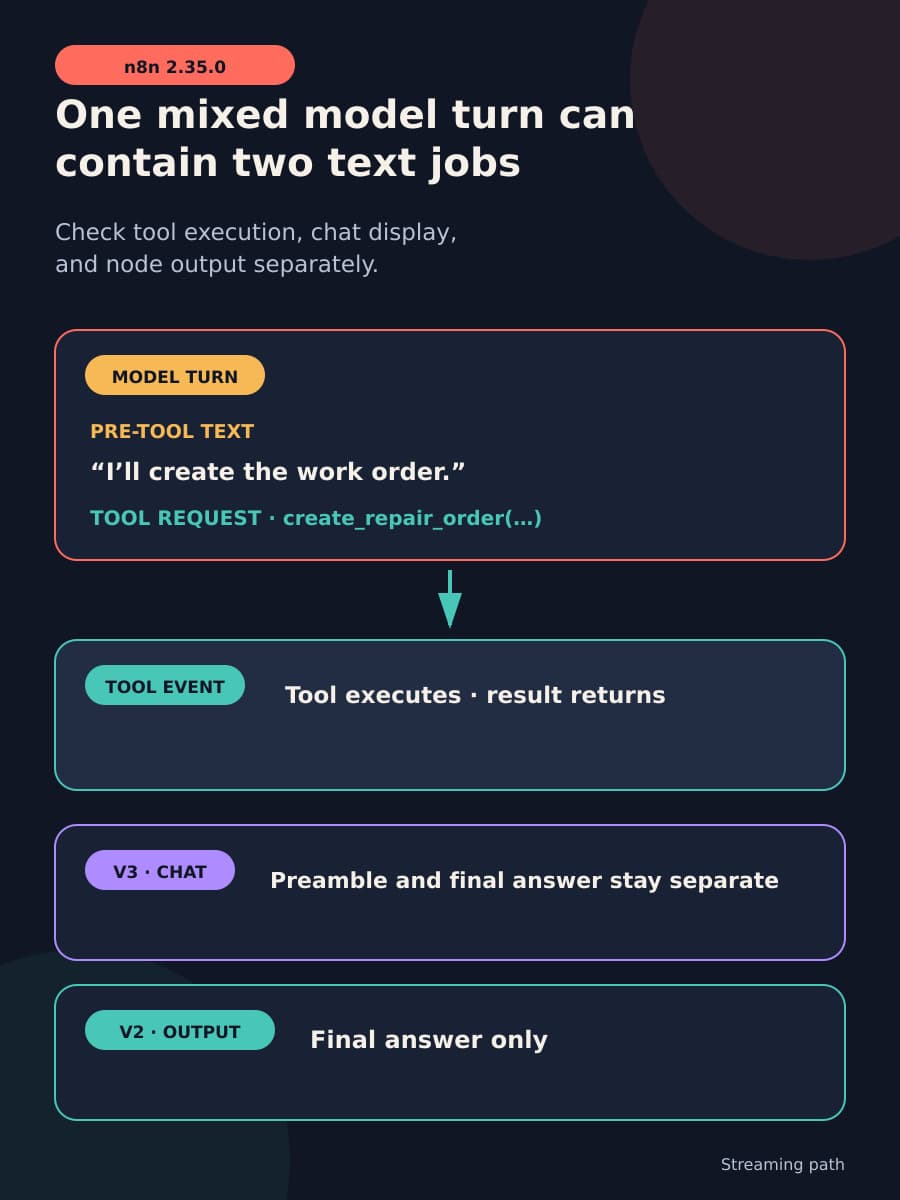
n8n 2.35.0, released on August 11, fixes how the AI Agent handles text that appears before a tool call. A model can return ordinary text and a tool request in one turn, a response shape supported by the Anthropic and OpenAI APIs. With streaming enabled, n8n could assign that pre-tool text to the wrong chat message or node output.
Tool execution is only one layer of the workflow. The chat view must keep the model’s preamble separate from its final answer, and the node output must contain the text that the next system expects. This article shows how to test tool execution, chat message separation, and node output on the exact AI Agent version and release channel your team uses.
A mixed response creates four ordered events
The sequence has four parts:
- The model sends ordinary text before it acts.
- The same model turn requests a tool.
- The tool runs and returns a result.
- The model uses the result to produce a final answer.
The first text can be valid model narration. Its position makes it distinct from the tool result and the final answer. If software joins these parts, a person can see one message where the model produced two. A downstream node can also receive text from different stages as one value.
The change description for pull request #35212 gives this before-fix example: Room 1101Work order created successfully! The first part was text before a work-order call. The second part was the answer after the tool ran. This example comes from the n8n source. It is not an independent BaristaLabs reproduction.
Tool execution, chat display, and node output are separate surfaces. A tool can run while the chat groups messages incorrectly. A clean chat message does not show what a downstream integration received. Review steps, exception handling, and local workflow settings determine whether the complete sequence works.
V3 keeps the preamble as a separate chat message
For the V3 AI Agent, identified in the source as defaultVersion: 3.1, the defect was chat display grouping. After a tool call, the resumed turn reused the original runIndex. The chat client used that value in its message key, found the existing message, and added later text to the same chat bubble.
V3 already processed each turn separately. Its agent runner discarded the preamble turn’s output, so the node’s final output value was already correct. The source does not support describing the V3 defect as node-output corruption.
In 2.35, StreamingMessageManager tracks the current turn within one node run. The preamble remains visible as a separate message, token streaming continues, and the post-tool answer gets its own message. The node output remains the final answer.
V2 removes pre-tool text from node output
The V2 AI Agent, which covers typeVersions 2 through 2.3, used one AgentExecutor stream for all model turns. It added streamed text chunks to agentResult.output across those turns. Pre-tool text could therefore remain in node output beside the final answer.
Version 2.35 buffers each turn’s text until that turn ends. If the turn requests a tool, n8n discards the buffered pre-tool text. When a later turn produces the final answer without another tool request, n8n keeps that answer in output. V2 does not preserve the preamble as a separate message as V3 does.
These repaired behaviors are intentionally different. V3 has per-turn boundaries that support separate messages. V2 does not expose the same boundary, so buffering protects its node output without changing the legacy stream shape.
The source pull request states that the non-streaming path was not affected by this fix. Its manual reproduction path requires streaming to be enabled and the workflow to run from the chat panel. The release note therefore does not describe every AI Agent workflow.
The original dropped-call symptom remains unproven by this fix
The original issue #26352 reported that a mixed text and tool_use response could silently drop the tool call on n8n 2.9.4. According to pull request #35212, that symptom did not reproduce on master. In the tests described there, the tool-use block remained beside the text block and the tool ran.
Pull request #35212 did not prove the cause of the original report or show that 2.35 fixed its dropped-call symptom. Its regression test establishes a narrower result: the tool call remains when the same turn also contains text. Reports involving Claude Sonnet 4.5 and Qwen through DashScope place the observed leak in more than one provider context. These source-bounded reports do not establish prevalence or community consensus.
One path remains explicitly unresolved. With streaming enabled and options.batching.batchSize > 1, concurrent items can still collide because the chat message key does not include itemIndex. The pull request says those items can interleave across message segments after this fix. The default batch size is 1, so teams that use a larger value must keep this exception open.
Test the exact version and channel you operate
Run one mixed-response acceptance test in a non-production instance. A live model decides whether to narrate before a tool call, so one manual attempt cannot show that the old behavior is absent. Use fixed events to produce pre-tool text and one tool call in the same turn when your test setup permits a deterministic fixture.
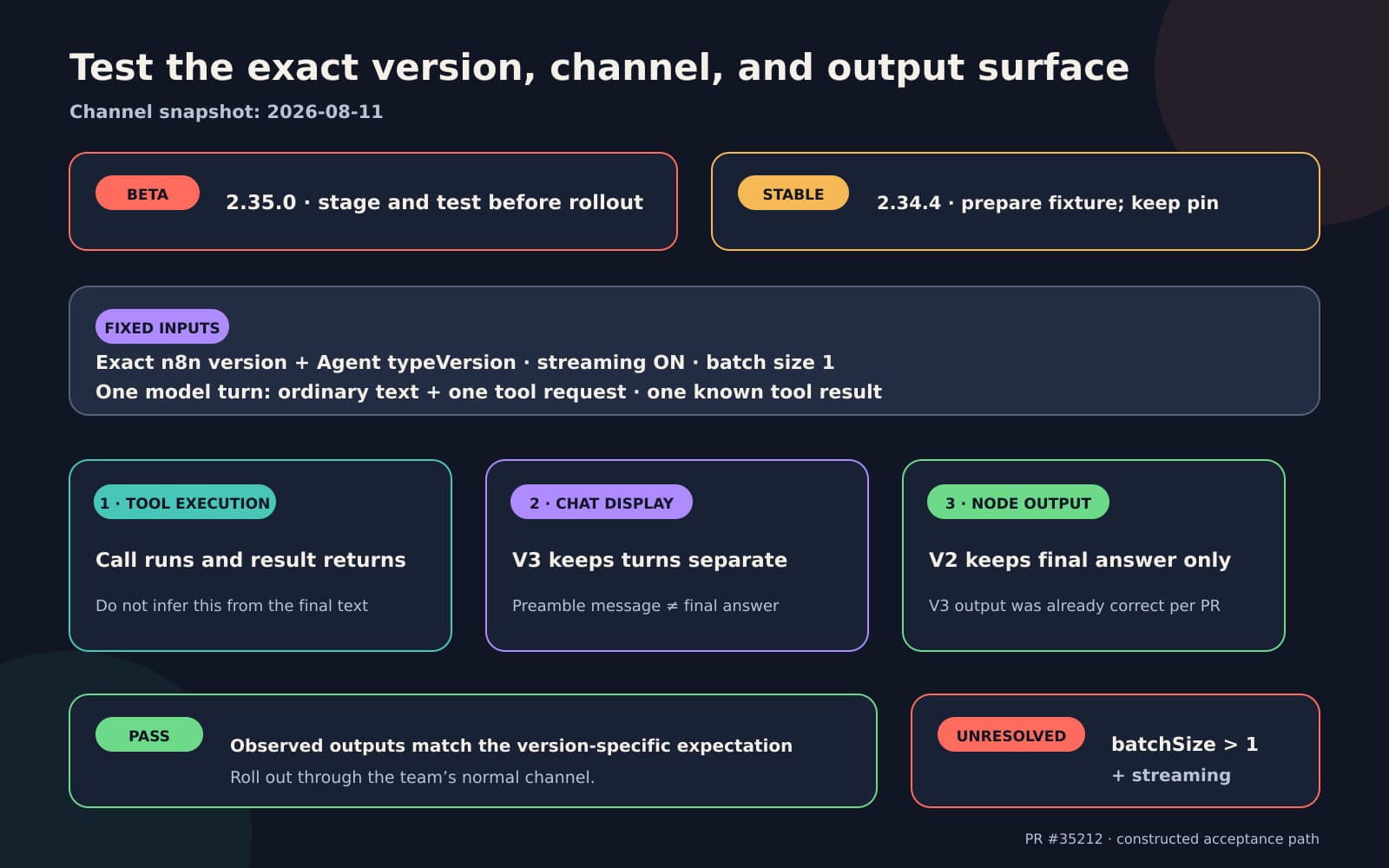
- Record the n8n version, AI Agent node
typeVersion, streaming setting, batch size, model and provider, and callable tool. UsebatchSize: 1for the covered path. - Send the deterministic mixed turn. If fixed events are unavailable, use a prompt that encourages narration before the tool call and label the run as non-deterministic.
- Confirm that the tool executes by checking its observed effect or test double. Do not infer execution from the agent’s words.
- On V3, confirm that the preamble and post-tool answer appear as separate chat messages. Confirm that node
outputcontains the intended final answer. - On V2
typeVersions2 through 2.3, confirm that pre-tool text is absent from nodeoutputand the final answer remains. V2 is not expected to retain the preamble as a separate message. - Confirm that no surface joins the pre-tool text to the post-tool answer. Use the result to make the release-channel decision for that workflow.
Keep the expected text and tool result simple enough to compare exactly. If the test fails, retain the version, settings, observed tool event, chat messages, and node output so the workflow owner can identify the failed surface. For a workflow with downstream writes or approvals, repeat the final-output assertion where the receiving system reads the value.
Choose the channel after the test
At the August 11 snapshot, n8n’s beta channel points to 2.35.0. The stable channel still points to 2.34.4, dated August 7. This channel state does not justify a blanket upgrade.
Teams that follow stable can keep their current pin and prepare the mixed-response fixture now. They can run it when the fix reaches the stable version they plan to deploy. Teams that use beta can stage 2.35.0 and require the test to pass before rollout. Any production path with streaming and batchSize > 1 remains unresolved by this fix, regardless of channel.
This small sequencing fix still depends on local tests, integration checks, review, and exception handling. BaristaLabs helps teams connect those parts through process automation services. If the change affects a workflow you operate, contact BaristaLabs with the version and path you need to test.
Workflow integration review
Test the output path your automation actually uses
Bring one n8n AI Agent workflow, its release channel, and one representative tool call. BaristaLabs will help separate the model turn, tool event, final answer, and downstream value before rollout.
Best fit for teams using streaming AI Agent nodes whose output feeds customer communication, approvals, or operational writes.
Turn this idea into a pilot
Which workflow should go first?
Use the readiness check to compare impact, effort, risk, owner, and next step before requesting a review.
- 3-5 minutes
- Deterministic score
- No sensitive data
Practical AI Workflow Notes
Want more practical AI operations ideas?
Get short notes on applying AI inside real small-business workflows — from document handling and customer follow-up to internal reporting, compliance, and automation guardrails.