


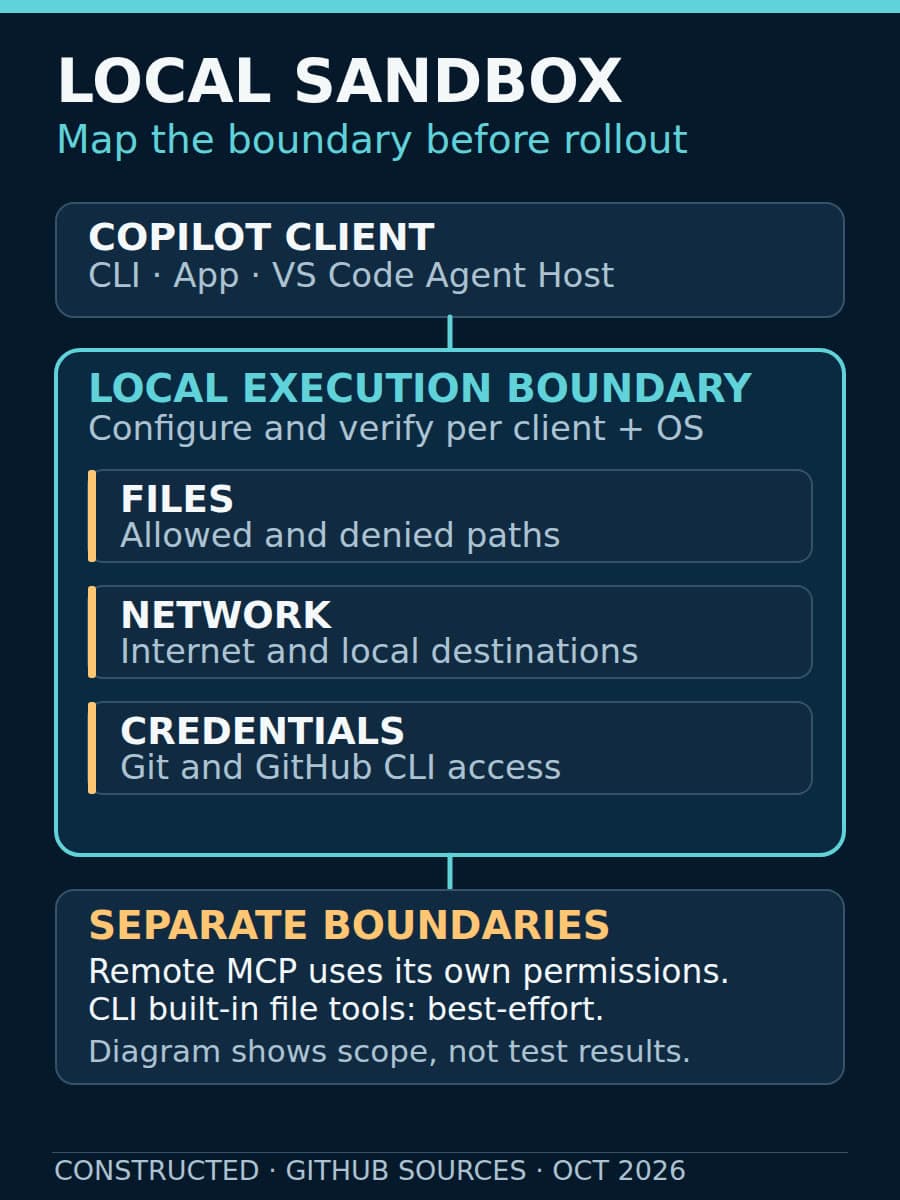
GitHub made local sandboxing generally available on October 7 in Copilot CLI, the Copilot app and VS Code sessions using Agent Host. That gives teams a supported way to restrict commands an agent runs on their own machines. It does not remove the need to decide which files, networks and credentials those commands actually need.
The useful rollout question is not “Does Copilot have a sandbox?” It is “Does this workflow run under the policy we intended, on this client and this operating system?” Treat general availability as a reason to test a bounded workflow, not permission to skip that check.
General availability is not automatic enablement
GitHub's current sandbox concepts guide says local sandboxing is off by default. Until it is enabled, shell commands run with the access available to the signed-in user. The guide also says settings are configured separately in the CLI and the Copilot app: enabling one does not configure the other.
That distinction matters when the same developer moves between clients. A successful test in the CLI is not evidence that an app session has the same restrictions. The GA announcement also includes VS Code sessions using Agent Host; it should not be read as a promise about every agent session in every editor.
Our earlier Copilot app sandbox guide covered the September public preview and per-project defaults. The October release changes availability and scope. Its older preview status is historical, not the current release status.
What the boundary does—and does not—cover
The announcement describes controls for filesystem access, internet and local-network access, Git credentials and GitHub CLI credentials. It also includes local MCP and language servers where supported, plus enterprise-managed settings that developers cannot weaken.
Microsoft eXecution Container, or MXC, translates a common policy into native operating-system controls. GitHub describes local sandboxing as lighter-weight process and filesystem containment, not a separate virtual machine or container. Teams with requirements for stronger isolation should assess that difference explicitly.
Model choice and tool isolation are separate concerns. A different model does not establish a different execution boundary. Conversely, a sandbox does not prove that a generated patch is correct, that a dependency is trustworthy or that an approved network destination is safe.
The concepts guide adds two important limits. The CLI's built-in file tools run in-process and check policy on a best-effort basis; the operating-system sandbox cannot directly constrain those operations. Remote MCP servers are never sandboxed. Review what a remote service can do using its own permissions rather than assuming the local boundary extends to it.

Test one workflow before expanding it
Start with a non-production repository and disposable fixtures. Write down the expected allowed paths, denied paths, network destinations and credential use. Include the client's version and operating system in the record so the evidence can be repeated.
A practical acceptance check should cover these cases:
- Allowed work: The agent can read the repository, produce a patch and run the intended tests without extra access.
- Denied filesystem access: A command cannot read or modify a disposable fixture outside the allowed scope. Do not use real personal files or secrets for this test.
- Denied network access: A command cannot reach a test destination that the policy excludes. Test local-network access separately where relevant.
- Credentials: The workflow receives only the access it needs. Do not infer credential masking from a successful repository command alone.
- Local and remote tools: Check local MCP and language-server behavior where supported, and record remote services as a separate boundary.
- Exceptions: Observe what happens when a command asks to run outside the sandbox. A bypass prompt is a request for broader authority, not proof the restriction held throughout the task.
These are recommended rollout tests, not claims that BaristaLabs has executed them against Copilot. Available restrictions depend on the client and operating system. When a required control cannot be demonstrated, narrow the workflow or keep that action manual.
Keep the exception owner separate from the agent
GitHub says enterprise settings can require sandboxing and enforce policy. That is useful governance, but the concepts guide notes that an effective policy permitting bypass can still allow sandboxing to be disabled for the current session. Review both the required-sandbox setting and its exception behavior.
Give a named person responsibility for approving broader access, and retain the reason alongside the command and test outcome. Recheck the workflow after changes to its client, operating system or tools. Keep normal patch review and release approval in place: execution restrictions do not replace either.
Local sandboxing is included with Copilot at no additional cost. That statement is about local sandboxing, not cloud sandbox usage, which GitHub bills separately. The immediate opportunity is a more deliberate local execution boundary—not a blanket guarantee of safe autonomy.
Sources
- GitHub GA announcement, October 7, 2026.
- GitHub Docs: About cloud and local sandboxes, accessed October 9, 2026.
- Microsoft MXC repository, accessed October 9, 2026.
Local agent rollout
Verify one local agent workflow
BaristaLabs can help map the tools and services one workflow needs, test its execution restrictions and document exceptions before a wider rollout.
Start with one repository, one client and a named owner for exceptions.
Turn this idea into a pilot
Which workflow should go first?
Use the readiness check to compare impact, effort, risk, owner, and next step before requesting a review.
- 3-5 minutes
- Deterministic score
- No sensitive data
Practical AI Workflow Notes
Want more practical AI operations ideas?
Get short notes on applying AI inside real small-business workflows — from document handling and customer follow-up to internal reporting, compliance, and automation guardrails.