


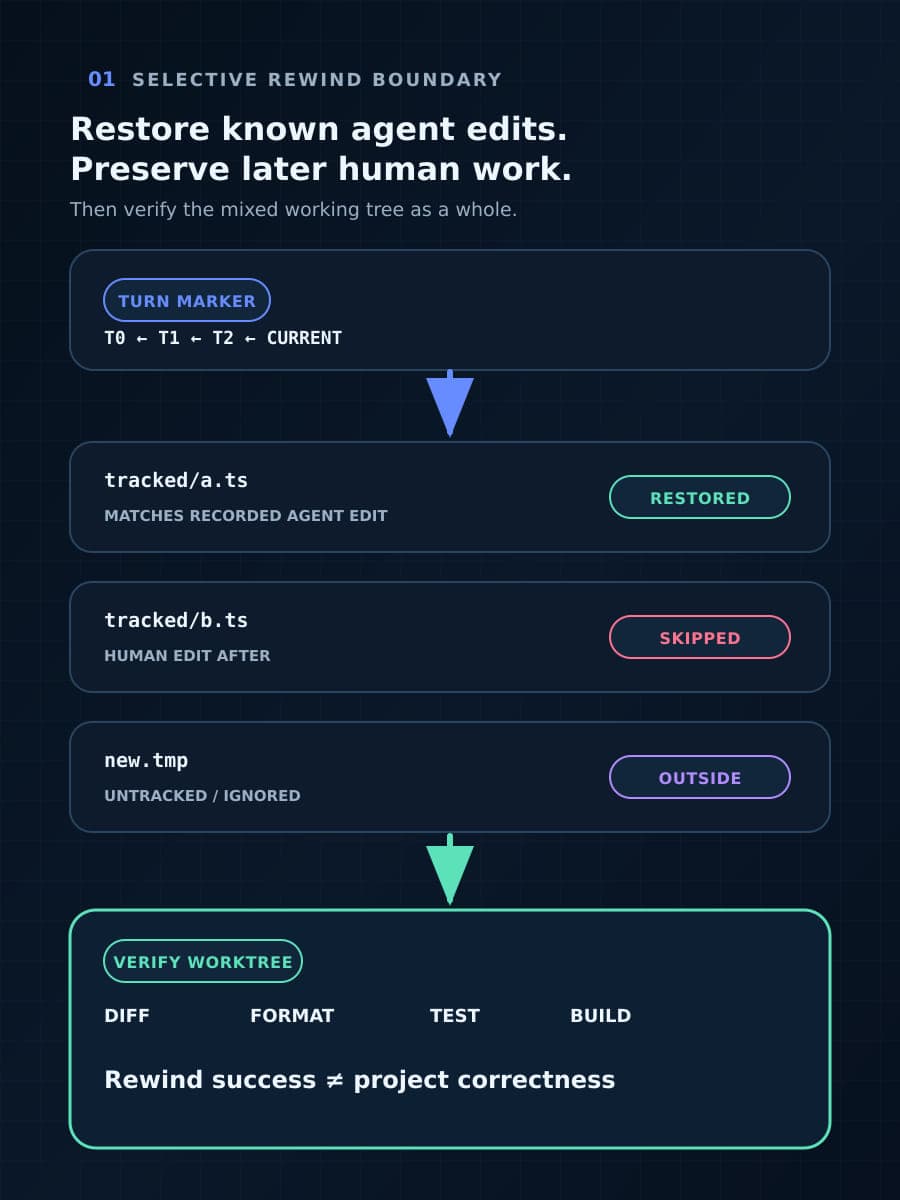
GitHub has changed how Copilot CLI recovers an agent session. The /rewind command can now roll conversation back and restore Copilot-authored file changes without requiring a Git repository, while leaving files alone when a person edited them after Copilot did.
That preservation rule prevents one dangerous overwrite, but it can also leave a mixed workspace: some files return to an earlier state and a later-edited file does not. This guide explains the two rewind scopes, the exact skip condition GitHub documents, and a small test that shows whether the resulting project is usable.
What does /rewind restore?
GitHub's Copilot CLI command reference says /undo and /rewind open the same picker. The user selects an earlier user turn, then chooses between Conversation only and Conversation + files.
Conversation only rolls the chat back while leaving files as they are. This is useful when the problem is the reasoning path or instruction history and the current workspace should not change.
Conversation + files also restores files Copilot changed during the selected turn and the later turns being discarded. GitHub says those files return to their pre-change contents. File-change tracking covers editing tools, shell commands, and subagents, so the mechanism is wider than edits made through one visible editor action.
The August 13 Copilot release summary describes the practical change plainly: restoration no longer requires Git and does not discard user edits. The github/copilot-cli release changelog at commit 3f9c5e1 places that behavior in version 1.0.78, dated August 3.
Why can a successful rewind still leave an invalid project?
GitHub documents a deliberate skip condition. If a file's current contents no longer match what Copilot last wrote, file restoration skips it. In ordinary use, that difference can mean a developer edited the file after the agent.
Skipping protects the newer human change from being replaced. It does not establish that the preserved file remains compatible with other files that were restored. A renamed function may survive in one file while its restored callers use the old name; a package setting may stay new while a related generated file returns to an earlier form.
This is BaristaLabs interpretation of the documented mechanism, not a GitHub claim that rewind creates inconsistent workspaces. The point is narrower: selective restoration preserves changes at file granularity, while project correctness often depends on relationships across files.
What remains outside this recovery boundary?
The cited documentation describes conversation state and tracked file changes. It does not say /rewind reverses a database migration, retracts a published package, deletes a cloud resource, undoes an API call, or restores an external service changed by a shell command.
Even inside the workspace, Git-free rewind and version control solve different problems. Rewind gives the current Copilot session a selective route back to an earlier turn. Git provides a durable repository history, reviewable commits, branches, collaboration, and recovery after the agent session is gone. The new feature should not be read as a reason to remove version control from software work.
How should a team test selective restore?
Use a disposable project with three small, related files. Ask Copilot to change all three in one turn, then make a manual edit to one of those files before opening /rewind. Keep the expected pre-change contents available outside the test so the result can be compared byte for byte.
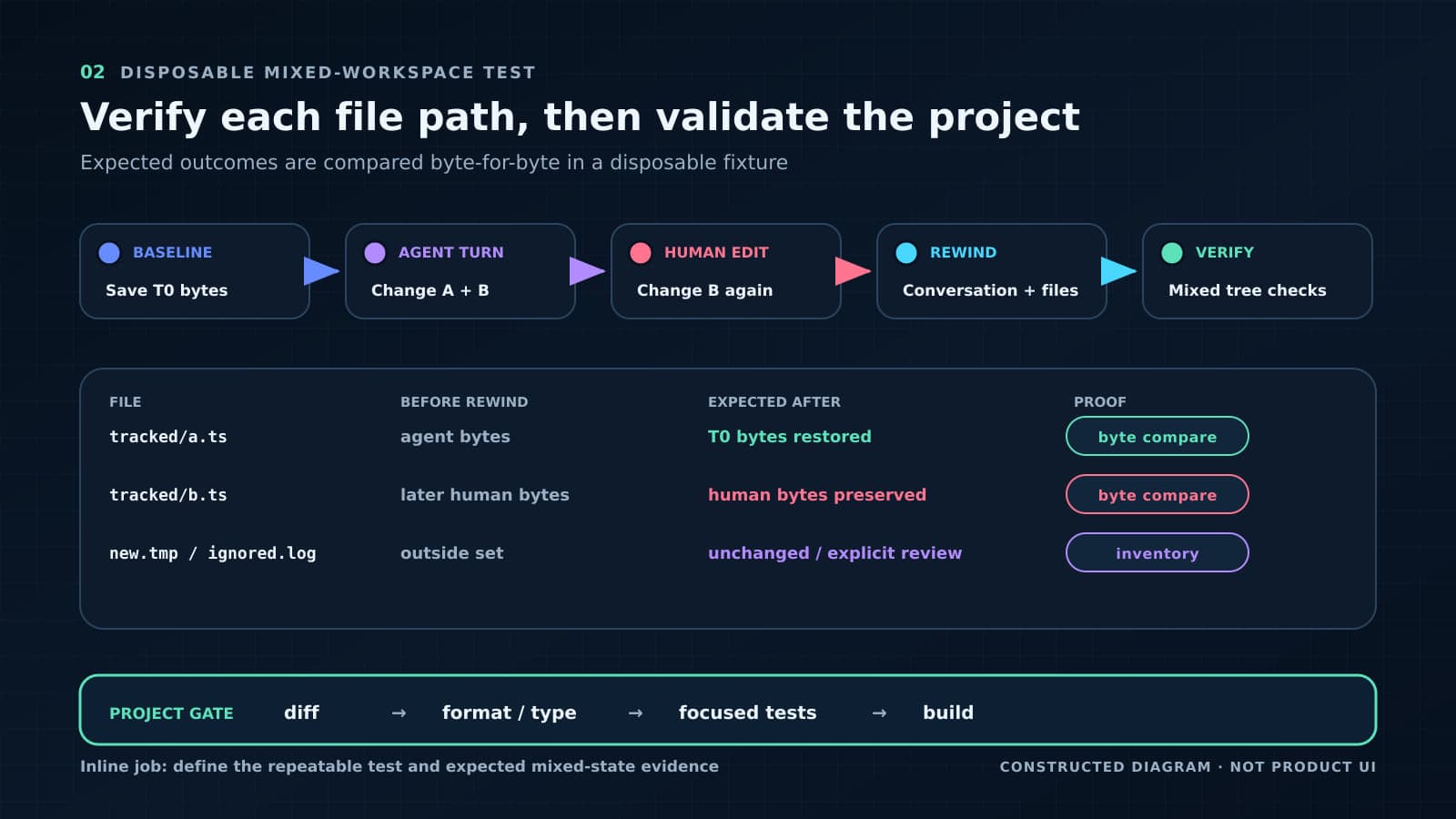
First choose Conversation only. Confirm that the conversation moves to the selected turn and that none of the three files changes. This proves the team can correct context without silently changing the workspace.
Repeat from a fresh fixture and choose Conversation + files. Confirm that the two files still matching Copilot's last output return to their exact pre-change contents. Confirm that the manually edited file is skipped and retains the manual bytes.
Then inspect the complete workspace rather than declaring success from the preserved file alone. Run the formatter, parser or type checker, focused tests, and a build where applicable. If the mixed state is invalid, decide whether the human edit should be adapted, committed elsewhere, or intentionally replaced through an ordinary reviewed change.
Add one shell-created file and one subagent edit to a second fixture if those paths are part of the team's real usage. GitHub says tracking covers both, so the test should exercise the interfaces the team plans to trust rather than only direct editing.
When is the new rewind useful?
The non-Git path is valuable for a bounded agent session, including scratch directories, generated experiments, and projects where a repository has not been initialized yet. The two scopes also let a developer separate a bad conversational branch from unwanted file changes instead of treating every correction as the same operation.
Use it as session recovery, not as proof that the project is restored. The safe completion condition is explicit: the intended conversation point is active, expected Copilot changes are reversed, later human edits remain, external effects are accounted for separately, and the resulting project passes its own checks.
That is a smaller promise than “undo the agent,” but it is operationally useful. If your team is expanding coding-agent file access, ask BaristaLabs to review one recovery workflow before selective rewind becomes the only plan for a bad run.
Use the GitHub Copilot enterprise-controls guide to record this file-level recovery path separately from repository rollback, remote-side-effect recovery, and the evidence required before rollout proceeds.
Sources
- GitHub Changelog: “GitHub Copilot weekly releases — August 10”, August 13, 2026.
- GitHub Docs: “GitHub Copilot CLI command reference”, accessed August 15, 2026.
- GitHub Copilot CLI changelog at commit
3f9c5e1, inspected August 15, 2026.
Coding-agent recovery review
Exercise one file-recovery path before wider agent use
BaristaLabs can help a software team trace agent edits, later human changes, rewind scope, skipped files, project validation, and durable repository recovery.
Useful for teams allowing coding agents to edit repositories, configuration, documentation, or other project files.
Turn this idea into a pilot
Which workflow should go first?
Use the readiness check to compare impact, effort, risk, owner, and next step before requesting a review.
- 3-5 minutes
- Deterministic score
- No sensitive data
Practical AI Workflow Notes
Want more practical AI operations ideas?
Get short notes on applying AI inside real small-business workflows — from document handling and customer follow-up to internal reporting, compliance, and automation guardrails.