


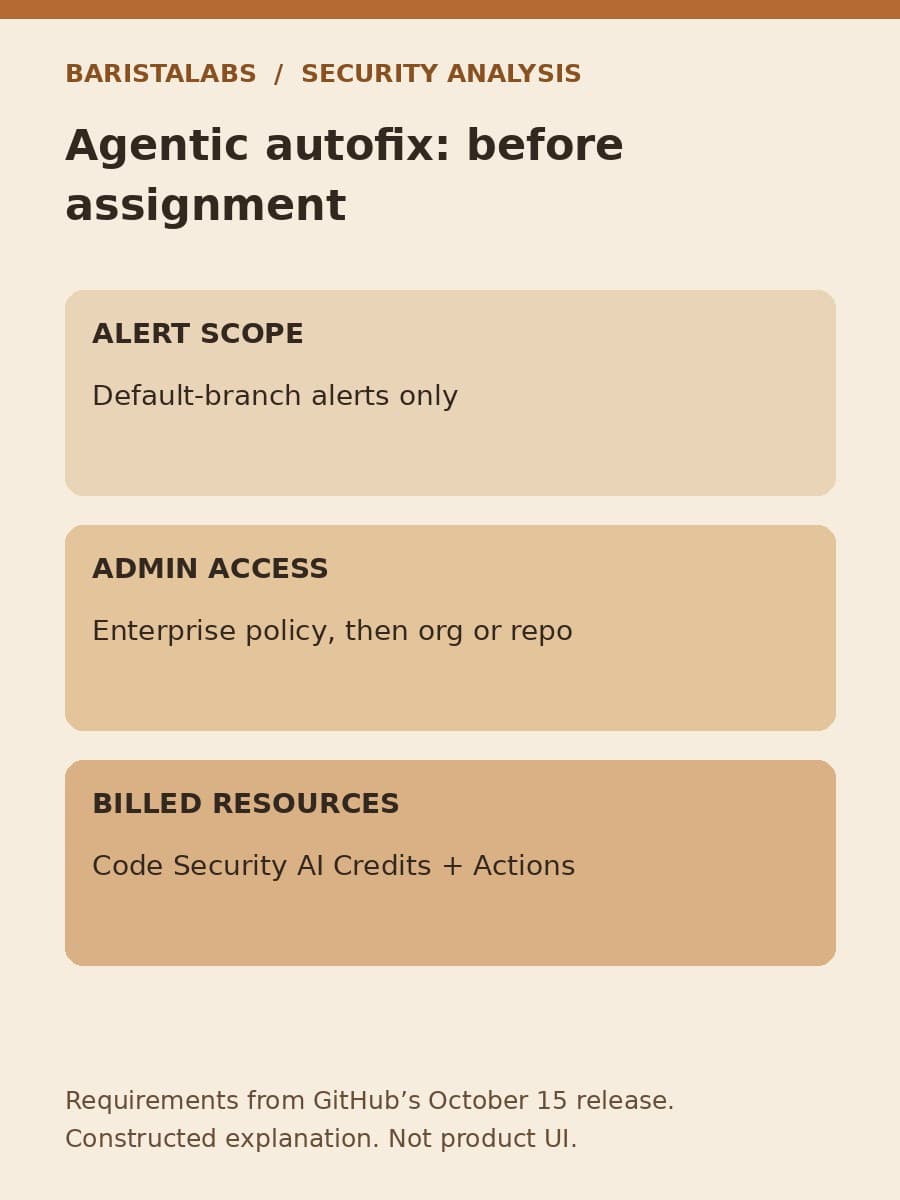
GitHub made agentic autofix for code scanning alerts generally available on October 15. It can explore a repository, propose a fix, rerun CodeQL and open a draft pull request for review. For an engineering lead, the immediate decision is whether to enable that workflow and which alert to assign first.
Enabling it changes more than the button on an alert. GitHub says Assign to Copilot replaces the free Generate Fix option when agentic autofix is enabled. The new workflow consumes Code Security AI Credits and GitHub Actions minutes. Check the access and billing path before offering it as the next step for a security backlog.
Start with a default-branch alert
The GA announcement limits assignment to code scanning alerts on the repository’s default branch. An alert detected only on a pull request or another branch cannot be assigned to Copilot through this feature.
That boundary matters if your team has just been evaluating AI Scan for pull requests. Do not assume a finding in that workflow is eligible for this assignment path. Identify the actual alert and the branch on which it exists before planning remediation.
GitHub supports assigning a single alert from its page. It also allows selecting up to 25 alerts from the repository or security campaign alert list for a single pull request. The batch limit is a capability, not a recommended starting size.
BaristaLabs recommends beginning with one alert whose affected behavior the team understands. A small assignment makes it easier to inspect the proposed change and identify missing tests. This is our pilot recommendation, not a GitHub requirement or a result from a customer trial.
Confirm both administrator steps and billing
The release is available to GitHub Code Security and GitHub Advanced Security customers on GitHub Enterprise Cloud, including Enterprise Cloud with data residency. The announcement does not establish availability on Enterprise Server or every Copilot subscription.
An enterprise administrator must first enable the new Agentic autofix policy in Advanced Security policies. An organization or repository administrator can then turn it on in Code Security settings. Access also requires a defined Copilot billing method. A repository owner’s willingness to try it is not enough to complete those prerequisites.
The billing section of the announcement identifies two resources: AI Credits from the Code Security budget and GitHub Actions minutes. Credit usage appears under the Advanced Security product in enterprise billing and licensing. GitHub also says SKU-level budgets can be set for Code Security AI credits.
Do not estimate a fixed cost per repaired alert from this announcement. It supplies no universal per-alert price, elapsed-time promise or success rate. Before assignment, ask the billing owner where the credit usage and Actions consumption will be reviewed, and which existing budgets apply. Treat a configured budget as a setting to verify, not an unsupported promise that every running operation stops at an exact amount.
Understand what the draft pull request proves
GitHub describes a loop: Copilot explores relevant files, generates a proposed fix, reruns CodeQL and iterates if needed before opening a draft pull request. That pull request includes a fix summary, an explanation of why it closes the alert and the validation steps performed.
A cleared CodeQL alert is not a complete release test. The agent’s validation addresses the reported alert; the team still needs evidence that the changed application behaves correctly. Read the diff as well as the explanation, and run the regression checks that matter to the affected feature.
For example, if a proposed security fix changes input handling, a reviewer should check both the rejected input and the legitimate input the application must still accept. This is an illustrative review question, not an observed behavior of a generated patch. The right checks depend on the actual alert and code.

GitHub says you can request further changes by commenting on the pull request or interacting with the session in the repository’s Agents tab. Use that path when the fix needs revision, but keep the final approval attached to the specific revision your team reviewed. The existence of a draft pull request does not make the change ready to release.
Prepare a first-assignment note
Before enabling broad use, write down the minimum information needed to judge one assignment. The following is a blank BaristaLabs planning worksheet, not a GitHub form or API schema.
Scroll sideways to see all 2 columns.
| Decision | What to record before assignment |
|---|---|
| Eligible work | Alert reference and confirmation that it exists on the default branch |
| Access | Enterprise policy owner and organization or repository setting owner |
| Spend | Billing owner, applicable Code Security credit budget and Actions usage view |
| Review | Named reviewer and the application checks required beyond CodeQL |
| Outcome | Where the draft PR, revision reviewed and release decision will be recorded |
After the attempt, compare the actual work with that note. Was a usable draft produced? Did the explanation match the diff? Which checks did the team have to add? What consumption can the billing owner attribute to the attempt? Leave an answer unknown if the evidence does not support it.
Our earlier remediation receipt guide covers retaining evidence from finding to release. The additional decision here comes before the assignment: whether this eligible alert, under these access and billing settings, is a sensible first use of the agentic workflow.
Expand only when review can keep up
A batch of alerts can produce one larger pull request. That may be convenient, but it can also make the review harder if unrelated behaviors change together. Before moving from one alert to a batch, decide whether the same reviewer can assess the combined diff and whether the relevant tests are available.
BaristaLabs recommends expanding only after the first assignment gives the team a reviewable change, an understood cost and a clear approval path. If any of those remain unclear, improve the pilot rather than treating the 25-alert maximum as a target. This recommendation is a way to manage uncertainty, not a claim that the feature fails at larger batch sizes.
If your team needs help defining that first attempt, our AI consulting work can help connect one alert, its release checks and the people responsible for access and spend. Start with a sanitized alert description; proprietary source code is not needed for an initial discussion.
Source and limits
- GitHub Changelog: Agentic autofix for code scanning alerts general availability, published October 15, 2026; accessed October 21, 2026.
This article interprets the release announcement. It does not report a hands-on benchmark, measured savings or production customer outcomes. Availability, policy and billing settings should be checked in your own enterprise before use.
Security workflow
Plan one agentic autofix assignment
Bring one sanitized alert description, a repository owner and your release checks. BaristaLabs can help scope a bounded remediation pilot.
Start with one alert and a named security reviewer.
Turn this idea into a pilot
Which workflow should go first?
Use the readiness check to compare impact, effort, risk, owner, and next step before requesting a review.
- 3-5 minutes
- Deterministic score
- No sensitive data
Practical AI Workflow Notes
Want more practical AI operations ideas?
Get short notes on applying AI inside real small-business workflows — from document handling and customer follow-up to internal reporting, compliance, and automation guardrails.