
GitHub Copilot in Teams: switch apps before November 16
GitHub merged its Teams apps. The legacy GitHub app retires November 16, and channel requests to Copilot now open PRs under the app identity.

Sean McLellan
Lead Architect & Founder

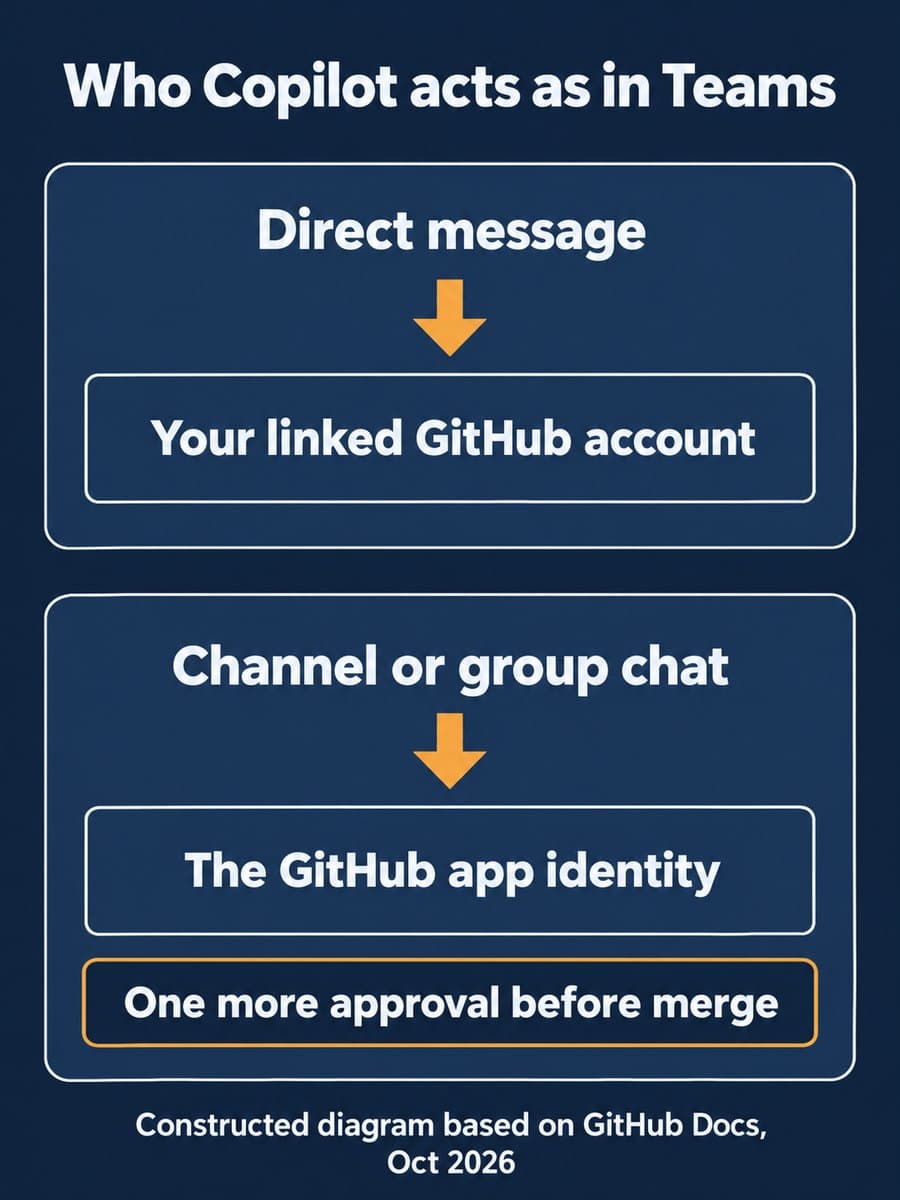
GitHub merged its Microsoft Teams apps on October 23, 2026: notifications and Copilot now live in one GitHub app for Teams. The legacy GitHub app will be renamed "GitHub (deprecated)" and retired on November 16, so teams that start Copilot work from Teams need the consolidated app installed before then.
The install takes minutes. The decision that takes longer is where you let people start Copilot sessions. In a direct message, Copilot acts with your own GitHub permissions. In a channel or group chat, it opens pull requests under its app identity, and by default GitHub then asks for one more approval before merge.
What changed with the GitHub app in Teams?
GitHub folded two apps into one. GitHub says the new app is the one "previously called GitHub notifications," and it now handles both channel notifications and @GitHub requests to Copilot. If you already run GitHub notifications, you update it to the latest version and your existing notifications keep working.
The legacy GitHub app is the one with a deadline. GitHub's changelog says that app "will be renamed 'GitHub (deprecated)' and retired on November 16," and that you should install the consolidated app "to continue using Copilot in Teams." After installing, you mention @GitHub and follow the prompts to connect your GitHub account and select a repository.
The workflow GitHub is pitching: a bug report lands in a Teams channel as a notification, someone asks @GitHub to investigate, Copilot fixes the bug and opens a pull request, and the team reviews and merges it. The Copilot cloud agent part of this is still in public preview, according to GitHub's Teams integration docs.

Who does Copilot act as in a Teams channel?
It depends on where you ask. GitHub's docs draw a clear line:
Scroll sideways to see all 3 columns.
| Comparison dimension | Direct message to the GitHub app | Channel or group chat |
|---|---|---|
| Identity for pull requests and issues | Your linked GitHub personal account | The GitHub app's identity |
| Context Copilot reads | The direct message only (GitHub's suggested way to limit context) | The entire thread |
| Who can trigger changes | You, with write access to the repo | Participants with write access; anyone in the conversation can add input |
| Merge approvals | Your ruleset as configured | One extra approval, on by default, when the ruleset requires at least one |
| Default repository | Not available | Set per channel with @GitHub settings |
Two rows deserve attention. First, context: Copilot "will capture the entire thread as context for your request," and that context "is stored in the artifacts the agent generates." A long incident thread with customer names or credentials pasted in can end up in a pull request description. GitHub's own advice is to use a direct message when you want to limit context.
Second, approvals. GitHub's rulesets documentation says the "additional approval for unattributed Copilot pull requests" setting is on by default for new and existing rulesets. A ruleset that requires one approval will require two for a channel-created Copilot pull request. The setting has no effect if your ruleset requires zero approvals.
Guests in the Teams workspace and outside collaborators on the repository can't start or steer a session.
What do you need before November 16?
Check four things before the cutover:
- A paid Copilot plan for anyone starting sessions.
- Copilot cloud agent and cloud sandboxes enabled by the organization or enterprise owner. GitHub notes that cloud sandbox policies share the same configuration as cloud agent policies.
- Permission to install apps in the Teams workspace. GitHub's integration guide also lists Microsoft Public Developer Preview enabled for the Teams client as a prerequisite.
- A budget for both meters. Sessions started in Teams consume AI credits, and cloud sandbox usage is billed separately. Our earlier post covers why a Copilot task from Teams can hit two budgets.
The app only needs to be installed once per team. After that, each member connects their own GitHub account the first time they mention @GitHub.
Default repositories decide where pull requests land
Each channel can have a default repository, and it matters more than it looks. If a channel has none, GitHub docs say Copilot "sets the repository you use in your first session in that channel as the channel's default repository." Whoever asks first picks the target for everyone after them.
Set it on purpose. Run @GitHub settings in each channel that will use Copilot and choose the repository. For one-off work against another repository, name it in the request: @GitHub Create a pull request to ... repo=OWNER/REPO_NAME branch=BRANCH_NAME.
Why it matters for teams that run work in Teams
BaristaLabs' interpretation: the retirement date is a forcing function, and that's useful. If Copilot in Teams has been running as a preview someone switched on, the migration is a cheap moment to decide how you want it used rather than inheriting whatever the old app was doing.
The channel model fits teams that triage bugs together. Everyone sees the investigation, and the extra approval keeps a person between agent-authored code and production. The cost is that the thread becomes part of the work record, and the first request in a channel can set its repository. Both are easy to manage if you set them before people start using the new app, and awkward to clean up afterward. The same thinking about keeping investigation separate from commitment applies here.
Recommended first step
Our recommendation: this week, install the consolidated app in one team that already triages bugs in Teams. Set that channel's default repository, confirm your ruleset requires at least one approval so the extra approval applies, and post a one-line team rule about what not to paste into threads that might reach @GitHub. Then remove the legacy app from that team and repeat for the rest before November 16.
If you want a quick audit of which repositories allow app-created pull requests and how your approvals are set, our guide to reviewing ruleset bypasses with Rule Insights is a good companion, and our AI consulting team can help you plan the rollout.
Sources and scope
- GitHub Changelog: Turn notifications into code with GitHub Copilot in Teams, October 23, 2026.
- GitHub Docs: Integrating Copilot cloud agent with Teams, accessed October 25, 2026.
- GitHub Docs: Integrating GitHub with Teams, accessed October 25, 2026.
- GitHub Docs: Available rules for rulesets, accessed October 25, 2026.
- GitHub Changelog: Shared agentic work with GitHub Copilot in Microsoft Teams, August 21, 2026.
BaristaLabs did not test the consolidated app. Features, dates and defaults are as GitHub describes them, and the Copilot cloud agent integration is in public preview and may change. GitHub's changelog doesn't say whether the legacy app's notification subscriptions carry over to the consolidated app.
Copilot in Teams
Plan your move to the new GitHub app
Bring your Teams channels and your repository rulesets. BaristaLabs can help you pick default repositories, confirm the extra approval applies where it should, and write a short team rule for agent requests before November 16.
Start with the channel where your team triages bugs.
Turn this idea into a pilot
Which workflow should go first?
Use the readiness check to compare impact, effort, risk, owner, and next step before requesting a review.
- 3-5 minutes
- Deterministic score
- No sensitive data
Practical AI Workflow Notes
Want more practical AI operations ideas?
Get short notes on applying AI inside real small-business workflows — from document handling and customer follow-up to internal reporting, compliance, and automation guardrails.