


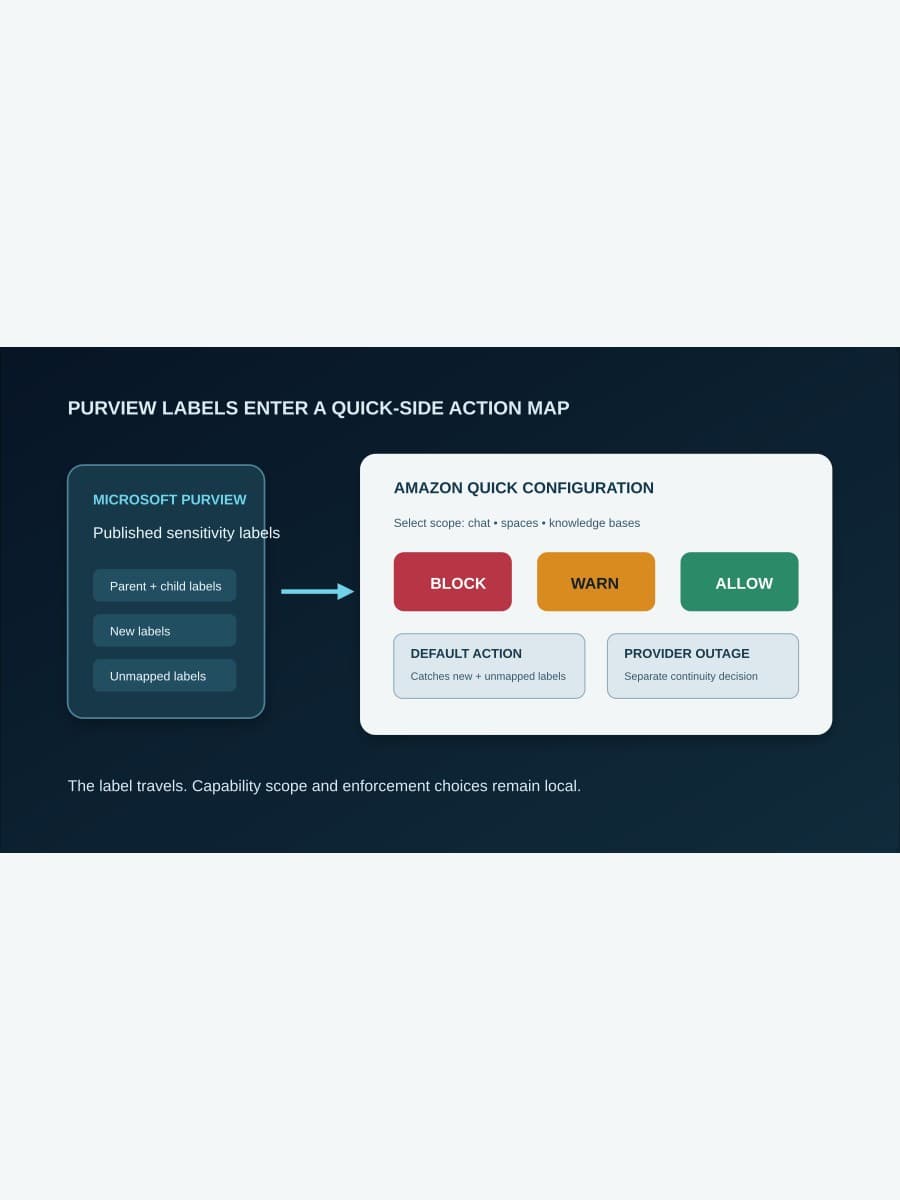
Amazon Quick can read an organization's published Purview sensitivity labels and apply a Block, Warn, or Allow action when people use labeled files in Quick chat, spaces, and knowledge bases.
The integration extends an existing label system into a new AI work surface, but it does not import a complete operating decision. Administrators still choose which Quick capabilities are covered, what happens to every mapped label, how unmapped and newly published labels behave, and whether file activity stops when Purview is unavailable. Those choices should be tested as one action map before broad enablement.
What does Amazon Quick actually inherit from Purview?
The Amazon Quick user guide describes Purview sensitivity labels as the classification input. Labels such as Public, Confidential, or Highly Confidential are defined and published in the organization's Microsoft Purview or Microsoft 365 tenant. Quick reads the current label list, then an Amazon Quick administrator maps those labels to local enforcement actions.
That is narrower than saying Quick inherits every Purview DLP policy. AWS documents a connection to labels and a Quick-side mapping for files. The user guide does not say that every Purview rule, location, exception, alert workflow, or content-detection behavior automatically becomes a Quick control.
The distinction changes ownership. The information-governance team owns label meaning and publication. The Quick administrator owns capability scope and actions inside Quick. Business-process owners still decide whether a warning is an acceptable interruption or whether the file must be blocked.
Where does enforcement apply?
AWS names three capabilities: files uploaded to collaborative spaces, files shared in chat, and content synchronized into knowledge bases through connectors such as SharePoint and OneDrive. Administrators select capabilities while creating a DLP configuration.
The user guide says a capability already claimed by another DLP configuration cannot be selected again. That makes configuration boundaries operationally important. A team cannot assume it will layer several competing maps over the same Quick capability and let precedence resolve the result.
Availability also has a boundary. AWS says the feature is available in all AWS Regions where Amazon Quick agentic capabilities are supported. That is not the same as universal AWS availability, so deployment plans should confirm the intended Quick Region and account rather than rely on a global product headline.
Why are the default and outage actions the key decisions?
An explicit label mapping handles labels known during setup. The default action handles a wider and changing set: any label that has not been mapped explicitly, including labels published in Purview after the Quick configuration was created. AWS says those new labels are governed immediately by the default, until an administrator gives them a specific action.
This means Allow as the default is not a neutral placeholder. It is a standing decision for every unreviewed label. A conservative initial map can use Block for the default, then add deliberate exceptions after testing. That is a BaristaLabs recommendation, not an AWS requirement; the product permits all three actions.
Provider availability is a separate branch. Quick asks administrators to choose Block, Warn, or Allow for periods when Microsoft Purview is temporarily unreachable. The user guide calls Block fail-closed and safest, and recommends it for a knowledge base holding sensitive material. A team that chooses Warn or Allow is accepting continuity at the cost of weaker enforcement during that outage.
Parent and child labels add one more dependency. A child label inherits a mapped parent's action unless it has an explicit override. Review the hierarchy, not only the flat list visible in a planning spreadsheet, because a parent change can alter the effective action for several labels.
How should a team test the integration?
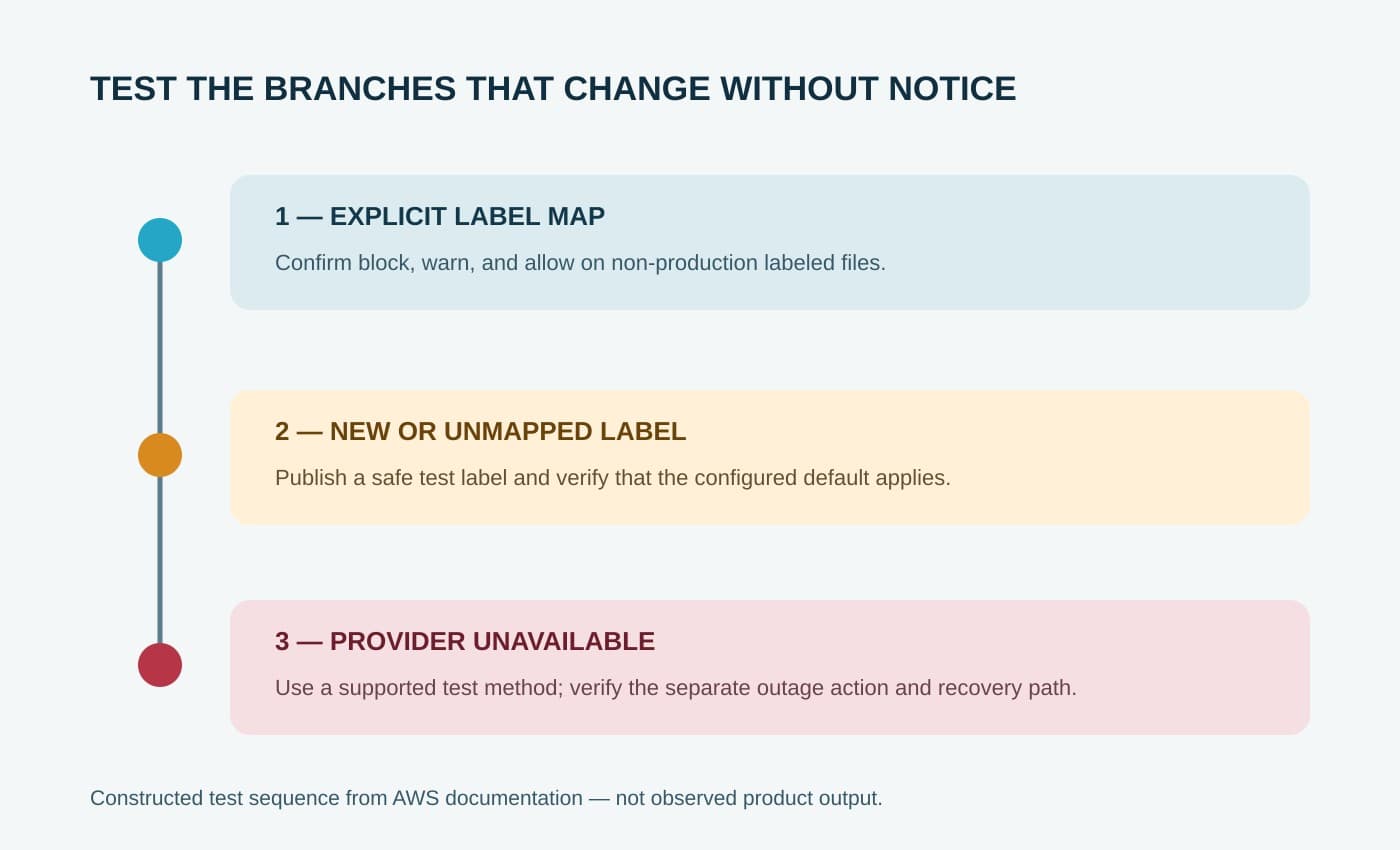
Start with one capability and a small label set that includes a parent, a child, and a label left deliberately unmapped. Use non-production files that are safe to share during testing. Confirm that Quick loads the expected labels and that the intended Block, Warn, and Allow outcomes occur for the selected capability.
Then publish a new test label in Purview without adding an explicit Quick mapping. Confirm that the default action applies. This is the most direct check that the safety net behaves as the administrators expect when the governance team changes the taxonomy later.
Test the warning path as a user decision, not merely a visible banner. Record who may proceed, what evidence is retained, and whether the business process permits that override. A warning that everyone routinely bypasses is different from a block, even if both create friction on screen.
Finally, exercise the provider-outage setting in a controlled environment using the vendor-supported test method available to your administrators. Do not disrupt a live Purview tenant to manufacture an outage. Verify whether the chosen result protects the sensitive workflow while giving operators enough information to diagnose and recover.
Microsoft's general Purview DLP planning guidance recommends identifying affected business processes, testing and tuning controls, and preparing users before restrictive production deployment. Purview supports simulation patterns in its own policy lifecycle, but the cited Amazon Quick documentation does not establish a Quick simulation mode. Test Quick's documented actions in a bounded environment instead of assuming that feature carries across the integration.
What should be owned after launch?
Assign one owner for the Purview label taxonomy and another for the Quick action map. Establish a change path so that a new or renamed label triggers review of its effective Quick action. The default prevents a label from being entirely unmapped, but it cannot decide whether that result matches the business meaning of the new classification.
Credential operations also remain local. AWS requires a Microsoft Entra ID app registration and a client secret stored in AWS Secrets Manager. Quick needs specified read permissions, and the secret must be available in every AWS Region where Quick evaluates files. Rotation, regional replication, Secrets Manager access, and any customer-managed KMS permissions need named owners.
Monitor false blocks, bypassed warnings, unexpected allows, provider failures, and label changes. The primary sources do not provide effectiveness rates, operating-cost figures, or evidence that enabling the feature prevents every sensitive-data disclosure. Local event evidence and periodic labeled-file tests must establish whether the map still works.
Enable the integration when the organization already maintains Purview labels, each selected Quick capability has a clear owner, new labels fail into an acceptable default, and the outage choice matches the workflow's tolerance for interruption. Otherwise, fix the label taxonomy and operating path first. If you want help tracing one controlled rollout, talk with BaristaLabs about the Quick DLP boundary.
Sources
- Amazon Quick User Guide: “Data loss prevention”, accessed August 13, 2026.
- Microsoft Learn: “Learn about data loss prevention”, accessed August 13, 2026.
Information-governance next step
Test one labeled-file path before broad enablement
BaristaLabs helps teams align Purview label ownership, Quick capability scope, default behavior, provider outages, and operating evidence around a bounded pilot.
Turn this idea into a pilot
Which workflow should go first?
Use the readiness check to compare impact, effort, risk, owner, and next step before requesting a review.
- 3-5 minutes
- Deterministic score
- No sensitive data
Practical AI Workflow Notes
Want more practical AI operations ideas?
Get short notes on applying AI inside real small-business workflows — from document handling and customer follow-up to internal reporting, compliance, and automation guardrails.