

Pull it before it expires
The 48-hour agent evidence drill
A small incident drill for the first two days after a coding-agent question becomes urgent.
- 01
Coverage
Pins down: Which Copilot surfaces actually feed this record: cloud agent, CLI, VS Code, Visual Studio, or a partner IDE.
Why it matters: A gap in coverage is invisible until the incident happens on the surface nobody wired up.
- 02
Destination
Pins down: Streaming endpoint into your SIEM or event collector, or an on-demand pull through the REST API.
Why it matters: A stream and a pull answer different questions on different timelines.
- 03
Enable switch
Pins down: Confirmation that both Copilot Usage Records Streaming and Copilot Usage Records API read 'Enable everywhere' in Copilot AI Controls.
Why it matters: Half-enabled controls create a false sense that the record already exists.
- 04
Retention window
Pins down: How long the record is recoverable: a standing SIEM archive, or the REST endpoint's rolling 48 hours.
Why it matters: A 48-hour window is a pull you make on purpose, not a safety net you can rely on later.
- 05
Access list
Pins down: Who inside the company can open a session transcript with prompts, responses, and tool calls, and what approval that takes.
Why it matters: Prompts and tool calls can carry source code, credentials, and customer data. Read access is not a spectator sport.
- 06
Question it answers
Pins down: Incident review, policy or model-use audit, cost attribution, or quality investigation.
Why it matters: Naming the question in advance keeps the record from becoming a dashboard nobody reads.
- 07
Watch mode
Pins down: Continuously alerted inside the SIEM, or sampled and pulled on a schedule.
Why it matters: Watching every token does not scale. Sampling with a clear trigger for a full pull does.
- 08
Health check owner
Pins down: Who confirms the stream is still delivering, and who owns the repair window before events start dropping.
Why it matters: A silently broken stream looks identical to a quiet week until someone needs the record that isn't there.
- 09
Pull trigger
Pins down: The specific event that means someone goes and pulls the REST window now, before it rolls off.
Why it matters: An incident, a customer complaint, or a policy question should trigger a pull automatically, not by memory.
The hard part is not the endpoint. It is remembering to pull while the record still exists.
A production bug arrives with the wrong kind of silence. The pull request is there. The diff is there. The test failure is there. The thing nobody can answer quickly is what the coding agent saw before it made the change.
That question used to feel philosophical. It is becoming operational.
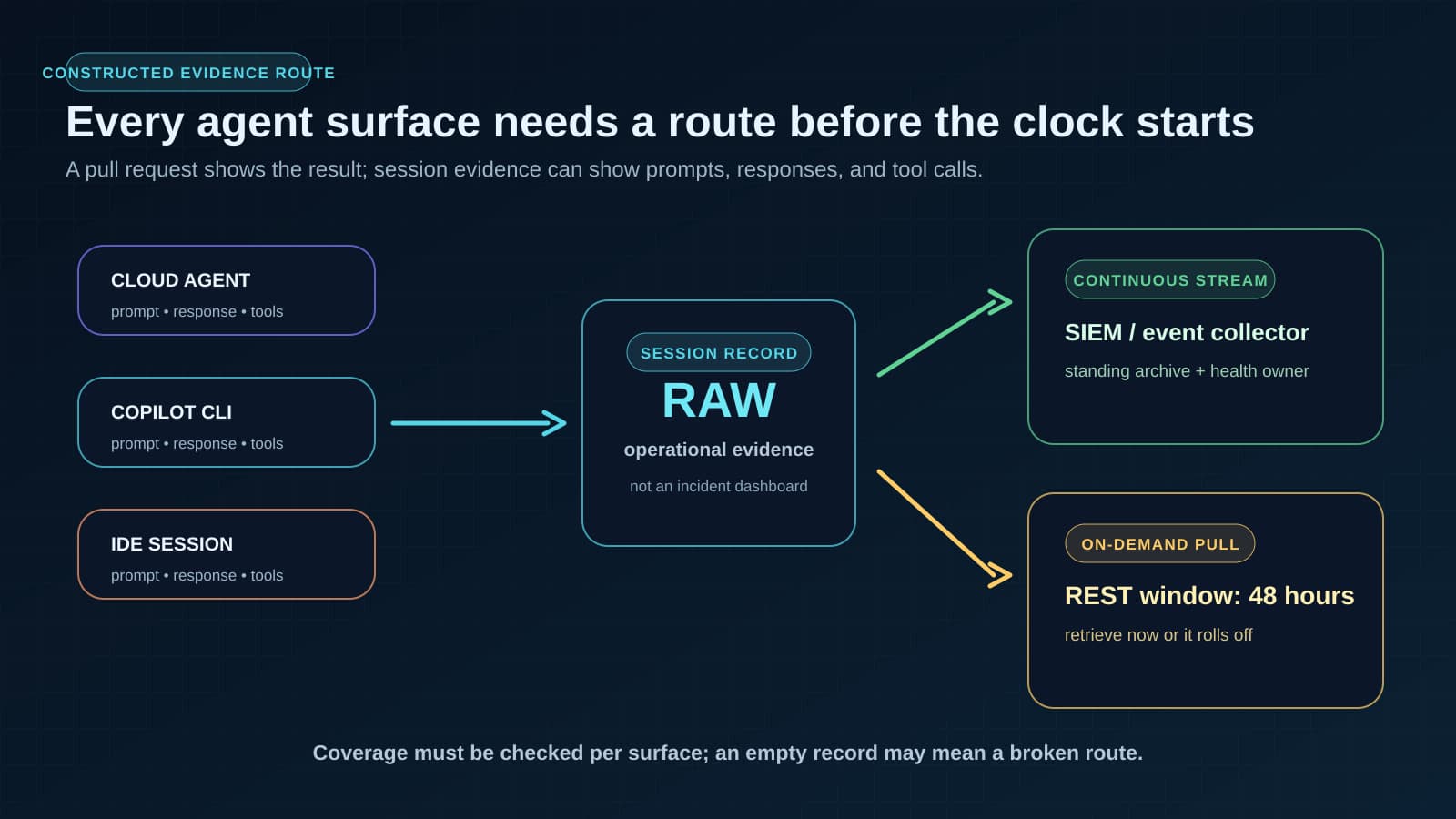
On July 2, GitHub put Copilot agent session streaming into public preview for GitHub Enterprise Cloud customers using Enterprise Managed Users. The feature covers the places where Copilot is now allowed to work: cloud agents on github.com and data-resident ghe.com deployments, Copilot CLI, Visual Studio Code, Visual Studio, and partner IDEs including JetBrains and Eclipse. GitHub says enterprise owners can get visibility into agent session activity, including prompts, responses, and tool calls.
That last phrase changes the shape of an investigation. A commit tells you what landed. A session record can tell you what was asked, what was answered, and which tool calls sat between the two.
The new evidence is not the pull request
Most teams already have a habit for code evidence. They look at commits, pull requests, reviews, CI logs, deploy records, and incident tickets. Those artifacts are still necessary, but coding agents leave another trail upstream of all of them.
A developer may ask Copilot for a refactor in VS Code. A CLI run may ask for help inside a GitHub Actions workflow. A cloud agent may open a pull request after working through a task on its own. Those are not the same surface, and they do not always create the same local trail. GitHub's preview matters because it treats the agent session itself as enterprise evidence rather than as a private chat pane that vanishes into the workday.
The routing options make that clear. Enterprise owners can stream the records into an existing audit-log destination, event collector, or SIEM. GitHub names Microsoft Purview as a public-preview-supported destination. They can also use a REST endpoint, GET /enterprises/{enterprise}/copilot/usage-records, to pull recent session data on demand. GitHub's audit log streaming documentation describes streamed audit data as compressed JSON files meant for a customer's own exploration, retention, and continuity tooling. This is not a polished incident dashboard. It is raw operational material.
That distinction matters. A raw record only becomes useful if the team knows which question it is supposed to answer.
The fragile part is the clock
The most important number in the preview is not a throughput number or a product tier. It is 48 hours.
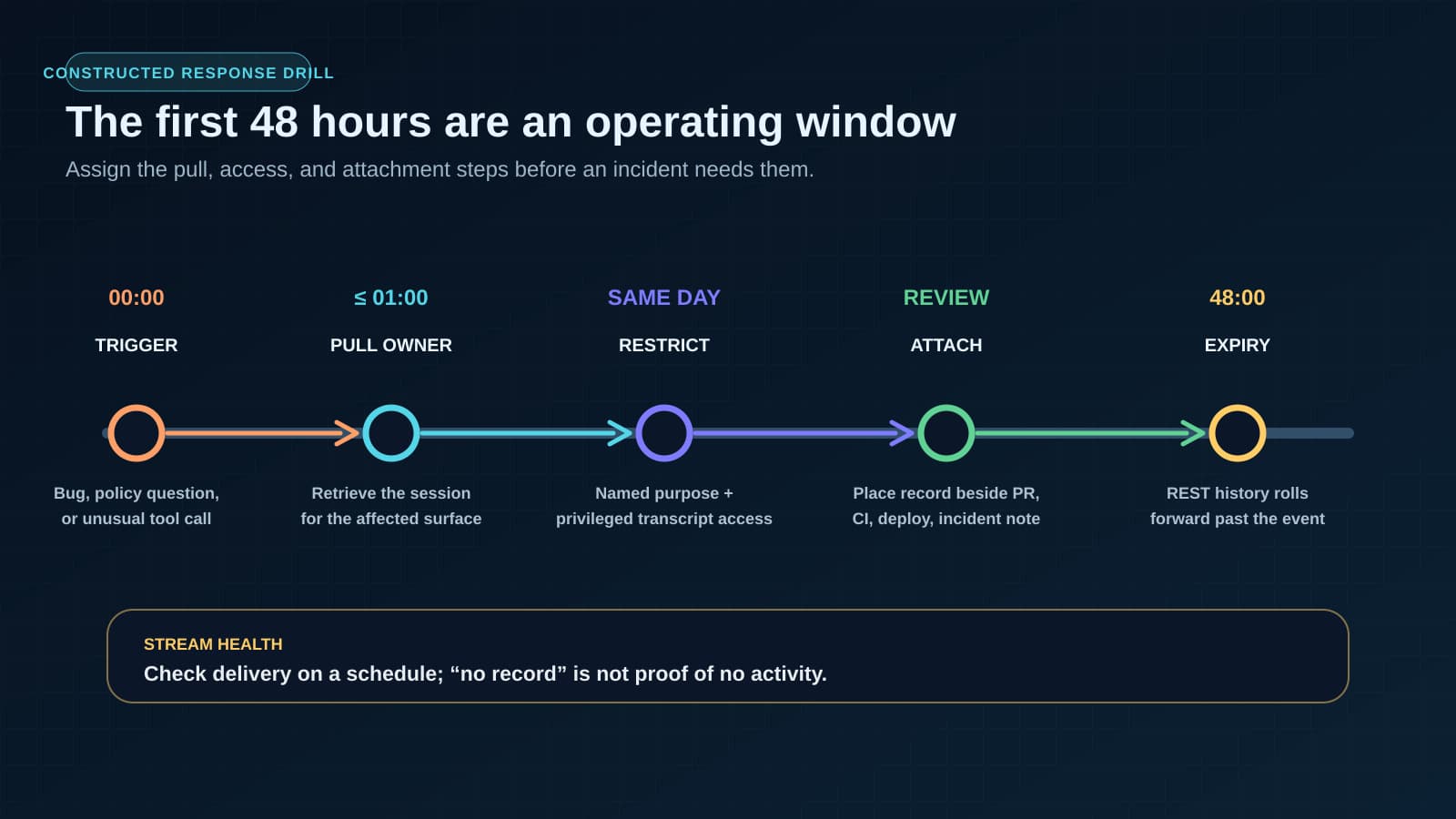
GitHub's changelog says the REST API can pull the last 48 hours of session data on demand. That is enough time for a well-run response habit and a bad fit for a vague one. If a team notices the strange commit on Friday morning and nobody knows who is supposed to retrieve the agent session until Monday, the most interesting part of the record may already be gone.
Streaming changes the retention story, but it introduces a different operational failure. GitHub's audit-log docs say a stream is health-checked every 24 hours, and that a misconfigured stream must be fixed within six days before audit log events are dropped. In other words, a streaming setup still needs an owner. The absence of a record does not necessarily mean the absence of activity. It may mean the pipe broke quietly.
That is the new management problem: the record exists in preview, but the habit around the record has to exist before the incident.
The 48-hour agent evidence drill
Run this as a small drill for one coding-agent surface before you enable session records broadly. The goal is not to build a massive policy. The goal is to prove that your team can retrieve and use the record while it still exists.
- Pick one surface: cloud agent, CLI, VS Code, Visual Studio, or a partner IDE. Do not pretend all surfaces are covered until you have checked them separately.
- Name the triggering event: suspicious code change, customer-impacting bug, policy question, unusual tool call, or a security review request.
- Assign the first pull owner: the person who retrieves the session record inside the first business hour, not the person who eventually writes the incident report.
- Define the destination: streamed archive, SIEM queue, Microsoft Purview, or REST pull saved into the incident workspace.
- Decide transcript access: prompts, responses, and tool calls can expose source code, credentials, customer data, or private business context. Reading them is a privileged act.
- Set the escalation rule: what turns a sampled record into a full pull of every related session before the 48-hour window rolls forward.
- Test stream health: who checks that the destination is still receiving events, and how quickly a broken stream is repaired.
- Attach the record to the review: the session belongs beside the pull request, CI log, deploy record, and incident note, not in a forgotten export folder.
The drill is deliberately small because the failure mode is small. Nobody has to reject agent adoption. Nobody has to stop every Copilot rollout until governance is perfect. The team just has to prove that when a real question appears, the record can be found before it expires.
Who should not read the transcript
The record is useful because it is intimate. That also makes it dangerous.
A coding-agent conversation can include unreleased product names, customer examples, stack traces, credentials pasted by mistake, private repository paths, and internal reasoning about security posture. Treating that material like ordinary analytics data is the wrong instinct. The safer pattern is closer to incident evidence: restricted access, named purpose, short review notes, and a reason someone opened the transcript in the first place.
That means the first policy question is not "can we collect it." GitHub has started giving enterprise owners a way to do that. The sharper question is "who is allowed to look." A platform lead may need to know whether the agent called a risky tool. A security engineer may need to inspect whether sensitive context left the expected boundary. A manager probably does not need casual access to a developer's entire assistant conversation just because the data is available.
Write the access rule before the first uncomfortable transcript exists. Otherwise the first review will set the precedent under pressure.
Put the record beside the work
The practical move is to make session evidence part of the same review packet as the work it influenced. If an agent-assisted change breaks production, the post-incident packet should not stop at the diff. It should include the retrieved session record, the reason it was opened, who read it, and what question it answered. If no record was available, that absence should be visible too: not enabled, not covered for that surface, stream broken, or window expired.
The GitHub Copilot enterprise-controls guide shows where that session row sits beside licensed access, policy coverage, measurement definitions, ownership, exceptions, and the event that should trigger another review.
That is different from asking every team to read every transcript. Most records should stay unopened. The point is to know when one becomes evidence and to have a calm path for retrieving it when it does.
The same discipline shows up in the broader agent work we recommend. Agent evals should test workflow receipts, not just final answers, and teams need agent receipts for customer-facing work, not just automation success messages. Session streaming gives coding teams another receipt type: not proof that the output was correct, but a reconstructable path from request to action.
BaristaLabs helps engineering and operations teams design those paths before the first urgent review: what gets logged, who can read it, where it goes, and what action the record is meant to support. If Copilot or another coding agent is already touching real repositories, start with one surface and one drill. We can help map the record path through our responsible AI workflow controls and process automation work. Map the session record path.
Implementation help
Map one coding-agent workflow's session record path
BaristaLabs helps engineering and security teams decide where a coding agent's prompts, responses, and tool calls go, who can read them, and what question they need to answer, before the agent's access scales past a pilot.
Best fit when a coding agent already has repository or CLI access and nobody has written down where its record goes.
Turn this idea into a pilot
Which workflow should go first?
Use the readiness check to compare impact, effort, risk, owner, and next step before requesting a review.
- 3-5 minutes
- Deterministic score
- No sensitive data
Practical AI Workflow Notes
Want more practical AI operations ideas?
Get short notes on applying AI inside real small-business workflows — from document handling and customer follow-up to internal reporting, compliance, and automation guardrails.