
OneCLI changed its policy model. Diff access before upgrading.
OneCLI's grants migration converts expressible credential access, removes rules it cannot map, and resets one project default. A staged before-and-after access diff shows whether v1.45 is ready to promote.

Sean McLellan
Lead Architect & Founder

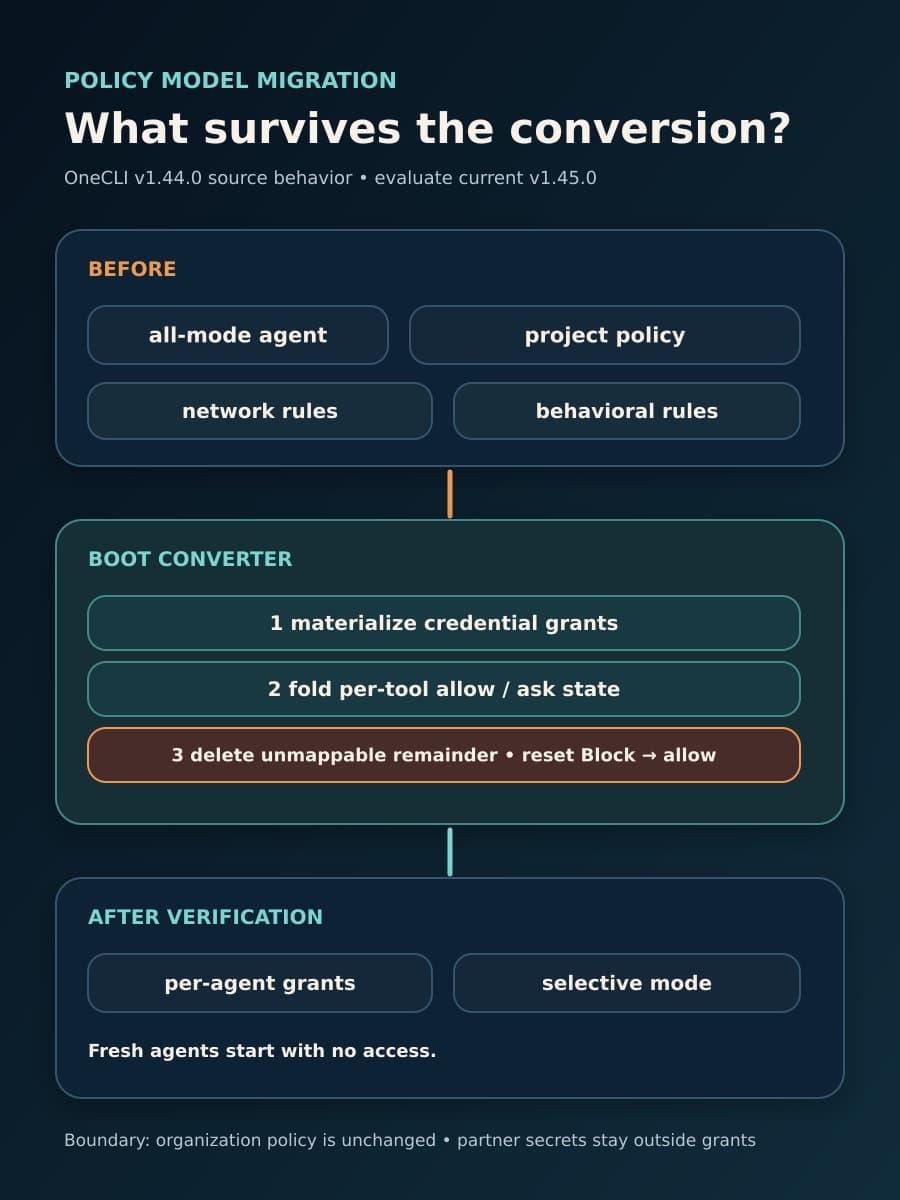
OneCLI v1.44 replaced the project policy page for per-agent credential access with agent grants. A team upgrading from an earlier release is therefore changing more than a settings screen. The upgrade converts stored project policy, deletes some rules it cannot express as grants, resets one project default, and changes how existing agents receive connections and secrets.
The current stable evaluation target is v1.45.0, but the grants migration entered OneCLI in v1.44.0. Before promotion, run the upgrade in a staged copy and compare each agent’s effective access before and after conversion. This article explains the conversion in the order it runs and gives the exact fields to include in that before-and-after access diff.
v1.44 changed agent authority. v1.45 did not revise the migration
OneCLI published v1.44.0 as a stable release on July 29, 2026. Its release note says agent grants replace the project policy page for per-agent credential access. The implementing commit defines a grant as a connection or secret attached to an agent. A connection can also have per-tool allow and approval lists.
The same commit says new agents start with no access. That statement applies to newly created agents. It does not describe how the converter handles an existing agent in all mode, which previously received its effective credential pool under the old policy.
OneCLI published v1.45.0 as a stable follow-up on July 31, 2026. Its release note adds an install page, per-connection resources, and an approvals bell. It does not introduce the grants migration or claim to correct migration defects. Teams evaluating v1.45.0 must therefore include the v1.44 policy change in the upgrade review.
How a system mediates a secret during use is an adjacent question, covered in our guide to proxying agent requests without handing over the reusable key. The question here is narrower: does the upgrade preserve the effective policy your agents had before the first converted boot?
The converter preserves expressible access before it removes old project rules
The migration note in the implementing commit describes a one-shot converter. Its sequence matters because later steps depend on the output of earlier steps.
First, the converter materializes each all-mode agent’s effective credential pool. In plain terms, it writes explicit grant rule stacks for the connections and secrets that the agent could receive before conversion. Each grant stack uses OneCLI’s canonical internal policy form. The converter writes all generated grant rows before it publishes one project policy generation.
Second, the converter evaluates the old project rules against each connection’s tools. It folds the result into a tri-state for each tool: allow, ask for approval, or block. The generated grant stores allowed tools and approval-required tools. Blocked tools do not receive access in that grant. This step moves the part of project policy that the grant model can express into agent-specific rules.
Third, the converter deletes the old project rows that it folded and the remainder it cannot map. The migration note explicitly includes network and behavioral rules in that deleted remainder. It also resets a project default action of Block to allow. These are data changes, so installing an older binary by itself would not recreate the deleted rows.
Fourth, the converter publishes the new policy generation. It then verifies that the expected grant stacks and an allow default are present and that only permitted rule types remain. Only after that check does it change an all-mode agent to secretMode="selective". The agent then receives credentials through selective grants instead of the old all-mode pool.
Publication verification does not prove equal effective access
OneCLI’s verification step checks whether the generated policy was published in the expected form. It does not show that a deleted network or behavioral rule has an equivalent control elsewhere. It also does not prove that the reset project default has the same result for every request that the old default covered.
Two conversion changes therefore need the most attention. Network and behavioral rules can express conditions that the per-tool grant vocabulary does not represent. The source treats their removal as a recorded loosening, not as a successful translation.
The reset from a project Block default to allow is separate. Generated grant stacks can preserve tool-level decisions for attached credentials, but the project default no longer supplies the same fallback posture for surfaces outside those stacks. Organization policy remains unchanged, so an organization rule can still restrict access. The before-and-after comparison must show project and organization effects separately instead of assuming one cancels the other.
The public repository contains implementation notes and tests. It does not contain an independent audit or a separate production migration report. No staged upgrade result is presented here. Treat the source as a precise description of intended behavior, then verify the result in your own staged data.
OSS boot conversion and cloud import have different retry paths
In the open-source edition, the grants converter runs on every web boot. For an older OSS instance that crosses both policy cutovers, the legacy policy pass runs first and the grants converter runs after it. Capture the real before state on the source release, because the first target boot can perform both conversions before the service starts handling normal work.
OSS idempotency is per agent: agents already marked selective do not need another flip. Conversion is all-or-nothing for a project, and a failed project is retried on the next boot. Later boots should take the no-op path after all relevant agents and project rules are converted. The conversion log is part of the comparison because it shows converted, skipped, failed, preempted, and verification-failed projects, as well as deleted rule counts and default resets.
The cloud path is different. The migration note says the enterprise/cloud boot entry point stopped calling the converter on July 29 after the cloud fleet was converted. A cloud import converts its own project inline and has no boot retry behind it. Do not use the OSS statement “restart and it retries” as a recovery plan for an import failure.
The note labels the converter TEMPORARY. It says the converter directory can be removed only after supported cloud, on-premises, and OSS environments report zero all-mode agents and a full boot logs 0 converted, N skipped, 0 failed. This removal condition is part of the implementation note, not an independent migration report.
Partner secrets remain outside materialized grants
Agent grants do not cover every credential tier. The migration note says grant rules cannot name partner secrets, so the converter excludes them from the materialized grant stacks. The gateway injects partner secrets independently of the agent’s secret mode.
A grants-only inventory will therefore miss part of effective credential access. Record partner-secret injection as a separate row for each affected agent and workflow. “All access is now grants” is not an accurate acceptance criterion.
Build the before-and-after access diff before the first target boot
The following comparison is a BaristaLabs recommendation, not a OneCLI-provided migration report. Run it against a disposable copy of the deployment and database. Preserve the source-side evidence before OneCLI can delete or reset project rules.
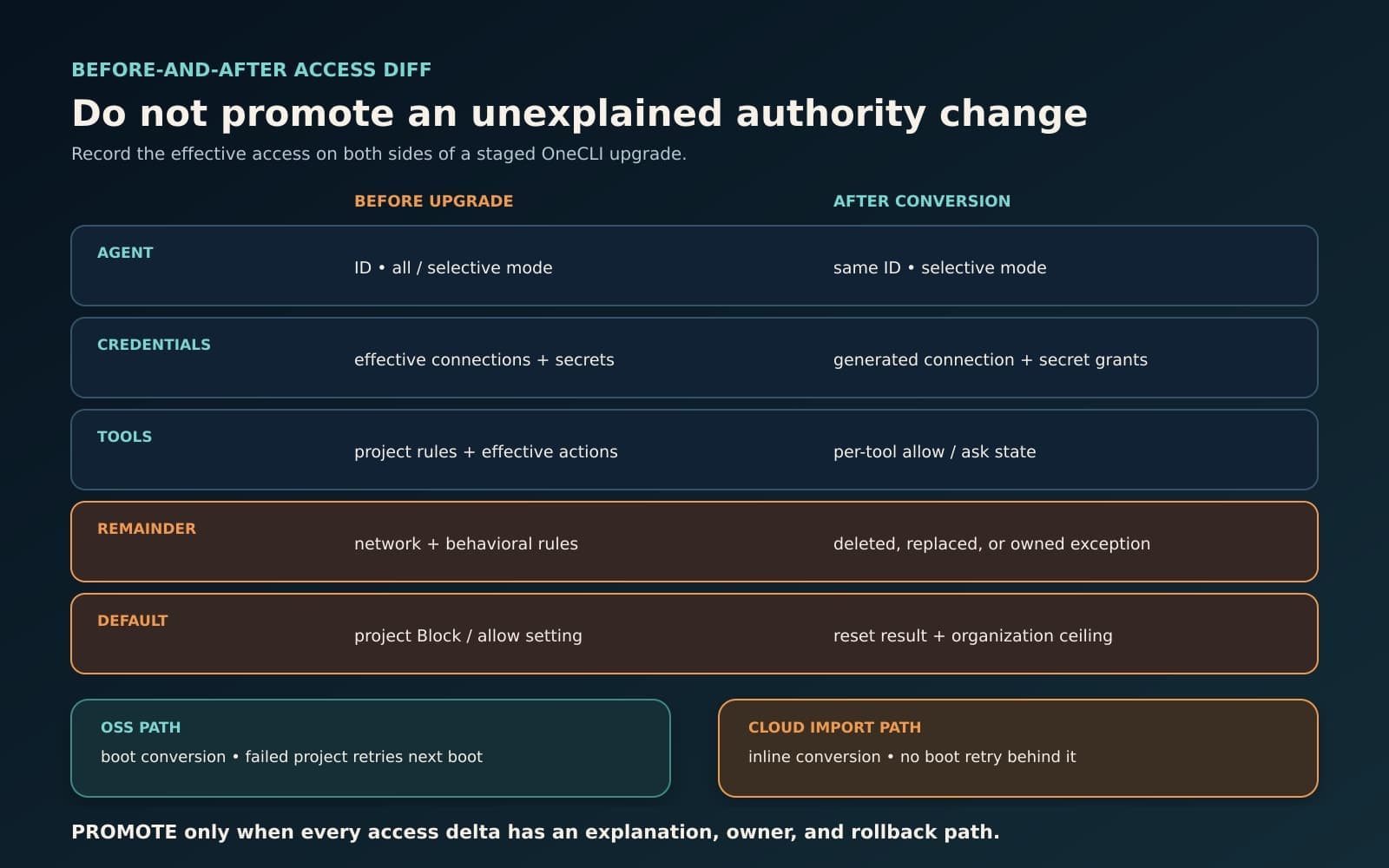
Scroll sideways to see all 4 columns.
| Compare | Record before the upgrade | Record after staged conversion | Hold when |
|---|---|---|---|
| Versions | Exact source version and deployment build | Target v1.45.0 and deployment build | The source or target cannot be reproduced |
| Agent identity | Stable agent ID, name, and current secret mode | Same agent ID and resulting secret mode | An agent is missing, duplicated, or cannot be matched |
| Effective credential access | Every connection and secret the agent can receive, including the rule source | Every generated connection and secret grant, plus partner-secret injection outside grants | A credential appears or disappears without an owner and explanation |
| Per-tool decisions | Effective allow, approval, and block result for each used connection tool | Generated grant access plus its per-tool allow and ask lists | The effective tool result changes without approval |
| Project network and behavioral rules | Rule ID, target, condition, action, and affected agents | Replacement control, if one exists, and the deleted-rule count in conversion output | A deleted rule still governed a required boundary |
| Project and organization defaults | Project default and the organization rules that affect the same agents | Project default after conversion and unchanged organization policy | A Block-to-allow reset has no reviewed consequence |
| Converter result | Not applicable before conversion | Converted, skipped, failed, preempted, verification-failed, deleted, and defaults-reset counts | Any failure is unresolved or expected counts do not match inventory |
| Retired interfaces | Calls and automation that use secret-mode, assignment-list, or project-policy endpoints | HTTP 410 response and the replacement endpoint named by OneCLI | An integration still depends on a retired endpoint |
| Fresh-agent behavior | Document the source release’s new-agent behavior | Create one fresh agent and confirm that it starts with no access | The fresh agent receives an unplanned connection or secret |
| Recovery and promotion | Named rollback owner, database recovery point, and maintenance boundary | Tested restoration steps and named promotion approver | Recovery depends only on reinstalling the old binary, or no approver owns the delta |
Compare effective results as well as database row counts. One old rule can produce many grant rows, while one deleted rule can remove a network condition that no generated row represents. The useful unit of review is the agent, credential, tool or operation, approval state, and any separate network or behavioral restriction that affected the request.
After the migration diff is clean, pin v1.45.0 and run end-to-end allowed and denied paths. The test method in our Nono control-path guide applies here: prove that expected work succeeds, denied work fails at the expected point, approvals appear where required, and the evidence agrees with the observed result.
Promote only explained access changes
BaristaLabs helps teams make this type of change inspectable through process automation and AI workflow controls. If a staged OneCLI upgrade touches a live agent workflow, bring the source policy and staged conversion result so the effective-access changes, recovery owner, and promotion decision can be made explicit.
Promote v1.45.0 only when every effective-access delta has a named owner and a source-based explanation. Hold the upgrade if a deleted rule has no replacement, a project default reset has an unreviewed effect, partner-secret access is absent from the comparison, a conversion failure remains open, or recovery has no tested owner. A clean release label cannot answer those questions. The before-and-after access diff gives the promotion owner the evidence to promote or hold.
Implementation help
Make the authority change inspectable before promotion
BaristaLabs helps teams compare effective access, exercise allowed and denied paths, assign recovery ownership, and turn the result into a clear promote-or-hold decision.
Best fit for teams upgrading AI workflows whose credential, tool, approval, or policy boundaries can change in place.
Turn this idea into a pilot
Which workflow should go first?
Use the readiness check to compare impact, effort, risk, owner, and next step before requesting a review.
- 3-5 minutes
- Deterministic score
- No sensitive data
Practical AI Workflow Notes
Want more practical AI operations ideas?
Get short notes on applying AI inside real small-business workflows — from document handling and customer follow-up to internal reporting, compliance, and automation guardrails.