


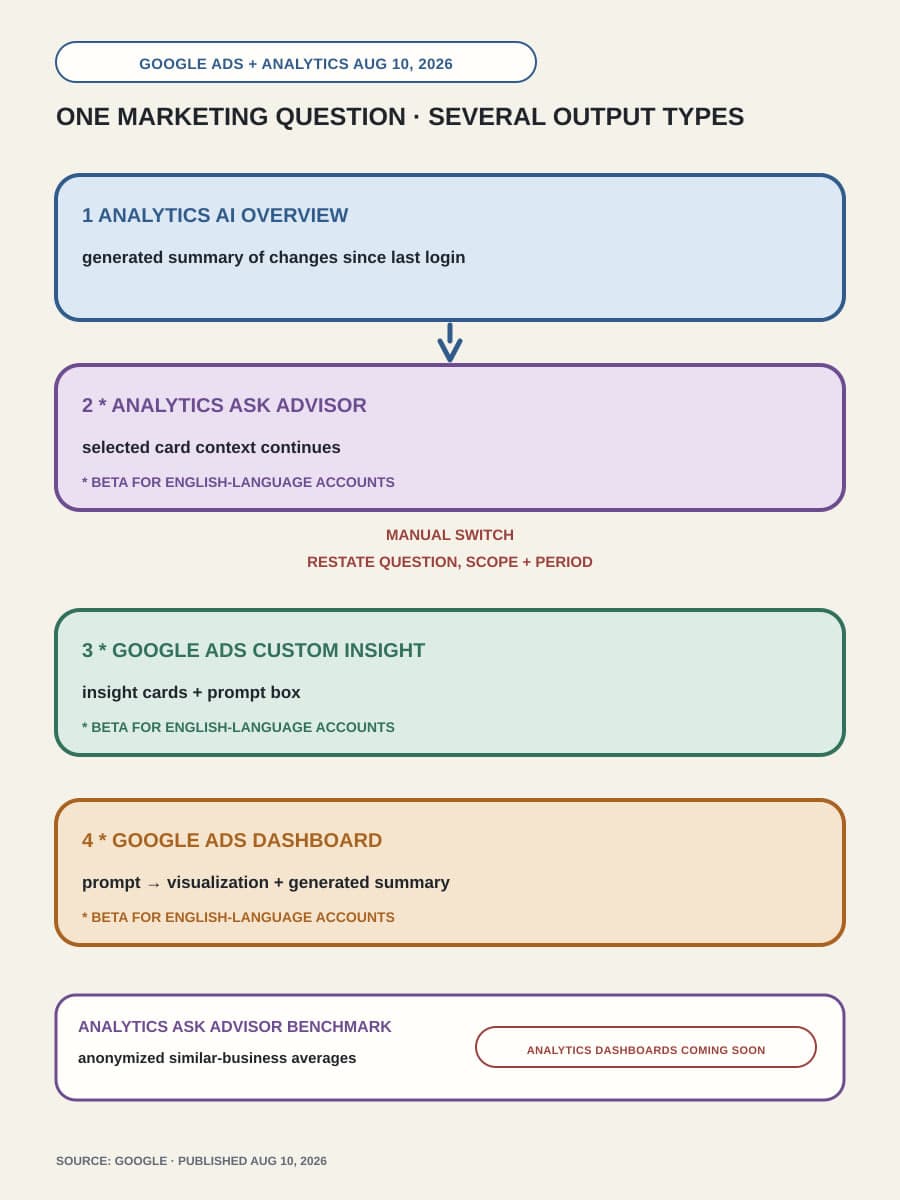
On August 10, 2026, Google announced new AI analysis and reporting features for Google Ads and Google Analytics. Google describes Ask Advisor as its in-product AI agent across its marketing platforms. Google says the announced features are built with Gemini. The release also connects homepage summaries to deeper Analytics analysis and adds custom Ads insights, visual reports, and Analytics peer benchmarks. Together, those surfaces can shorten the path from seeing a performance change to discussing what to do about it.
For marketing and operations leaders, the immediate decision is smaller than a broad AI rollout. An eligible English-language beta account can test one recurring question, such as “Why did paid campaign performance change since our last review?” The useful result is a faster review that keeps the source metric visible and labels generated explanations and peer comparisons for what they are.
Analytics starts the review with the change that needs attention
Google Analytics now puts AI Overviews at the top of its homepage. These overviews summarize important updates since the user last logged in. For the recurring question, this is the first filter: identify the update that appears relevant, then inspect the data card and its metric context before asking for an explanation.
Google says one click carries the data card’s context into Ask Advisor for more analysis. The announcement does not list the fields that transfer or say that the source card stays visible beside the answer. Record the card’s metric, date range, and filters so the reviewer can compare them with the response that Ask Advisor generates.
Google also lets users opt into phone or email summaries at a chosen frequency. A team can use that option to bring the same reporting question into a regular review. The notification can start the review, but it should still lead back to the current metric view before a person changes a campaign or budget.
Ask Advisor continues the question with context from Analytics
The context transfer is the most useful connection in the announcement. Ask Advisor can start with the Analytics data card that raised the issue instead of a new, loosely worded request. The reviewer can ask what changed, which dimensions contributed to the change, and which source view supports the response.
Google’s page establishes that Ask Advisor can analyze the card further. The page publishes no accuracy or causal-validation results for the generated explanations. A plausible explanation can direct the next investigation. The announcement provides no evidence that the explanation identifies the cause of a performance change.
This distinction matters when the answer will support a budget or campaign decision. Keep the Analytics metric view beside the Ask Advisor response, and check the explanation against evidence that can show what changed, such as campaign settings, approved changes, experiments, or known demand patterns. If teams disagree about the metric itself, resolve that issue first; our guide to owning the metric behind an analytics agent explains that separate prerequisite.
Google Ads can turn the same question into a visual report
The Google Ads homepage now has personalized AI-powered insight cards and a prompt box for custom insights. A reviewer can carry the same recurring question into Ads and ask for a view that is specific to the relevant account or campaign scope. The announcement describes no automatic transfer of Analytics card context into Google Ads, so the reviewer must preserve the question, scope, and comparison period when moving between the products.
Google says prompt-generated Dashboards are currently available in beta for English-language Google Ads accounts. They turn text prompts into visualizations, and every report automatically generates a real-time summary that explains Google’s stated “why” behind the data. Dashboards are coming soon to Google Analytics, so an Analytics Dashboard workflow must wait.
The Ads Dashboard can reduce manual report assembly, but its visualization and summary remain two different outputs. The chart presents selected account data. The summary is a generated explanation of that data. Google’s announcement provides no validation that the summary proves which event or decision caused the result.
This scope also differs from an external system that can operate campaigns through platform APIs. Our earlier analysis of a Perplexity marketing agent connected to Google and Meta Ads covered campaign scanning, budget management, and other execution claims. Google’s August 10 page describes analysis, insights, reporting, and benchmarking. End-to-end campaign execution is outside its documented scope.
A peer benchmark answers a different part of the question
Ask Advisor in Google Analytics now adds benchmarking against anonymized averages from similar businesses. This can show whether performance sits above or below a peer average.
Google does not disclose on this page how it selects the similar-business cohort. The page also omits a method for validating generated explanations and a date when every eligible account will receive each feature. These gaps limit the claims a team can make from the benchmark.
A benchmark can show relative position within an undisclosed cohort. Causal proof requires evidence from the account, campaign history, experiment, or market event being examined. Keeping those evidence classes separate prevents a useful comparison from becoming an unsupported explanation.

Run one bounded review before adding the beta to routine reporting
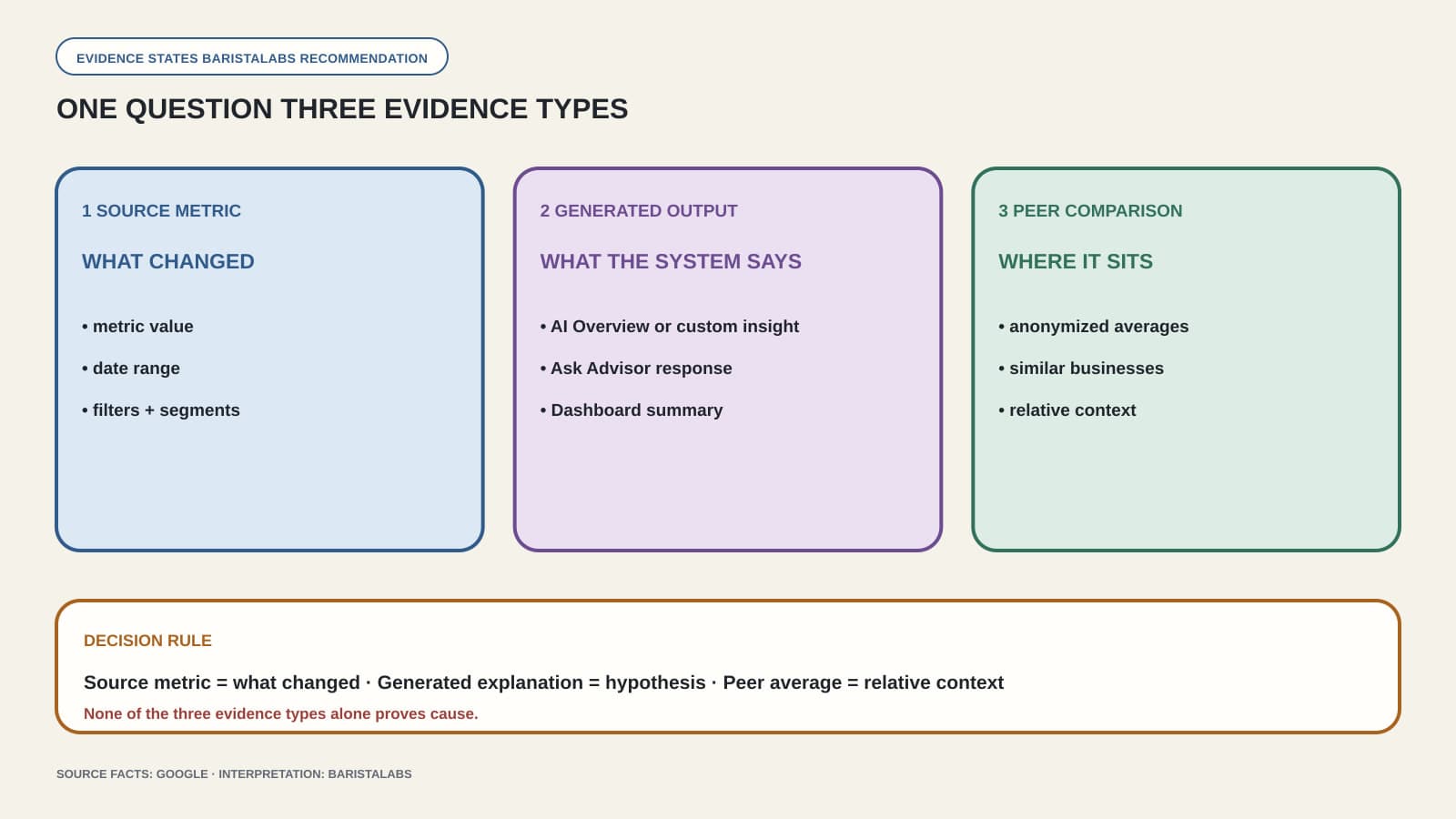
Use the beta features that appear in the account for the same recurring question across a small number of reporting cycles. Keep the test inside one account, use a consistent metric and comparison period, and do not let the generated answer trigger an automatic campaign change. During each review, preserve these three evidence types separately:
- Source data: the underlying Analytics metric view and Google Ads report data, including the date range and filters.
- Generated output: the AI Overview, Ask Advisor response, custom Ads insight, or Dashboard summary. Treat any generated explanation as a hypothesis until other evidence supports it.
- Peer comparison: the anonymized similar-business average, labeled with the fact that Google does not disclose the cohort method on the announcement page.
The test should answer an operational question: did the connected surfaces reduce reporting work while keeping the evidence clear enough for a person to approve, reject, or investigate the explanation? Also record whether each marked feature appeared consistently. Google’s footnote says those features are currently available in beta for English-language accounts, and the page gives no universal per-account rollout timing.
Use the available beta features for recurring analysis when the source metric remains easy to inspect and a named reviewer checks explanations before action. Wait before making it part of an unattended decision process if the workflow depends on an Analytics Dashboard that is still coming soon, a disclosed peer-cohort method, or causal claims that Google’s page does not validate.
If the bounded test is useful, the next job is to make that review repeatable without merging the source data, generated explanation, peer comparison, and approved action. BaristaLabs’ process automation and integration service can help connect those steps while keeping the evidence and human decision visible in each reporting cycle.
Marketing reporting workflow review
Test one recurring question before automating the review
Bring one Google Ads or Analytics reporting question. We will map the source view, AI-generated outputs, reviewer decision, and follow-up action.
Best fit for teams evaluating Ask Advisor, AI Overviews, Google Ads Dashboards, or marketing-report automation.
Turn this idea into a pilot
Which workflow should go first?
Use the readiness check to compare impact, effort, risk, owner, and next step before requesting a review.
- 3-5 minutes
- Deterministic score
- No sensitive data
Practical AI Workflow Notes
Want more practical AI operations ideas?
Get short notes on applying AI inside real small-business workflows — from document handling and customer follow-up to internal reporting, compliance, and automation guardrails.