
What Fyxer learns from edits to AI email drafts
Fyxer reports that 53% of its AI drafts are accepted unchanged. Its approach shows why the edits people make can be more useful than a single acceptance score.

Sean McLellan
Lead Architect & Founder

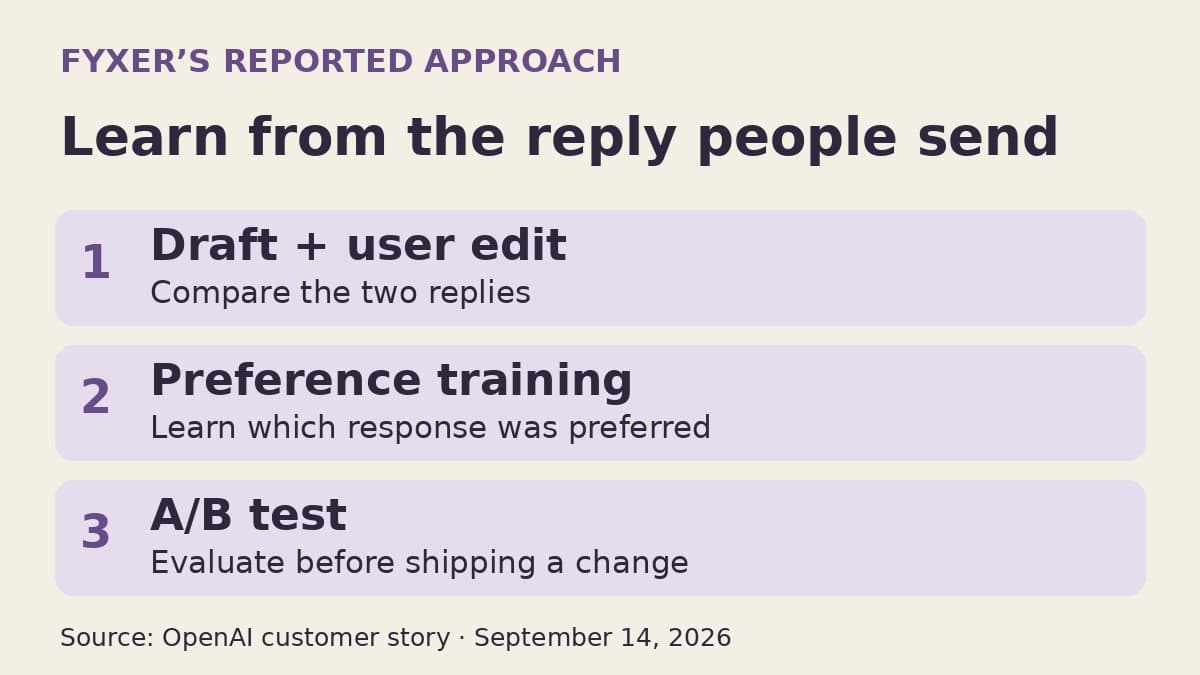
OpenAI's September 14 customer story about Fyxer describes an email assistant that learns from the difference between its drafts and the replies people actually send. Fyxer reports that 53% of its AI-generated drafts are accepted as written. For teams building email automation, the more useful detail is how the company uses the drafts that people change.
The story describes a system that divides email work among specialized models, evaluates them on its own tasks, and turns user edits into preference-training examples. It is an account of Fyxer's approach, not a new self-serve OpenAI feature or an independent comparison of email assistants.
That approach gives a team a concrete place to start improving its own drafting tool: study what people correct. A change to the greeting and a correction to a promised delivery date may both look like edited text, but they point to different problems.
Fyxer breaks email into smaller jobs
Fyxer says its system uses 30–50 specialized models rather than asking one model to handle the entire email workflow. OpenAI models help interpret an incoming email, retrieve and re-rank useful context, and generate the reply. Memory is another part of the work: the system must decide which details belong in future conversations and which matter only for the current exchange.
This matters because a reply depends on more than the latest message. The same request can require a different answer depending on who sent it, what was agreed earlier, and what the recipient wants to accomplish. Better prose cannot repair a draft built from the wrong earlier conversation.
Fyxer also had experience to draw on before it built its AI product. According to the story, its human executive assistant business accumulated more than 500,000 hours of annotated workflows. Those examples captured judgments such as when to answer, when to wait, and which previous exchange matters. That is a substantial source of task-specific training material, not a prerequisite that every smaller team must reproduce.
The company describes supervised fine-tuning and Low-Rank Adaptation, or LoRA, across its broader system. Before deploying a model, it uses validation sets for jobs including drafting, classification, and prioritization, weighing accuracy alongside response time and cost. The lesson is to evaluate the job being changed, rather than assume a better general model score will produce better email replies.
An edited reply becomes a preference example
When a user changes a generated draft before sending it, Fyxer retains a useful comparison: the original output and the version the user preferred. The story says Fyxer converts these pairs into training data using Direct Preference Optimization, or DPO. In plain terms, the system learns from which of two responses was preferred instead of requiring someone to write a separate quality label for every draft.
Fyxer then tests drafting changes through A/B experiments and says it ships a new version only when the result shows a statistically significant improvement. Its account distinguishes learning from edits from deciding whether a new drafting version should reach users. The accessible story does not specify the sample sizes or statistical thresholds, so those details should not be inferred from the reported result.
For another business, this is a reason to preserve useful feedback, not an instruction to start fine-tuning immediately. A small collection of reviewed edits can first reveal whether the system has a writing problem, a context problem, or a task it should not attempt.


Sort edits by what the draft got wrong
The following distinctions are BaristaLabs recommendations for teams reviewing their own email automation. They are not a description of Fyxer's internal labeling process.
Tone and style changes include shortening a greeting, removing exaggerated enthusiasm, or using the sender's usual level of formality. If the facts and intent remain the same, these are plausible preference signals. Repeated patterns may justify changing instructions or, with enough suitable examples, evaluating a trained model.
Missing-context changes need a different investigation. If the user adds an agreement from an earlier thread, check whether the drafting system could retrieve that agreement. Training the generator to imitate the edited reply will not make an inaccessible source available next time. Keep the input and retrieved context with the draft during diagnosis so the reviewer can tell what the model actually had to work with.
Factual corrections deserve separate attention. A changed price, recipient, date, or commitment can make a draft materially wrong even if the rest reads well. Find the authoritative source and check how the incorrect fact entered the response. Measure these corrections separately from stylistic edits so a rise in polished, accepted replies does not hide mistakes in business commitments.
There is also a timing question. A user may add information learned after the draft was generated. That final reply is useful, but it is not necessarily a fair example of what the model should have produced from its original inputs. Preserve that distinction when selecting training pairs.
Email can contain confidential business and personal information. Before retaining drafts and edits for training, establish which material the team may use, who may review it, and when it should be deleted. The customer story does not establish those permissions for another company's mailbox.
Use the 53% figure to ask a better question
Fyxer's reported acceptance rate describes drafts accepted without changes. It does not tell another business how much employee time it will save, whether every accepted reply was factually correct, or whether it should send messages without review. The story provides useful implementation detail, but not enough measurement detail to make 53% a universal target.
For your own tool, define the denominator before comparing versions. Are you counting all generated drafts, only drafts shown to users, or only replies that were eventually sent? Record discarded drafts as well as edited ones. Otherwise, a system that produces fewer usable suggestions can look good when measured only on the replies people kept.
Then inspect where a new version improves. Fewer tone edits may be a worthwhile gain while the rate of factual corrections stays unchanged. Better retrieval may reduce missing-context edits without changing the sender's preferred style. These are different improvements, and knowing which one occurred helps the team choose its next change.
Fyxer's example is useful because it treats everyday corrections as material for system improvement. Start by making those corrections understandable. Once the team can explain why drafts changed, it can decide whether to adjust instructions, improve retrieval, or test preference training—with evidence from the email work itself.
Source
- OpenAI: How Fyxer built an AI executive assistant people trust, September 14, 2026. Company-reported architecture and results; recommendations in this article are identified separately.
Email automation evaluation
Find out why your email drafts need editing
BaristaLabs can help review recurring draft corrections and design tests for changes to instructions, retrieval, or model training.
Bring a description of the workflow and examples cleared for sharing.
Practical AI Workflow Notes
Want more practical AI operations ideas?
Get short notes on applying AI inside real small-business workflows — from document handling and customer follow-up to internal reporting, compliance, and automation guardrails.