
GitHub Copilot comment automations keep definitions private to creators
A visible comment can start a Copilot automation whose definition only its creator can inspect. Follow the run from trigger to definition, output, and usage before enabling it.

Sean McLellan
Lead Architect & Founder


On August 3, 2026, GitHub announced issue-comment and pull-request-comment triggers for Copilot cloud-agent automations. The new trigger uses the existing ownership model: GitHub stores each automation separately from the repository and makes its definition visible only to the creator.
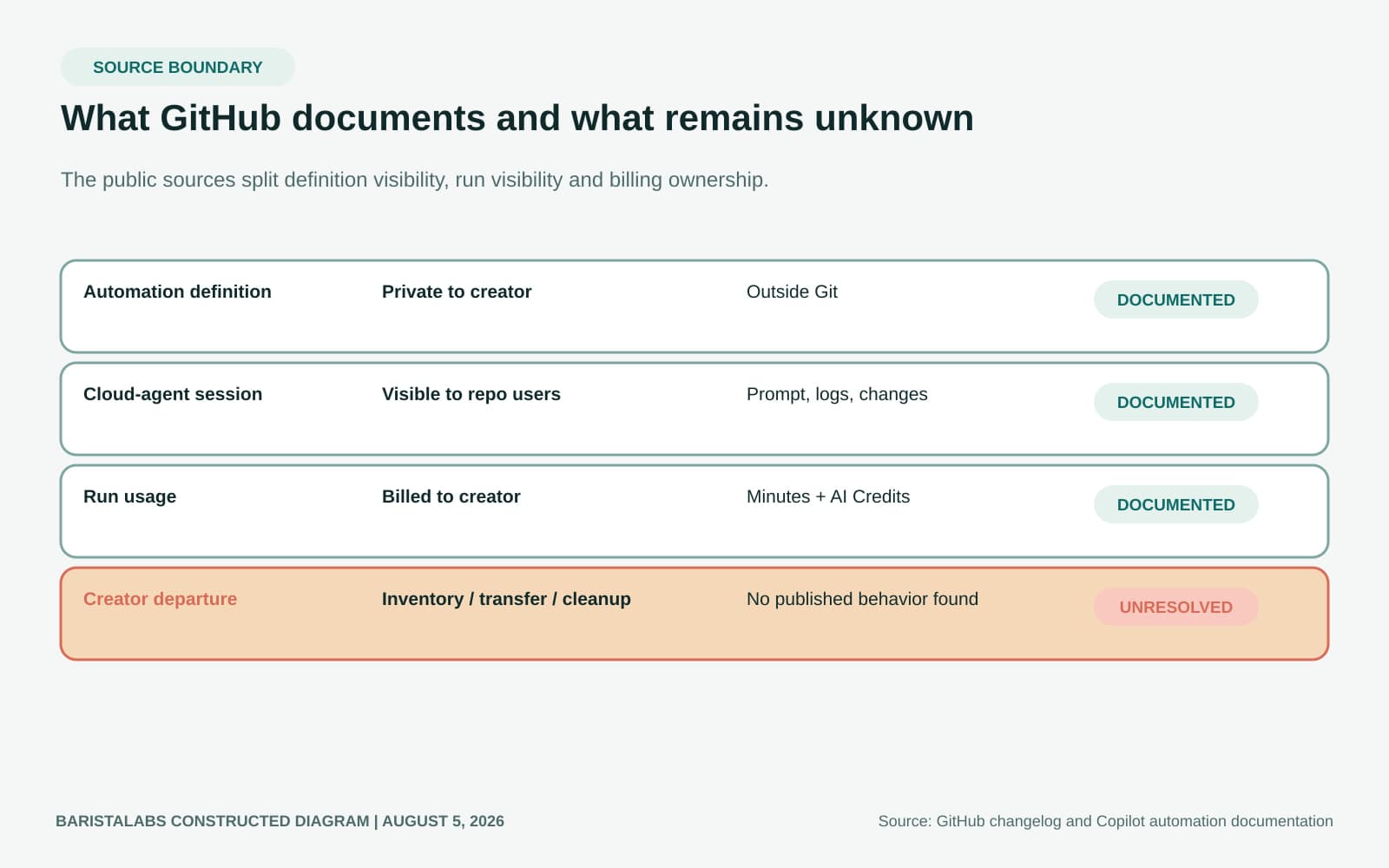
That difference matters when a team expects repository administrators to know which unattended instructions can change code or issues. GitHub makes the resulting cloud-agent sessions visible to eligible repository users, but its current documentation says the automation definition remains private to its creator. Repository owners should decide whether that split is acceptable before they rely on a comment-triggered automation.
Comment triggers extend a user-owned automation model
The changelog says a newly created issue comment or pull-request comment can run an automation. It says the creator specifies the comment text that should trigger the automation. GitHub gives examples such as updating documentation from a pull-request comment, investigating an error log from an issue comment, and creating follow-up issues for technical debt.
GitHub's linked automation concepts page has not yet caught up with the announcement. It still lists schedule, issue creation, pull-request creation, and pull-request synchronization as the available triggers. The changelog proves that the comment triggers exist, but the reviewed pages do not yet specify matching rules, edit behavior, or duplicate-comment behavior. Those details should stay in a repository test rather than in an assumption.
Automations are available on GitHub Copilot Pro, Pro+, Max, Business, and Enterprise. They require a private or internal repository, Copilot cloud agent enabled for the repository, and organization permission for both cloud agent and automations. Business and Enterprise customers need an administrator to enable the Copilot cloud-agent policy. GitHub says any user with repository write access can create an automation.
The repository does not contain the standing instruction
The creator chooses the automation's name, prompt, one or more triggers, model, and tools. GitHub's creation instructions describe testing and managing the definition from that person's Automations view.
The repository does not receive that configuration. GitHub stores automations separately from repository contents, so the trigger and standing prompt are not committed to Git, reviewed through a pull request, or preserved in repository history. The definition is also private to the creator. GitHub states that other people, including repository administrators, cannot see it.
Repository administrators can disable automations for the repository, but GitHub's documented product view does not give an administrator an inventory of definitions created by other users. The owner may know that automations are allowed without knowing the configured comment text, prompt, model, or tools for each private definition.
Visible sessions provide evidence after execution, not an inventory before it
The visibility model changes after a run starts. GitHub says people with repository access can see the cloud-agent session, including its prompt, logs, pull requests, and other changes. Each run uses GitHub Actions minutes and AI Credits billed to the automation creator.
The creator's selected tools control which actions the automation can take. GitHub's risk documentation says code pushes and pull requests are attributed to that creator, who cannot approve a pull request created on their behalf. By default, GitHub Actions workflows on a Copilot-created pull request wait until a user with write access approves them, although GitHub also documents an option to let those workflows run automatically.
These records and controls help a reviewer understand one active or completed run. They do not reveal every private definition that might run next. A repository owner can have good evidence of past output without an independent pre-run view of the standing instructions.
The reviewed GitHub pages do not state a universal duration or credit amount for one run, so the team must measure actual usage. A comment count cannot establish spend, and creator-attributed billing does not tell a repository owner which other private definitions remain available.
Creator departure is the unresolved continuity question
The current public pages explain who can create, view, edit, disable, and delete an automation while its creator is active. They do not describe an administrator inventory, transfer or export behavior, or what happens when the creator loses repository write access, loses a Copilot license, leaves the organization, or can no longer use the account.
That absence is not proof that an automation survives or stops. It is a reason to avoid making either assumption. Before adoption, the repository owner needs an enforceable local way to know which creators have relevant definitions and a response for each role, license, or employment change. A repository-level disable switch can stop all automations, but it is a coarse substitute for individual visibility.
Choose the ownership model before choosing the trigger
A user-owned Copilot automation can be reasonable when the creator remains an accountable operator, the team reviews the definition with that person, and the repository can tolerate a coarse emergency stop. This choice keeps the standing instruction outside Git and relies on local ownership for inspection and continuity.
A versioned deterministic workflow is the clearer choice when repository owners need independent inspection, review history, and continuity across account changes. Its trigger conditions, permissions, and executable steps live with the repository rather than in one person's private product view.
The deciding fact is where the durable configuration resides. With a Copilot automation, the creator's account is the only documented inspection surface for the definition. With a repository workflow, Git is the shared inspection surface. The choice is therefore about continuity and independent visibility, not whether one trigger syntax looks more convenient.
The GitHub Copilot enterprise-controls guide can connect repository policy, licensed users, exceptions, and review events. It cannot create a GitHub management view that the product does not expose. BaristaLabs can help compare the two ownership models for one repository through AI consulting.
Adopt only when the repository owner can own the definition
Adopt comment-triggered Copilot automations only when the repository owner can account for each private definition and handle the creator's loss of access. If that continuity depends on undocumented product behavior or an informal promise, keep the standing instruction in a versioned workflow until GitHub exposes the required management surface.
Sources
- Trigger Copilot automations with comments, GitHub Changelog
- About Copilot automations, GitHub Docs
- Creating automations with Copilot cloud agent, GitHub Docs
- Risks and mitigations for GitHub Copilot cloud agent, GitHub Docs
Repository automation review
Can the repository owner inspect and stop every relevant automation?
BaristaLabs helps teams compare Copilot automations with versioned deterministic workflows across trigger visibility, tool scope, review, usage, and ownership changes.
Built for teams operating private or internal repositories with Copilot cloud agent.
Turn this idea into a pilot
Which workflow should go first?
Use the readiness check to compare impact, effort, risk, owner, and next step before requesting a review.
- 3-5 minutes
- Deterministic score
- No sensitive data
Practical AI Workflow Notes
Want more practical AI operations ideas?
Get short notes on applying AI inside real small-business workflows — from document handling and customer follow-up to internal reporting, compliance, and automation guardrails.