


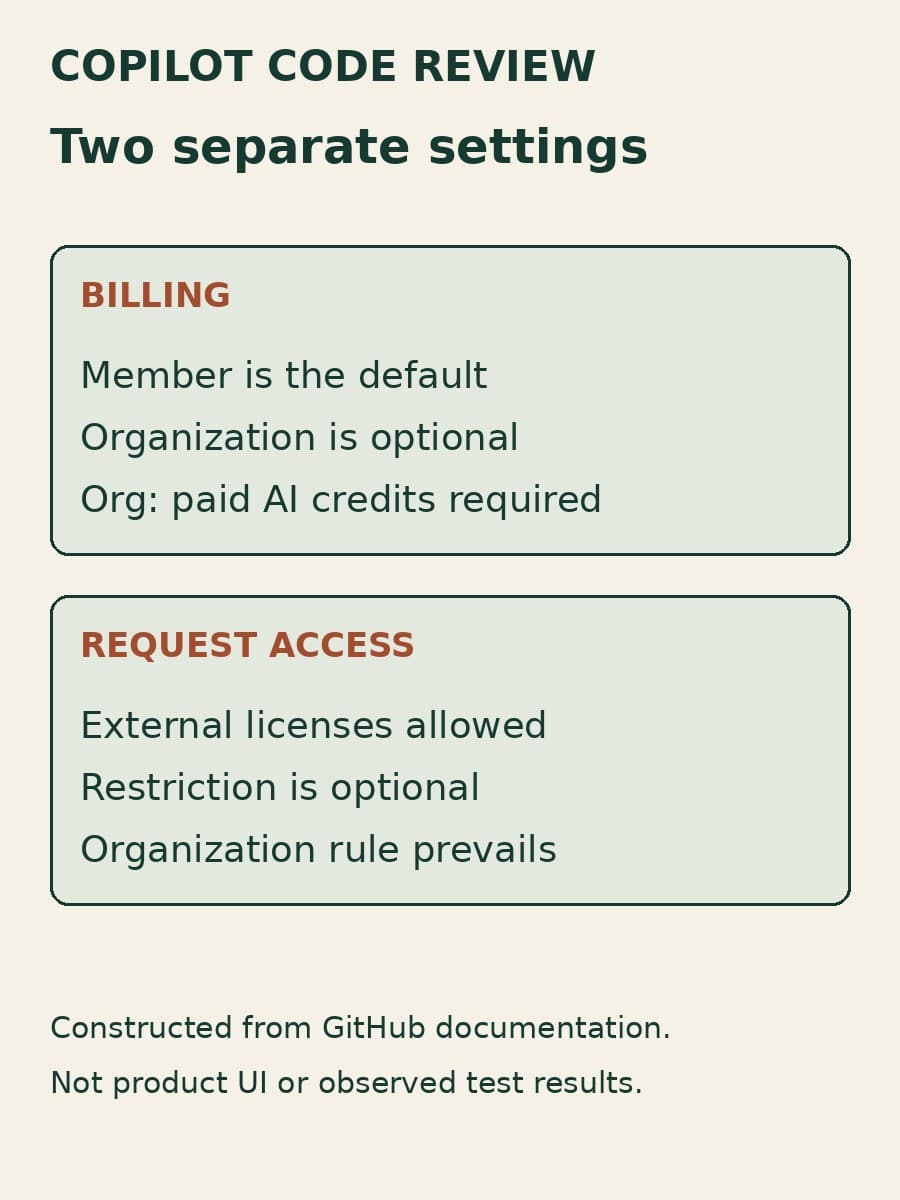
GitHub's October 8 update to Copilot code review gives administrators two choices: charge licensed members' reviews to the organization, and restrict requests made with licenses supplied outside the organization or enterprise. Those choices affect different parts of the workflow. One selects the payer; the other limits who can start a review.
That distinction matters when an engineering team wants review costs to stay with the repository owner without opening another request path. Changing billing does not grant review access. Restricting external-license requests also does not stop every automatic review. This article explains the defaults and the exception so administrators can choose both settings deliberately.
Organization billing changes the payer
By default, requests associated with organization members who have a paid Copilot license use the member's own Copilot entitlement. GitHub's announcement says a review fails if that member's quota is exhausted. An organization owner can instead select Organization under Choose how members with a Copilot license are billed, in the organization's Copilot policy settings.
Organization billing requires AI credits paid usage to be enabled. A budget is optional, so selecting the organization does not by itself establish a spending cap. GitHub's code review concepts guide says this billing choice applies to both manually requested and automatic reviews, and changes billing only. Existing access policies still determine whether the review can run.
For a team, the useful consequence is that a licensed developer's remaining personal allowance need not determine whether the organization's review workflow can continue. The cost moves to the repository-owning organization instead. Before making that change, identify the applicable organization, cost-center or enterprise limit and its owner. That is an administrative decision, not a benefit the setting supplies automatically.
The same guide distinguishes AI credits used for the model interaction from GitHub Actions minutes used for agentic context gathering and tool use. Do not read the new billing selector as a promise that all review costs have disappeared into one allowance. The guide also describes separate policies for members without a Copilot license; the October setting for licensed members should not be used as a substitute for those policies.
Request authorization depends on who supplied the license
An external Copilot license is a license that the repository-owning organization or enterprise did not provide. A personal paid license or a license from another organization can qualify. By default, people with a paid license can request Copilot reviews in repositories they can access.
The new Only allow Copilot code review to be triggered by authorized users setting lets organization owners and repository administrators restrict that path. For organization-owned repositories, the announcement describes authorized requests as coming from people with a license provided by the organization or enterprise. If an organization enables the restriction, repository administrators cannot turn it off.
This is narrower than repository access. A person may still have permission to contribute code while their externally supplied Copilot license no longer lets them request a Copilot review. It is also separate from payment selection: choosing organization billing does not authorize that person, and leaving member billing in place does not prevent an administrator from restricting external-license requests.
Our API request guide covers recording a request and following its completion. This release adds an earlier decision for that caller: whether the requesting identity is allowed to start the review at all. A permitted repository operation and a paid Copilot license are not enough to infer that authorization.
Automatic reviews have a ruleset exception
The concepts guide spells out what happens when the restriction is enabled. Copilot is not offered as a reviewer to unauthorized people, and their API requests do not start a review. Personal automatic-review settings also do not run reviews for unauthorized people.
Automatic reviews configured by repository or organization rulesets still run. A ruleset is a repository-policy mechanism administrators can use to configure review behavior. Its automatic review path is therefore important to inspect separately from a user's own automatic-review setting. Enabling the external-license restriction should not be described as disabling all Copilot reviews for those pull requests.

The guide adds a different rule for personal repositories: only the repository owner or a direct collaborator can request a review when the setting is enabled. That exception is another reason to record the repository's ownership type rather than applying the organization-license explanation to every repository.
Request authorization also leaves merge authority unchanged. Our Copilot approval guide explains the separately configured behavior that can make a review count toward a required approval. Neither the payer choice nor the external-license restriction establishes that permission.
Trace the actual paths before changing the defaults
For one repository, record the selected billing source, the policies that permit review access, who supplied the requester's license, and any automatic-review rulesets. Then compare the intended behavior with a manual request, an API request if your team uses one, a personal automatic-review setting and an applicable ruleset. These are proposed verification steps, not results from a BaristaLabs rollout.
Keep the observed review separate from the settings screen. A request that does not start analysis may be the intended authorization outcome; a review that still appears may have come from the documented ruleset path. Inspect both before treating either as a configuration failure. Use the billing evidence available to your organization to confirm the payer rather than inferring it from the fact that a review completed.
The practical choice is whether the organization should own these review costs and whether externally supplied licenses should be allowed to initiate reviews. Answer both, with the automatic paths in view. The new controls make those decisions explicit; the team still needs to connect them to its repositories, budgets and contributors.
Sources
- GitHub Changelog: Copilot code review new organization billing options and controls, October 8, 2026.
- GitHub Docs: About GitHub Copilot code review, accessed October 10, 2026.
Product behavior above comes from GitHub's announcement and documentation. The suggested verification steps are BaristaLabs guidance. No review-quality improvement or customer rollout result is claimed.
AI-assisted review
Review one repository's billing and access settings
BaristaLabs can help trace how a review starts, which budget pays for it, and which automatic paths remain active before you expand the workflow.
Bring a redacted settings summary, not proprietary source code.
Turn this idea into a pilot
Which workflow should go first?
Use the readiness check to compare impact, effort, risk, owner, and next step before requesting a review.
- 3-5 minutes
- Deterministic score
- No sensitive data
Practical AI Workflow Notes
Want more practical AI operations ideas?
Get short notes on applying AI inside real small-business workflows — from document handling and customer follow-up to internal reporting, compliance, and automation guardrails.