
Bedrock Web Search domain filters live in your app code
AWS added domain filters and user location to Bedrock Web Search on Oct. 23. The allowlist is a request field, so your application must send it every time.

Sean McLellan
Lead Architect & Founder

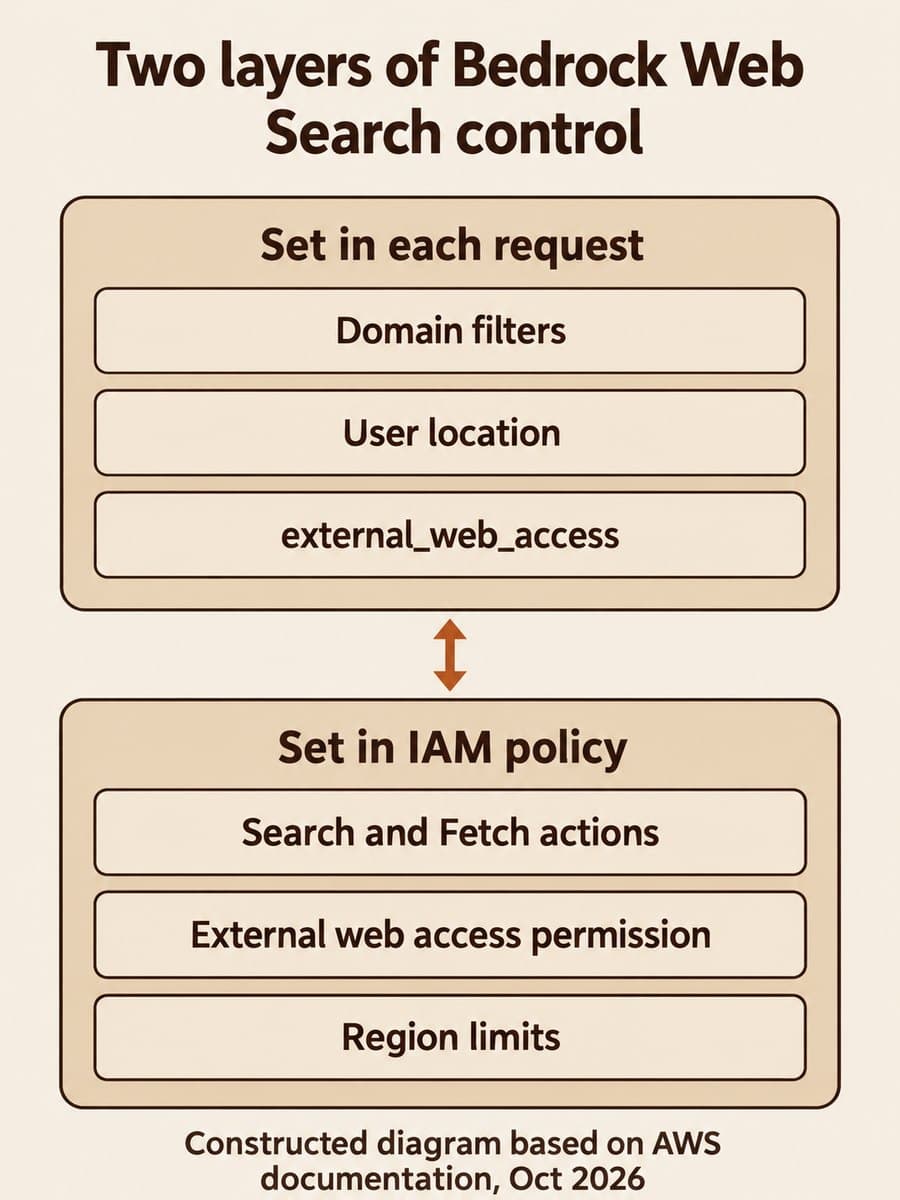
AWS added domain filtering and user location controls to Web Search on Amazon Bedrock on October 23, 2026. You can now pass up to 100 allowed_domains or blocked_domains on the web_search tool in an OpenAI Responses API request, which decides whether a grounded answer can draw on any site or only on sources you trust.
The catch is where that rule lives. The filter is a field in each request, and the IAM controls AWS documents for Web Search cover which actions an identity may call and in which Region, not which domains. If your team wants a source allowlist, your application code has to send it every time.
What changed in Bedrock Web Search?
Two optional controls arrived on the existing web_search tool: filters for domains and user_location for geography. AWS says both are "configured directly on the web_search tool in your existing OpenAI Responses API request," and they are available in every Region where Web Search runs: US East (N. Virginia), US East (Ohio), US West (Oregon) and AWS GovCloud (US-West).
The Bedrock User Guide adds the details you need to write the request:
- You can set up to 100
allowed_domainsand up to 100blocked_domains. - List domains without
http://orhttps://. Each entry also matches its subdomains, soaws.amazon.comcoversdocs.aws.amazon.com. - If
user_locationis missing or empty, location defaults to the United States.countrymust be an assigned ISO 3166-1 alpha-2 code (AWS notes thatUKis rejected), andtimezonetakes an IANA identifier such asAmerica/New_York.
Web Search itself only works with OpenAI GPT-5.4 and later models on the bedrock-mantle endpoint. AWS says it "isn't available when you call the Responses API on the bedrock-runtime endpoint."
How do domain filters work with Search and Fetch?
Web Search is two operations, and the filter is documented against only one of them. Search returns titles, URLs and snippets from an AWS-built web index. Fetch retrieves the content of a specific URL. The User Guide describes domain filtering as restricting "Web Search results."
The IAM page explains why that distinction matters. Fetch "still applies to any URL the model produces — one you provide in your request or one the model generates from its own knowledge." AWS also warns that "Fetch is not limited to URLs you supply." The published documentation does not say whether allowed_domains also limits Fetch on a URL the model writes itself. Treat that as an open question to test, not a guarantee.
A second default affects the same path. external_web_access defaults to true to match the OpenAI Responses API, but the general AmazonBedrockFullAccess policy does not grant the bedrock-websearch:ExternalWebAccess permission. With that combination, AWS says each Fetch attempt fails authorization, yet the request can still return HTTP 200 with citations, and "the presence of a citation does not mean the cited page was fetched."

Can IAM enforce a domain allowlist?
Not according to the current documentation. The Web Search IAM page lists three actions (InvokeSearch, InvokeFetch, ExternalWebAccess) and one condition key, aws:RequestedRegion. Administrators can turn Web Search off for an organization with a service control policy, for an account with an IAM deny, or for a Region with that condition key. Nothing on the page ties a permission to a domain.
That puts Bedrock Web Search in a different spot from AgentCore. In our look at AgentCore Web Search's per-call source filters, the gateway combines each request's filter with a separate admin-level domain policy. With Bedrock Web Search on bedrock-mantle, the documented domain control is the request field alone.
Scroll sideways to see all 3 columns.
| Control | Where it is set | What it limits |
|---|---|---|
filters.allowed_domains / blocked_domains | Each Responses API request | Which domains Search results can come from |
user_location | Each request | Which geography results are tuned for |
external_web_access | Each request | Whether Fetch may go past the AWS cache to the live web |
InvokeSearch, InvokeFetch, ExternalWebAccess | IAM policy | Which Web Search operations an identity can call |
aws:RequestedRegion | IAM policy | Which Regions can run Web Search |
Who does this affect?
Teams that already call Web Search through bedrock-mantle, or plan to, are the ones affected. That includes customer-facing assistants that cite sources, internal research tools, and coding agents. AWS notes that Codex connects to Bedrock through the same endpoint and sets external_web_access to false on each request.
If your application builds tool definitions in one shared module, adding a domain list is a small change. If several services or prompts each assemble their own tools array, every one of them needs the same filter, and nothing at the IAM layer will catch the one that forgets.
Why it matters for teams with a source policy
BaristaLabs' interpretation: the new filter gives you real control over where Search grounds an answer, which helps when an assistant should quote your documentation, a regulator, or a vendor's status page instead of whatever ranks first. The risk is assuming the filter is a policy boundary. It is a parameter. A missing parameter quietly widens the source set, and a citation in the answer does not prove the page was read.
AWS's own note on external access is the sharper version of the same point. With external_web_access set to true, "an agent could encode query data into a URL and then attempt to fetch that URL from the external internet." For prompts that carry customer or internal data, the live-web path is an egress decision, the same kind we covered in auditing allowed egress for agent sandboxes.
Recommended first step
BaristaLabs recommends one bounded change for any workload that should cite approved sources only:
- Set
"external_web_access": falseexplicitly in the tool definition, so Search uses the AWS index and Fetch uses the AWS cache only. - Add
filters.allowed_domainswith the short list of sources the answer may cite, from a single shared config file rather than in each prompt. - Grant
bedrock-websearch:InvokeSearchandbedrock-websearch:InvokeFetchonly. KeepExternalWebAccessoff unless a workload needs live pages. Note that theReadOnlyexternal policy grants the same live-web access as theFullAccessone. - Turn on CloudTrail data event logging for Web Search, then run ten real questions and check which URLs were searched and fetched against your list.
If you also keep documents in a Bedrock knowledge base, the same "who can see what" check applies there; see how ACL-aware retrieval in Bedrock still depends on your app's authentication. For help designing source policy across AI tools, see our AI consulting service.
Sources and scope
- AWS What's New, Web Search on Amazon Bedrock now supports domain filtering and user location controls, October 23, 2026.
- Amazon Bedrock User Guide, Web Search, read October 26, 2026.
- Amazon Bedrock User Guide, Identity and access management for Web Search, read October 26, 2026.
These sources do not say whether domain filters apply to Fetch requests for URLs the model generates, and they do not list Web Search prices (AWS points to the Bedrock pricing page). BaristaLabs did not run Web Search for this article.
Bedrock Web Search
Set a source allowlist your apps actually send
Bring the assistants or agents that call Web Search. BaristaLabs can help you choose the allowed domains, move the filter into one shared tool config, tighten IAM to Search and cached Fetch, and check CloudTrail against the list.
Start with the one assistant that cites sources to customers.
Turn this idea into a pilot
Which workflow should go first?
Use the readiness check to compare impact, effort, risk, owner, and next step before requesting a review.
- 3-5 minutes
- Deterministic score
- No sensitive data
Practical AI Workflow Notes
Want more practical AI operations ideas?
Get short notes on applying AI inside real small-business workflows — from document handling and customer follow-up to internal reporting, compliance, and automation guardrails.