

If AI agents are going to run real workflows for hours, pause for approvals, recover from failures, and touch production systems, better prompts are not enough.
They need runtime plumbing.
That is the practical signal behind Google Cloud's May 20, 2026 announcement of Agent Executor, an open-source distributed runtime for agent execution, resumption, and deployment. Google frames it as a response to a simple operational reality: agents are taking on complex tasks that can run for hours or days, and those long-running workflows are fragile in production.
For business and engineering teams, the announcement is less about whether they should adopt Google's runtime today. The more useful question is what it reveals about the shape of production AI agent systems.
The next phase of AI workflow automation is about durability, isolation, state consistency, recovery, evidence, and control.
What Google announced
Google introduced Agent Executor as an open-source runtime standard for running distributed AI agents. The project is available in preview, with code published in the google/ax GitHub repository.
The runtime is designed to support long-running agent workflows across local and remote actors, including agents, tools, skills, harnesses, and sandboxed environments. Its core capabilities include:
- durable execution using event logs, snapshots, and resumption
- human-in-the-loop interruptions for approvals and confirmations
- secure sandboxing for isolated execution
- session consistency through a single-writer architecture
- client disconnect and reconnect handling with backfilled responses
- checkpoints and trajectory branching for exploring or replaying agent paths
That list is worth reading as an infrastructure checklist, not a feature brochure.
Google is also placing Agent Executor inside a broader enterprise agent push. In its Google I/O 2026 Cloud roundup, the company described Gemini Enterprise, Agent Platform, Managed Agents API, Antigravity, and other tools as part of its agentic enterprise direction. Agent Executor fits that pattern. If agents become a regular way to automate business work, the runtime becomes part of the product surface.
The same pattern shows up in a more ordinary place: release notes. The Gemini Enterprise release notes, last updated May 27, 2026, include ongoing changes around model availability, admin controls, connectors, access behavior, analytics, security, and enterprise rollout details. Serious agent adoption usually depends on boring controls. Admin toggles, connector behavior, sharing rules, auditability, and compliance posture are the difference between a demo and an operating system for work.
Why long-running AI agents are an infrastructure problem
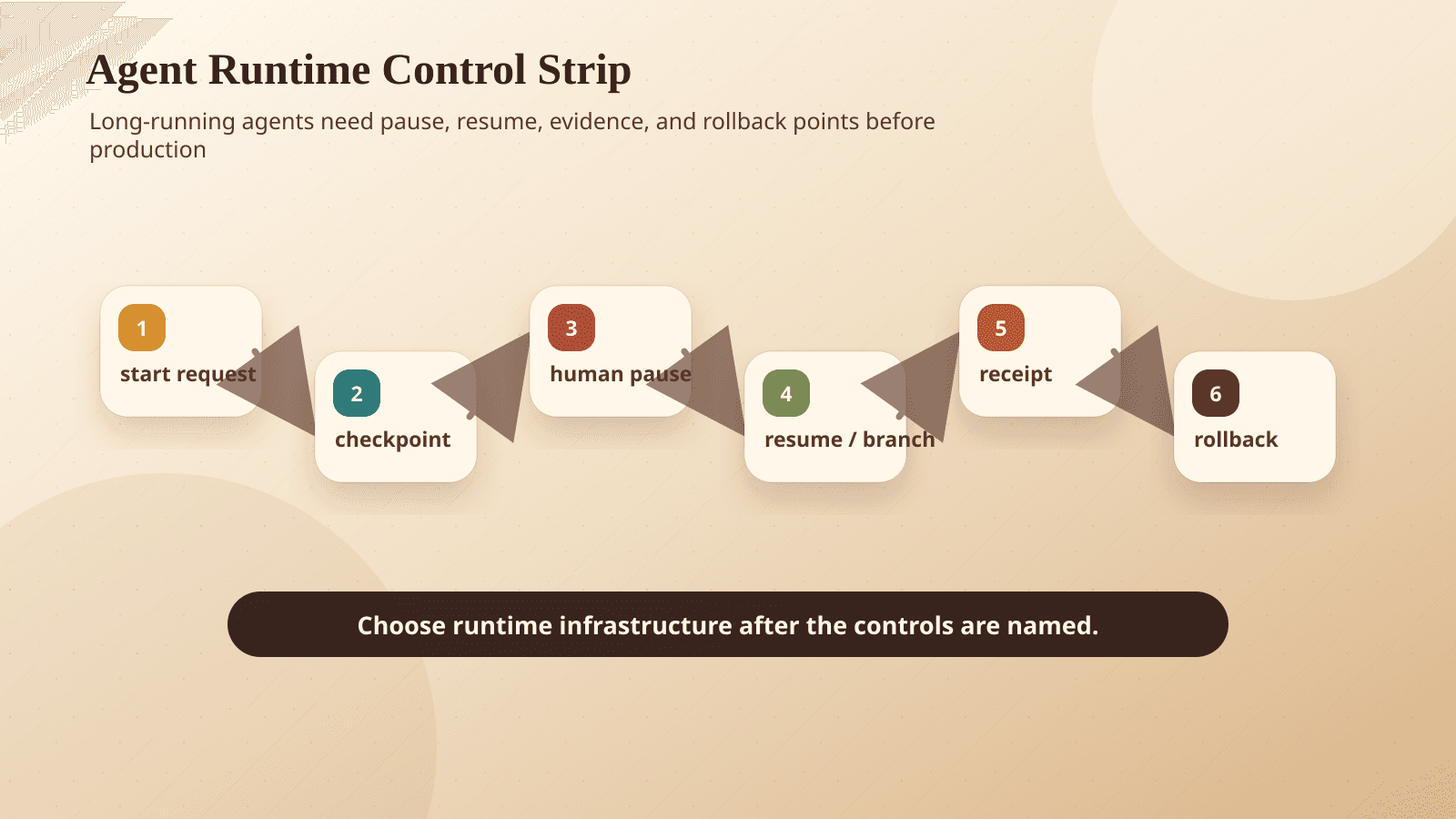
Most agent demos are short. A user asks for something. The agent plans, calls a few tools, returns an answer, and the session ends.
Production workflows are different.
A real agent might need to:
- investigate a customer issue across several systems
- draft a remediation plan
- ask for approval before changing a record
- wait for a deployment window
- retry after a service outage
- resume after a worker restarts
- preserve an audit trail for compliance
- hand off context to a human or another system
That workflow cannot depend on a chat window staying open or a single process staying alive. It also cannot treat agent state as an informal transcript that may or may not match what happened in external systems.
Once agents run for hours, cross trust boundaries, and take real actions, they begin to look like distributed systems. That means they inherit distributed systems problems.
Agent Executor is Google's answer to several of those problems.
Durability and resumption
Long-running agents fail in ordinary ways.
A container restarts. A network connection drops. A model call times out. A tool returns a partial result. A user approval arrives six hours later. A workflow pauses overnight because the next step should happen during business hours.
Without durable execution, those failures turn into manual cleanup. Someone has to figure out what the agent already did, what it intended to do next, and whether retrying is safe.
Google says Agent Executor uses an event log and snapshotting to support durable execution and resumption. In plain language, the runtime keeps enough structured history to restart work without guessing.
That matters for any AI agent runtime because agents are often nonlinear. They do not always follow a fixed workflow chart. They may branch, wait for external input, call different tools based on intermediate results, or revise their plan. A production runtime needs to preserve more than "the latest message." It needs to preserve the execution trail.
Business question: if an agent stops halfway through a customer-impacting workflow, can you safely resume it, cancel it, or inspect it?
If the answer is no, the workflow is not production-ready.
Human-in-the-loop pauses
Human approval is not an afterthought. It is one of the main ways teams should introduce agents into sensitive workflows.
An agent might be allowed to research, summarize, draft, classify, and prepare changes. But before it sends an email, refunds a payment, updates a CRM field, merges code, or changes infrastructure, a person may need to approve the action.
Google explicitly calls out human-in-the-loop confirmations as one of the interruption patterns Agent Executor is designed to support.
That is the right framing. Approval is not simply a button in a UI. It creates runtime requirements:
- the agent must pause cleanly
- the pending action must be visible
- the approver needs enough context to make a decision
- the system must preserve what was approved
- the workflow must resume from the right point
- a denied action must not leave the workflow in an inconsistent state
This is why we often recommend building an approval layer before expanding an agent's permissions. See our earlier piece on why teams should build an AI approval queue before giving agents more autonomy.
Business question: can your team see exactly what the agent wants to do before it does it, and can the workflow continue cleanly after approval or rejection?
If approval exists only as a Slack message or a verbal instruction, it will be hard to audit and hard to scale.
Secure isolation
Agents are useful because they can call tools. They are risky for the same reason.
A production agent may read files, execute code, call internal APIs, access customer data, query business systems, or operate a browser. If it runs generated code or interacts with untrusted content, isolation becomes essential.
Agent Executor includes secure sandboxing so agents, tools, skills, and environments can run as isolated actors. Google specifically notes that sandboxes are useful when agents generate code, handle multiple tenants, or process user data concurrently.
This should be a default design concern, not a late-stage hardening task.
Isolation gives teams a way to contain bad outputs, malicious inputs, tool misuse, and tenant-boundary mistakes. It also supports clearer permission boundaries. One agent should not inherit broad access just because another workflow needs it.
This connects directly to data protection and workflow design. For sensitive use cases, teams need clear rules for where data goes, which tools can see it, how secrets are handled, and what logs are retained.
Business question: if an agent does something unexpected, is the blast radius constrained by design?
If every tool runs with broad credentials in the same environment, the answer is probably no.
Session consistency
Distributed agents often involve multiple actors.
One process may coordinate the workflow. Another may run a tool. Another may execute code. Another may call a model. Another may stream updates to a client. If all of them can write to shared session state at the same time, consistency becomes fragile.
Google says Agent Executor uses a single-writer architecture for shared session state. One controller coordinates state changes instead of letting every component mutate the session independently.
This sounds technical because it is. But the business implication is straightforward: if the record of work is inconsistent, you cannot trust the result.
For production AI agents, the session state is not just chat history. It may represent approvals, tool calls, files produced, API responses, partial decisions, retries, errors, and final actions. If that state becomes inconsistent, the agent may repeat a step, skip a required check, or make a decision from stale information.
Business question: what is the source of truth for an agent workflow?
If the answer is spread across logs, chat messages, tool outputs, and memory snapshots with no coordination layer, the workflow will be difficult to govern.
Reconnect and backfill
Users disconnect. Browsers close. Mobile devices switch networks. Long workflows may continue after the original client session disappears.
Agent Executor includes connection recovery so a client can reconnect and receive backfilled responses. This is a small feature with large operational importance.
Without reconnect and backfill, users lose visibility into what happened while they were gone. That creates support problems and trust problems. Did the agent keep running? Did it pause? Did it fail? Did it take action? Did it ask for approval?
For engineering teams, reconnect behavior is also part of incident response. If an agent is mid-workflow, operators need a consistent way to inspect status and recover the interaction.
Business question: if a user closes their laptop while an agent is running, what do they see when they come back?
If the workflow cannot answer that, users will either distrust it or create manual side channels to monitor it.
Checkpoints and trajectory branching
Agent workflows often involve judgment calls. The agent may choose one investigation path, one fix, one message draft, or one sequence of tool calls. Sometimes teams need to inspect alternatives.
Google describes trajectory branching as a capability of Agent Executor. In practice, this means the runtime can support checkpoints and alternate paths from a given point in the workflow.
That can be useful for debugging, evaluation, and controlled experimentation. For example:
- rerun from a checkpoint with a different model
- compare two remediation plans from the same starting state
- reproduce why an agent made a specific decision
- preserve the approved path while exploring an alternative
- build regression tests around prior failures
This connects to a larger requirement: teams need evidence from agent work, not just final answers. We have written about why agent evals should test workflow receipts. A runtime that records meaningful execution history makes those receipts more practical.
Business question: can you replay, inspect, or compare an agent's path through a workflow?
If not, debugging and evaluation will depend too much on anecdote.
What this means for teams evaluating production AI agents
Agent Executor is an early-stage open-source project, and teams should treat it accordingly. The GitHub repository describes active development, with breaking changes expected before a stable release. That does not make it irrelevant. It makes it a useful signal.
Google is naming the operational layer that many teams eventually discover the hard way.
If you are evaluating long-running AI agents, the key questions are not limited to "Which model performs best?" or "Which prompt works?" Those questions matter, but they sit inside a larger system.
Ask these questions before putting agents near production workflows:
- What is the workflow boundary?
- What can the agent do without approval?
- What requires human review?
- What is completely off limits?
- How is state stored?
- Is there a durable event log?
- Are tool calls recorded?
- Can the workflow resume after failure?
- How are approvals handled?
- Are pending actions explicit?
- Is the approver shown the right context?
- Is the approval recorded as part of the workflow?
- How are tools isolated?
- Does each agent run with least-privilege access?
- Are code execution and browser automation sandboxed?
- Are tenant and customer data boundaries enforced?
- How do users regain visibility?
- Can clients reconnect?
- Are missed events backfilled?
- Can operators inspect workflow status?
- How is quality evaluated?
- Do you evaluate only final answers, or the steps taken?
- Are receipts captured for actions, approvals, and tool calls?
- Can failures become regression tests?
- How are releases controlled?
- Can you test new models, tools, and prompts before rollout?
- Are there gates for higher-risk workflows?
- Can you roll back behavior when something changes?
That last point matters because agent systems change at several layers: model behavior, prompts, tools, permissions, UI, policies, and runtime. For engineering teams, this starts to look like a release process. We wrote about a related pattern in the OpenAI Tax AI feedback loop.
The BaristaLabs view: start smaller, instrument earlier
Our practical take is simple: do not begin with a fully autonomous agent that touches everything.
Start with a scoped workflow where the business value is clear and the risk boundary is narrow. Then build the runtime habits early.
A good first production workflow might look like this:
- the agent gathers context from approved systems
- it drafts a recommendation or action plan
- it prepares a structured action request
- a human approves, edits, or rejects the action
- the system records the evidence, decision, and outcome
- the team reviews receipts and improves the workflow
That pattern works across many domains: customer operations, internal support, sales operations, compliance review, software maintenance, reporting, and back-office workflows.
It also fits older systems where APIs are limited and agents may need to operate through UI surfaces. In those cases, runtime controls become even more important. Browser or desktop agents that touch legacy workflows need strong boundaries, visible action queues, and clear receipts. We explored a related issue in our post on computer-use agents and legacy workflows.
The goal is not to slow automation down. It is to make automation safe enough to keep running.
For teams building AI workflow automation systems, the useful sequence is:
- Pick a workflow with a clear owner and measurable outcome.
- Define the agent's allowed actions.
- Add approval queues for irreversible or sensitive actions.
- Capture receipts for every tool call and decision.
- Evaluate the workflow, not just the final text.
- Expand permissions only after evidence supports it.
- Treat the runtime as production infrastructure.
Agent Executor may or may not become the runtime your team uses. But the problems it targets are real. Durable AI workflows need more than a clever agent loop. They need infrastructure that can pause, resume, isolate, explain, and recover.
That is the practical bar for production AI agents.
Check agent runtime readiness
Design the runtime controls before the agent owns work
BaristaLabs helps teams translate production-agent ideas into checkpointed, reviewable workflows with audit trails and recovery paths.
Best fit when a prototype works in a demo but has not yet proven pause, resume, review, recovery, or audit behavior.
Turn this idea into a pilot
Which workflow should go first?
Use the readiness check to compare impact, effort, risk, owner, and next step before requesting a review.
- 3-5 minutes
- Deterministic score
- No sensitive data
Practical AI Workflow Notes
Want more practical AI operations ideas?
Get short notes on applying AI inside real small-business workflows — from document handling and customer follow-up to internal reporting, compliance, and automation guardrails.