



GitHub Code Quality now records three repository audit events when someone enables the product, disables it, or changes its settings. For engineering and finance teams, that creates a missing piece of change history: the repository, actor, and time behind a scope change can now be found in the organization or enterprise audit log.
The events do not calculate a bill or prove that Code Quality improved software. They can explain when repository scope changed and who initiated it. This article shows how to join that evidence with current settings, license counts, usage, and an owner decision without asking the audit log to prove more than it records.
What do the three events record?
GitHub announced the events on August 20, 2026. The GitHub changelog names them precisely:
repo.code_quality_enabledrecords that someone turned on Code Quality for a repository.repo.code_quality_disabledrecords that someone turned it off.repo.code_quality_updatedrecords that someone changed the configuration of a repository where Code Quality was already enabled.
GitHub says each event captures the repository, the actor who made the change, and when it happened. The events appear in organization and enterprise audit logs and can be queried through the audit log API.
That is useful, bounded evidence. The announcement does not promise that an event contains a complete before-and-after settings diff. Treat the named event, repository, actor, and timestamp as the supported facts, then use the repository's current configuration and the team's change record for the rest of the explanation.
Why does configuration history matter to billing?
Code Quality scope affects more than one cost. GitHub's billing documentation separates GitHub Actions minutes, AI credits, and active-committer licenses. A repository setting can therefore change which code is scanned, where AI-assisted analysis can consume shared credits, and which recent committers can enter license scope.
An active committer is not simply anyone listed on one repository. GitHub applies a 90-day push rule and counts qualifying people uniquely across the organization or enterprise. If a person remains active through another enabled repository, disabling one repository may not free that person's license.
This is why an audit event is not a savings amount. It establishes that scope changed at a particular time. Billing records establish the measured units. Current enablement and contributor overlap determine how the repository relates to those units.
For the full product-cost decision, use our guide to Code Quality's three cost meters. The narrower task here is explaining a specific scope change with evidence.
Build one reconciliation instead of reading the log alone
Start with a review window such as one billing cycle. Export or query the three Code Quality event types for that period, then preserve the event identifier or raw record according to your existing audit procedure. Do not copy sensitive fields into a new spreadsheet unless the review requires them.
For each event, join five facts:
Scroll sideways to see all 3 columns.
| Evidence | Question it answers | What it does not establish |
|---|---|---|
| Audit event | Which repository changed, who initiated it, and when? | The complete business reason or invoice effect |
| Current Code Quality setting | What is enabled now, including languages and runner choice? | What every earlier setting value was |
| Scope policy or change record | Was the change approved, and which repository group was intended? | Actual licenses, credits, or compute consumed |
| Billing and usage records | Which units were measured for the period? | Whether findings were useful or caused an outcome |
| Repository owner review | Should the repository stay enabled, narrow its configuration, or be disabled? | Organization-wide consistency without a wider inventory |
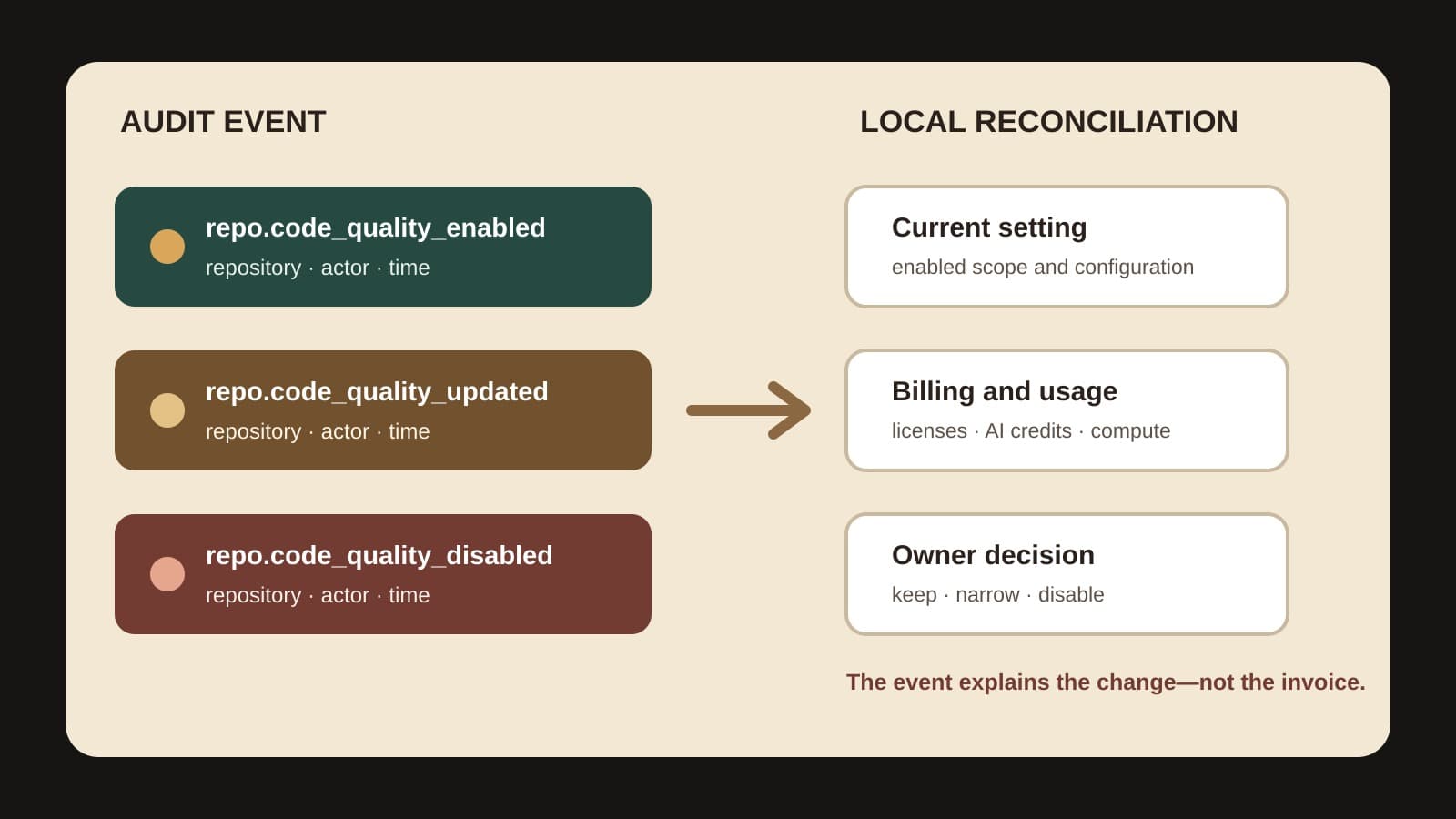
This reconciliation distinguishes provider facts from local interpretation. GitHub supplies the event and billing definitions. Your organization supplies the approval, intended scope, current state, and reason for the next decision.
Check organization-level scope after it propagates
GitHub lets organization owners set repository access to all repositories, selected repositories, or repositories matching a filter. Its enablement documentation says repositories inside the selection are enabled and those outside it are disabled. Organization owners can also prevent repository administrators from overriding that scope.
GitHub says a broad change begins propagating immediately but can take several minutes in a large organization. Do not take a snapshot in the middle of that window and label the mixed state final. Record the organization-level change, wait for the documented propagation window to pass, and then compare the intended selection with current repository state and the available audit events.
The changelog says the new events record repository changes. It does not state how many repository events every organization-level filter edit will produce. Verify the behavior in your own audit log rather than assuming a one-to-one event count from the number shown in an enablement dialog.
Test the evidence path with one low-risk repository
Before relying on the events for a quarterly control or billing review, test the path on one repository where a temporary change is acceptable. Use a repository owner or administrator following the normal approval process.
Record the initial state, make one approved configuration change, and confirm that the expected event appears with the correct repository, actor, and time. Then confirm that your audit export or API query preserves the fields your review needs. If the test includes enablement or disablement, restore the approved final state and verify that the corresponding event also appears.
The test proves that your evidence path can observe the controlled change. It does not prove that every historical event was exported, that every repository follows the intended policy, or that a setting generated a particular charge. Those require separate completeness, scope, and billing checks.
Investigate four mismatches without inventing a cause
The reconciliation becomes valuable when its inputs disagree. Handle each mismatch as a question:
- An enabled repository has no event in the review window. It may have been enabled before the window. Extend the query only as far as the decision requires, then label the earlier origin unknown if the available retention period does not reach it.
- An event has no matching change record. Ask the actor and repository owner for the reason. Do not infer intent from the timestamp.
- The intended organization selection differs from current repository state. Check propagation, filter membership, enforcement, and permitted local changes before calling it drift.
- A repository was disabled but consumed licenses did not fall as expected. Check the 90-day push rule and whether the same people remain active through other enabled repositories before claiming a billing error.
These are investigation paths, not explanations in advance. Preserve what each source actually shows and assign an owner to resolve the gap.
Make the event part of an owned scope decision
A Code Quality audit event can now answer who changed repository scope and when. Pair it with the present setting, the approved scope rule, billing evidence, and the repository owner's keep, narrow, or disable decision.
Run the reconciliation after a broad rollout, before a billing review, and when current scope differs from policy. BaristaLabs can help connect those records through a focused Code Quality scope review or a wider process automation engagement. The useful outcome is not a larger audit export. It is an explainable repository boundary with a named owner.
Sources reviewed on August 24, 2026
- GitHub Changelog: Track GitHub Code Quality enablement changes in the audit log, August 20, 2026.
- GitHub Docs: Enabling GitHub Code Quality, accessed August 24, 2026.
- GitHub Docs: GitHub Code Quality billing, accessed August 24, 2026.
GitHub's documents control the product, event, access, propagation, and billing descriptions. The reconciliation order, low-risk evidence-path test, mismatch handling, and owner recommendations are BaristaLabs interpretations. This article does not provide legal, accounting, or security-assurance advice.
Repository scope review
Explain one Code Quality scope change
BaristaLabs can help connect repository settings, audit events, billing evidence, and owner decisions without treating configuration activity as ROI.
Best fit for GitHub Team or Enterprise Cloud organizations that need an accountable record of why Code Quality scope changed.
Turn this idea into a pilot
Which workflow should go first?
Use the readiness check to compare impact, effort, risk, owner, and next step before requesting a review.
- 3-5 minutes
- Deterministic score
- No sensitive data
Practical AI Workflow Notes
Want more practical AI operations ideas?
Get short notes on applying AI inside real small-business workflows — from document handling and customer follow-up to internal reporting, compliance, and automation guardrails.