

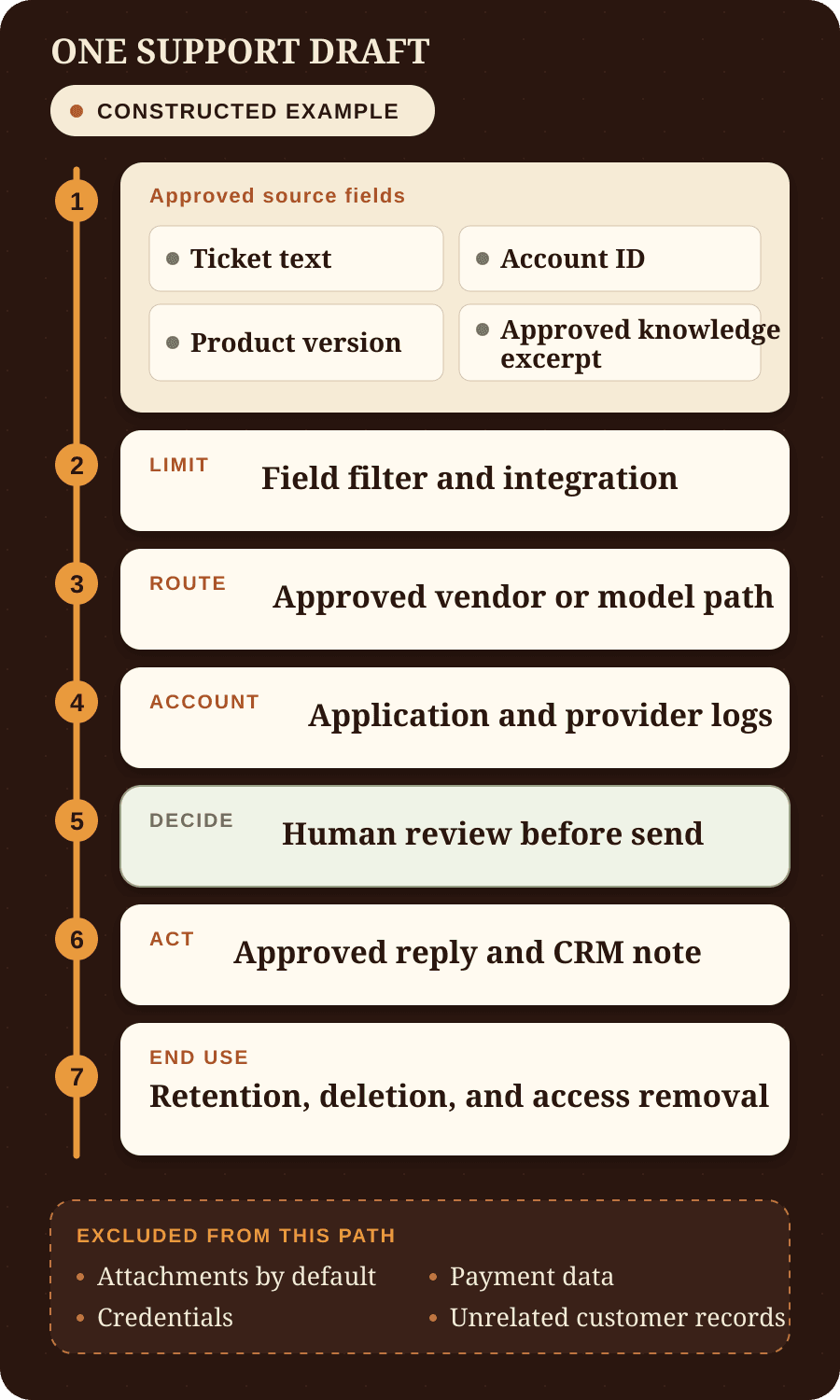

Before customer or business data enters an AI tool, decide whether one named workflow may use it. Track the exact source fields and each service that receives them. Then find the copies that remain, who can access them, and how your team will delete the data or remove access.
This guide to AI data privacy for small business shows how to trace that path. By the end, you will have the facts needed to approve a limited test, keep production data out, or send specific questions to a qualified reviewer.
The workflow is the useful unit of review. A general statement such as “we use an enterprise AI plan” leaves the important facts unresolved. The U.S. Federal Trade Commission advises businesses to trace how personal information enters, moves through, and leaves the business, including who can access it. That same sequence is a practical starting point for an AI workflow. See the FTC's guide for protecting personal information.
Map customer data in AI tools before you approve access
Name the workflow in operational terms. “Use AI for customer support” is too broad. “Draft a reply to a new support ticket for a person to review” identifies a trigger, an output, and a human decision point.
Next, list the minimum source fields that the first version needs. Do not approve a whole inbox, drive, CRM, or customer export when the task uses four fields from one record. Record excluded data beside the approved fields so the builder and reviewer enforce the same boundary.
The BaristaLabs guide to setting the workflow's data boundary adds the other implementation questions. It covers what the workflow may read, what stays out, who approves risky actions, what gets logged, and how the team stops the workflow or removes access.
Trace one constructed support workflow from source to end of use
The example below is constructed. It uses neutral sample fields and contains no client data.
A small business wants an AI tool to draft replies to new support tickets. A support team member must review each draft before it is sent. The first version does not close tickets, change account status, issue credits, or make decisions about customer eligibility.
Scroll sideways to see all 3 columns.
| Stage | Data path | Decision to record |
|---|---|---|
| 1. Source | A new ticket enters the help desk. | Allow the ticket text, account ID, product version, and one approved knowledge excerpt. Exclude attachments by default, payment data, credentials, and unrelated customer records. |
| 2. Field filter | An integration selects the approved fields and builds the request. | Confirm that hidden fields, prior threads, file attachments, and system-created record details do not enter by accident. |
| 3. Vendor or model path | The request goes through the approved AI product, plan, account, region, interface, and model path. | Name every service involved. These services can include an automation platform, model provider, retrieval service, storage service, or other third party. |
| 4. Logs and temporary copies | The application, provider, monitoring system, review queue, and backups can create more copies of the input or output. | For each known copy, record its purpose, access owner, storage location, retention period, deletion method, and backup treatment. Mark unverified copies and behavior as unknown. |
| 5. Human review | A support team member compares the source ticket, approved knowledge excerpt, and draft. | The reviewer can edit, reject, or approve the draft. The system records the decision without copying more sensitive text than the record needs. |
| 6. Downstream action | An approved reply is sent, and the workflow can write a note to the CRM. | Treat the email and CRM note as new stored copies. Apply their access, retention, correction, and deletion rules. |
| 7. End of use | The test ends, a person changes roles, an account closes, a deletion request arrives, or the vendor relationship ends. | Delete eligible test data, remove user and vendor access, revoke keys or tokens, export required records, and name the owner of any required record hold. |
An AI request does not travel only from a screen to a model and back. A 2025 external-expert report hosted through the EDPB Support Pool of Experts describes a generic large language model service. Input can pass through an interface and provider infrastructure before output returns. The report also identifies logs, third-party dependencies, log access, retention, and output as separate privacy risk areas. See AI Privacy Risks & Mitigations for Large Language Models.
Use the report as practical risk guidance. It does not prove that every provider follows the same path. Current first-party documents and the controlling contract must establish what the selected service does.
Verify the exact service and the terms that control it
Do not approve a vendor from a company-wide privacy statement or a general claim about “enterprise data.” Product behavior can depend on the product, plan, region, account type, interface, optional feature, and setting. Record the source and access date for every answer that affects the workflow.
The review should answer these questions for the exact service in use:
- What input, file content, metadata, retrieved material, and output leave your systems?
- Which providers, integrations, other services, and support channels receive each item?
- Can the provider use input or output for model improvement or training under this product, plan, account, interface, and setting?
- Which application, security, abuse-monitoring, support, and diagnostic logs can retain content or metadata?
- Which customer administrators, vendor staff, contractors, or support staff can access stored content?
- Where is the data processed or stored, and can the customer select a region?
- How long does each copy remain, and what event starts the retention period?
- What can the customer delete through the product? What requires a support request? How do backups and legal holds affect the result?
- Which setting, order form, data processing agreement, product term, or privacy notice controls if the documents conflict?
- How will the team review a relevant change to a feature, term, other service, or setting?
A data processing agreement can define important duties. It does not replace the product and setting review. A security certification can support a vendor assessment. It does not prove that the selected workflow uses the minimum data, has the correct retention setting, or gives the right person control of deletion.
If you cannot verify an important answer, mark it unknown. Do not turn a sales statement, plan label, or assumed default into a fact.
Use this AI data security checklist for one workflow
Privacy and security controls overlap, but they do different jobs. NIST describes its Privacy Framework as a voluntary tool for identifying and managing privacy risk. It can help organize this review. It does not replace applicable law or prove that a workflow is compliant.
Limit the data that enters the path
Keep only the fields required for the stated task and purpose. The FTC advises businesses not to collect sensitive personal information without a legitimate business need and to keep needed information only as long as necessary. In the constructed support workflow, this means selecting the fields that support a draft instead of sending a full account history.
Masking or removing a direct identifier can reduce exposure, but it does not automatically make the record anonymous. Context, uncommon details, and stable identifiers can still identify a person. The FTC states that hashing an email address, phone number, or other direct identifier does not by itself make data anonymous. See No, hashing still doesn't make your data anonymous.
Give each person and integration the minimum access
Give each person, service account, integration, and vendor only the access required for its task. Separate permission to read a ticket from permission to send a reply, change a CRM record, export an account, or administer the system.
Record the owner of each credential and permission. Also record who can grant access, review it, and remove it after a role change. Name the person who responds if a key or account is compromised. Encryption protects data in defined storage and transmission conditions. It does not decide whether an authorized user or connected service should have the data.
Set retention rules and test deletion
Set a retention rule for the source, integration cache, provider logs, application logs, review queue, output, monitoring data, and backups that exist in the workflow. “Delete after the test” is incomplete until the team names the owner, trigger, method, exceptions, and required evidence.
Use an approved test record to exercise the documented deletion process. Check the source, integrations, provider controls, logs, outputs, and downstream records. Record which copies were deleted, restricted, retained, or scheduled for later removal. Also record the stated treatment of backups and legal holds when you cannot inspect those systems directly.
Deleting the source record does not prove that another copy is gone. The team needs a way to locate related provider records, application logs, outputs, CRM notes, and other records that can remain subject to deletion or restriction.
Make human review a real decision
A human approval button is not sufficient by itself. The reviewer needs the source evidence, time, authority, and ability to edit, reject, or stop the proposed action. Record what the reviewer saw and decided without copying more personal data than the record needs.
The required review depends on the use, risk, and applicable rules. A routine draft can need a different process from a decision that affects a person's access, employment, credit, insurance, housing, healthcare, or legal rights.
Name the incident owner before a failure
Name who can pause the workflow, revoke access, preserve required evidence, investigate the affected path, and correct the control. The FTC's business guide recommends an incident plan and a named response owner. It also tells businesses to consult an attorney about applicable notice duties.
A provider's incident notice does not finish your response. Your team still needs to identify the affected workflows, records, people, credentials, outputs, and downstream systems.
A local model or private cloud changes the path
A model on equipment you control can remove an external model provider from one path. It can also add local model files, servers, administrators, deployment tools, telemetry, remote support, monitoring, backups, and maintenance accounts. A private cloud can still involve cloud staff, managed services, regions, logs, snapshots, and account permissions.
The EDPB-hosted expert report says a self-developed system can give an organization more control over data and model interaction. It also describes added expertise, resource, and privacy responsibilities. The limited practical conclusion is that deployment location changes the data path. It does not settle data minimization, access, retention, deletion, incident response, or applicable law.
Use the same review for a local model, private cloud, hosted API, or software product. Draw the real path and name the controls. Do not use the architecture label as the privacy decision.
Applicable law and consequential decisions need qualified review
This guide does not provide legal advice. The applicable rules depend on the people, data, purpose, decision, industry, contracts, and jurisdictions involved. Involve qualified privacy, legal, compliance, and security reviewers before a workflow uses regulated or highly sensitive data. Get the same review before AI makes or materially shapes a consequential decision.
Where the GDPR applies, the European Commission describes a right not to be subject to a decision based solely on automated processing when the decision has legal or similarly significant effects. The Commission also describes exceptions and safeguards. Safeguards can include human intervention and a way for the person to express a view or contest the decision. See the Commission's information for individuals and guidance for organizations.
The Commission also explains that a person can request erasure in specified cases where the GDPR applies. The right is not absolute, and exceptions can require or permit some records to remain. A qualified reviewer must determine which rights, duties, exceptions, and records apply to the actual workflow.
The NIST AI Risk Management Framework connects intended use, context-specific rules, third-party components, testing, and human oversight. NIST describes the framework as voluntary, and NIST states that AI RMF 1.0 is under revision as of the source access date. It does not decide whether a workflow is lawful or compliant.
If a workflow could make or materially shape a consequential decision, stop before production use. Ask qualified reviewers which rules apply, which data can be used, and what notice or legal basis is required. They must also decide what human involvement is sufficient, how a person can exercise applicable rights, and which records must remain.
Test the workflow before live customer data enters
Start with constructed records. Include normal cases, excluded attachments, missing source material, sensitive text, and cases that must go to a person. Set the expected result and acceptance criteria before the test begins. If a later test needs real records, obtain the required approval and qualified review before those records enter the workflow.
During the test, confirm that the field filter sends only approved data and that each service appears in the recorded path. Check that logs follow the documented settings and that reviewers see enough source evidence. Confirm that blocked actions remain blocked. Exercise the deletion process and remove user, vendor, and integration access as documented.
Keep production data out when the team cannot verify controlling terms, locate important copies, test deletion, remove access, or name an incident owner. Pause for qualified review when the data or decision requires it. A prototype can remain useful while the team resolves those questions, but it has not earned production data.
Use the AI data security checklist to record the source fields, excluded data, services, logs, approvals, retention, deletion, and access-removal steps for one workflow. The Learn hub has related practical AI workflow guides. If unresolved vendor, data, or pilot questions need a scoped review, BaristaLabs provides AI consulting for a first pilot.
Sources reviewed on August 23, 2026
Official sources control the descriptions of frameworks, government guidance, and GDPR rights in this article. The EDPB source is a technical report hosted through its Support Pool of Experts and prepared by an external expert. It is practical risk guidance. It is not a substitute for law or a regulator's decision. No vendor behavior claim appears because the article does not select a product, plan, account, interface, region, setting, or controlling contract. The constructed workflow, review order, and stop conditions are BaristaLabs recommendations.
- National Institute of Standards and Technology: NIST Privacy Framework, accessed August 23, 2026. NIST describes the framework as a voluntary tool for identifying and managing privacy risk.
- National Institute of Standards and Technology: AI Risk Management Framework and AI RMF 1.0 PDF, accessed August 23, 2026. NIST describes AI RMF 1.0 as voluntary and states that it is under revision as of the access date.
- Federal Trade Commission: Protecting Personal Information: A Guide for Business, accessed August 23, 2026. The guide is general business data-security guidance and is not specific to AI.
- Federal Trade Commission Office of Technology: No, hashing still doesn't make your data anonymous, July 24, 2024; accessed August 23, 2026.
- European Commission: Information for individuals and Dealing with requests from individuals, accessed August 23, 2026.
- European Data Protection Board Support Pool of Experts: AI Privacy Risks & Mitigations for Large Language Models and the report PDF, accessed August 23, 2026. External expert Isabel Barbera prepared the April 2025 report. The report states that its technical analysis reflects March 2025.
Practical AI Workflow Notes
Want more practical AI operations ideas?
Get short notes on applying AI inside real small-business workflows — from document handling and customer follow-up to internal reporting, compliance, and automation guardrails.