


The end-of-life notice for your database engine does not arrive with a siren. It shows up as the fourth unread message in a shared inbox, wedged between a billing alert and a calendar invite, ninety days ahead of a window you will spend the last week of in a panic.
Multiply that by dozens of linked accounts and a handful of services and you get the Monday AWS describes in its June post on self-service AWS Health analytics: Amazon Linux 2 going end of life, an RDS engine sliding into deprecation, a batch of EC2 instances queued for retirement. Every event accurate, time-stamped, attributed to a service and an account, and not one of them answering the question the on-call engineer actually has before standup: which of these touches production first, and whose job is it?
The information is all there. The triage is not. That is the gap AWS is poking at with Chaplin, short for Customer Health and Planned Lifecycle Intelligence Nexus, an open-source sample published as aws-samples/sample-aws-health-agentic-assistant. AWS describes the status quo as reactive event management, static dashboards, manual categorization, and a bottleneck where teams wait on a Technical Account Manager to interpret what is urgent.
Three states, and teams confuse them daily
A cloud health notice lives in one of three states, and most teams cannot tell you which one they are in.
Delivered. AWS sent it. It sits in an inbox, a feed, or an API response. This feels like progress. It is not. An unread retirement notice and an unsent one blow the same deadline.
Summarized. Something can now tell you there are hundreds of scheduled changes across services. The AWS Chaplin example shows a scheduled-change breakdown with 728 total events across eight services. That beats scrolling. It is still not a plan: a count tells you how big the pile is, not which thing on top is on fire.
Owned. One named person knows the RDS deprecation in account 41 lands on the payments database, that the window shuts in three weeks, that the migration is theirs, and that a ticket is tracking it to done. Only this last state survives a real deadline.
Dashboards stop at summarized, by design. They answer "how many" and "what kind," and they answer it well. But "how many end-of-life events do we have" is a counting question, while the operator's question is a routing one: which row is mine, and when does it bite. No chart closes that. A person turning each row into an assignment does.
Counting through a chatbot is a trap
Here is the detail in the AWS post worth slowing down for. A retrieval-based setup, asked how many end-of-life events existed, reported 190 when the real answer was 958. That is off by a factor of five, stated with total confidence, in exactly the sentence a stressed operator pastes into a status update.
The cause is structural, and it is the most reusable idea in the piece. Health events carry two kinds of information. Structured metadata, including event type, service, affected resources, timestamps, severity, and account IDs, is what you count, filter, and total. That is a database query. Unstructured text, including the description and recommended action, is what you interpret. Stuff event documents into a model's context and ask it to add them up, and you have handed arithmetic to a system built to predict plausible text. Plausible and correct are not the same number, and a five-to-one miss is what the gap between them looks like.
So the principle worth stealing, even if you never run the sample, is a division of labor: structured queries count; the model reads, weighs a tradeoff, and drafts the summary a human signs. The repo wires exactly this. Its README says Chaplin uses a data pipeline that collects AWS Health events across linked accounts into DynamoDB via S3, plus an MCP server that exposes that data to AI agents. The MCP server provides instant DynamoDB lookups for structured questions and Strands Agent plus Bedrock analysis for natural-language insights. The README is also candid that AI analysis tools may take 30 to 60 seconds, while summary and detail tools query DynamoDB directly and return instantly. That is not a flaw to hide. It is the seam doing its job: the fast lane counts, the slow lane reasons.
It is the same line we keep drawing between agents and the data they are allowed to touch: the model is good at language and a bad source of truth, so do not make it the source of truth.
The health-event action row
Counting correctly still leaves you in state two. To get to owned, you need an artifact, and it is smaller and more boring than a platform. It is a row.
Think of it as an action desk: every notice that comes off the stream gets turned into one line that a human, or a tightly-scoped agent, can act on. The fields are not decoration. Each one forces a question the summary let you skip, and each one is a place the work goes wrong later if you leave it blank.
Action desk field packet
Health-event action row
Every health notice becomes one owned row before it can be called handled.
- 01
Event ID and source
Required
Pins down: Which exact notice, from where
Why it matters: Two RDS deprecations in two accounts are two rows, not one talking point.
- 02
Affected account and resource
Required
Pins down: The specific ARN, instance, or database
Why it matters: "RDS is deprecating" is trivia until it names your payments DB.
- 03
Environment
Required
Pins down: Production, staging, or sandbox
Why it matters: The same event is a fire drill in prod and a shrug in a sandbox.
- 04
Service and category
Required
Pins down: EC2 retirement, security patch, version EOL
Why it matters: Category decides who even reads the row.
- 05
Deadline and window
Required
Pins down: The date the grace period closes
Why it matters: A count has no clock. A row does, and the clock is the whole point.
- 06
Business owner
Required
Pins down: A name, not a team alias
Why it matters: A row owned by "platform@" is owned by no one at 5 p.m. on the deadline.
- 07
Risk class
Required
Pins down: Blast radius if you do nothing
Why it matters: This is what sorts 958 events into the ten you handle this week.
- 08
Next action
Required
Pins down: The single concrete move
Why it matters: "Be aware of this" is not an action. "Cut over to Postgres 16 by the 18th" is.
- 09
System-of-record ticket
Required
Pins down: The Jira, GitHub, or ServiceNow ID
Why it matters: A decision that does not reach the tracker the team actually works gets re-decided weekly.
- 10
Proof or receipt
Required
Pins down: What closes the loop
Why it matters: "Done" is a claim. A merged PR or a resolved ticket is a receipt.
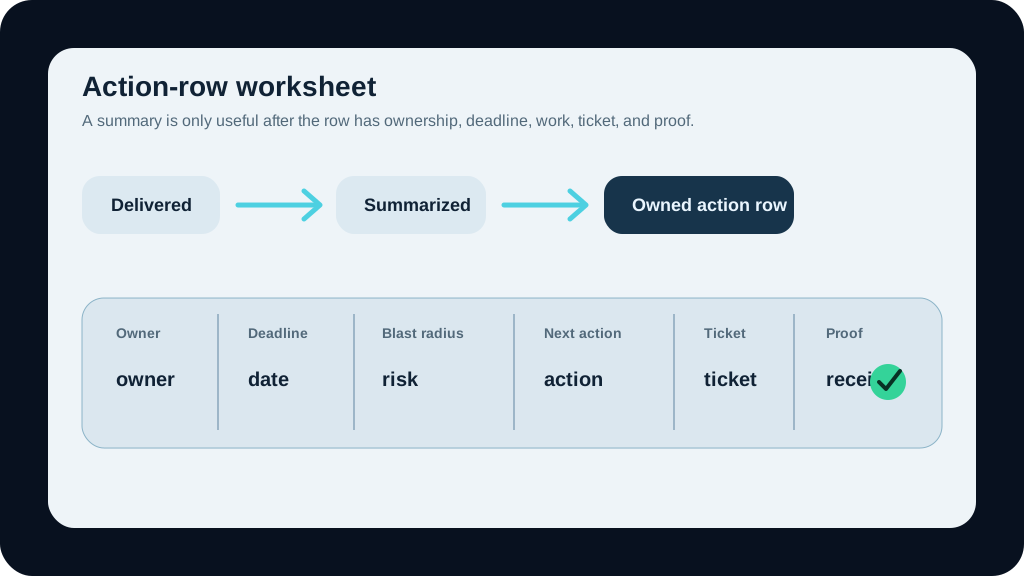
Done means owner, deadline, blast radius, next action, ticket, and proof.
The picture is the whole idea in one frame. Notices come off the stream as undifferentiated tiles. They land at the desk and become rows, and the chips that turn a tile into a row are the ones the inbox never filled in: who owns it, when it is due, how much it will hurt. The summary tells you the pile exists. The desk tells you what to pick up.
One rule keeps the desk honest, and it is the mental model worth carrying out of this post:
Example
A health event is not done when it is summarized. It is done when it has an owner, a deadline, a blast radius, and a next action, with a ticket that proves it.
What Chaplin's plumbing gets right
If you look at the sample, the architecture is a clean illustration of the desk underneath the desk, and you can map it onto almost any operational notice stream.
Events from many linked accounts get collected into S3. A Lambda function ingests them into DynamoDB, which becomes the structured store the fast lookups hit. On top of that sits an MCP server, the layer that exposes the data to AI assistants, with Amazon Bedrock and Strands agents handling the natural-language analysis. The assistant you actually talk to, any MCP-compatible client, is just the front door. AWS's framing is that a team can ask questions in plain language and get contextual answers without waiting on Support or a TAM for routine analysis.
A few details in the README are worth lifting on their own. The events get carved into the buckets a desk actually needs: critical events in the next 30 days, events in the 30-to-60-day window, and the ones already past due. You can filter by service, category, status, region, account, event type, or ARN. And the model that makes triage real carries customer metadata: whether a resource is production or non-production, which business unit owns it, and who is accountable. That metadata is what turns a generic "EC2 retirement" into "your team's prod box, due the 18th." Without it, you are back to a count.
The Chaplin examples also show why owner and blast radius cannot be afterthoughts. One walks through RDS PostgreSQL deprecation for Tier-1 production accounts and finds six of ten accounts already past due, with a demo figure of $304,400 a month at risk across those accounts. Treat that number as sample data from the post, not a universal benchmark. The shape is the lesson: "past due" and "dollars at risk" are exactly the fields a dashboard count leaves out and an action row makes you fill in.
There is a quieter warning here too, the same one we flagged about observability dashboards that look complete while missing the business signal. A green wall of "all events ingested" can sit one layer above a stack of unowned rows. Ingestion is not triage. Coverage is not closure.
The natural next move, and AWS calls this out, is wiring the assistant to the tools where work actually lives: Jira, GitHub, or ServiceNow over MCP. That is also the exact moment to get careful. Reading and summarizing is low-stakes. Creating and closing tickets is a write action, and write actions are where an over-eager agent turns a typo into a tracked commitment. Decide what the assistant may do on its own and what needs a human nod before it acts. We have written separately about keeping agent actions bounded, and the ticket queue is precisely where those controls earn their keep.
Start with one notice family
The wrong way to use any of this is to stand up a grand assistant over every notice you receive and call it triage. The right way is smaller.
RDS version deprecations make a good first family because the deadlines are real, the owners are usually knowable, and the answers can be hand-checked. EC2 retirements work too. So does a security-patch stream. Pick one family where the business already feels pain and where a wrong assignment would be visible before it becomes dangerous.
Start by defining ownership metadata. If you cannot say which business unit owns an account and which resources are production, the assistant will hand you confident, low-value counts. Owner and environment are the fields that make every later field worth filling in.
Then keep the first routing rule conservative. Let structured lookups count and bucket without a model in the loop. Use the slower natural-language pass for interpreting recommended actions and drafting the note a human can approve. If the structured data is ambiguous, the row goes to a person, not to a guess.
Finally, keep write actions behind approval until the workflow earns trust. Surfacing rows, drafting summaries, and proposing next actions are useful early wins. Opening, changing, or closing tickets in your system of record is a different class of permission. The cost of a wrong read is a second look. The cost of a wrong write is a commitment somebody has to unwind.
Do that for one notice family and you get something a count never gives you: a stream of events that arrive, get owned, and close with a receipt. Then you add the second family.
Turn one stream into a desk
AWS's sample is a sharp picture of a real problem and a fair start on the plumbing. But the thing you can put to work this week is not the repo. It is the row: owner, deadline, blast radius, next action, ticket, proof. Six fields that move a notice from received to finished.
If you would rather not build that routing from scratch, bring us one notice family and we will map it with you, or wire the full path as part of process automation. You will leave with rows that get owned and close with a receipt, the one thing a count never hands you.
Before you wire up an assistant
Give one notice stream an action desk
Bring one family of health notices. BaristaLabs will help you turn it into rows with an owner, a deadline, a risk class, and a ticket that closes the loop.
Best fit when notices already arrive but nobody can say what hits production first.
Turn this idea into a pilot
Which workflow should go first?
Use the readiness check to compare impact, effort, risk, owner, and next step before requesting a review.
- 3-5 minutes
- Deterministic score
- No sensitive data
Practical AI Workflow Notes
Want more practical AI operations ideas?
Get short notes on applying AI inside real small-business workflows — from document handling and customer follow-up to internal reporting, compliance, and automation guardrails.