

An AI-generated draft can usually be rejected before it affects the business. A change to a customer record, ledger, payment state, access setting, sent message, or public page has a different consequence. It can alter what the business knows, owes, permits, or promises.
This guide shows how to trace one back-office handoff and decide what AI may read, prepare, propose, and change. The owner, reviewer, and builder can use the resulting boundary before the workflow receives permission to update a business record.
Start with one handoff, not a department
Labels such as sales automation, finance automation, and support automation hide the action that needs a boundary. A sales workflow can summarize a request, draft a reply, change a CRM stage, and send a message. These actions do not have the same effect, even when one tool can perform all of them.
Choose one repeated handoff. Name the trigger, sources, prepared work, reviewer, receiving system, and correction path. A workflow baseline worksheet can hold this description before the team discusses products or integrations.
If the workflow is still unclear, use the weekly workflow audit to observe recurring work. If several candidates compete for attention, choose by what the team can safely undo. For judgment-heavy work, first find the stable part that AI can prepare. The first automation to study before automating explains that prerequisite. Those are workflow-selection decisions. This guide starts after one handoff has been selected.
Trace the point where preparation becomes action
A system of record is the authoritative system a business relies on for a given customer, financial, access, or operational state. A CRM can be the system of record for lead status. Accounting software can be the system of record for invoice status. An identity service can be the system of record for account access.
Work outside that system can still matter, but it is often easier to review and reject. A draft email in a review queue has not yet promised a delivery date to a customer. A proposed invoice note has not yet changed the accounting record. The consequence changes when the workflow can act. It can send, publish, approve, delete, grant access, move money, or write a new state into the system of record.
The following invoice exception is a constructed example. It does not describe a BaristaLabs customer or a measured result.
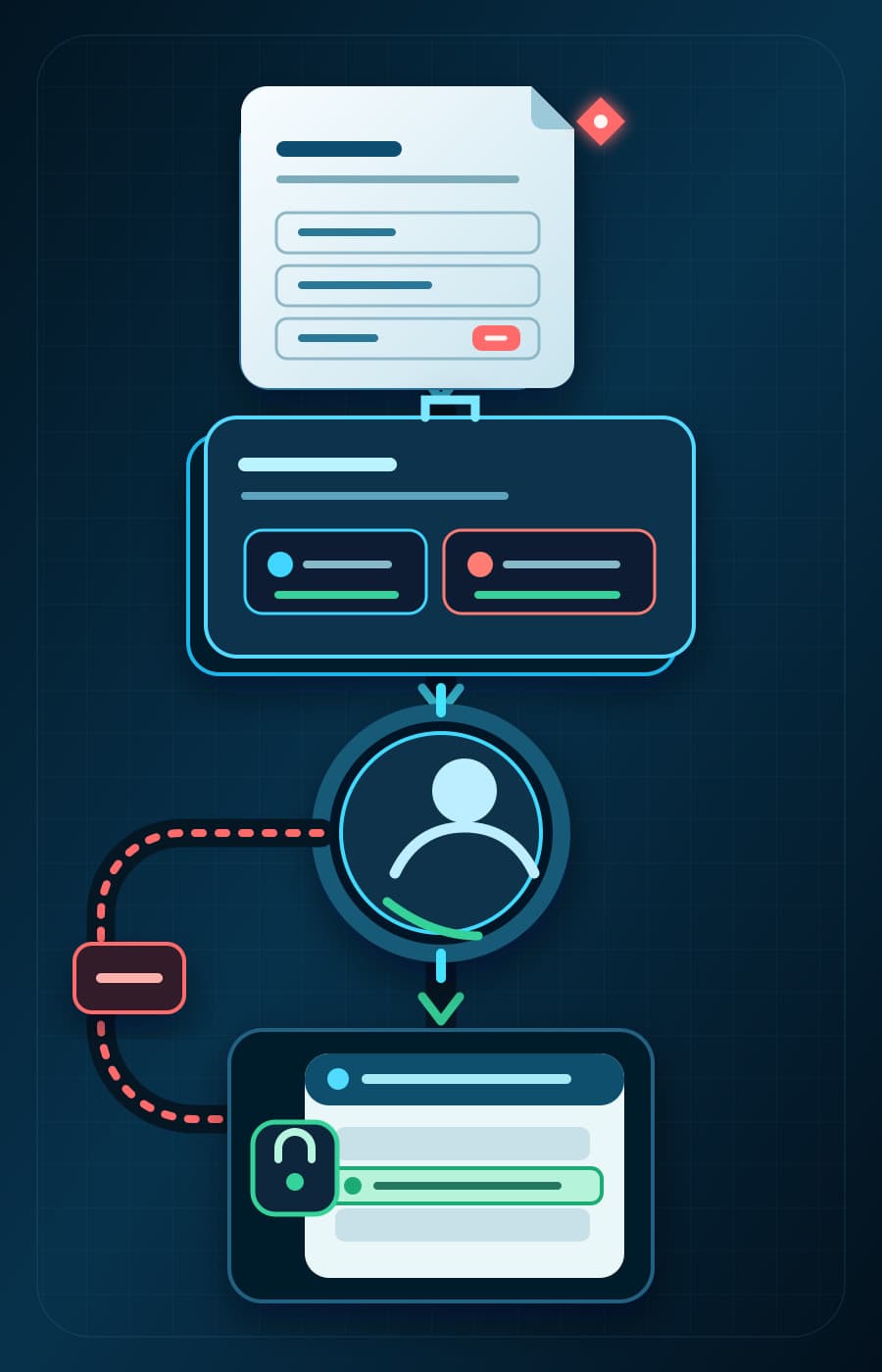
An invoice arrives with a total that does not match the purchase order. The workflow reads the invoice, purchase order, vendor record, and approved exception rule. It prepares a short comparison and attaches the relevant source fields. It then proposes a hold reason and an invoice-status change for a finance reviewer.
The reviewer sees the source documents, the rule used, the proposed field value, and the difference between the current and proposed record. If the reviewer rejects or edits the proposal, the accounting record does not change. If the reviewer approves it, a separate, narrow action updates the invoice status. The workflow stores the prior value and the approval so the finance owner can correct the record later.
That sequence exposes the action boundary. AI can do useful preparation before it receives permission to change the authoritative record.
Action boundary
Where preparation becomes a record change
The prepared packet and proposed value remain outside the accounting record until a reviewer decides what happens next.
Prepared artifact
Invoice comparison, source fields, current value, proposed hold reason, and proposed status.
Proposed state — accounting record unchanged
Human review
Reviewer sees the source, rule, current value, proposed value, and any missing information or exception.
Review decision — no write yet
Narrow permission gate
Only the approved invoice-status operation and required fields may cross into the accounting system.
Boundary — connected system enforces the action
If approved
Apply one permitted status update and record the old value, new value, approver, action result, and correction owner.
Constructed approved-change path — not an observed result
If held, edited, rejected, or escalated
Return the packet for correction or manual handling.
Accounting record unchanged
Use four ordinary action levels
The handoff comes first. Once the team can see the trigger, sources, reviewer, record change, and correction path, four ordinary levels help describe the allowed action.
Scroll sideways to see all 4 columns.
| Action level | What the workflow does | Business effect | Boundary question |
|---|---|---|---|
| Read | Retrieves named records or source material | The source remains unchanged | Which records and fields are necessary for this handoff? |
| Prepare | Extracts, classifies, compares, summarizes, or drafts work outside the authoritative record | A person can inspect or discard the artifact | What artifact will help the reviewer make the decision? |
| Propose | Shows the exact message, field value, status, or other change for approval | The proposed difference is visible, but no change occurs | What source and rule must appear beside the proposal? |
| Change | Sends, publishes, approves, deletes, grants, pays, or updates the system of record | The workflow changes a business state or commitment | Which exact action is approved, logged, and supported by a correction path? |
One workflow can use more than one level. The invoice example reads source records, prepares a comparison, and proposes a status change. It should not receive broad accounting access merely because the final step can update one field.
Separate the permissions as well as the words. Read access should use a read-only identity when the workflow does not need to write. A proposed change should remain outside the system of record until approval. The approved change should use a specific operation and the minimum fields needed for that operation.
Human review needs source evidence and a visible difference
A polished draft is not enough evidence for approval. The reviewer needs to see why the workflow produced it and what will change if approval is given. Otherwise, the person is reviewing tone and appearance instead of the business action.
For one proposed record change, the review view should show:
- the source record or document;
- the current value in the system of record;
- the exact proposed value or action;
- the policy, rule, or source passage used;
- any missing information, conflict, or exception;
- the person or role that can approve, edit, reject, or escalate the proposal.
The NIST AI RMF Playbook Map guidance includes planning for human-AI configurations and documenting the roles and responsibilities for human oversight. The Playbook does not define this review screen. Showing the source and proposed difference is a BaristaLabs recommendation for making that oversight useful in one back-office handoff.
The SBA's current small-business AI guidance recommends that another person review AI products made with free tools or software. It also says a person should assess AI-generated messages and outreach. A business workflow needs the same clarity about what the reviewer is assessing. A reviewer who cannot see the source, proposed difference, and consequence is being asked to approve more than the screen shows.
Observe the workflow before permission expands
Run the workflow in preparation mode before it can change the system of record. A shadow run lets AI prepare or propose the work while the current human process continues. The team can compare the output with the actual decision without exposing the business to an automatic record change.
Record enough evidence to explain what happened in each observed case:
- the case and source material used;
- the prepared artifact and proposed change;
- whether the reviewer accepted, edited, rejected, or escalated it;
- the exception or missing context behind a correction;
- any attempt to use data or take an action outside the boundary;
- the correction work the case would have required after a write.
Do not choose a universal accuracy threshold from another company or a vendor demonstration. Write the local condition that would justify the next permission. The NIST Manage guidance asks organizations to determine whether an AI system achieves its intended purpose and whether development or deployment should proceed. For this handoff, the team can keep preparation only or test one proposed record change. It can also narrow the source or action, redesign the review, or keep the workflow manual.
Performance claims need the same discipline. The FTC's Operation AI Comply announcement describes enforcement actions involving alleged deceptive or unfair AI conduct, including complaints about claims that lacked supporting evidence. The announcement is not an automation design standard. It is a useful reason to tie any claim about time saved, errors reduced, or work replaced to observed cases and a named baseline.
Keep the permission smaller than the tool
Many products can perform more actions than one workflow needs. The permission boundary should follow the handoff, not the product's full feature set.
OWASP describes excessive agency as damaging action enabled by excessive functionality, excessive permissions, or excessive autonomy. Its guidance recommends limiting functions and downstream permissions to the minimum needed and requiring human approval for high-impact actions.
For a back-office handoff, apply that guidance in the connected systems:
- expose only the functions the handoff needs;
- restrict access to the named records and fields;
- enforce approval and authorization in the system that receives the action;
- check that the source and proposed change are still current at approval time;
- record the prior value, approved value, approver, and action result;
- give a named owner a tested correction or rollback path.
A prompt that says "do not update other fields" is not the permission control. The connected system should reject an out-of-bound update even if the model proposes one. The AI workflow controls guide shows how approval, evidence, logs, monitoring, rollback, and escalation fit around the workflow.
Data access needs the same limit. The SBA cautions small businesses against entering sensitive or proprietary information into AI tools. That caution does not tell a team which records a private, contracted, or self-hosted system may process. Before connecting sensitive work, identify the necessary fields, vendor terms, storage path, access owner, and retention rule. Check the applicable legal and industry requirements as well.
Decide which permission the workflow has earned
The evidence from the real handoff controls the next step. It can support more automation, continued preparation, a redesign, or manual work.
Keep AI in preparation mode when the evidence is incomplete
Use preparation mode while the team organizes source material or reviewers correct important context. Use it when exceptions are common or the team cannot state the exact write operation. AI can still extract fields, compare documents, prepare a case summary, or draft a proposed change. The authoritative record stays under the current process while the team learns.
This is also the right boundary when the output is useful but the correction path is weak. A saved draft can reduce preparation work without forcing the business to accept the cost of an incorrect write.
Test one proposed record change when the action is narrow
A write-back is an update that the workflow sends into the system of record. Test one only after the team defines the source fields and shows the proposed difference. The reviewer must have authority to approve it. The receiving system must enforce the allowed operation and fields, and the team must be able to correct the result.
Require approval for the first test. The workflow proposes the change. A person reviews the evidence and approves the exact action. The system records the old value, new value, approval, result, and any later correction. Evidence from that narrow action can support the next decision without granting broad write access.
Keep the action manual or redesign it when the boundary is unclear
Keep an action manual when its consequence is high or its rules depend on unresolved judgment. Do the same when the available sources cannot reveal important exceptions. Moving money, changing access, making legal or pricing commitments, deleting records, and sending sensitive customer messages need more than a convenient integration.
Redesign the workflow when the reviewer cannot see the necessary evidence or the source is contradictory. Redesign it if no one owns exceptions, the receiving system cannot enforce a narrow permission, or the business cannot correct a bad action. The problem may be the process or integration rather than the model.
Write the first action boundary in plain language
The boundary should be short enough for the owner, reviewer, and builder to use. Replace the bracketed text with one real handoff:
Workflow: [one repeated handoff]
AI may read: [named sources, records, and fields]
AI may prepare: [artifact outside the system of record]
AI may propose: [exact message, field, status, or action]
AI may change: [one approved operation, or "nothing"]
A person must review: [source evidence and proposed difference]
The workflow must stop when: [exception, conflict, or out-of-bound request]
Correction owner and path: [person, prior state, and correction action]
For the constructed invoice exception, the boundary permits reads from the invoice, purchase order, vendor record, and approved exception rule. AI prepares the comparison and proposes one hold reason and status change. A finance reviewer approves the exact update. The workflow cannot approve payment, change vendor details, or edit other ledger fields. The finance owner can restore the prior status and attach a correction note.
The AI approval policy worksheet can turn that sentence into a fuller approval rule when the workflow needs one. Keep the first boundary tied to the selected handoff. A broad policy that says "humans approve important actions" does not tell the system which action is important or what the person must see.
Expand permission one action at a time
Back-office AI can create useful work before it receives authority over connected systems. The action boundary is where preparation crosses into a customer, financial, access, or operational change.
Start with one baseline, one reviewer view, and one plain-language boundary. Keep the workflow in preparation mode until observed cases support a narrower decision. If the evidence justifies a write-back test, grant one operation with minimum permission, visible approval, a record of the change, and a correction path.
BaristaLabs process automation and integration work starts with that handoff. We help teams trace the source, proposed output, review decision, system change, and correction path before selecting or expanding the integration.
The next permission should name the exact business action that the workflow has earned the right to propose or perform.
Source note
The NIST AI RMF Playbook provides voluntary suggestions for the Govern, Map, Measure, and Manage functions. NIST states that the Playbook is not a checklist or a set of steps that every organization must follow. The SBA page is general small-business guidance. OWASP LLM06:2025 is security guidance about excessive agency. The FTC page is an enforcement announcement, and several matters described there were complaints, proposed orders, or ongoing cases at the time of the announcement. The action levels, reviewer view, observed evidence, and write-back boundary in this article are BaristaLabs recommendations informed by those sources.
Action boundary review
Review one write-back boundary
BaristaLabs can help your team trace one back-office handoff, separate preparation from system change, and define the evidence required before permission expands.
Best fit when a repeated workflow is already visible and the open question is what AI may change in a CRM, ledger, payment state, customer message, access system, or public page.
Turn this idea into a pilot
Which workflow should go first?
Use the readiness check to compare impact, effort, risk, owner, and next step before requesting a review.
- 3-5 minutes
- Deterministic score
- No sensitive data
Practical AI Workflow Notes
Want more practical AI operations ideas?
Get short notes on applying AI inside real small-business workflows — from document handling and customer follow-up to internal reporting, compliance, and automation guardrails.