


It is a Tuesday, and someone on your team has a browser agent doing the dull work. Summarize this vendor page. Pull the pricing. Check whether this forum thread actually answers the support ticket. The agent has a real browser, real autonomy, and it runs on the same laptop the person uses to build things.
Now the near miss. The agent opens a page that reads like any other writeup. Inside that page is content the agent dutifully parses and acts on, and one of the actions it takes is to open a connection to a service running on the same machine at 127.0.0.1. Not a website. A local control socket that exists so a developer tool can launch helpers on demand. The page feeds that socket a set of parameters, the socket treats them as instructions, and a brand new process starts on the host.
No download dialog. No file flagged as malware. One web page, one local port, one new process running as the person who opened the tab.
That is the shape of AutoJack, and it is worth sitting with before it happens to a workflow you own.
What actually broke
On June 18, Microsoft Defender Security Research published the chain. The target was AutoGen Studio, the open-source prototyping UI for building AutoGen agent workflows. The claim is blunt: untrusted web content, rendered by a browsing agent, could reach a local MCP WebSocket and spawn arbitrary processes on the host.
Three weaknesses had to line up, and they did.
First, there was an origin allowlist meant to keep outside callers away from the socket. It was defeated because the request did not come from the outside. It came from the agent's own local execution context, which is exactly the trusted position the allowlist was built to honor.
Second, the auth middleware that protected the app did not gate the MCP WebSocket. The front door had a lock. This side door did not.
Third, and this is the part that turns a reachable socket into code execution, the server_params arriving from the URL became command-line parameters for a real process. Model-reachable input flowed straight to the operating system.
A fair question is how exposed anyone actually was. The Hacker News adds the packaging nuance, and it matters. A plain pip install autogenstudio gives you 0.4.2.2, which has no MCP route at all. The vulnerable handler lived in pre-release builds 0.4.3.dev1 and 0.4.3.dev2, the kind you only get by passing --pre or pinning a dev version on purpose. Microsoft notes the affected surface was not in the stable PyPI release it inspected, and the maintainers hardened upstream main in commit b047730. The fix stores MCP server parameters server-side behind session IDs instead of accepting them from a WebSocket query string, with a comment that says the quiet part out loud: "This prevents attackers from injecting arbitrary server_params via the WebSocket query string."
So this is not an emergency for most installs. Read it instead as a clean, well-documented reconstruction of a failure mode that generalizes past one project. The dev-build detail is the tell. The pattern that bit AutoGen Studio, a network-reachable local service handing caller-supplied input to a process, is easy to reproduce by accident, and pre-release tooling is exactly where that kind of surface tends to ship before anyone reviews it.
The loopback exception register
Most teams treat localhost as private by default. The unspoken rule is that anything bound to loopback is reachable only by you, the operator at the keyboard, so it does not need the ceremony you would give a public endpoint. No auth, friendly defaults, broad permissions. It is the workshop, not the storefront.
A browsing agent breaks that rule, because the agent is now an operator at your keyboard who also reads pages written by strangers. The instant those two facts share a host, every privileged loopback service becomes a thing the open web can try to reach through the agent. Loopback stops being a boundary and becomes an attack surface.
You cannot fix this with vibes, and you cannot fix it with a blanket "block localhost" rule, because half your dev tooling lives there for good reason. What you can do is make the exceptions explicit. Build a register. For every privileged local surface a browser agent could plausibly touch, write down why it exists, who is allowed to reach it, what it can do, and how you kill it.
The point is not the document. The point is that filling it forces the question AutoJack answers for you if you do not: if a web page steered my agent into this port, what would happen?
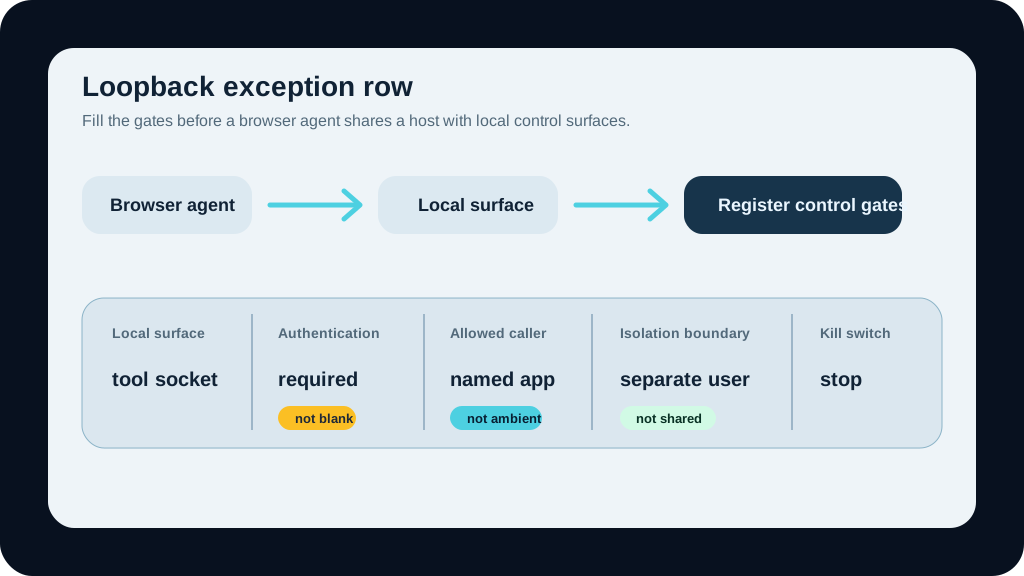
Here is the register, sized to copy into a sheet and fill one row at a time:
Scroll sideways to see all 8 columns.
| Local surface | Why it exists | Who can reach it | What can it do | Authentication | Allowed callers | Isolation boundary | Kill switch |
|---|---|---|---|---|---|---|---|
| MCP or tool control socket | Lets an app launch tools and helpers on demand | Anything that can open the port from the host, including your agent | Start processes, run tools, pass parameters to the OS | Often none by default; verify it is enforced on this route | Named app session only, not "any local caller" | Separate user, container, or VM from the browsing agent | One command to stop the listener and launcher |
| Local dev or preview server | Fast iteration on the app you are building | Browser, agent, and anything on the host | Serve app state, hit dev-only routes, sometimes mutate data | Usually none | Your dev session only | Bound to a profile the agent does not share | Stop the dev process |
| Local database or admin console | Convenience during development | Any local process, including the agent | Read and write data, run admin actions | Frequently weak or default credentials | Explicit app credentials, not ambient access | Non-production data, isolated from the agent's identity | Drop the connection or stop the service |
Three rows, but the exercise is the same for every entry: name the surface, then prove each later column instead of assuming it. The columns that catch people are Authentication and Allowed callers. AutoJack found the gap between a front door that had a lock and a side door that trusted anything local.
What to copy from the fix
Microsoft's guidance lines up with each link in the chain.
Treat every model-reachable parameter as attacker-controlled. If a value can be influenced by a page the agent reads, it is hostile input the moment it reaches a tool. AutoGen Studio's fix moved server parameters server-side behind session IDs so the URL could no longer dictate them. That is the move: never let agent-supplied strings become process arguments.
Stop binding sensitive control planes to localhost without auth. "It's only loopback" was the entire bet, and the agent collected on it. If a service can launch processes or touch real data, it needs authentication and authorization even when it only ever listens on 127.0.0.1.
Allowlist what can run. When a control surface does spawn processes, constrain it to a known set of executables. An allowlist on callers did not save AutoGen Studio because the caller was trusted. An allowlist on executables narrows the blast radius even when the caller is not.
Separate the agent's browsing identity from the developer's identity. This is where the boundary becomes architecture rather than policy. The browsing agent should not run as the same user, in the same profile, with the same reach as the person building software on that machine. We have made the browser-profile version of this case before, and AutoJack is the reason it is not optional once an agent has open-web access. If you have already done the work of counting your agent identities and shutdown paths, the register slots into it as the localhost layer that inventory tends to skip.
External enforcement points still matter. We have written about running agent firewalls in observe mode first. But a firewall in front of the agent does nothing about a socket the agent reaches from inside the host. The loopback register is the control that lives where the firewall cannot.
The one thing to do this week
Pick a single browser-agent workflow you actually run. The support summarizer, the research assistant, the QA agent clicking through a staging app. Map the host it runs on, list every privileged loopback service that host exposes, and fill one row of the register for each.
Most teams find at least one surface where the honest answer in the Authentication column is "none, because it's local," and that is precisely the row AutoJack was written about.
If you want a second set of eyes on the mapping, BaristaLabs can fill the loopback exception register for one of your agent workflows with you: start here. If you would rather run it yourself first, the AI workflow security review worksheet walks the same ground, and the control design notes cover how to keep the boundaries in place once they exist. Teams that want the whole workflow mapped, not just the risk surface, can do that through process automation.
Loopback was never a sandbox. It was a polite assumption that no untrusted caller would ever be standing at your keyboard. A browsing agent is exactly that caller. Write down the exceptions before a web page does it for you.
Security mapping help
Map the loopback surfaces before the browser agent browses
Bring one browser-agent workflow. BaristaLabs will help identify local services, privileged sockets, allowed callers, isolation boundaries, and kill switches, then turn the gaps into a short remediation path.
Best fit for teams testing browser agents, MCP tools, local dev servers, support automation, or internal workflow agents.
Turn this idea into a pilot
Which workflow should go first?
Use the readiness check to compare impact, effort, risk, owner, and next step before requesting a review.
- 3-5 minutes
- Deterministic score
- No sensitive data
Practical AI Workflow Notes
Want more practical AI operations ideas?
Get short notes on applying AI inside real small-business workflows — from document handling and customer follow-up to internal reporting, compliance, and automation guardrails.