
AgentCore rate limits need two kinds of bucket
Amazon Bedrock AgentCore Gateway can now limit requests, tokens, and connections by user, group, model, target, or tool. The important design choice is which callers share a bucket.

Sean McLellan
Lead Architect & Founder

Amazon Bedrock AgentCore Gateway can now apply customer-defined limits to requests, token throughput, and concurrent connections. The rules can group traffic by user identity, role, model, target, or individual tool.
That flexibility matters when several people or agents share the same downstream capacity. A single shared limit can protect a service while still allowing one busy caller to crowd out everyone else. This article explains how AgentCore builds its rate buckets, why shared and per-caller limits solve different problems, and where throttling stops being a security control.
What can AgentCore Gateway limit?
AgentCore Gateway provides a managed entry point for traffic headed to MCP tools, inference models, agents, and HTTP endpoints. In its August 6 announcement, AWS added three traffic measures.
Request limits count requests per second or minute and apply to all target types. A quick request and a long streaming request each count as one request. Token limits count input and output tokens per minute, but apply only to inference targets. Connection limits track open connections and therefore address long-running streams that a simple request count can miss.
These measures answer different capacity questions. Request rate protects a service from bursts. Token rate constrains model throughput. Connection rate protects finite concurrent capacity. Choosing one number for all three would hide the behavior each measure is meant to control.
How does a request enter a bucket?
A rate limit starts with dimension keys. AgentCore can resolve keys such as targetName, toolName, qualifiedModelId, a validated JWT claim, an IAM principal, or IAM source identity. The resolved combination determines which bucket receives the request.
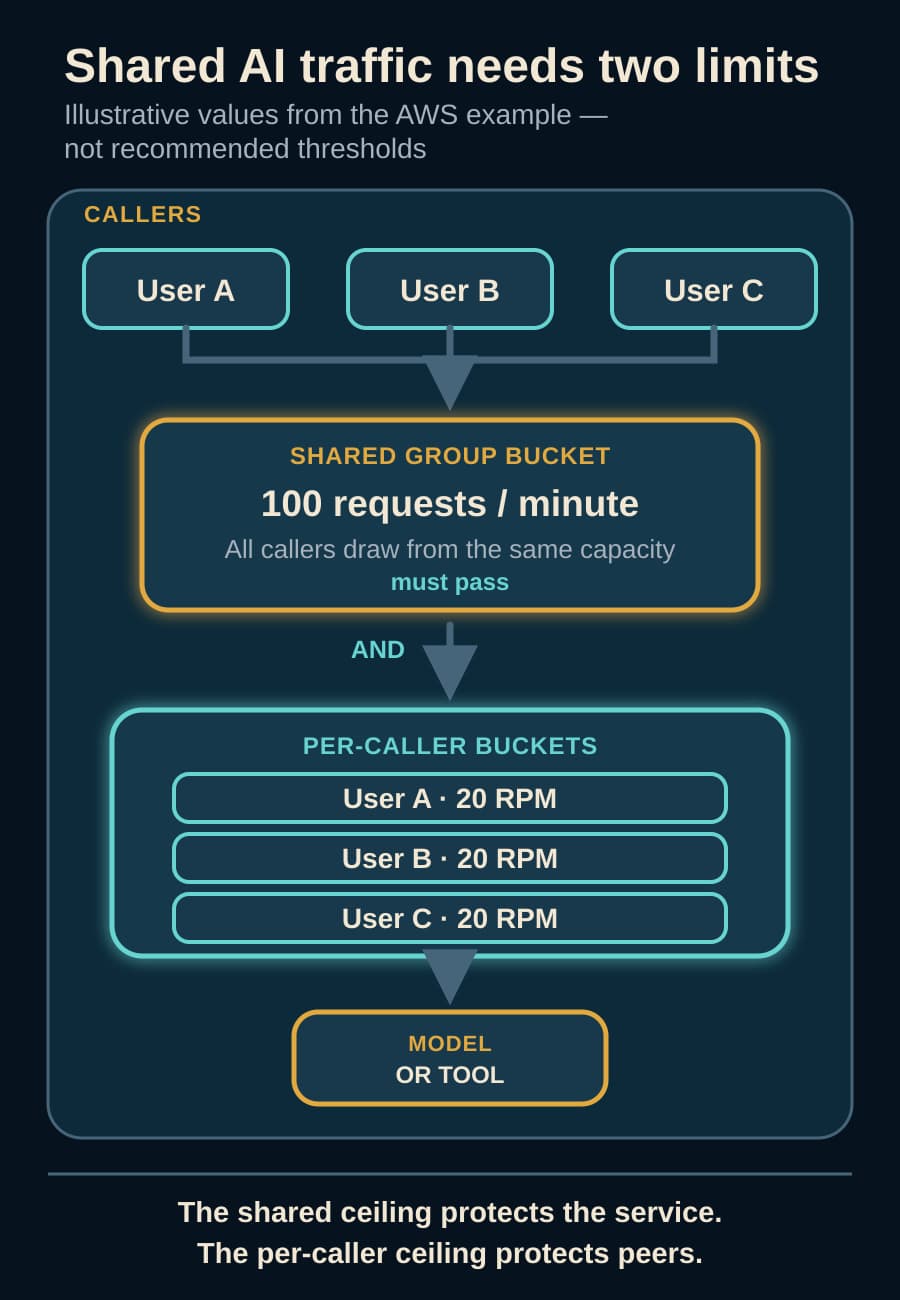
The distinction between a shared and independent bucket is easy to miss. A rule keyed only to a role gives all callers with that role a shared allowance. If the “Basic” role receives 100 requests per minute, one caller can consume all 100 and leave no room for peers.
Adding a stable caller identifier such as the JWT sub claim creates a separate bucket for each caller. AWS's example combines a 100-request shared ceiling for the Basic group with a 20-request per-user ceiling. Both rules must pass. The group cannot exceed 100 requests per minute, and no one user can take more than 20 of them.
This is the useful operating pattern: a shared ceiling protects the organization or downstream service, while a per-caller ceiling protects peers from one another.
Why is the wildcard behavior important?
In an AgentCore rate entry, * is not always one global catch-all bucket. The rate-limit dimensions guide says it gives each distinct resolved value an independent bucket at the configured rate.
For example, a wildcard entry on targetName can give every target its own ten-request-per-second bucket. A wildcard on $.context.jwt.sub can give every validated caller a separate allowance. A named value takes precedence over the wildcard, so a heavily used target can receive an explicit setting while other targets inherit the default.
Multi-dimension rules add another constraint: wildcard values must occupy trailing positions. The order of the dimension keys therefore affects which specific and default entries can be expressed. Treat that order as part of the design, not formatting that can be rearranged later.
What happens when identity data is missing?
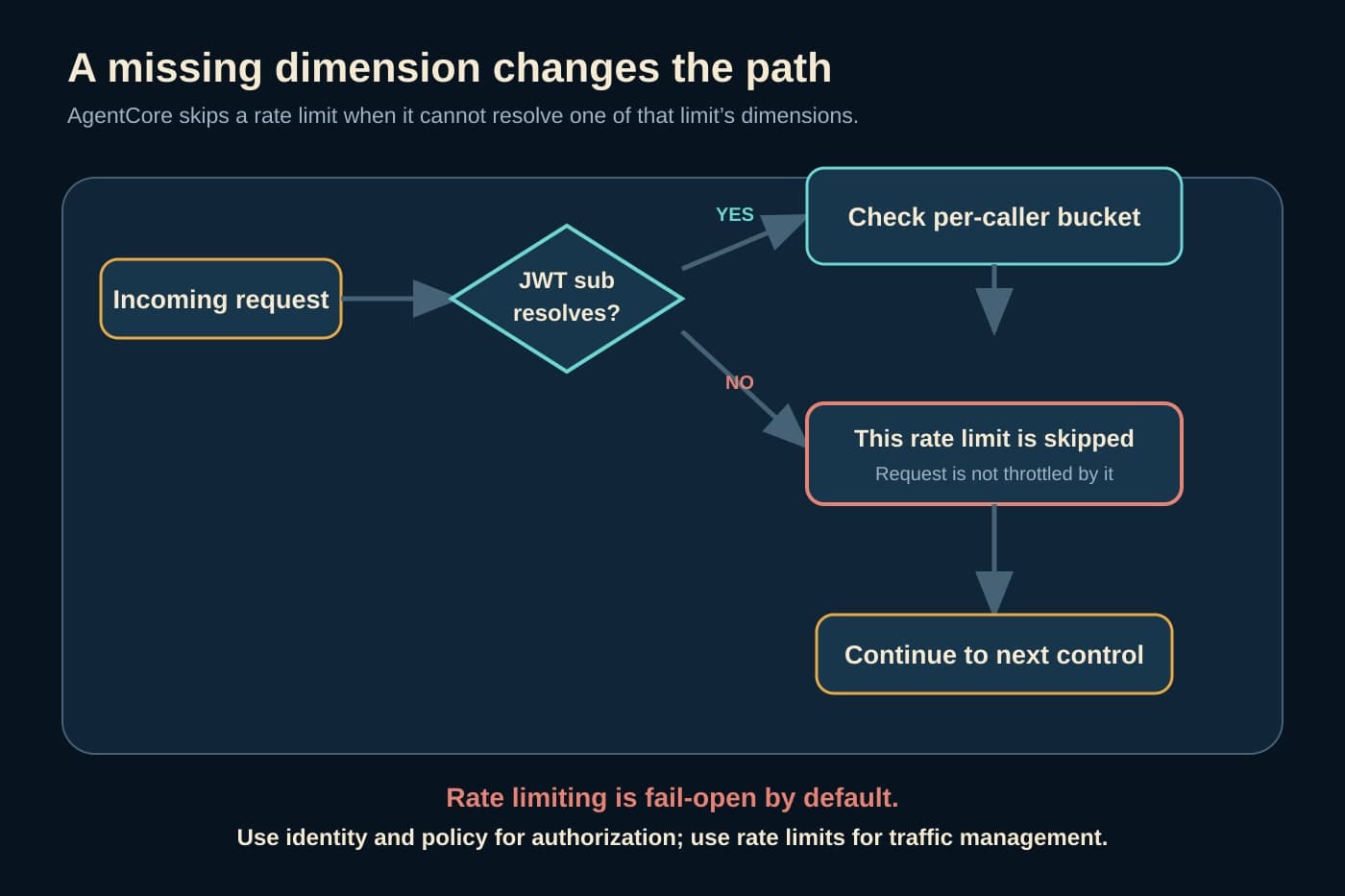
AWS documents an important boundary: if AgentCore cannot resolve a dimension, it skips that rate limit. A rule keyed to a JWT team claim will not throttle a request that lacks that claim through that rule.
Rate-limit evaluation also uses fail-open behavior by default. If the rate-limit service is unavailable, the gateway allows the request to proceed. AWS explicitly says not to rely on rate limits alone as a security boundary.
BaristaLabs' interpretation is that a team must design the unthrottled path as deliberately as the throttled path. Validate which authentication mode reaches each gateway route. Test requests with a missing claim, an unexpected claim shape, and the wrong authentication method. A dashboard showing active rate-limit resources does not prove that every production request resolves into one.
Keep authorization separate. AgentCore Policy, identity controls, and AWS WAF decide whether a caller is allowed to act. Rate limits decide how much traffic an allowed path should receive. AWS notes that rate limits are evaluated before AgentCore Policy, so a request that Policy later denies can still consume its rate bucket.
Which limits should a team set first?
Do not begin with arbitrary round numbers. Start with measured traffic from one bounded workflow and the capacity of what sits behind it.
For a shared internal assistant, inspect requests per minute by user, input and output tokens by model, concurrent streaming sessions, downstream latency, and throttled responses. Separate ordinary use from batch jobs, load tests, and retry storms. Then choose limits that preserve normal peaks while containing one caller or workload that behaves abnormally.
Use at least two layers when the service is shared. Set an overall or group ceiling to protect the downstream target, then a stable per-caller ceiling to preserve fairness. Add model- or tool-specific limits where one expensive model, constrained API, or long-running tool has a different capacity envelope.
A zero rate can block matching traffic, but it should not replace authorization. It remains subject to the same fail-open and dimension-resolution behavior. If a role must never invoke a model or tool, deny that access through policy and use a zero-rate entry only as an additional traffic control.
How should the limit be tested before rollout?
Build the test around bucket behavior rather than the existence of a configuration object. Send synthetic traffic from two caller identities in the same group. One caller should reach its individual ceiling while the other continues until the shared ceiling is reached. Repeat the test for the model or tool that has its own downstream limit.
Test the failure edges separately. Remove the expected identity claim, change its shape, use the alternate authentication path, and observe whether the rule is skipped. Update a limit and allow for the documented propagation time of up to 30 seconds before judging the data-plane result.
Capture the returned throttling response and the applicable rate-limit identifier. AWS says all active limits use AND logic, so the first denial may come from a narrower rule than the shared ceiling. Monitoring should let an operator tell whether a caller, group, model, target, tool, or service-managed quota produced the constraint.
The AgentCore gateway documentation allows up to 50 rate limits per gateway, 1,000 entries per limit, and 10 dimension keys. Those capacities do not justify using all of them. A small set of explainable buckets is easier to test and operate than a dense policy whose effective limit no one can reconstruct during an incident.
What should the operating record contain?
For each limit, record the gateway, dimension order, named and wildcard entries, metric and period, source of the threshold, downstream capacity being protected, expected missing-dimension behavior, and owner. Link it to a synthetic test that proves both isolation and the shared ceiling.
Also record what the limit does not establish. It does not prove that the caller is authorized, that the model's answer is correct, that a tool action is safe, or that total spend stays within a business budget. It is a quality-of-service control with useful cost effects, not a substitute for the rest of the operating boundary.
AgentCore's new rate limits make shared AI infrastructure easier to govern, but the valuable decision is not “turn throttling on.” It is deciding exactly who shares capacity with whom, and proving that a noisy caller cannot quietly take the lane.
BaristaLabs helps teams turn that decision into a testable workflow through process automation. If an AgentCore Gateway is becoming shared infrastructure, bring one traffic path to a focused boundary review.
Sources
- AWS AI Blog: “Configure rate limits for AI traffic on AgentCore gateway”, August 6, 2026.
- AWS Developer Guide: “Add rate limits to a gateway”.
- AWS Developer Guide: “Rate limit dimensions”.
AWS supplies the service behavior, supported dimensions, examples, limits, and fail-open warning. BaristaLabs supplies the interpretation, rollout sequence, and test recommendations. No benchmark, independent customer result, universal threshold, or return-on-investment claim is made.
AI traffic control review
Keep one busy agent from consuming the shared lane
BaristaLabs can help turn observed traffic and downstream constraints into testable group, caller, model, and tool limits without confusing throttling with authorization.
Best fit for teams sharing AgentCore Gateway across users, agents, models, or MCP tools.
Turn this idea into a pilot
Which workflow should go first?
Use the readiness check to compare impact, effort, risk, owner, and next step before requesting a review.
- 3-5 minutes
- Deterministic score
- No sensitive data
Practical AI Workflow Notes
Want more practical AI operations ideas?
Get short notes on applying AI inside real small-business workflows — from document handling and customer follow-up to internal reporting, compliance, and automation guardrails.