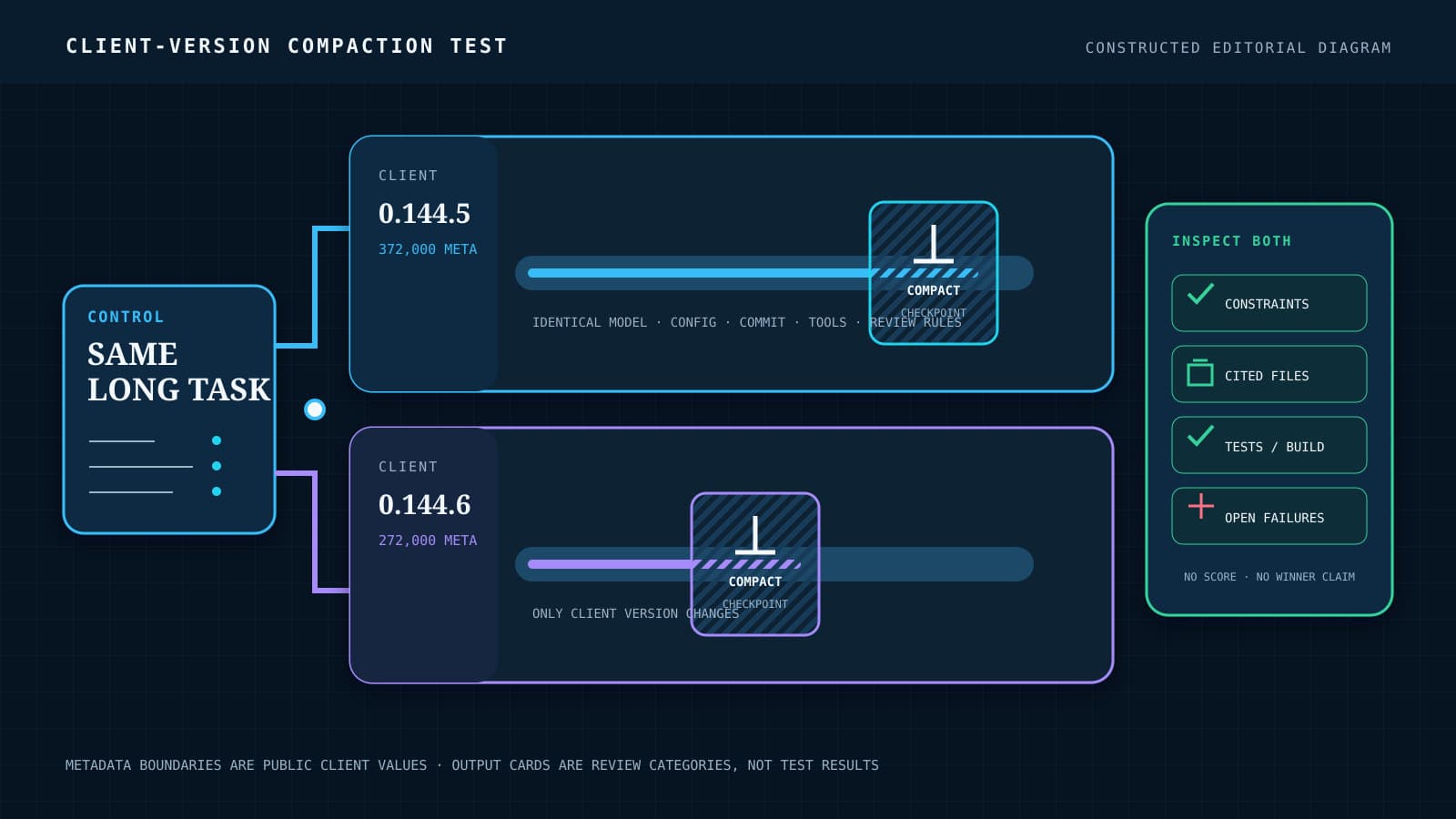


OpenAI released Codex CLI 0.144.6 on July 18, 2026, with a correction to the bundled context-window metadata for GPT-5.6 Sol, Terra, and Luna. The values changed from 372,000 to 272,000 tokens. Because Codex uses that client-side metadata to manage long sessions, the patch can change when the client compacts earlier material even though the selected model name stays the same.
Software teams should treat this as a dependency change that deserves a bounded workflow test, rather than as evidence of a model-capacity cut or a performance regression. This article explains the nominal window, effective window, and automatic compaction threshold in the order Codex uses them, then shows how to compare one long task under 0.144.5 and 0.144.6 without changing the test around it.
The context window is the client’s nominal capacity value
A context window is the token budget available for the material a model receives during a request, including instructions, conversation history, tool results, and the current task. Tokens are the units the model processes; they do not correspond one-for-one with words. In a coding agent, the window has to accommodate both the work a person supplies and the evidence the agent accumulates while inspecting files, running tools, and revising code.
The public models.json file for 0.144.5 lists context_window and max_context_window as 372,000 for gpt-5.6-sol, gpt-5.6-terra, and gpt-5.6-luna. The same file in 0.144.6 lists 272,000 for all three. The nominal difference is 100,000 tokens, or 26.88% of the earlier value; those figures are BaristaLabs calculations from the public metadata, not OpenAI benchmark results.
The backported change says stable 0.144 clients still bundled older model metadata and that the refreshed metadata would ship in the next non-alpha 0.144.x hotfix. Release 0.144.6 supplied that hotfix. Its release note describes the change as corrected context windows alongside refreshed bundled instructions.
Codex reserves headroom to produce an effective window
Codex does not treat the entire nominal value as working room for a turn. The model metadata type defaults effective_context_window_percent to 95, and TurnContext::model_context_window() applies that percentage. This reserves headroom instead of planning against the last token in the declared window.
With a nominal window of 272,000 tokens, the default effective window is 258,400 tokens. Applying the same public formula to the previous 372,000 value gives 353,400. Both effective-window figures are calculations from the tagged 0.144.6 source behavior and the published metadata values; they are not measurements of how much context a backend accepted in a live task.
Automatic compaction can begin earlier under the corrected metadata
Compaction is the client process that condenses earlier session material so the agent can continue working within its context limit. The useful question is what survives that condensation: requirements stated near the start, decisions already made, file and test evidence, and unresolved failures. A compacted session can continue, but its summary cannot preserve every original token.
When no explicit compaction limit is set, ModelInfo::auto_compact_token_limit() uses 90% of the resolved context window. For 272,000 tokens, that default threshold is 244,800; for the earlier 372,000 metadata, the same calculation gives 334,800. These thresholds are derived from public source code, separate from the 95% effective-window calculation, and do not demonstrate a change in task quality.

Codex also has logic to compact before a turn when a session moves from a model with a larger context to one with a smaller context. That source path explains another way context size can affect session handling. The patch sources do not establish that this model-switch path ran in every session affected by the metadata correction.
The patch proves a metadata correction, not a backend or quality change
The release and tagged files establish that the bundled client metadata changed. The public code shows that Codex uses context metadata in status reporting, headroom calculations, compaction thresholds, and other context-window handling. A long-running session may therefore reach client-side management boundaries at a different point after the upgrade.
The sources do not show that every request from 0.144.5 received 372,000 tokens from the backend, or that the backend models lost 100,000 tokens of intrinsic capacity. They also report no outage, customer impact, lost data, or measured quality degradation. Those questions require runtime evidence beyond a release note and source comparison.
Context capacity also differs from the completeness of a tool result. A large window cannot restore records that a tool never returned, while a complete result still consumes context that the client must manage. Our analysis of sampled MCP tool results explains why teams should make both boundaries visible without treating them as the same failure mode.
Compare the same long workflow under 0.144.5 and 0.144.6
BaristaLabs recommends one paired upgrade test using a real task that is long enough to accumulate substantial repository and tool context. A suitable task might require the agent to trace a change across several files, preserve constraints given at the start, implement the change, run focused tests and a build, and cite the evidence used to declare completion. Use separate clean working copies at the same commit so each client begins from identical repository state.
Run the task once with Codex 0.144.5 and once with 0.144.6. Keep the model, client configuration, repository commit, task text, instructions, available tools, environment, and evidence requirements identical; change only the client version. Require both runs to cite the relevant files, report the exact test and build commands, retain the original acceptance constraints, and leave a result that can be checked against the same review criteria.
Capture when compaction occurs, then inspect whether the agent retains early constraints after that point. Compare the files and tests it cites, the tool output supporting its claims, and the final repository result. A pass means 0.144.6 meets the same acceptance and evidence criteria as 0.144.5; a difference is a lead for investigation, not proof that the metadata correction caused a general model regression.
This paired run is a workflow regression screen, not a model benchmark. Keep its token and tool budget visible because a result only has meaning under the resources used to produce it, as our guide to agent benchmark budget curves explains. After the upgrade decision, track recurring instructions and tool output to understand ongoing context cost and compression using the approach in our context calorie-label analysis.
Standardize the patch only after the known long task passes
If 0.144.6 compacts earlier and the tested workflow loses required constraints, evidence, or acceptance quality, keep the team on 0.144.5 temporarily or stage the patch for narrower work while you investigate. Record the exact failing boundary and rerun after adjusting the workflow, client configuration, or task decomposition. If the task passes with equivalent evidence, standardize 0.144.6 and retain the paired test for future client updates.
Teams that want this check built into their engineering process can use BaristaLabs’ process automation service to reproduce agent tasks, capture compaction and tool evidence, and apply consistent acceptance rules across versions. Contact BaristaLabs to review one coding-agent upgrade workflow before the next client patch becomes the team default.
Sources
Coding-agent upgrade test
Automate evidence-based coding-agent updates
BaristaLabs helps teams reproduce long-running agent workflows across client versions, capture compaction and tool evidence, and turn the result into a practical update decision.
Best fit when coding-agent updates affect long sessions and the team needs a repeatable acceptance test.
Turn this idea into a pilot
Which workflow should go first?
Use the readiness check to compare impact, effort, risk, owner, and next step before requesting a review.
- 3-5 minutes
- Deterministic score
- No sensitive data
Practical AI Workflow Notes
Want more practical AI operations ideas?
Get short notes on applying AI inside real small-business workflows — from document handling and customer follow-up to internal reporting, compliance, and automation guardrails.