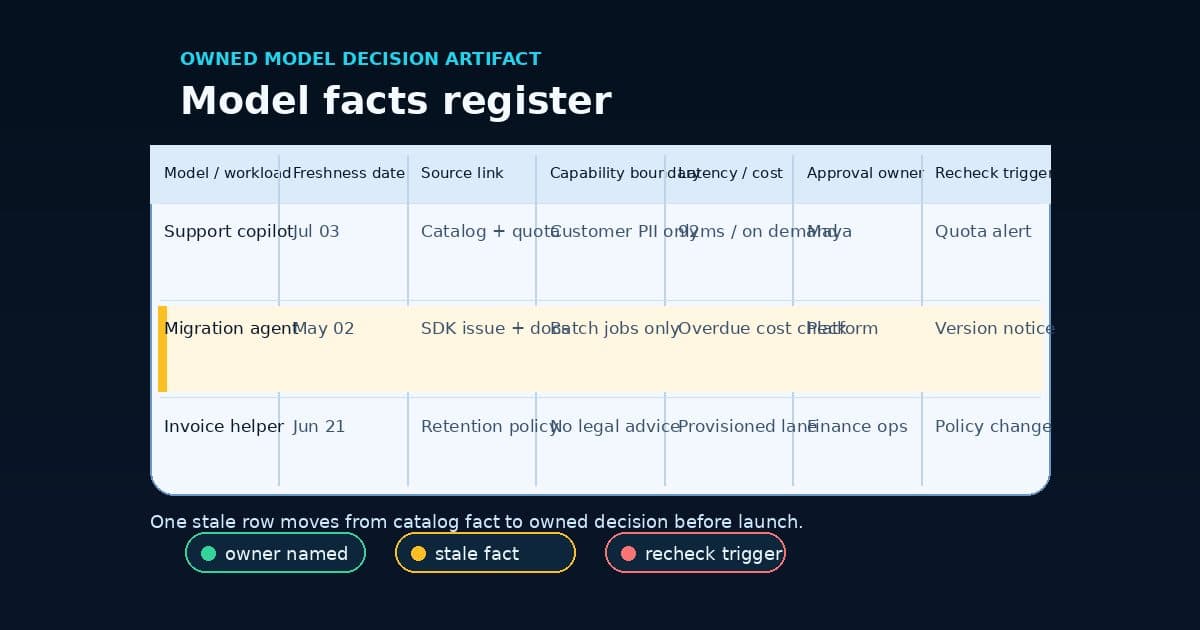

Six tabs, one meeting. The pricing page says one thing about a model's per-token rate. The regional availability table, three clicks deeper in the console, says the model isn't actually served where the workload runs. Someone has the quota dashboard open because the team hit a throughput ceiling last month and never found out why. Someone else has a GitHub issue pulled up because the SDK the frontend team uses rejects a field the model now requires. Security is asking, again, whether this model's data-retention setting matches what was promised in the last audit. By the time the meeting ends, three of those tabs are already wrong, and nobody in the room will notice until something breaks in production.
That's not a caricature. It's the situation AWS described in its own words when it published the Amazon Bedrock Model Profiler on July 1: with access to more than 100 foundation models from providers like Anthropic, OpenAI, Meta, Mistral AI, Cohere, and Amazon, "teams have the flexibility to choose the right model for each use case." Then the sentence that actually explains why this tool exists: "But choice comes with complexity. That information is scattered across console pages, documentation, and regional API calls." AWS wrote that as a problem statement for their product. It's also an accurate description of most teams' actual model-selection process, minus the product.
What AWS built instead of a spreadsheet
The Model Profiler is an open source tool that pulls model metadata from Bedrock's own APIs, alongside pricing and quota data, into what AWS describes as "a single interface with model cards, side-by-side comparisons, regional availability maps, and pricing breakdowns updated daily." Under the hood, seventeen Lambda functions process that data across four phases, and the pipeline leans on inter-Lambda caching in S3 to cut API calls from roughly 480 down to 29 per run, a 97% cache hit rate. The whole thing completes in 8 to 12 minutes and runs once a day at 6 AM UTC. There's also a self-healing layer: an agentic system, powered by Bedrock itself, that detects gaps in the collected data and applies safe configuration fixes automatically.
Run it locally and it takes about 90 seconds to pull a snapshot, using read-only permissions against ListFoundationModels, ListInferenceProfiles, pricing, and service-quota APIs. Deploy it fully and you get S3 storage, a CloudFront distribution, a Step Functions workflow, and EventBridge scheduling, an actual daily-refreshed catalog rather than a one-time export. The README lists the intended use cases plainly: model selection, migration planning, cost optimization, regional planning, capability matching, quota analysis. It's a genuinely useful piece of infrastructure, and at an estimated $1 to $2 a month for typical usage, there's not much reason not to run it.
The more interesting fact is what a daily-refreshed catalog admits: these facts don't hold still. A tool built to refresh itself every 24 hours is a tool built for data with a shelf life measured in hours, not a reference you check once during a bake-off and then close the tab on.
The facts a catalog can't hold
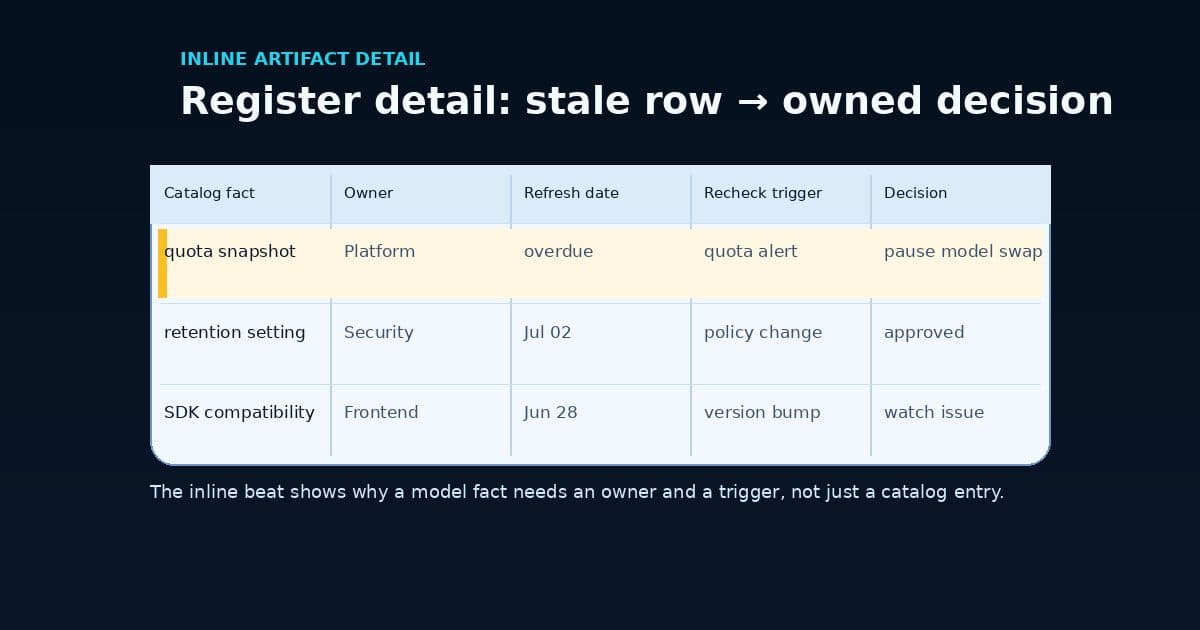
A catalog, even a good one refreshed daily, only covers what a vendor's own APIs expose. It won't tell you that your specific SDK breaks against a specific model, or that your legal team's data-retention policy applies unevenly across the models you've already deployed. Those facts live in the operational layer above the catalog, and right now that layer is a scatter of GitHub issues.
Look at what teams are actually filing tickets about this quarter. The Vercel AI SDK has an open issue about Bedrock's Messages API rejecting a strict tool field for Claude Opus 4.7 and 4.8, the kind of incompatibility that only shows up when a specific SDK meets a specific model version. LiteLLM has a feature request asking to configure Bedrock's project and data-retention mode on a per-model basis, because right now that setting isn't granular enough to match how teams actually route traffic. Over in the Terraform AWS provider, a June pull request adds a new resource for the Bedrock AgentCore registry, and a related open issue is still asking for private endpoint support against a custom JWT authorizer. Nothing exotic about any of it. It's the ordinary residue of infrastructure catching up to a fast-moving catalog, and every one of those facts belongs on somebody's desk, not buried in an issue tracker three teams removed from the workload it affects.
A profiler tells you what's true across the catalog right now. It can't tell you which of those facts your specific workload actually depends on, or who's supposed to notice when one of them changes.
The model facts register
This is where the meeting from the top of this article actually gets fixed, not with a better dashboard, but with one page per workload that names an owner and forces a refresh date onto every fact the team is relying on. Fill it in once and it's a snapshot, no better than the tab someone had open. Fill it in with an owner and a review cadence, and it becomes the thing that catches a quota change or a deprecation notice before it becomes an incident.
Model selection field packet
Model facts register
Write these twelve lines for one production workload before the model choice gets treated as done.
- 01
Workload owner
Required
Pins down: The person accountable for this workload's model choice staying current.
Why it matters: A catalog can surface facts. It can't assign anyone to act on them.
- 02
Candidate model / provider
Required
Pins down: The specific model and version this workload actually calls.
Why it matters: Provider families move fast enough that 'Claude' or 'Llama' isn't a decision, a version string is.
- 03
Region availability
Required
Pins down: Where this model is actually served, not where the org assumes it is.
Why it matters: A model can be generally available and still absent from the region your workload runs in.
- 04
TPM / RPM quota
Required
Pins down: The current throughput ceiling for this account and region.
Why it matters: Quotas are per-account and per-region, and they get raised, lowered, and reset without a workload-level notice.
- 05
Context and max output limits
Required
Pins down: The real input and output ceilings this workload depends on.
Why it matters: A prompt that fit last quarter can silently truncate after a model swap or a version bump.
- 06
Pricing / consumption mode
Required
Pins down: On-demand, provisioned throughput, or batch, and the rate that applies.
Why it matters: The same model can bill three different ways depending on how it's invoked.
- 07
Lifecycle status
Required
Pins down: Generally available, legacy, or on a deprecation clock.
Why it matters: Deprecation notices land in a console banner, not in the architecture doc that cited the model.
- 08
Data-retention / project policy
Required
Pins down: Which retention or data-residency setting this workload's traffic is bound to.
Why it matters: Security and legal don't read model cards. They read this row.
- 09
Known SDK / API incompatibilities
Required
Pins down: Any client library or API quirk that breaks for this specific model.
Why it matters: Strict tool schemas, message formats, and auth flows don't always travel cleanly across every model behind the same API.
- 10
Last refreshed
Required
Pins down: The date someone last confirmed every other row was still true.
Why it matters: A fact with no timestamp is a guess wearing a table's clothing.
- 11
Review cadence
Required
Pins down: How often this row gets re-checked, and by what trigger.
Why it matters: Quarterly is fine for a stable workload. A workload near a quota ceiling needs a tighter loop.
- 12
Fallback model / stop rule
Required
Pins down: What this workload switches to, or does, when the primary choice breaks.
Why it matters: Without this, a quota miss or a deprecation notice turns into an incident instead of a routing decision.
Done means someone owns this row, not that someone filled it in once.
The table makes the shape visible, but the register only does its job as a living document, one row per workload, revisited on the cadence it names rather than the day someone happened to build it.
Where stale facts fail quietly
None of these failures announce themselves. A quota that was fine at launch gets consumed by a feature nobody flagged as a heavy caller, and the first sign is a stream of throttled requests in production. A model that was available in a region during the proof of concept gets deprecated there, and the team finds out from a support ticket instead of a planning doc. An SDK that worked against one model version starts rejecting a field against the next one, the way the Vercel AI SDK issue shows happening right now with Claude Opus on Bedrock's Messages API. A retention policy that applied cleanly to one model doesn't carry over to the one that replaced it, and legal finds out during an audit instead of a design review. Each of these is a one-line fix if someone's watching the right row. Each one becomes an incident if the only place the fact ever lived was a slide from the model bake-off.
The Model Profiler is a real improvement on the status quo it replaces: pricing PDFs, regional footnotes, and whichever engineer happened to remember the quota conversation from last quarter. Anyone routing production traffic across more than one Bedrock model should run it. But a catalog answers "what's true right now if you ask." It doesn't answer "who noticed when it stopped being true," and that second question is the one that actually protects a production workload. That's the same gap we've written about from the runtime side: an effort policy governs how hard a model is allowed to try once it's chosen, and an inference lane governs how a chosen model actually gets deployed. A model facts register sits underneath both of those. It's the layer that keeps the choice itself honest after the meeting where it got made. The receipts, ledgers, and source records shelf places that register beside the other evidence records a workload may need as it moves toward production.
Pick one production workload this week, the one closest to a quota ceiling or a deprecation notice you've been meaning to check. Write the twelve lines. Name an owner. Put a date on it. That's a smaller commitment than it sounds like, and it's considerably cheaper than finding out in production that a fact from the bake-off stopped being true in March.
If you want a second set of eyes on one workload's model facts register, particularly the data-retention and SDK-compatibility rows that don't show up in any vendor catalog, that's exactly the kind of focused session BaristaLabs' process automation work is built for.
Before the next model swap
Build one workload's model facts register
Bring one production workload that calls a foundation model, on Bedrock or elsewhere. We'll map its region availability, quota, retention policy, SDK compatibility, and lifecycle status into a register with an owner and a refresh cadence, before the next deprecation notice or quota change catches it off guard.
Best fit when a team routes production traffic to more than one foundation model and no one owns keeping the facts current.
Turn this idea into a pilot
Which workflow should go first?
Use the readiness check to compare impact, effort, risk, owner, and next step before requesting a review.
- 3-5 minutes
- Deterministic score
- No sensitive data
Practical AI Workflow Notes
Want more practical AI operations ideas?
Get short notes on applying AI inside real small-business workflows — from document handling and customer follow-up to internal reporting, compliance, and automation guardrails.